


Apple Music gives you access to millions of songs, but saving them as MP3 files is different from downloading them for offline listening. Apple Music downloads are managed within the Apple Music app, while an Apple Music to MP3 converter saves Apple Music content as standard MP3 files that can be stored and played more widely.
There are two groups of tools: desktop Apple Music to MP3 converters and browser-based Apple Music MP3 downloaders. Desktop converters provide more control over output formats, audio settings, batch conversion, and music information; online downloaders offer a simpler link-based workflow without software installation.
In this guide, we'll look at how Apple Music to MP3 converters work, the main desktop converters available, and how they compare with online Apple Music MP3 downloaders. We'll also cover key factors when choosing a converter, including supported platforms, output formats, conversion features, and ease of use.
Part 1. What Is an Apple Music to MP3 Converter?
An Apple Music to MP3 converter is a tool designed to convert Apple Music content into MP3 files. Some converters also support other audio formats and offer settings such as bitrate, sample rate, bit depth, and channel. For example, ViWizard Apple Music Converter is a desktop application for Windows and macOS that supports MP3 output and customizable audio settings.
This differs from Apple's offline download feature, which lets subscribers download music for offline listening through the Apple Music app. Offline downloads remain managed within Apple Music, while an Apple Music to MP3 converter is designed to create MP3 files for local use.

Need Apple Music in more flexible audio formats? ViWizard Apple Music Converter helps Apple Music subscribers create a personal music library with seamless music backup. Build your collection and keep your music beyond the Apple Music app.
Part 2. How Do Apple Music to MP3 Converters Work?
Apple Music to MP3 converters follow a simple workflow: load Apple Music content, process the audio, and save it as local MP3 files. Users therefore access or select Apple Music content, choose MP3 as the output format, adjust available audio settings, and start the conversion. The resulting MP3 files are saved to a selected location on the computer. For example, ViWizard Apple Music Converter includes an integrated Apple Music Web Player, allowing users to sign in, select songs, albums, or playlists, configure output settings, and convert the selected content to MP3 or other supported formats.
Part 3. Best Apple Music to MP3 Converters
Most Apple Music to MP3 converters are desktop applications for Windows or macOS. They provide an interface for selecting Apple Music content, choosing MP3, adjusting audio settings, and converting the selected content.
Examples include ViWizard Apple Music Converter, NoteBurner Apple Music Converter, Sidify Apple Music Converter, and TuneFab Apple Music Converter. These tools offer similar conversion capabilities but differ in supported music sources and features. ViWizard focuses on Apple Music conversion and includes a built-in Apple Music Web Player for selecting content. NoteBurner and Sidify support multiple music sources, including iTunes, the Apple Music app, and Apple Music Web Player. TuneFab combines Apple Music conversion with other music conversion features through its All-in-One Music Converter.
Common features include batch conversion, multiple output formats, and preservation of song information. Supported formats, conversion speed, metadata handling, operating systems, and pricing vary by tool, so users can compare them based on their conversion needs.
Best Apple Music to MP3 Converters Comparsion:
| Feature | ViWizard | NoteBurner | Sidify | TuneFab |
|---|---|---|---|---|
| Type | Desktop converter | Desktop converter | Desktop converter | Desktop converter |
| Platforms | Windows, Mac | Windows, Mac | Windows, Mac | Windows, Mac |
| Apple Music access | Built-in Web Player | Web Player / app | Web Player / app | Built-in Web Player |
| MP3 output | Yes | Yes | Yes | Yes |
| Other formats | M4A, AAC, WAV, FLAC, AIFF, M4B | AAC, WAV, FLAC, AIFF, ALAC | AAC, M4A, WAV, FLAC, AIFF, ALAC | M4A, WAV, FLAC, AIFF, AAC, ALAC |
| Batch conversion | Yes | Yes | Yes | Yes |
| Metadata | Yes | Yes | Yes | Yes |
| Key features | Simple interface, Web Player, file organization | Speed, batch conversion, metadata and lyrics | Speed, batch conversion, broad format support | Web Player, batch conversion, simple workflow |
| Best for | Beginners and regular users | Users wanting more control | Users prioritizing speed | Users wanting a simple Web Player workflow |
01 ViWizard Apple Music Converter

- Platform: Windows, macOS
- Function: Converts Apple Music to MP3 (no recording needed)
- Formats: MP3, WAV, FLAC, AIFF, M4A, M4B
- Max bitrate: Up to 320 Kbps
- Speed: Up to 30× faster
- Metadata: Keeps ID3 tags, lyrics, album art
- Requirements: Apple Music account
- Price: ~$14.95/month or ~$89.95 lifetime
- Best for: Converting full libraries or playlists
ViWizard Apple Music Converter can convert Apple Music to MP3 (or other popular formats) without breaking a sweat. It saves tracks directly from anything you find through the built-in Apple Music Web Player. For MP3 output, it supports up to 320 Kbps, with options to adjust bitrate, sample rate, bit depth, and channel. DRM is removed automatically during conversion, giving you the freedom to play your converted files more widely.
It's ideal if you want to convert your entire Apple Music library or select songs, playlists, or albums. It works with the full Apple Music catalog, supports batch conversion, and can preserve metadata, album art, and lyrics. Unlike iTunes or Apple Music, which can't convert streaming tracks to MP3, ViWizard provides a direct conversion workflow without real-time recording.
No waiting through real-time recording like with Audacity, and no extra tools are needed for different output formats. Aside from MP3, it supports WAV, FLAC, AIFF, M4A, and M4B. You can adjust bitrate and channels, while other available output settings give you more control over the converted files.
It works on both Windows and Mac. You can try it now and see for yourself.
Key Features of ViWizard Apple Music Converter
Free Trial Free Trial* Security verified. 5, 481,347 people have downloaded it.
- Convert Apple Music songs, albums, playlists, and artists into MP3 for easy access
- Preserve lossless audio, high-resolution lossless, and Dolby Atmos quality
- Strip DRM from Apple Music for unrestricted offline listening
- Save converted audio files while retaining full ID3 tag details
- Fast MP3 conversion
- Batch downloads
- Keeps full metadata
- Multiple output formats
- No real-time recording
- Paid software
- Requires Apple Music login
02ViWizard All-in-One Converter for Apple Music

- Platform: Windows, macOS
- Function: Records streaming audio from Apple Music and other services to MP3
- Formats: MP3, AAC, WAV, FLAC, M4A, M4B
- Metadata: Auto-filled
- Method: Real-time recording
- Price: ~$29.95/month or ~$159.95 lifetime
- Best for: Users with multiple streaming accounts
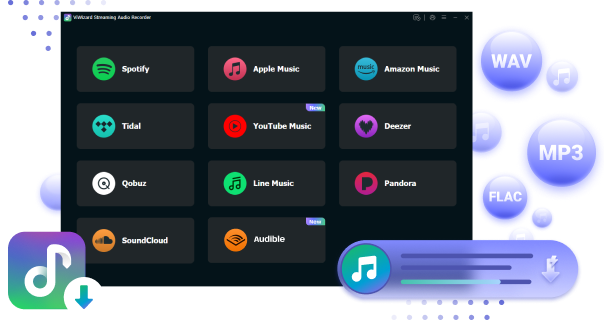
ViWizard Streaming Audio Recorder is basically ViWizard Apple Music Converter combined with other popular music converters designed by ViWizard, like those for Amazon Music, Tidal, and more. It's more comprehensive for users juggling multiple music services and libraries. You still get clean MP3s with proper metadata attached.
If you've used ViWizard tools before, it'll feel familiar - open the app, choose the Apple Music Converter module, and ViWizard loads the Apple Music Web Player so you can add tracks, set your format, and start converting.
- Works with many music services
- Simple interface
- Saves MP3s with tags
- Good for multi-platform users
- Paid software
03NoteBurner Apple Music Converter

- Platform: Windows, macOS
- Function: Converts Apple Music to MP3
- Formats: MP3, ALAC, AIFF, AAC, WAV, FLAC
- Metadata: Full ID3 tags
- Speed: Up to 10×
- Price: ~$14.95/month or ~$129.9 lifetime
- Best for: Large libraries, consistent output
This is another Apple Music converter that supports MP3. NoteBurner Apple Music Converter differs from ViWizard mainly because it comes from a different developer. NoteBurner separates its Windows "iTunes Audio Converter" and Mac "Apple Music Converter," letting users rely on either the Apple Music Web Player, the Apple Music app, or iTunes depending on their setup. It supports MP3, ALAC, AIFF, AAC, WAV, and FLAC.
Batch conversion and music information preservation are also supported, while ID3 tags and album art can remain intact. You can compare its supported platforms, formats, and features with other Apple Music converters based on your needs.
Read More: NoteBurner Apple Music Converter Review & Guide
- Supports many formats
- Stable batch converting
- Keeps ID3 tags
- Clean, organized output
- Different apps for Mac/Windows
- Paid
- UI feels dated
04Sidify Apple Music Converter

- Platform: Windows, macOS, Android
- Function: Converts Apple Music to MP3
- Formats: MP3, AAC, ALAC, WAV, AIFF, FLAC
- Metadata: Preserved
- Speed: Up to 10×
- Price: ~$59.95/year or ~$129.9 lifetime
- Best for: Cross-device use, including Android
Sidify Apple Music Converter takes a similar approach to other desktop Apple Music converters, with support for MP3 and other common audio formats. It supports MP3, AAC, WAV, FLAC, AIFF, and ALAC and is available for Windows and Mac, with additional Android options depending on the product version.
Sidify also focuses on preserving music information during conversion. Its product descriptions specify support for metadata such as song titles, artists, albums, and cover artwork. Available features and workflows may vary by platform and version.
Read More: Sidify Apple Music Converter Review & Guide
- Works on Windows, Mac, Android
- Solid MP3 output
- Simple interface
- Supports multiple formats
- Android version limited
- Paid
- Very similar to NoteBurner
05TuneFab Apple Music Converter

- Platform: Windows, macOS
- Function: Converts Apple Music Web Player songs to MP3
- Formats: MP3, FLAC, WAV, M4A
- Max MP3 quality: 320 Kbps
- Speed: 5×–10×
- Price: ~$35.95/month or ~$99.95 lifetime
- Best for: Simple Web Player–based conversion
TuneFab Apple Music Converter is similar to other all-in-one music converters in that MP3 conversion is bundled with other music conversion features. It focuses on the Apple Music Web Player and allows adjustments to bitrate, sample rate, and channels.
Along with MP3, other formats are supported as well. It also provides batch conversion and music information preservation, making it an option for users who want Apple Music conversion alongside other music conversion features.
Read More: TuneFab Apple Music Converter Review & Guide
- Web Player access
- MP3 with adjustable settings
- Easy setup
- Multiple formats supported
- Fewer advanced features
- Paid
- Web Player can load slowly
Part 4. Best Apple Music MP3 Downloaders
Apple Music MP3 downloaders use browser-based services instead of installed applications. Users submit an Apple Music link, and the service processes it and provides an available audio file for download.
AAPLMusicDownloader, for example, provides a browser-based workflow for processing Apple Music links and downloading available audio files. APLMate follows a similar approach and provides basic Apple Music downloads. Features may vary between services, including supported URLs, account requirements, output formats, and access limits.
Best Apple Music MP3 Downloaders Comparsion:
| Feature | AAPLMusicDownloader | APLMate |
|---|---|---|
| Type | Online downloader | Online downloader |
| Installation | None | None |
| How it works | Paste an Apple Music link | Paste an Apple Music link |
| Main output | MP3, M4A | MP3 |
| Individual tracks | Yes | Yes |
| Playlists | Limited support | Limited |
| Metadata | Basic | Basic |
| Batch downloading | Limited | No |
| Output control | Limited | Very limited |
| Key features | Quick browser-based downloads | Free and simple |
| Best for | Occasional downloads | Individual tracks |
01 AAPLMusicDownloader (Online Downloader)
- Platform: Web (Chrome, Firefox, Safari, Edge)
- Function: Downloads Apple Music tracks as MP3 using link
- Formats: MP3 only
- Max bitrate: Claims 320 Kbps
- Price: Free
- Metadata: Varies
- Limitations: Source unclear; not always reliable
- Best for: Fast, no-install MP3 downloads
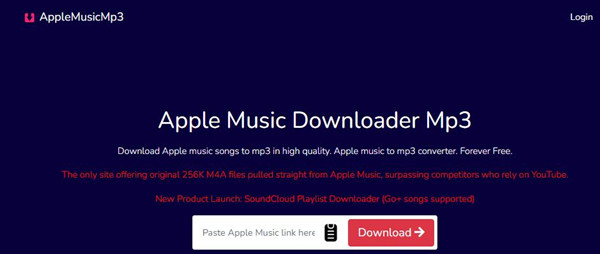
Online Apple Music downloaders like AAPLMusicDownloader provide a simple way to turn Apple Music links into downloadable audio files. The idea is straightforward: paste an Apple Music URL into the service, let it process the link, and download the available file. AAPLMusicDownloader provides MP3 downloads with available bitrate options, depending on the link and service.
Compared to software like ViWizard Apple Music Converter, AAPLMusicDownloader is browser-based and requires no installation. It can be accessed through common modern browsers, making it convenient for occasional downloads. The trade-off is that it offers less control over formats, audio settings, and other conversion options than a desktop converter.
Read More: AAPLMusicDownloader Review & Guide
- No install needed
- Free
- Very simple
- Works in any browser
- Premium required for large downloads
02APLMate

- Platform: Web
- Function: Converts Apple Music links to MP3
- Formats: MP3 only
- Price: Free
- Metadata: Rarely included
- Limitations: No format or quality options
- Best for: Single tracks, simple browser use
APLMate is another simple online tool that turns sharable Apple Music links into downloadable audio files. It's useful for one-off tracks, but it provides fewer output and customization options than desktop Apple Music converters like ViWizard Apple Music Converter. MP3 bitrates may vary, so it's worth double-checking the file after saving.
Read More: APLMate Review & Guide
- Fast for single tracks
- Free
- Browser-based
- No setup
- No format control
- Inconsistent results
- Not for big libraries
- Unknown MP3 source
Part 5. Apple Music to MP3 Converter vs. Apple Music MP3 Downloader
Both Apple Music to MP3 converters and Apple Music MP3 downloaders can save Apple Music content as MP3 files, but their workflows differ.
| Feature | Apple Music to MP3 Converter | Apple Music MP3 Downloader |
|---|---|---|
| Music source | Apple Music content accessed through a desktop app, built-in Web Player, or other supported source | Usually an Apple Music song, album, or playlist URL |
| Platform | Windows or macOS desktop software | Web browser on computers, phones, and tablets |
| Workflow | Select content, configure output settings, and convert | Paste an Apple Music link and download the processed file |
| Output formats | MP3 plus M4A, M4B, WAV, FLAC, AIFF, and others, depending on the converter | Usually MP3; some also support M4A |
| Audio settings | Often includes bitrate, sample rate, bit depth, and channel | Usually limited or preset |
| Batch processing | Commonly supports multiple songs, albums, or playlists | Depends on the service; some support playlists or ZIP downloads |
| Metadata | Often preserves song information and may support artwork or lyrics | Usually fewer metadata and organization options |
| File management | Output folders, file naming, and local organization may be available | Usually relies on the browser's download process |
| Installation | Required | Normally not required |
| Account requirements | May require Apple Music sign-in through the app or built-in Web Player | Varies by service; some work from Apple Music URLs without an account |
| Best suited to | Larger collections, regular conversion, flexible formats, and local music management | Quick downloads of individual tracks or smaller collections |
| Main limitation | Requires desktop software and may require a paid license for full features | Less control and dependence on the online service |
An Apple Music to MP3 converter converts content to MP3 with options for bitrate, sample rate, bit depth, and channel settings. It may also support batch conversion and local file organization. An Apple Music MP3 downloader obtains Apple Music content as a local file, often through a URL-based workflow. Some tools combine both functions. For example, APLMate lets users paste an Apple Music link into its website and download the result as an MP3 without installing software.
The main difference is how Apple Music content is accessed and processed. Converters offer more control over formats, audio settings, batch processing, metadata, and file management, while downloaders prioritize quick downloads with minimal setup. Converters suit larger collections and users who need more control, while downloaders suit simpler download needs.
Part 6. How to Choose an Apple Music to MP3 Converter
Choosing an Apple Music to MP3 converter really comes down to what you want to do with it. Start by checking what Apple Music content and input methods it supports, then look at the available output formats, audio settings, batch conversion, and metadata features. Speed, conversion modes, system requirements, and operating system support can also make a difference, especially if you're converting a large collection. And before you pay, check the trial limits and pricing to make sure you get the features you actually need.
1. Supported Apple Music content and input methods
If you want to convert Apple Music songs to MP3, the first thing to check is what the converter can access. Some tools work with songs, albums, playlists, and artists through an integrated Apple Music Web Player, while others also support the Apple Music app or additional sources. ViWizard Apple Music Converter, for example, uses a built-in Apple Music Web Player and supports songs, albums, playlists, and artists. This matters if you plan to convert more than a few tracks while preserving as much original audio as possible.
2. Output formats and audio settings
MP3 may be all you need, but you may want more flexibility. Look for support for M4A, AAC, WAV, FLAC, AIFF, or ALAC if you need other formats. Current converters from ViWizard, NoteBurner, Sidify, and TuneFab support multiple output formats. Some also let you adjust bitrate, sample rate, bit depth, and channel settings, giving you more control over the resulting files.
3. Batch conversion and collection management
Converting a few songs is easy enough, but large playlists and libraries are another story. Batch conversion can save time, while some desktop converters, such as ViWizard Apple Music Converter, can organize files by artist, album, playlist, or other categories. Some tools also retain title, artist, album, artwork, track number, and genre, reducing manual cleanup afterward.
4. Speed and conversion modes
Speed becomes more important when you're converting a large collection, but advertised speeds are not directly comparable because products use different conversion modes and source methods. ViWizard Apple Music Converter, for example, offers a Single mode for Apple Music Web Player mode and advertises speeds of up to 17× under suitable network and device conditions, with average speeds potentially around 13×. NoteBurner, on the other hand, offers different source modes for the Apple Music app and Web Player. For large playlists, look at batch support, source modes, and the actual workflow, not just the advertised speed.
5. Operating system and system requirements
A desktop converter requires software installation, so make sure it works with your computer first. ViWizard Apple Music Converter currently supports Windows 10 or later and macOS 11 or later, while other converters have their own requirements. This matters if you're using an older computer or switching between Windows and Mac.
6. Trial limitations and pricing
A free trial can help you test compatibility with your Apple Music account and computer, but restrictions vary. ViWizard's current trial, for example, limits conversion to the first 30 seconds of each song, while the full version removes that limitation. Conversion speed and available features may also vary between plans. Check what the trial and each plan actually allow, rather than just looking for a "free" label.
Part 7. Final Thoughts
When you want to save Apple Music as MP3 files, a desktop Apple Music to MP3 converter is usually a better fit than an online Apple Music MP3 downloader. Online downloaders are handy for a quick, occasional download, but desktop converters give you more control over output formats, audio settings, batch conversion, metadata, and file management.
If you're new to this, ViWizard Apple Music Converter is an easy place to start. It has a clean, user-friendly interface, a built-in Apple Music Web Player, flexible output and audio settings, and customer support when you need help. Most users can get started without dealing with a complicated setup.
In short, use an online downloader for a quick download, or go with a desktop converter for a more complete workflow. For beginners, ViWizard Apple Music Converter offers a simple way to get started without giving up useful controls and support.
You May Be Interested




Adam Gorden is always looking for new ways to explore music and videos. He likes trying different media tools and learning how to manage audio and video files with ease.

Leave a Comment (0)