


SoundCloud is best known for finding remixes, DJ sets, mixtapes, and exclusive, unreleased, or unofficial content. One example is Billie Eilish, who uploaded her debut single, "Ocean Eyes", and went viral in 2015. If you are a big fan of hers or we say, pop music, you may care about each track and album they release, and add them to your SoundCloud playlists. Then, is there a detailed guide about adding a song to SoundCloud playlists? Yes!
In this post, we show you how to add a track, album, or playlist to your SoundCloud playlists. Beyond that, we offer you a workaround to add an album to a playlist in one go. Let's dive in.

Part 1. How to Add Tracks to a Playlist on Soundcloud
You can add both single songs and multiple songs to a playlist on SoundCloud. If you want to build playlists over time or add a track while browsing, you can add a single track to playlists. All you need to do is use the Add to Playlist button on any song's menu. But for bulk organization, you can choose multiple tracks in your library and add them to a new or existing playlist at once. Here are the steps to add tracks.
Option 1: Add a Single Track to a SoundCloud Playlist
On Mobile
01Open the SoundCloud app on your mobile.
02Sign in to the app with your account.
03Search for the track within the app or enter the "Now Playing" screen.
04Tap the three dots near the song.
05Tap Add to playlist in the dropdown list.
06Select the playlist you'd like to add to (or create a new one).
07After adding the track, tap Library > Playlist to check the added track.

On Desktop
01Open a modern browser you prefer (Chrome, Edge, Firefox, etc.).
02Visit the SoundCloud website and sign in.
03Find the track you desire to add in the search bar at the top.
04Click the three dots under the waveform.
05Click Add to playlist.
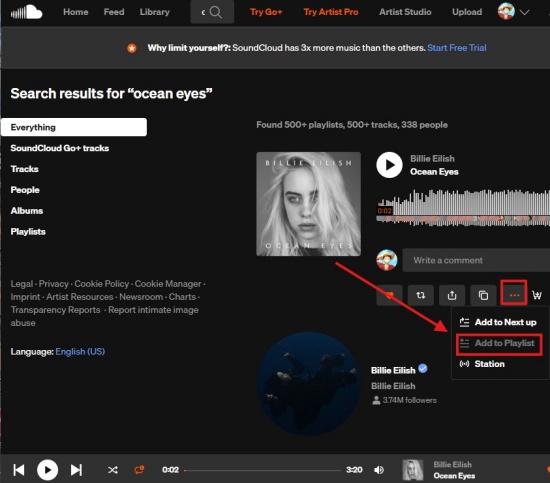
06Choose an existing playlist. Select Add to Playlist to confirm it. (or click Create a new playlist.)
07To view the track, click Library > Playlists.
08Choose the playlist you chose, and you can see the new track has been added at the bottom of the playlist.
Option 2: Add Multiple Tracks to a SoundCloud Playlist
One thing to note is that there is no bulk add feature on your mobile or desktop. You must add tracks manually via Add to playlist. Here are the details.
On Mobile
01Open the SoundCloud app and find the tracks you want to add.
02Tap the three dots of one track.
03Tap Add to playlist and select the playlist.
04Repeat for other tracks.
On Desktop
01Search or browse to find tracks.
02Click More (the three-dot icon) under the waveform.
03Choose Add to playlist.
04Choose an existing playlist or select + Create a playlist to make a new one.
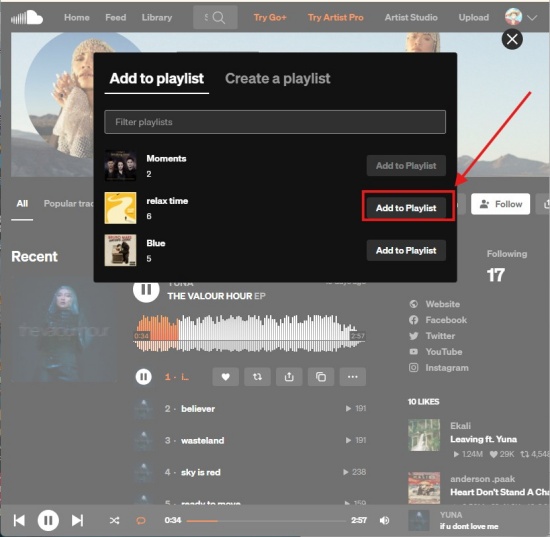
05If you choose to create a new playlist, enter the name, set privacy, and click Save.
06Take the steps again.
Note:
- Playlist Limit: SoundCloud currently enforces a 500-track limit per playlist to maintain performance.
- Rearranging: Click Edit (pencil icon) on the playlist page and drag the track to reorder it.
- Privacy: If you want to display your tracks to followers, make sure the playlists and tracks are public.
- Uploading: If you want to add a newly uploaded song to an existing playlist instead of creating a new one, you can do this in the upload or edit settings. (This supports bulk adds.)
Part 2. How to Add a Playlist/Album to Another Playlist on SoundCloud
SoundCloud does not have a direct "add entire playlist to another playlist" feature. To make it, you must add the individual tracks from the source playlist or album to the destination playlist. All you need to do is select Add to playlist under More (three dots) on each song one by one.
On Mobile
01Sign in to the app on your phone.
02Tap the playlist you want to move.
03Tap the three dots icon on each track.
04Choose Add to playlist and select your target playlist.
On Desktop
01Open a browser you like to use and sign in to SoundCloud.
02Navigate to the playlist you want to move.
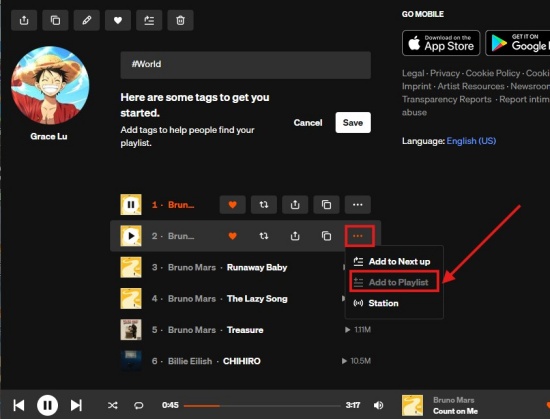
03Click the three-dot button next to the song name.
04Select Add to playlist.
05Locate the target playlist (or create a new one), and click Add to Playlist next to it.tools to function across different browsers.
Part 3. Workaround to Organize Your SoundCloud Library in One Place
While we can add a track or playlist to a SoundCloud playlist, it is not as easy as we think. For example, if you want to move the playlist content to another playlist, you need to add songs one by one. Same with tracks adding, one cannot add multiple search results to a playlist. Is there a handy tool to help us manage our SoundCloud library and easily add an album to a playlist? YES, there is ViWizard SoundCloud Music Downloader. It is a desktop software that helps you download SoundCloud music, including your liked songs, playlists, albums, and all the audio on the entire page.
The best thing about ViWizard SoundCloud Music Downloader is that you can set the software to your needs. After installing it, you choose your favorite output formats, such as MP3, M4A, M4B, etc. For better organization, you name the output file with the title, artists, album, etc. Upon customization, you can sign in to the SoundCloud web player in ViWizard and add your favorite tracks, albums, and playlists to the conversion list. When adding all the songs to the list, you can download them to your computer very fast with original audio quality. Even if you cancel your subscription, you can own your SoundCloud Library forever.

Want more flexibility with your SoundCloud music? ViWizard SoundCloud Music Converter helps SoundCloud listeners convert tracks, playlists, and albums with seamless music conversion. Save your favorites and keep your SoundCloud collection accessible.
Use ViWizard to Download SoundCloud Music and Play Tracks
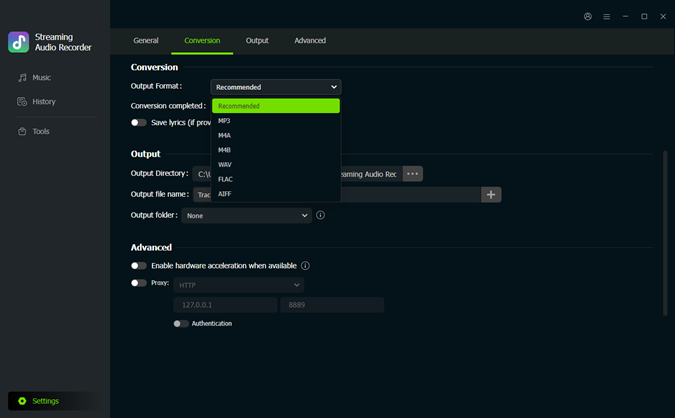 Step 1: Set Output Formats
After installing ViWizard, launch the application. Click the menu icon in the top right corner. Select Preferences > Conversion. Choose your favorite output formats: MP3, FLAC, WAV, etc. Adjust the audio quality, and click OK to save the settings.
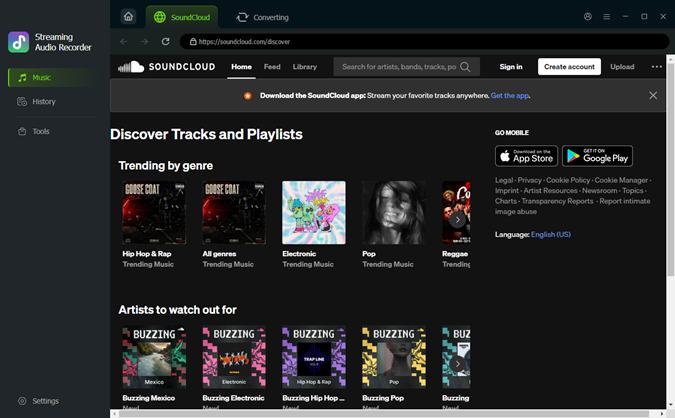 Step 2: Enter the Built-in SoundCloud Web Player
Go back to the main screen. Choose SoundCloud as the source platform. The built-in SoundCloud web player will jump out. Sign in to the web player with your account. You can see your liked music, the playlist, and albums.
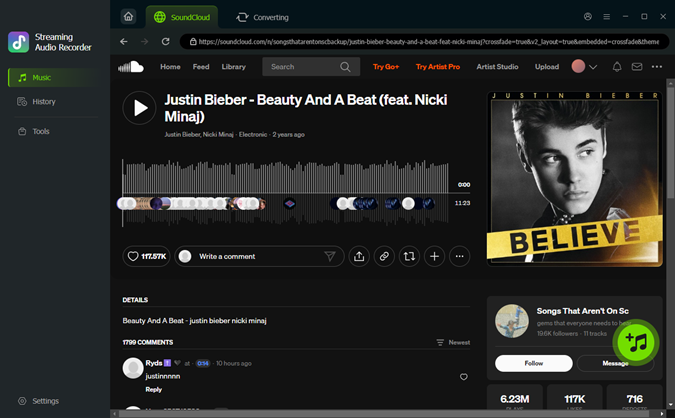 Step 3: Choose Songs or Playlists for Download
In the built-in SoundCloud web player, browse the tracks and playlists to make sure you get the ones you want. Once you figure it out, open the music page and click the + icon (Add to list). ViWizard then scans and loads all available songs to the conversion queue.
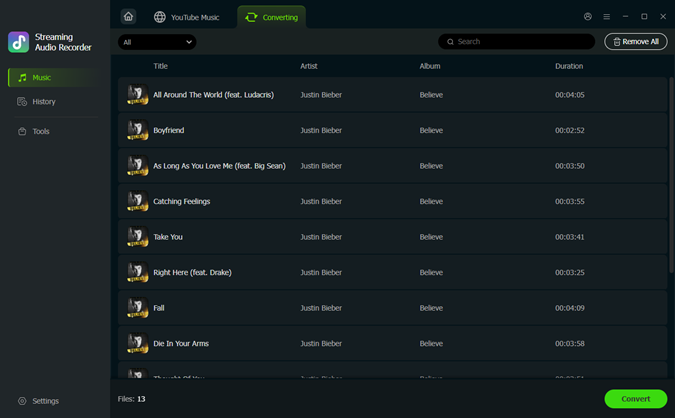 Step 4: Convert and Save SoundCloud Music on Desktop
Make sure your desired tracks are in the conversion page, and select Convert. ViWizard begins downloading SoundCloud at high speed while preserving the original audio quality. After converting, click the converted page. You can select the folder icon to locate the music files on your Windows or Mac. Enjoy the music you've saved from SoundCloud!
Conclusion
To sum up, you can add tracks, albums, and playlists to your SoundCloud playlists on both mobile and desktop devices. It is pretty easy, though; one cannot add tracks or playlists to a playlist in one go. If you want a handy tool to help organize your SoundCloud library in one place, you can consider ViWizard SoundCloud Music Downloader. With it, you can download and sort your music from SoundCloud more efficiently. Want you to try it for free?
You May Be Interested

How to Add SoundCloud to Spotify (Playlists, Songs & Podcasts)

Does SoundCloud Have Ads? 9 Ways to Block Ads on Any Device

Step-by-Step Guide to Cancel SoundCloud Subscription

[Fixed] Why Does SoundCloud Keep Pausing?

SoundCloud Shuffle Not Random? 5 Ways to Shuffle Songs Properly on PC

How to See Your Most Played Songs on SoundCloud

Dave Henry loves movies and all things video. He likes checking out different video formats and trying new media players to see how they change the viewing experience.

Leave a Comment (0)