


You're in the middle of your favorite SoundCloud track, the beat is just picking up, and then—an ad suddenly cuts in. A few minutes later, it happens again. If you listen to SoundCloud often, those interruptions can really take you out of the music.
If you're looking for a way around them, you have a few options. Below, we'll walk through 10 ways to block or remove SoundCloud music ads, from built-in options to tools you can use on your browser, computer, or phone. Pick the one that fits the way you listen.

Quick Overview of the Best Methods:
- Best Official Option: SoundCloud Go or Go+
- Best Chrome Extensions: AdLock / AdGuard AdBlocker / AdBlock Plus
- Best Offline Ad-Free Solution (Any Device): ViWizard SoundCloud Music Converter
- Best Open-Source Tool: ZenPrivacy
- Best Mobile Apps: AdGuard for Android / SoundCloud Mod APKs/AdBlock Pro
- Best DNS Filtering Service: AdGuard DNS Settings
Part 1. Can You Remove SoundCloud Ads?
Yes, you can remove SoundCloud ads. SoundCloud's free version may show audio ads, display ads, and promoted content while you listen or browse. Generally, ads appear every 2-3 tracks. Each advertisement lasts 15-30 seconds and cannot be skipped. If you want uninterrupted music, there are three main approaches:
Official vs. Third-Party Methods
01 Official Method: SoundCloud Go or Go+
The most direct option is to subscribe to SoundCloud Go or Go+.
- SoundCloud Go ($4.99/month): starts with a 7-day free trial
- SoundCloud Go+ ($10.99/month): includes a 30-day free trial
02 Third-Party Methods: Ad Blockers
You can also try browser extensions, open-source tools, DNS filtering, or mobile ad blockers. These tools attempt to stop ads from loading or playing. They can block some SoundCloud ads, but results vary by device, browser, and SoundCloud updates. They may not remove every type of ad.
03 Offline Listening: Save SoundCloud Music
If you simply want to listen without interruptions, you can save SoundCloud music for offline playback. For example, ViWizard SoundCloud Music Converter lets you save tracks to your computer in common audio formats. This doesn't block ads on SoundCloud. Instead, you listen to saved music without streaming through SoundCloud, so there are no SoundCloud ads during playback.
Read More : How to Get SoundCloud Free Trial and Cancel It Easily
Part 2. How to Block SoundCloud Ads with Official Methods
If you want the simplest way to stop SoundCloud ads, the official option is to subscribe to SoundCloud Go or Go+. Since these plans are provided by SoundCloud, you don't need to install an ad blocker or change any browser or phone settings.
2.1 Subscribe to SoundCloud Go or Go+
SoundCloud Go and Go+ are paid plans that offer an ad-free listening experience. They also include features such as offline listening, depending on the plan and region.
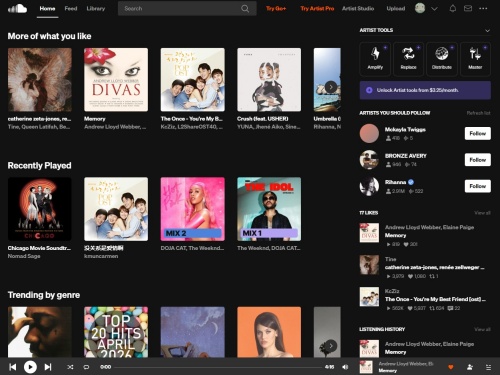
01Open SoundCloud and sign in to your account.
02Go to the Go or Go+ subscription page.
03Choose a plan and start the available trial or subscription.
04Complete the payment process.
05Return to SoundCloud and start listening without regular SoundCloud ads.
- Official SoundCloud solution
- Removes regular ads from the listening experience
- Works across supported devices with the same account
- Includes offline listening
- No extra ad-blocking software is required
- Requires a paid subscription after any trial period
- Plan prices and features vary by region
- Not ideal if you only want to block ads for free
- Subscription may automatically renew unless you cancel it
Part 3. How to Block SoundCloud Ads with Browser Extensions
If you usually listen to SoundCloud in a desktop browser like Chrome, Firefox, Edge, or Opera, a browser extension can be an easy way to block ads without paying for a subscription. These extensions can filter ads before they appear or play, helping reduce banner ads, pop-ups, and audio interruptions.
3.1 Using AdLock
AdLock is a full-featured Chrome extension that effectively blocks all ads on websites, video streaming services, social networks, and more. Users will no longer see any banner ads, pop-ups, video ads, or audio ads on streaming services, including SoundCloud. Here's how to use AdLock to skip SoundCloud ads:

01Open the Google Chrome application on your computer.
02Go to the Chrome Web Store.
03Type "AdLock" in the search bar.
04Find "AdLock" in the search results and click the "Add to Chrome" button.
05In the pop-up window, click "Add extension" to start the installation.
06After the installation is complete, the AdLock extension will usually start blocking ads automatically.
07Now, visit SoundCloud.com in your browser to unlock ad-free listening.
- Easy to install and use
- Blocks ads and trackers while browsing SoundCloud
- No SoundCloud subscription required
- Can reduce both visual and some audio ad interruptions
- Effectiveness on SoundCloud can vary
- May need filter updates when SoundCloud changes its ad delivery
- Mainly useful when listening through a browser
3.2 Using AdGuard AdBlocker
Unlike AdLock, AdGuard not only removes ads, but also protects your privacy from websites. Here's what you need to do to use AdGuard for SoundCloud no-ads listening:

01Open Google Chrome and go to the Chrome Web Store.
02Search for "AdGuard."
03Select "AdGuard AdBlocker" from the search results and click "Add to Chrome."
04Click "Add extension" to install it.
05The AdGuard icon will appear in your browser's toolbar and start working automatically.
06For advanced customization, click the AdGuard icon to access its settings, where options such as custom filters, incognito mode, and whitelisted websites can be explored.
07Visit SoundCloud.comSoundCloud.com to listen to ad-free music.
- Blocks ads and trackers on SoundCloud and other websites
- Easy to enable or disable
- Offers customizable filtering options
- No SoundCloud subscription required
- Some SoundCloud ads may still get through
- Requires occasional filter updates
- Browser extension mainly affects web-based SoundCloud playback
3.3 Using Adblock Plus
Adblock Plus is one of the most widely used ad-blocking extensions. It blocks most of the pop-ups, video ads, and banners on YouTube and everywhere else you browse. We recommend this extension to ad-blocking newbies and users who prefer a simple, effective tool with minimal configuration. To stop ads on SoundCloud using the Adblocker Plus extension, here's what you need to do:

01Visit the Chrome Web Store in the Google Chrome app.
02Search for "Adblock Plus."
03Click "Add to Chrome" and confirm installation.
04Once the installation is complete, pin the AdBlock Plus icon to your browser toolbar so you can see that it is active.
05Now, visit SoundCloud.com and enjoy an ad-reduced browsing experience.
- Simple to install and use
- Blocks common ads and pop-ups
- Works with popular desktop browsers
- No SoundCloud subscription required
- Results can change when SoundCloud updates its website
- May not block every SoundCloud audio ad
- Mainly works with SoundCloud in a web browser
- Some filtering features may require additional configuration
Part 4. How to Download Ad-Free SoundCloud Music with Desktop Software
If you'd rather listen to SoundCloud music without interruptions, you can save the music to your computer for offline playback. ViWizard SoundCloud Music Converter is a desktop tool for Windows and Mac that supports downloading SoundCloud tracks, playlists, albums, and uploads.
- Multiple Audio Formats: Save songs as MP3, FLAC, WAV, M4A, and more, while preserving audio quality.
- Keeps Track Info: Automatically saves metadata like song titles, artists, album names, and cover art.
- Built-In Player: Browse and search SoundCloud directly inside the ViWizard app without switching tabs.
- Batch Downloads: Download entire like lists and albums at fast speeds.
- Permanent Offline Listening: Transfer downloaded tracks to any device and play them locally—completely ad-free.

Want more flexibility with your SoundCloud music? ViWizard SoundCloud Music Converter helps SoundCloud listeners convert tracks, playlists, and albums with seamless music conversion. Save your favorites and keep your SoundCloud collection accessible.
4.1 Using ViWizard SoundCloud Music Converter
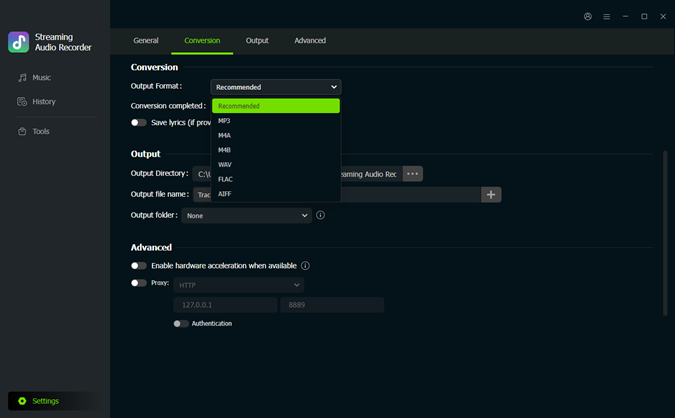 Step 1: Choose the Output Format
Open ViWizard SoundCloud Music Converter on your computer. Click the Settings icon in the bottom-left corner and open Conversion. Choose your preferred output format, then adjust the audio quality and output folder if needed. Return to the main Music interface when you're done.
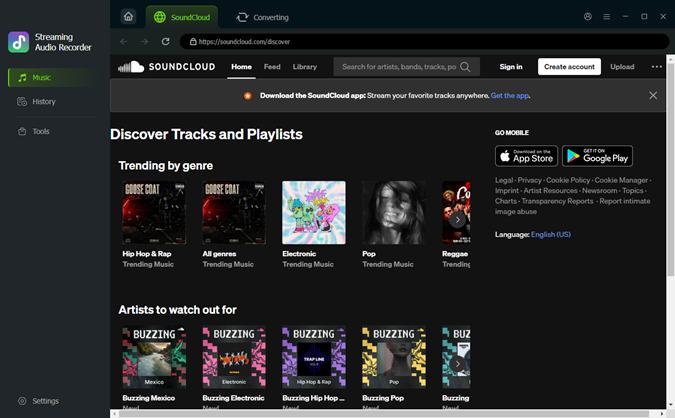 Step 2: Open SoundCloud in ViWizard
Click the SoundCloud icon to open the built-in SoundCloud player. Sign in, then browse your library or use the search bar to find the track, album, playlist, or artist you want to save.
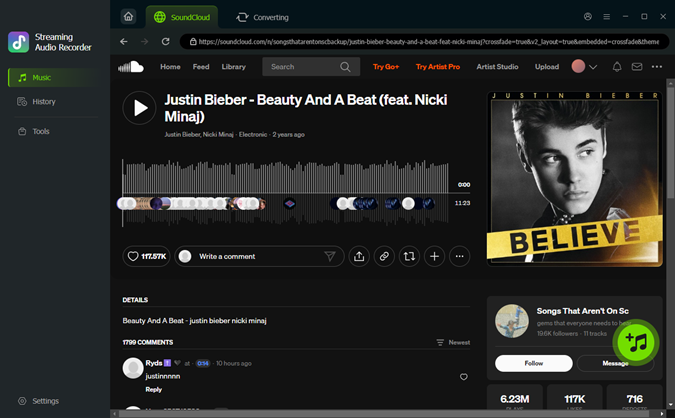 Step 3: Add Music to the Download List
Open the SoundCloud track, album, or playlist you want to save and click the + button to analyze it. Select the songs you want and add them to the download list.
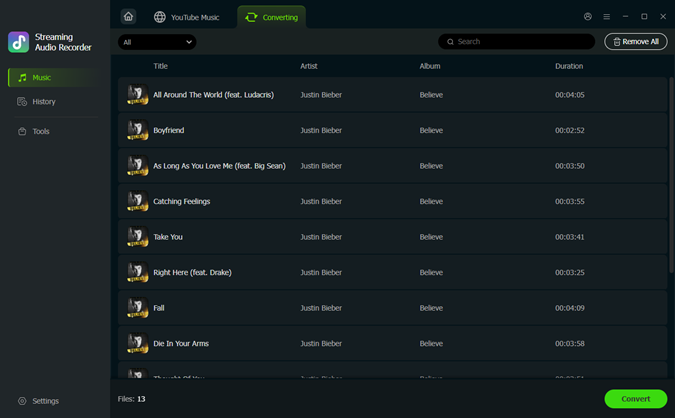 Step 4: Download SoundCloud Music
Open the download list and check your selected songs. Click Convert to start downloading. When the process finishes, go to History to find your saved music. Now you have the music as local files on your computer. Play them with your preferred music player whenever you want, without returning to SoundCloud or dealing with ads interrupting your listening.
- Works on Windows and Mac
- Supports tracks, playlists, albums, and uploads
- Batch downloads multiple songs at once
- Supports MP3, FLAC, WAV, AIFF, M4A, and M4B
- Saves music for offline playback without SoundCloud ads
- Keeps music metadata for easier organization
- Requires a desktop computer
- Downloads take up local storage
- Doesn't actually block ads inside the SoundCloud website or app
- You need to download the music before listening offline
Part 5. How to Block SoundCloud Ads with Open-Source Tools
For those who prefer a system-wide ad blocker, ZenPrivacy (also known as Zen) is a good choice. Zen is an open-source, free ad blocker and privacy protector for Windows, macOS, and Linux. Unlike browser extensions, Zen functions by setting up a local proxy that intercepts HTTP and HTTPS requests from all applications on your computer. Zen blocks not only ads in the SoundCloud Web Player, but also removes potential ads in the SoundCloud desktop application.

5.1 Using ZenPrivacy
01Download and install from Zen's official website.
02Run the installer and follow the on-screen instructions to complete the installation.
03Open the Zen application. It will automatically start blocking ads using the default filters.
04Go to the SoundCloud Web Player or the official SoundCloud desktop app and start playing music.
05There shouldn't be any ads interrupting you at this point. But if you're still experiencing ads, check out the Reddit post that includes a list of domains that block SoundCloud ads.
06Adding the blacklist and whitelist to Zen's custom filters will help you remove all audio ads on SoundCloud.
- Free to use
- Open-source
- Focuses on privacy as well as ad blocking
- Doesn't require a SoundCloud subscription
- Requires some setup
- May not block every type of SoundCloud ad
- Effectiveness can change after SoundCloud updates
Part 6. How to Block SoundCloud Ads with Mobile Apps
If you mainly listen to SoundCloud on your phone, browser extensions aren't always enough. Depending on your device, you can try a system-wide ad blocker, a modified SoundCloud app, or a mobile ad-blocking app to reduce ad interruptions.
6.1 Using AdGuard for Android
AdGuard for Android is a system-wide ad blocker that filters all outgoing and incoming network traffic, including ads in the SoundCloud app. It offers features such as HTTPS filtering. Therefore, we highly recommend this application as it works at the network level and makes ad blocking super effective.
However, due to the Google Play Store's restrictions on system-wide ad blockers, the Android version of AdGuard is only accessible from the official AdGuard website.

01Open a browser on your Android device and visit adguard.com.
02Download the latest APK file and install it on your device.
03It is necessary to enable "Unknown sources" in the security settings of your device to allow installation of third-party applications outside the Play Store.

04Launch the AdGuard application.
05Follow the on-screen instructions to set up basic functions.
06To specifically skip ads in the SoundCloud app, navigate to AdGuard's settings and enable "HTTPS Filtering".

07Install the security certificate as prompted.
08Launch the SoundCloud application on your Android phone.
09AdGuard will now filter and block most audio ads while you play music in the app.
- Works beyond the browser
- Blocks ads and trackers across supported apps
- Offers customizable filtering
- No SoundCloud subscription required
- Mainly intended for Android
- Some features may require a paid AdGuard plan
- SoundCloud ads may not always be blocked
- Filtering can sometimes affect how websites or apps work
6.2 Using SoundCloud Mod APKs
SoundCloud Mod APKs are unofficial, modified versions of the Android app. Some are designed to remove in-app ads or unlock features normally available with a paid SoundCloud plan, making them appealing if you want an ad-free experience without a subscription.
However, these apps are not provided or supported by SoundCloud, and their safety and reliability can vary. Modified APKs from unknown sources may contain unwanted software or request unnecessary permissions. If you decide to try one, use a reputable APK source, check the file and permissions carefully, and avoid installing anything you don't trust.
01To use the SoundCloud Mod APK, you will need to uninstall the SoundCloud app on your Android device.
02Allow "Unknown Sources" in your phone's security settings.
03Download an APK that states ad-free from a secure website.
04Open the APK and sign in to your SoundCloud account (it's best to sign up for a new account in case your account gets banned).
05Now you should be able to listen to SoundCloud music without ads.

Are you looking for free SoundCloud mod APKs? Check out this review to explore the SoundCloud mod APK you will love and discover a safer alternative to SoundCloud premium features.
- May remove ads directly from the modified app
- Doesn't require a separate ad-blocking app
- Can offer additional features
- Not officially supported by SoundCloud
- APKs from unknown sources can pose security and privacy risks
- Versions may stop working after SoundCloud updates
- Your account or personal information could be at risk
- Availability and features can vary between modified versions
6.3 Using AdBlock Pro
iOS allows ad-blocking apps to run on the Safari web browser. This means that if you play music through the SoundCloud web player in Safari, these blockers will stop the ads. AdBlock Pro is one of the most popular and reliable tools available. To use it, do the following steps:
01Download AdBlock Pro from the App Store.
02Open the AdBlock Pro app and follow the prompts to set the basic configuration.
03Go to the Settings app > Apps > Safari > Extensions.
04Tap on the AdBlock Pro extension and toggle on "Allow Extension."
05With AdBlock Pro enabled, visit SoundCloud Web Player through Safari.
- Works with SoundCloud in Safari
- No SoundCloud subscription required
- Easy to enable through iOS settings
- Can also block ads on other supported websites
- Does not block ads inside the SoundCloud app Only applies to Safari web browsing
- Some SoundCloud ads may still appear
- Requires AdBlock Pro to support the current version of iOS and Safari
Part 7. How to Block SoundCloud Ads with DNS
So, is there a solution to block ads at the system level without using a VPN app or jailbreaking your phone? AdGuard DNS offers a free solution!
It is a free DNS (Domain Name System) filtering service provided by AdGuard. You can set up your iPhone's Wi-Fi directly to use AdGuard's DNS servers. Then, when an internet request comes in, it first passes through these DNS servers, which filter known advertising and tracking domains before the request reaches the device. Although the configuration requires some patience and a few taps, you can make it work by following the steps below:
7.1 Using AdGuard DNS Settings
01Open the Settings app.
02Tap on "WLAN."
03Tap on the small blue "i" icon next to the currently active Wi Fi network.

04Scroll down and select "Configure DNS." Change the setting from "Automatic" to "Manual".
05Tap on the red minus sign, then tap "Delete" to delete any existing DNS entries.
06Tap on "Add Server" and enter one of the AdGuard DNS addresses: 94.140.14.14 or 94.140.15.15. Both can be added.
07Tap on "Save" in the upper right corner of the screen to apply the changes.
08Open the SoundCloud app. With the new DNS settings, advertisements should be significantly reduced or eliminated.

- No browser extension needed
- Can work across multiple apps and websites
- Can block ads and trackers at the DNS level
- Available on many devices
- May not block every SoundCloud ad
- Requires some DNS setup
- Results vary by device and network
- Some SoundCloud ads may bypass DNS filtering
Part 8. FAQs About Blocking SoundCloud Ads
Why is SoundCloud giving so many ads?
SoundCloud uses ads to fund the platform and support independent musicians on the platform. Since the service allows all SoundCloud users to listen to millions of tracks for free, relying on ad revenue to keep the platform running has become essential.
Is SoundCloud ad blocker safe?
Most Chrome extensions and DNS blockers are safe to use, and you can usually download these ad blockers from official channels such as the Apple App Store or Google Web Store, but APK mods and scripts may pose risks.
Does SoundCloud Go remove ads?
Yes, upgrading to SoundCloud Go or Go+ will remove ads and unlock other features such as offline listening.
How to get no ads on SoundCloud for free?
Use a combination of ad blockers, DNS filters, or use tools such as ViWizard SoundCloud Music Downloader to download music with no ads for offline playback.
Conclusion
SoundCloud ads can be a little frustrating, but thankfully, you don't have to put up with them every time you listen. You can go with SoundCloud Go or Go+, try an ad blocker, or save your favorite tracks for offline listening.
If offline listening sounds like your thing, ViWizard SoundCloud Music Converter is a handy option for saving tracks, playlists, albums, and uploads in different formats.
Whichever way you go, the goal is simple: less interruption and more time enjoying the music you actually came for.
You May Be Interested

Top 10 SoundCloud MP3 Downloaders to Get Songs in 320kbps MP3

Top 7 SoundCloud Downloaders: Desktop, Online & Extension Compared

8 Proven Ways to Unblock SoundCloud at School

SoundCloud Shuffle Not Random? 5 Ways to Shuffle Songs Properly on PC
How to Loop Song and Playlist on SoundCloud
Add a Track, Album, or Playlist to SoundCloud Playlists

From new releases to old favorites, Matt Smith is always on the lookout for good music. He follows the latest in digital entertainment and shares songs and media he thinks are worth checking out.

Leave a Comment (0)