


Music says a lot about your personality, mood, and memories, and SoundCloud makes it easy to discover trending, new tracks that match your taste. Whether you desire to revisit your favorite songs, analyze your listening habits, or explore trending tracks from artists all around the world, SoundCloud offers several built-in tools to help.
In this guide, we show you how to see your most played songs on SoundCloud as both a listener and an artist, discover extra tracking methods with Last.fm, explore trending charts, and even save your favorite tracks forever for offline listening.

Part 1. How to See Your Personal SoundCloud Top Songs
SoundCloud is not a traditional streaming service. It allows listeners and artists to interact. So, in this part, both listeners and artists can find a way to see the most-played music.
For Listeners
To see your personal top played songs on SoundCloud in 2026, you can go to the "Your Playback" Playlist, which displays your top tracks for the year. There is also a prerequisite: you need to listen to at least 30 tracks and 10 artists. For daily, recent data, you can check your "Listening History".
SoundCloud "Your Playback" (On Mobile & Desktop)
01Navigate to SoundCloud on your phone or desktop.
02Log in to SoundCloud with your account.
03Navigate to Home on the main screen.
04Scroll through the page to look for the "Your Playback" playlist. Or directly go to: https://soundcloud.com/discover/sets/your-playback.
05Select the heart icon to save the playlist to your library for future listening.
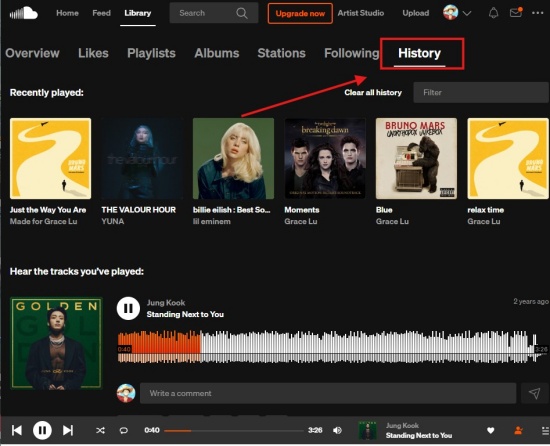
SoundCloud Listening History (On Mobile & Desktop)
01Navigate to SoundCloud with your account.
02Click or tap Library at the top or bottom.
03Select History to see your recently played tracks.
04Use the Filter in the top right corner of the History section to search for your favorite tracks or artists to play. Now enjoy the tracks!
For Artists
If you are an artist, you can use the "Insights" tab to see the most played songs. This offers a detailed breakdown of analytics. You can use the dashboard to sort tracks by total plays, see top-performing content over various timeframes, and analyze listener engagement.
On Desktop
01Open a modern browser you prefer (Chrome, Edge, Firefox, etc.)
02Navigate to the SoundCloud website and sign in.
03Click on the profile picture in the top right corner and choose "You Insights".
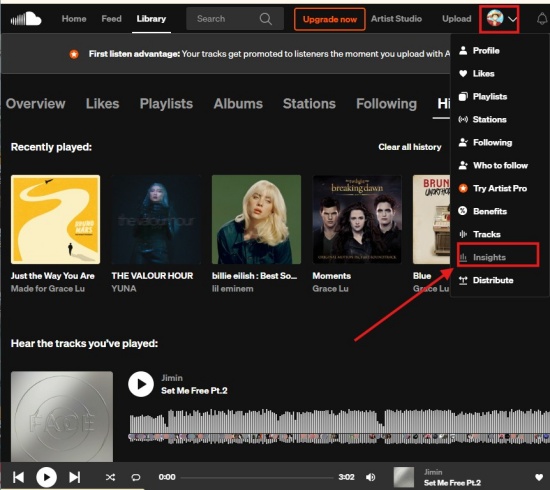
04The dashboard defaults to showing your top tracks by plays. Use the dropdown menu to filter by specific timeframe: Past Day, Week, Month, or Year.
05To learn which tracks are performing best, you can toggle between Plays, Likes, Comments, Reposts, and Downloads in the upper left corner.
06Click a specific song name to see the details of that track (listeners, traffic sources, etc.).
On Mobile
01Open SoundCloud on your mobile phone.
02Sign in and navigate to the profile picture.
03Go to Library or Artist Home.
04Select Your Insights to view your top-performing songs.
Part 2. Extra Way to Track and Analyze Your SoundCloud Most Played Songs
If you want to see your most played songs all year long, the best way is to connect your SoundCloud account to Last.fm. Last.fm operates in the background and automatically tracks every song you listen to on the SoundCloud desktop website. You will get detailed charts of your daily, weekly, and yearly listening habits.
Use Last.fm to Scrobble SoundCloud
01Visit Last.fm on your website and log in (create an account if you don't have one).
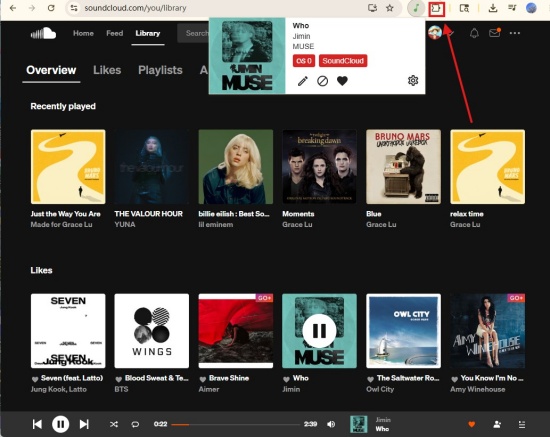
02Add the Web Scrobbler browser extension (Chrome/Firefox/Edge/Safari).
03Navigate to SoundCloud in your browser, play a song, and click the extension icon to connect it to your Last.fm account.
04If you use a mobile to scrobble, Android users can also use the official Last.fm app.
05iOS users use the VOX music player app. VOX music player app supports streaming SoundCloud and scrobbling to Last.fm.
06Listen to your music on SoundCloud, and the extension or app begins to scrobble the plays to your Last.fm.
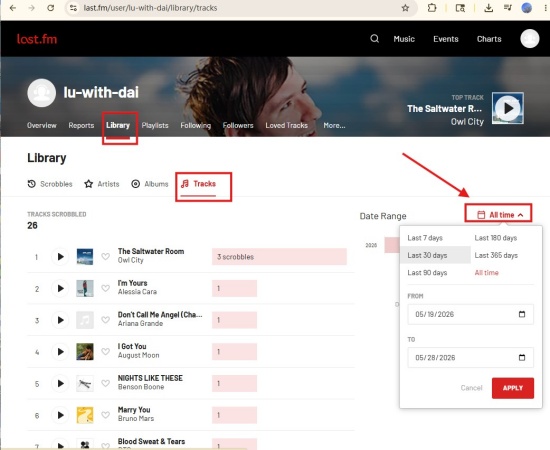
07To view the top songs on Last.fm, select Library > Tracks, and you can filter by time period, such as last 30 days.
Part 3. How to Explore SoundCloud's Top Songs
If you want to explore the top tracks on SoundCloud, you can use the SoundCloud Charts to find trending music by genre. Another option is to use Discover for personalized recommendations based on your listening habits. Also, you can find out hits through "The Lookout" playlist.
Explore SoundCloud Chart
You can explore SoundCloud charts on both desktop and mobile to figure out the top-50 tracks by genre or overall, as well as new, rising music.
01Go to the SoundCloud homepage and select "Charts" in the top navigation bar, or directly go to https://soundcloud.com/charts/new. (Mobile users tap the Search icon> Charts.)
02There are two main charts:
Choose Top 50 if you want to know the top 50 most played tracks on SoundCloud for this week across various genres.
Choose the New & Hot chart if you desire to find viral or emerging music.
03You can select specific genres below the main chart options, like Electronic and Hip Hop.
04Click the play icon to play these tracks in order. And the charts update regularly.
Explore Discover Page
This is the best way to find trending, top-performing, and new music tailored to your tastes.
01Go to SoundCloud on your phone or website.
02Select Feed or Discover.
03Browse the curated playlists, e.g., SoundCloud Weekly. These playlists mix popular tracks with your known tastes.
Explore Trending Playlists and Reposts
This method is best for emerging trends.
01Open SoundCloud on your device,
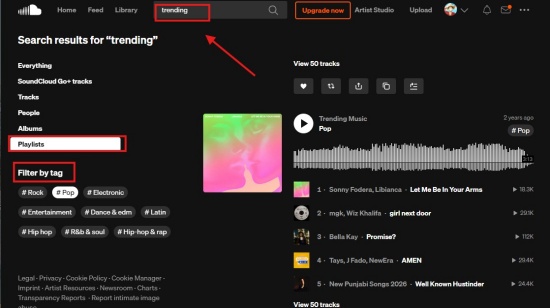
02Type keywords like "trending", "hot", or certain genre tags.
03Find results with Playlists, and locate the collections created by influential users or SoundCloud's editorial team.
04Look into the Reposts of popular curators or artists within your liked genre.
Part 4. How to Save Your SoundCloud Most Played Songs Forever
After following the guide above, I believe you have found your most-played tracks on SoundCloud. Music always reflects our moods, so your top songs mean a lot to you. If you are looking for a handy tool to keep your favorite SoundCloud tracks forever, ViWizard SoundCloud Music Downloader is a good choice. It is a powerful software that supports Mac and Windows. It works with multiple platforms, including SoundCloud, Spotify, YouTube Music, and the like. You can download the most played tracks, trending playlists, latest albums, and even podcasts.
Once you download ViWizard, you set the output format to MP3, OGG, WAV, FLAC, and more. It also lets you adjust the sound details like sample rate and bit rate. Besides, if you like, you can name the file with its artist, song title, album, and year. When you set everything well, you can batch download the library at 65x while retaining ID3 tags and original audio. Whenever and wherever you want, you can take out the music downloaded from ViWizard to play. Have a free trial and test it out!

Want more flexibility with your SoundCloud music? ViWizard SoundCloud Music Converter helps SoundCloud listeners convert tracks, playlists, and albums with seamless music conversion. Save your favorites and keep your SoundCloud collection accessible.
Use ViWizard to Download SoundCloud Music and Play Tracks
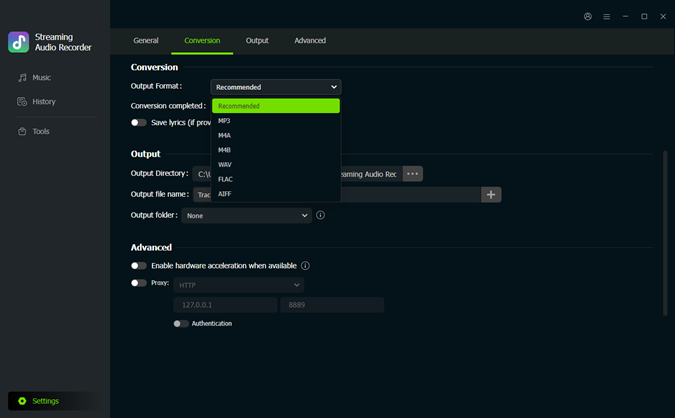 Step 1: Customize Output Formats
After installing ViWizard, log in to it. Click the menu icon in the top right corner. Click Preferences > Conversion. Choose your favorite output formats: MP3, FLAC, WAV, etc. Adjust the audio quality, and click OK to keep the settings.
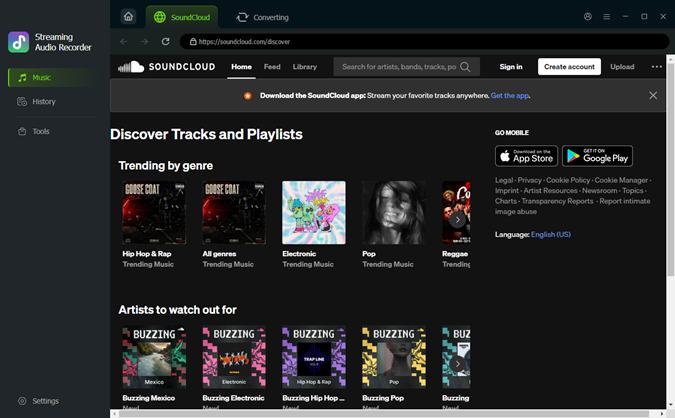 Step 2: Go to the Built-in SoundCloud Web Player
Return to the main screen. Choose SoundCloud as the source platform to convert. The built-in SoundCloud web player will appear. Sign in to it with your account. You can see your played tracks, liked music, the playlist, and albums.
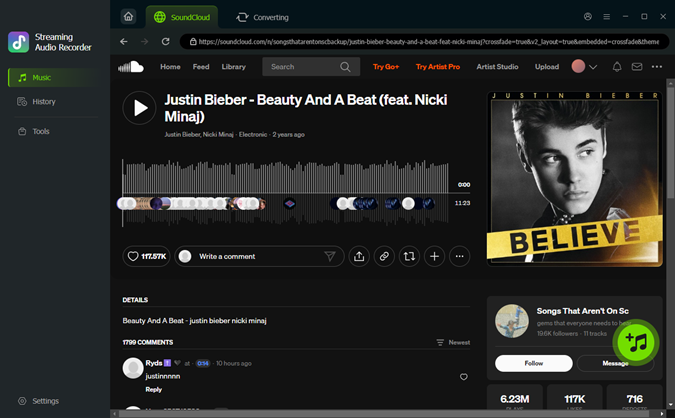 Step 3: Choose Songs or Playlists for Download
In the built-in SoundCloud web player, view the tracks and playlists to choose the ones you want. Once you make up your mind, open the music page and click the + icon (Add to list). ViWizard then scans and loads all available songs to the conversion queue.
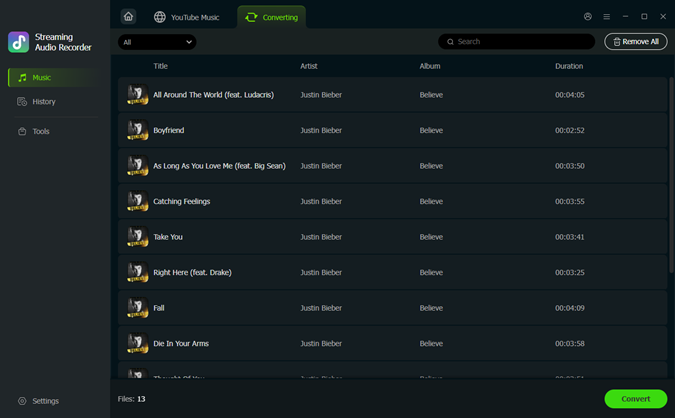 Step 4: Convert and Save SoundCloud Music on Desktop
Make sure your desired tracks are in the conversion page, and select Convert. ViWizard begins downloading SoundCloud at high speed while preserving the original audio quality. After converting, click the converted page. Select the folder icon to find the music files on your computer. Enjoy your SoundCloud most-played tracks on any device!
Conclusion
Finding your most-played songs on SoundCloud is a marvelous way to revisit the music that defines your musical taste. Whether you use the "Your Playback" playlist, Listening History, artist Insights, or Last.fm scrobbling, there are many ways to track and explore your favorite tracks. You can also discover trending music through SoundCloud Charts and curated playlists. And if you want to keep your favorite tracks permanently, tools like ViWizard SoundCloud Music Downloader make offline listening simple and convenient. Now, enjoy your top SoundCloud tracks anytime and never miss the music you love most.
You May Be Interested

Full Guide to Find and Clear SoundCloud Listening History

Add a Track, Album, or Playlist to SoundCloud Playlists

Does SoundCloud Have Ads? 9 Ways to Block Ads on Any Device

[Fixed] Why Does SoundCloud Keep Pausing?

How to Loop Song and Playlist on SoundCloud

How to Change Your Email on SoundCloud (Fast & Easy Guide)

Dave Henry loves movies and all things video. He likes checking out different video formats and trying new media players to see how they change the viewing experience.

Leave a Comment (0)