


Your SoundCloud account stores more than just your login information. It keeps your playlists, liked tracks, followers, and uploaded music, so making sure your account details are up to date is important. If you have switched to a new email address, lost access to your old inbox, or want to improve account security, changing your SoundCloud email is a quick fix.
In this guide, we will explain how to change your email address on SoundCloud and the requirements you need to know. Besides, we'll cover common issues that may prevent you from updating your email. At the end of this passage, there's also a workaround to save your favorite SoundCloud music locally. Let's dive in.
Part 1. Can You Change Your Email Address on SoundCloud?
Yes. SoundCloud lets you change the email address linked to your account at any time through your account settings. Updating your email is useful if you've switched to a new email provider, lost access to your old inbox, or simply want to improve your account security.
- Sign In to Your Account: You must be able to log in to your SoundCloud account before you can update your email address.
- Use a Different Email Address: The new email address cannot already be associated with another SoundCloud account. If it is, you'll need to use a different email or remove it from the other account first.
- Verify Your New Email: After adding your new email address, SoundCloud will send a verification email. Click the confirmation link in your inbox to verify it before using it as your primary email address.
Once your new email is verified, you can use it to sign in, recover your account, and receive important notifications from SoundCloud. Changing your email won't affect your playlists, likes, followers, uploaded tracks, or other account data.
Part 2. How to Change Your Email on SoundCloud
Changing the email address linked to your SoundCloud account is a simple process, but you need to verify the update before the new address becomes active. SoundCloud lets you add a new email address, set it as your primary email, or replace your existing one through your account settings. After making the change, you'll need to enter a 6-digit one-time passcode (OTP) sent by SoundCloud to confirm your identity.
Before you start, make sure you can access your SoundCloud account and the new email address you want to use. The new email must not already be linked to another SoundCloud account.
Change Your Email on Desktop (Web)
01Open SoundCloud and log into your account.
02Click the three dots next to your profile and click Settings from the drop-down menu.
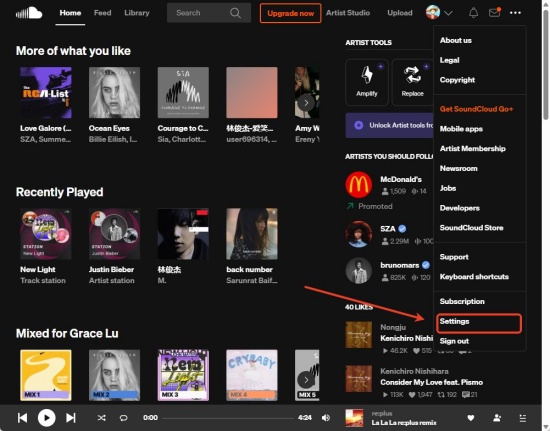
03Scroll down to find Email addresses.
04Click the Make primary button next to your new email address if it has already been added to your account.
05Click Add another email, enter your new email address, and save the changes if you want to add a new email.
06Check your inbox for the 6-digit one-time password (OTP) sent by SoundCloud.
07Enter the verification code to confirm your identity and complete the email change.
Change Your Email on Mobile (iOS & Android)
SoundCloud's mobile app does not currently provide a direct option to change your email address. Instead, you need to access the SoundCloud website through a mobile browser using desktop mode.
01Open a web browser on your phone or tablet and visit the SoundCloud website.
02Open your browser menu and select Desktop Site (Android) or Request Desktop Website (iOS).
03Log in to your SoundCloud account.
04Tap your profile icon and open Settings.
05Go to the Emails section, add a new email address if needed, or select Make primary next to the email you want to use.
06Enter the 6-digit verification code sent by SoundCloud to verify your new email address.
Part 3. Why Can't You Change Your Email on SoundCloud?
If you can't change your email on SoundCloud, it may be because you no longer have access to your current email inbox or your account is connected to a social login. SoundCloud requires a 6-digit One-Time Password (OTP) sent to your current email address to verify your identity before allowing any email changes. Here are the most common roadblocks and troubleshooting tips:
You lack access to the old email: If you can't sign in to get the OTP, SoundCloud's automated system cannot verify your identity. At this time, for email expiration, recreate the old email address; for unknown reasons, reach out directly to support.
You created your account via social media: For users who signed up using Google, Facebook, or Apple, there is no traditional password setup. If you want to change or add an email address, first generate a password by requesting a password reset link to your linked social email address.
The new email has been put into use: According to SoundCloud, one email address can only be linked with one account at a time. If you desire to switch to an email already tied to an old or secondary profile, the change will be turned down.
Part 4. What Happens After Changing Your SoundCloud Email?
After you change your SoundCloud email, the update happens immediately. Your future logins, password reset requests, and account notifications will be sent to the new email address, while your tracks, playlists, and account information remain unchanged.
If you don't receive any email, check your spam folder or verify your settings on your SoundCloud Account Settings. You can also sign out and log back in to refresh your profile cache.
- Login Updates: Next time you sign in, you will use your new email address, unless you log in using a connected social account, such as Google, Apple, or Facebook.
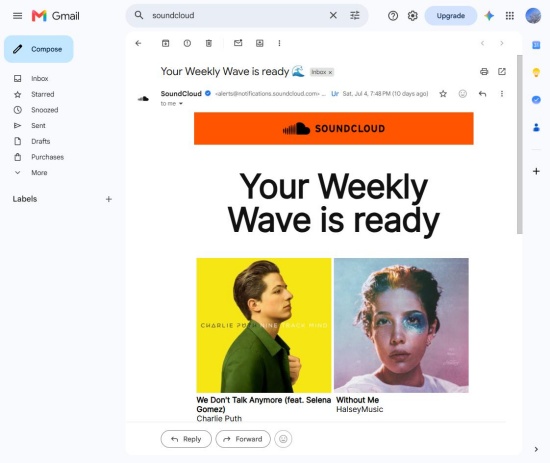
- Account Verification: You will get a one-time 6-digit code or confirmation link in your inbox from SoundCloud for switch authentication.
- Notification Redirect: All future newsletters, copyright updates, and activity alerts from notifications@soundcloudmail.com will be sent to the updated inbox.
Part 5. How to Save Your Favorite SoundCloud Music for Offline Listening
Changing your SoundCloud email is a simple way to keep your account secure and make sure you can always access your profile. However, updating your email address does not change how SoundCloud works. You still need an internet connection to stream most tracks, and your favorite songs may not always be available offline.
If you want to keep your favorite SoundCloud tracks and listen to them anytime, a music downloader can be a convenient solution. ViWizard SoundCloud Music Downloader allows you to save SoundCloud songs, playlists, and albums to your computer and convert them into common audio formats like MP3, FLAC, WAV, AIFF, M4A, and M4B. It also keeps the original ID3 tags, including song titles, artists, and album information, so your music library stays organized.
With ViWizard, you can enjoy your SoundCloud collection offline without opening the SoundCloud app or relying on a stable internet connection. It is a handy tool for users who want to create a personal music library, back up their favorite tracks, or listen to SoundCloud music on different devices.

Want more flexibility with your SoundCloud music? ViWizard SoundCloud Music Converter helps SoundCloud listeners convert tracks, playlists, and albums with seamless music conversion. Save your favorites and keep your SoundCloud collection accessible.
How to Download SoundCloud Music with ViWizard
 Step 1: Choose Output Settings
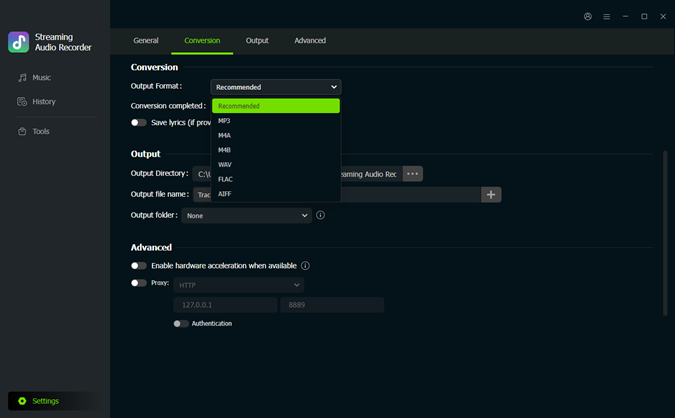
Open ViWizard SoundCloud Music Downloader on your computer. Click the Settings menu at the bottom left and select Conversion. Choose your preferred output format, such as MP3, FLAC, WAV, AIFF, M4A, or M4B. You can also adjust the audio quality, output folder, and other file settings. After that, return to the Music section.
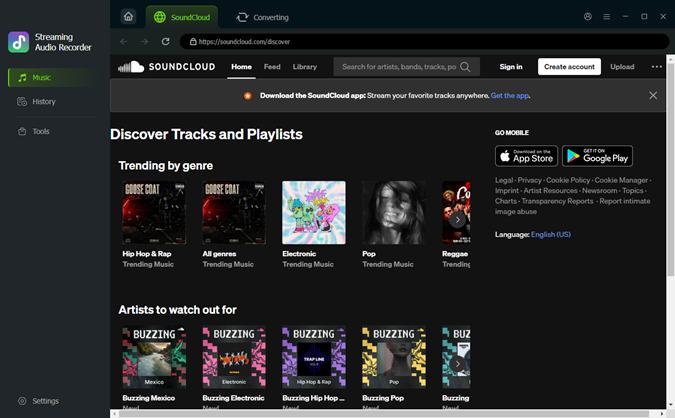 Step 2: Open SoundCloud in ViWizard
Click the SoundCloud icon in ViWizard to open the built-in SoundCloud player. Browse SoundCloud or search for the tracks, albums, playlists, or artists you want to save.
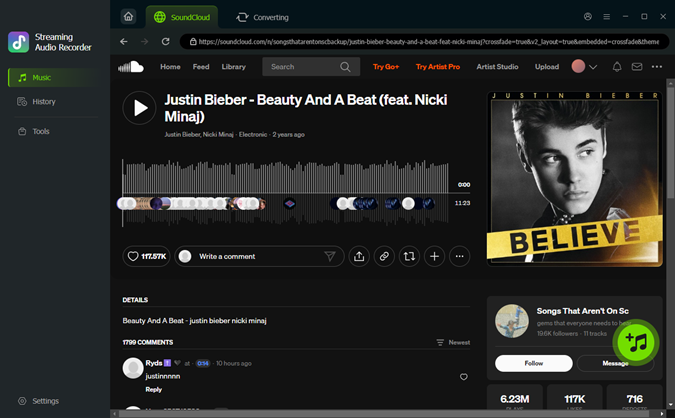 Step 3: Add SoundCloud Music to the Download List
Open the SoundCloud song, playlist, or album you want to download and click the plus (+) button. ViWizard will analyze the page and display the available tracks. Select the songs you need and add them to the download list.
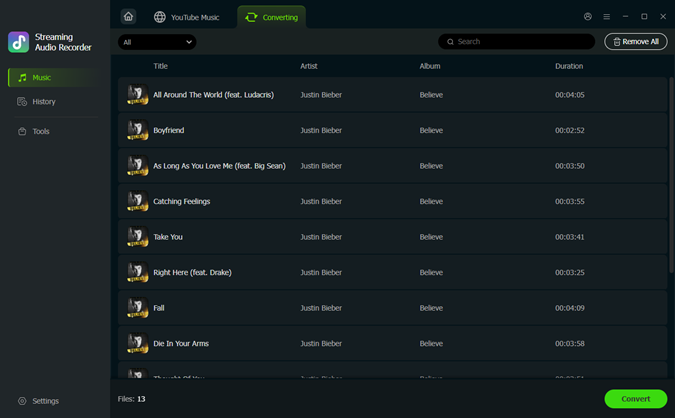 Step 4: Convert SoundCloud Music to Audio Files
Go to the conversion list and check the selected SoundCloud tracks. Click the Convert button to start downloading. Once finished, open the History section to find your saved files. By keeping a local backup of your favorite SoundCloud music, you can still enjoy your personal collection even if you change your account email, update your login information, or need to manage your SoundCloud account settings in the future.
Conclusion
Changing your email on SoundCloud only takes a few steps, but it helps ensure you can continue accessing your account, receive important notifications, and recover your account when needed. As long as you can verify your identity and use an available email address, you can update your login information without losing your playlists, followers, or uploaded tracks.
However, changing your email does not make SoundCloud music available offline. If you want to keep a backup of your favorite tracks or listen without an internet connection, saving SoundCloud music as local audio files can be a useful option. With a tool like ViWizard SoundCloud Music Downloader, you can create a personal music library and enjoy your favorite songs more flexibly.
You May Be Interested






Dave Henry loves movies and all things video. He likes checking out different video formats and trying new media players to see how they change the viewing experience.

Leave a Comment (0)