


Are you crazy about discovering music on SoundCloud? Do you want the transitions between songs to be smoother? Unlike Spotify and some other streaming platforms, SoundCloud doesn't offer a built-in crossfade feature to blend tracks together automatically. Fortunately, that doesn't mean you're stuck with abrupt song endings and silent gaps. Whether you're listening casually, creating party playlists, or mixing tracks like a DJ, there are some effective ways to achieve seamless playback.
In this guide, we'll explore 3 practical methods to crossfade SoundCloud tracks. From AI-powered mobile apps and professional DJ software to a clever Spotify workaround, you'll find the best option for creating seamless listening on any device.

Part 1. Does SoundCloud Support Crossfade?
No, SoundCloud does not support crossfade. It functions as an open audio platform for direct track playback. But you can try other methods to enjoy seamless music. We recommend 3 methods: using mobile apps, using DJ software and tools, or using other supported platforms and workarounds. Choose the way you prefer, and do it with us.
Part 2. How to Crossfade SoundCloud Tracks Using Mobile Apps
To better blend your tracks, you can use third-party apps. Among the apps, we recommend Offtrack. Offtrack, formerly known as Mixonset, is an AI DJ app that automatically turns playlists into smooth, nonstop music mixes. It acts as an automatic mixer for your SoundCloud playlists. You can find and download Offtrack on iOS devices, Mac Computers, Android devices running Android 8.0 or newer, and Cars with built-in Apple CarPlay. Here are the features and steps to use it.
Smart Mix: AI automatically picks the best fade-in and fade-out points between songs, creating smooth, continuous music.
Song Highlights: Offtrack can trim long songs by playing only the best 25%-50%, which are the highlights of your playlists.
Smart Queue: This app can change song order by matching tempos and energy levels.
Multiple Compatible Platforms: Offtrack supports many music libraries, including Spotify Premium, Apple Music, TIDAL, SoundCloud Free, and local MP3 files.
Crossfade SoundCloud Tracks Using Offtrack
01Go to the App Store on your phone and download Offtrack.
02Open the app and tap the menu to choose SoundCloud to connect your free account.
03Select a playlist from your library.
04Select the bright red Smart Mix button.
05The AI automatically orders your songs and adds seamless crossfades.
06Tap the three dots next to any song in the playlist and choose Mix control.
07To choose when the new song fades in, drag the red dot.
08To choose when the current song fades out, drag the purple dot.
Part 3. How to Crossfade SoundCloud Using DJ Software and Tools
To crossfade SoundCloud tracks, you need DJ software with built-in SoundCloud streaming. Popular compatible apps include djay Pro, Rekordbox, or Serato DJ. And make sure you have a SoundCloud DJ or SoundCloud Go+ subscription to stream the music into your software.
DJ Software that Works with SoundCloud: Rekordbox, Serato DJ Pro & Lite, VirtualDJ, djay Pro, Mixvibes Cross DJ.
Web-based DJ Apps that Work with SoundCloud: Transitions DJ, YOU.DJ, eDJing Mix / edjing Pro, Party Cloud.
Crossfade SoundCloud Using DJ Software and Tools
01Open the DJ software and go to the Settings or Preferences menu.
02Navigate to the Library or Music Streaming tab.
03Locate SoundCloud in the list of streaming services and select Log in.
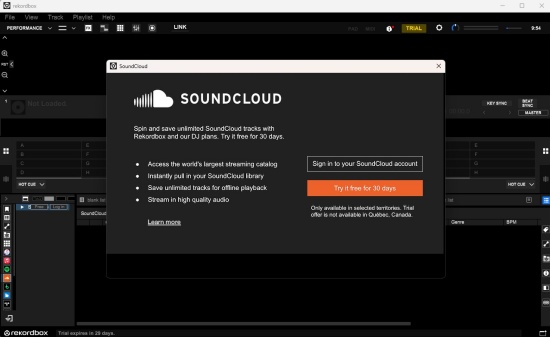
04Log in to your SoundCloud account in the browser window that appears and authorize the connection.
05Once you log in, your SoundCloud albums, playlists, and saved tracks will show up in the software's browser.
06Drag and drop a track into Deck A and another track into Deck B.
07Wait a few seconds for the software to analyze the track so the BPM (Beats Per Minute) and Phrase (musical structure) are visible.
08Move the crossfader—the horizontal slider on your DJ controller or software—gradually from Deck A to the middle. This mixes both songs.
09While mixing, use the Low/Bass EQ knob on Deck A to lower the bass slowly while turning up the bass on Deck B. This prevents "muddy" sounding audio.
10Once the new track reaches its main part, slide the crossfader completely over to the Deck B.
Part 4. How to Crossfade SoundCloud with Other Supported Platforms and Workarounds
Although SoundCloud doesn't offer a built-in crossfade feature, there are still ways to create seamless transitions between tracks. You can use AI-powered mobile apps or connect SoundCloud to professional DJ software such as djay Pro, Rekordbox, and Serato DJ. Want to enjoy crossfade without relying on DJ apps or a SoundCloud Go+ subscription? You can use ViWizard SoundCloud Music Converter. You can download music and then transfer it to Spotify, which supports crossfade natively.
Why do we choose ViWizard SoundCloud Music Converter? It saves SoundCloud songs, playlists, and albums in popular formats such as MP3, FLAC, WAV, AIFF, M4A, and M4B. Besides, ViWizard preserves the original audio quality and ID3 tags while offering customizable output settings, including bit rate, sample rate, and bit depth (up to 24-bit, 320 kbps, and 192 kHz). With batch conversion and fast download speeds, you can quickly build an offline music library and listen without streaming restrictions. Here are the steps to crossfade SoundCloud with ViWizard and Spotify.

Download songs, playlists, albums, and your whole music library from 10 major streaming platforms, including SoundCloud Music, to MP3, FLAC, WAV, AIFF, M4A, or M4B with original quality and ID3 tags for permanent offline listening.
How to Use ViWizard SoundCloud Music Converter
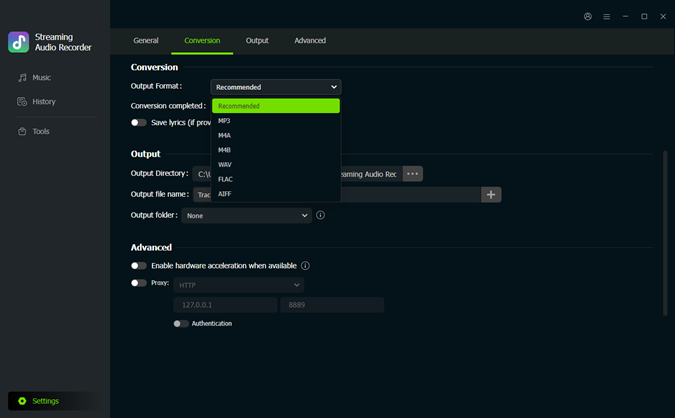 Step 1: Customize the Output Format and Audio Quality
Install and launch ViWizard SoundCloud Music Converter on your computer. Click the Menu icon in the upper-right corner and select Preferences. Under the Conversion tab, choose your preferred output format, such as MP3, WAV, AIFF, or FLAC. You can also adjust audio settings like bitrate and sample rate (up to 24-bit, 320 kbps, and 192 kHz) for the best listening experience. Click Save to apply the changes.
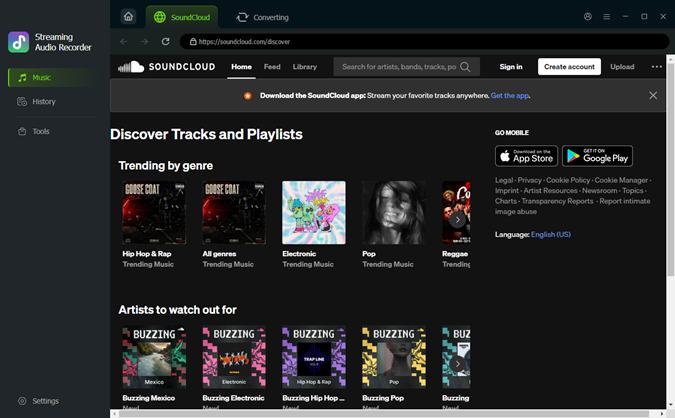 Step 2: Open SoundCloud in ViWizard
Close the Settings window and return to the main interface. Click SoundCloud to launch the built-in SoundCloud web player. Then sign in with your SoundCloud account to access your music library.
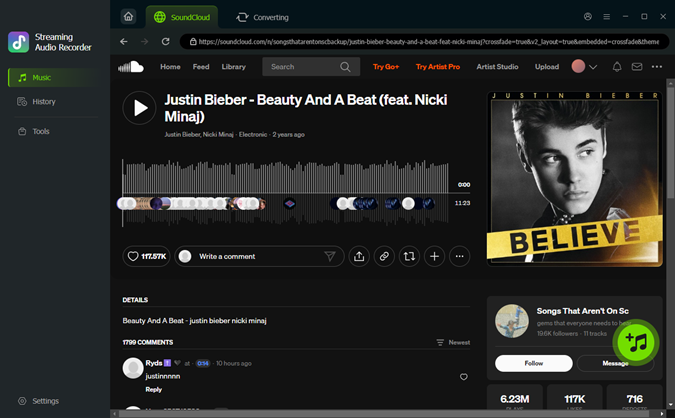 Step 3: Add SoundCloud Songs, Playlists, or Albums
Browse your favorite tracks, playlists, albums, or liked songs within the built-in SoundCloud player. Open the content you want to download and click Add to List. ViWizard will automatically analyze and load all available tracks into the conversion queue.
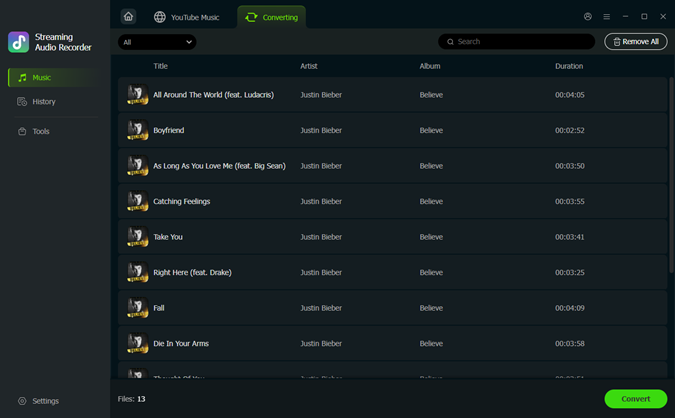 Step 4: Download and Save SoundCloud Music
Review the tracks on the conversion page and click Convert. ViWizard will download and convert the selected SoundCloud music at high speed while preserving the original audio quality. Once the process is complete, go to the converted section to locate your downloaded files. You can then transfer them to Spotify for crossfading or play them with media players such as Windows Media Player or QuickTime Player.
How to Use ViWizard SoundCloud Music Converter
After downloading SoundCloud playlists, you can import the files into Spotify Desktop App and apply Spotify's built-in crossfade feature. Now follow me:
01Make sure you've downloaded Spotify and the SoundCloud music from ViWizard.
02Open Spotify and click the profile picture.
03Go to Settings > Local Files, and toggle on the switch.
04Click Add a Source and choose the folder where your SoundCloud music is saved.
05Navigate to Library > Local Files in the left sidebar.
03Go to Settings > Local Files, and toggle on the switch.
04Click Add a Source and choose the folder where your SoundCloud music is saved.
05Navigate to Library > Local Files in the left sidebar.
05Navigate to Library > Local Files in the left sidebar.
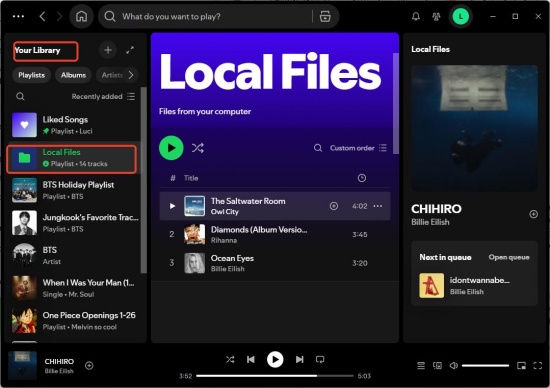
06Right-click your SoundCloud song and choose Add to playlist.
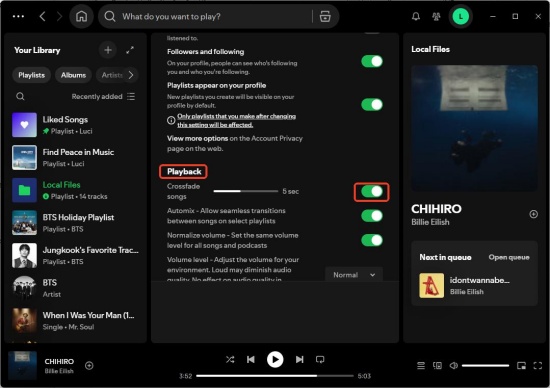
07Click your profile picture in Spotify, and go to Settings.
08Scroll down to find Playback and toggle on Crossfade songs.
09Adjust the number of seconds you'd like the songs to overlap, for example, 6s. (3-6 seconds is a great starting point.)
08Scroll down to find Playback and toggle on Crossfade songs.
09Adjust the number of seconds you'd like the songs to overlap, for example, 6s. (3-6 seconds is a great starting point.)
Conclusion
SoundCloud doesn't support crossfade natively, though. You always have ways to enjoy smooth transitions between your favorite music. Mobile apps like Offtrack offer quick, automated mixing, while DJ software such as djay Pro, Rekordbox, and Serato DJ provide advanced crossfading tools for greater control.
If you prefer a simpler solution for everyday listening, ViWizard SoundCloud Music Converter can help you. You can download SoundCloud songs and transfer them to Spotify. No matter which way you choose, you can easily bridge gaps between songs and enjoy music!
You May Be Interested




Dave Henry loves movies and all things video. He likes checking out different video formats and trying new media players to see how they change the viewing experience.

Leave a Comment (0)