


Can i get Soundcloud user listening history? Can't get users (me) listening history on SoundCloud. Is there a way to retrieve SoundCloud user listening history?
If you are wondering how to review your whole year of listening history, you can get the official SoundCloud Wrap. However, there is a more direct way to see your recently listening history with one click. With the button, SoundCloud users can revisit tracks they listened to before, reset music recommendations, or simply seek their liked songs that fail to add to their SoundCloud library.
This post will show you a step-by-step guide to finding your SoundCloud listening history, whether you stream on mobile devices or the SoundCloud web player. Additionally, the cleaning of the SoundCloud listening history is also displayed in this tutorial. Let's dive in!
Part 1. How to Find Your Listening History on SoundCloud
Before clearing or managing your SoundCloud listening history, the first and key step is to see where SoundCloud stores your listening history and how accessible it actually is. If you are new to SoundCloud or have not used SoundCloud for a period, below are the most reliable ways to find your listening history on SoundCloud.
On Android/iOS
Step 1 Please initiate the SoundCloud application.
Step 2 Next, select the Library icon, which is represented by a stack of books, found in the bottom navigation menu.
Step 3 Proceed to scroll down until you find the section labeled "Listening History."
Step 4 Finally, click on "See All" to view your comprehensive history of tracks that you have played.
On Windows/Mac
Step 1 Open the SoundCloud website and log in with your personal SoundCloud account.
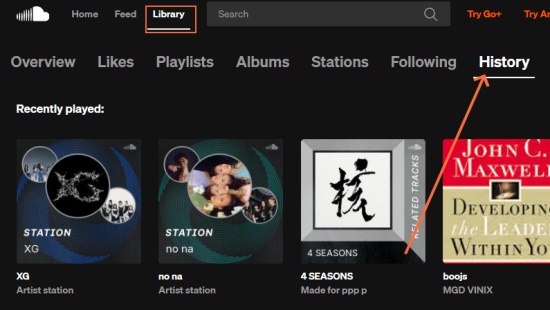
Step 2 After entering the SoundCloud Home interface, tap the Library option next to the Search bar.
Step 3 It will automatically enter the Overview page, and you can click the History button at the top line.
Step 4 The following section will show you the playlist, station, track, or audiobook you have streamed on SoundCloud.
Part 2. How to Clear Listening History on SoundCloud
After knowing how to find your listening history on SoundCloud, there is a question that most people are concerned about: how to remove the listening history on SoundCloud? Most people want to delete their SoundCloud listening history to maintain their account privacy, refresh SoundCloud's music recommendations to remove unwanted, accidental, or disliked tracks from the library/home feed, or just want to tidy up their SoundCloud library. If you also have cleaning needs, the following shows how to do it on the SoundCloud application and web player.
On Android/iOS
Step 1 Launch the SoundCloud app on your device.
Step 2 Navigate to the Library section and scroll down to select Recently Played.
Step 3 Look for the option to Clear or Remove your recent tracks.
Step 4 Once you've made your selection, confirm your decision to finalize the action when SoundCloud asks you whether to delete.
On Windows/Mac
Step 1 To begin, access SoundCloud through your web browser.
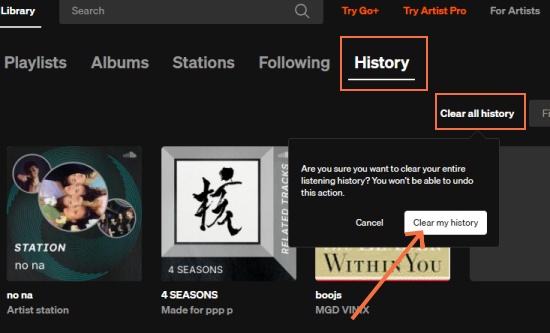
Step 2 And then, navigate to the Listening History section of your account.
Step 3 From there, choose the option to Clear All History next to the Filter bar.
Step 4 Make sure to confirm this action. Please note that once your listening history is cleared, it is generally irreversible.
Part 3. Alternative Methods to See SoundCloud Listening History
Does SoundCloud restore the whole listening history every time I stream? Unfortunately, no. SoundCloud does not automatically restore your complete listening history each time you play a new track. Instead, it keeps a dynamic and continuously updated record of your recent activity. However, there are instances when syncing issues may occur, leading to the removal of recent songs from your history instead of adding them.
So, here we will display other powerful programs to help you track your SoundCloud listening history.
Option 1. Web Scrobbler
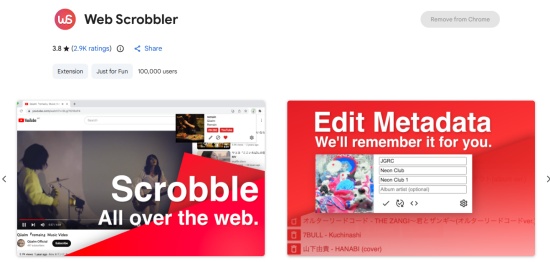
Web Scrobbler is an innovative browser extension designed for individuals who enjoy streaming music online and wish to maintain a current playback history through scrobbling services. This versatile tool is compatible with a variety of music streaming platforms, including popular options such as SoundCloud, Spotify, and Tidal. It suits for SoundCloud users who tend to stream on a web browser.
Option 2. Last.fm
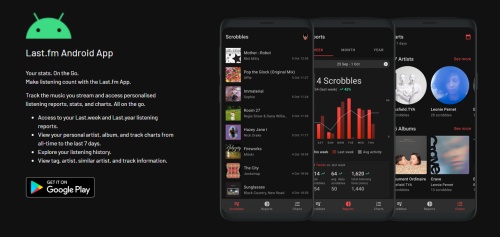
If you connect your SoundCloud to Last.fm, you can effortlessly delve into your SoundCloud listening history. Last.fm excels at tracking and analyzing listening habits, offering tailored music recommendations, global music taste statistics, and engaging social networking features. However, only Android users can access the official SoundCloud scrobbling with the Last.fm app. While the iOS users still need to install the Web Scrobbler browser extension 3.0 for iOS Safari version, as it is unsupported for the Last.fm SoundCloud officially app scrobbling.
Option 3. ListenBrainz
ListenBrainz is a robust open-source platform designed to aggregate scrobble data from various sources, including SoundCloud. It seamlessly integrates with the BrainzPlayer component, enabling users to play tracks while also providing the functionality to search and stream music directly from SoundCloud. Users have the option to select SoundCloud within the player settings, and the service is capable of recording listening history, provided that a SoundCloud ID is associated with the original listening session.

Bonus: How to Download Your SoundCloud Listened Music without Subscription
For the song you preferred, you can choose to add it to your SoundCloud library, loop it, or choose to download it on SoundCloud local library for offline listening. However, the offline listening is only available for SoundCloud Go or Go+ users. Once the subscription expires, you are no longer allowed to listen to your SoundCloud downloads due to DRM protection. If you want to keep songs you've listened to—especially those found through your listening history—without subscribing, you can download your favorites with ViWizard SoundCloud Music Downloader.
ViWizard SoundCloud Music Downloader is expertly crafted to facilitate the downloading of SoundCloud tracks while preserving their original audio quality, which can reach up to SoundCloud's high-quality streaming of 256 kbps. In addition to the standard MP3 format, ViWizard offers a selection of high-resolution audio formats, including FLAC, WAV, AIFF, M4A, and M4B. Once you've saved your favorite SoundCloud playlists using ViWizard for personal listening, you can permanently stream them without a SoundCloud paid subscription.

Download songs, playlists, albums, and your music libraries from SoundCloud, Spotify, Apple Music, Tidal, Deezer, Qobuz, Amazon Music, Pandroa, and Line Music as MP3, FLAC, WAV, AIFF, M4A, and M4B foramts with original audio quality and full metadata information.
Step 1 Log in to SoundCloud
Open ViWizard SoundCloud Music Downloader on your computer. Once enter the main interface, click the SoundCloud icon and log in with your SoundCloud account. The built-in web player will give you secure access to your SoundCloud profile, playlists, and listening history.

Step 2 Add Your Listening History to List
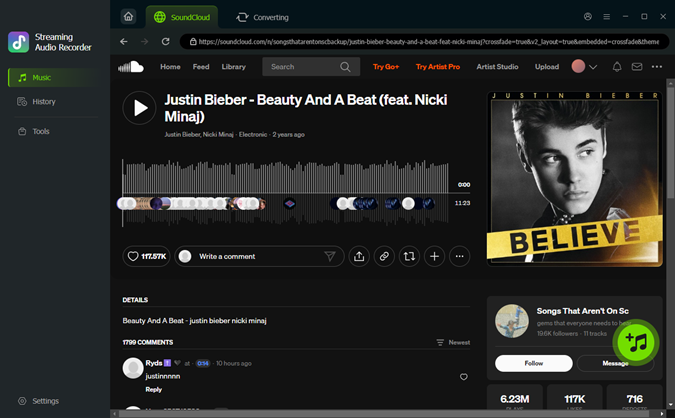
Once logged in, follow the step in Part 1 to navigate to your Listening History on SoundCloud. Browse through the tracks you've played and select the songs you want to download. While viewing your listening history, click Add to List on the tracks you want to download. ViWizard will automatically queue them for recording and conversion.
Step 3 Set Output Format
Click Menu icon at the top right screen. Navigate to Conversion > Output Format in ViWizard. Choose the format and audio quality, bitrate, or sample rate your preferred. Click OK to save your settings.

Step 4 Download and Save Tracks
Click Convert to start recording and converting the selected tracks to MP3. Once the process is complete, open the History tab to access your downloaded files. You can now listen offline, transfer to other devices, or organize your music library.

FAQs about SoundCloud Listening History
Is SoundCloud's listening history private?
Yes, your listening history remains private and is not accessible to other users.
Does SoundCloud track my listening time?
SoundCloud tracks when a user presses play on a track, but it does not record the length of time that the user listens. You can try other scribblers, like Last.fm, to see your streaming hours.
Can I see who listened to my tracks?
Creators can access Insights, which provide valuable information such as play counts, top listeners, and geographical locations. However, it's important to note that they cannot view the specific identities of individual listeners. Additionally, any plays made on your own account are not included in these statistics.
Can I see my history offline?
Although offline listening is available on SoundCloud, you may experience syncing issues that prevent your history from updating accurately until you reconnect to Wi-Fi.
Will the motion to delete SoundCloud history synchronic all platforms?
Indeed, when you delete your SoundCloud listening history, it effectively removes that data from all synchronized devices. This is due to the fact that your listening activity is directly tied to your account. Therefore, whether you clear your history through the mobile app or the web player, those changes will be consistently reflected across all devices where you are logged in.
Conclusion
The listening history feature on SoundCloud proves to be invaluable for effortlessly revisiting your recent tracks. By mastering the process of locating your listening history, understanding how to clear it, and utilizing third-party scrobblers for comprehensive long-term tracking, you can significantly enhance your listening experience and preserve an extensive record of the music you cherish. When it comes to downloading music from SoundCloud, ViWizard SoundCloud Music Downloader stands out as an excellent option.
You May Be Interested

How to Find Audiobooks on SoundCloud [Full Guide]

How to Upload Songs to SoundCloud [Latest]

How to Make and Manage Playlist on SoundCloud [Android/iOS/Desktop]

Top 6 SoundCloud Artwork Downloaders to Save Album Art

How to Download SoundCloud Entire Like List on PC & Mobile

How to See Your Most Played Songs on SoundCloud

How to Change Your Email on SoundCloud (Fast & Easy Guide)

Dave Henry loves movies and all things video. He likes checking out different video formats and trying new media players to see how they change the viewing experience.

Leave a Comment (0)