


SoundCloud is one of the most popular music streaming platforms for discovering new artists and exclusive tracks. However, frequent ads, limited skips, and the lack of offline listening on free accounts often push students to look for a more affordable premium option.
Fortunately, SoundCloud offers a discounted Go+ Student Plan, making premium features more affordable. In this guide, we'll cover everything you need to know — from eligibility and subscription steps to common issues and how to listen to SoundCloud offline even without a student subscription. Are you ready? Let's move on.

Part 1. Is There a SoundCloud Student Discount for Go+?
Yes, SoundCloud offers a student discount for its Go+ plan. Eligible students can subscribe to SoundCloud Go+ at a reduced monthly price, typically 50% off ($5.49/mo) compared to the standard Go+ subscription($10.99/mo). If you are new subscriber to SoundCloud, there are available 30 days free trial.
With the SoundCloud Go+ Student Plan, students can enjoy:
- Ad-free listening.
- Offline listening in the SoundCloud app.
- Full access to Go+ tracks and DJ integrations.
- High-quality audio streaming.
Only the student who enrolled at the Title IV degree-granting college or post-secondary school is eligible for SoundCloud Go+ for Students for up to 4 consecutive years.
Part 2. How to Get the SoundCloud Go+ Student Plan (Step-by-Step)
Can't wait to get your personal SoundCloud Go+ for students? Before getting, you need to verify your student status by the third-party service SheerID. Here we will display you how to get it in detailed steps:
Step 1 Enter the SoundCloud Student Discount Page
Visit SoundCloud official website with your frequently used browser.
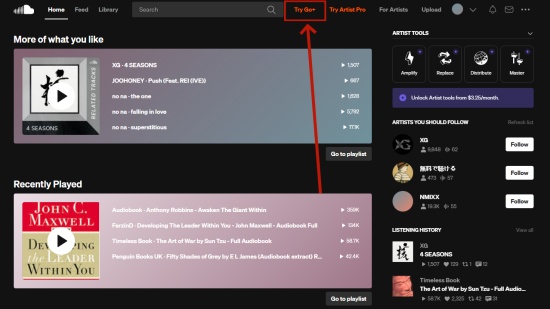
Click the Try Go+ icon at the right of the search bar.
You will enter the next window of SoundCloud subscription plans, click the Get SoundCloud Go+ for 50% off to navigate to the SoundCloud Go+ for student page.
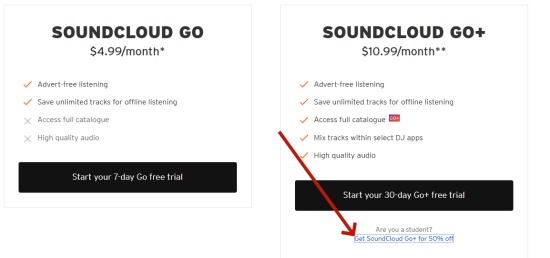
Hit the Start your 30-day free trial icon on screen.
Step 2 Verify Your Student Status
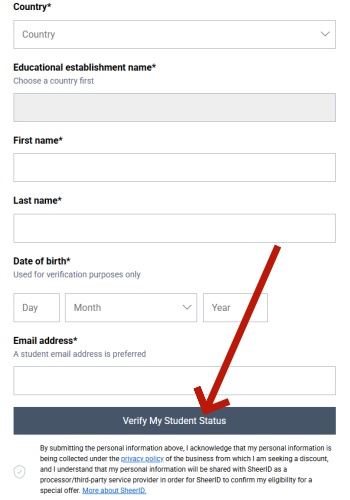
You will enter the SoundCloud Unlock this Student-Only Offer screen and are asked to paste your Country, Educational establishment name, your first and last name, birthday, and email address.
After finishing the editing of info, you can hit the Verify My Student Status button under the window.
Step 3 Choose Student Plan and Complete Payment
Once verified, you can select to subscribe to SoundCloud Go+ Student Plan and review the discount price.
Enter your payment details and confirm your subscription. Then you can access SoundCloud Go+ content with student plan.
Part 3. How to Fix SoundCloud Go+ Student Plan Not Working Issues
If you encounter the issues with SoundCloud Go+ for Student not working, you are not alone, there are many people annoyed by SoundCloud sucking services. Below are the common problems and we will show you how to fix them.
Problem 1. Student Verification Failed
If the SheerID inform your that the account is unmatched or fail to find your account, you must firstly check there isn't mistakes on the account and password you have typed. After checking, you find there isn't mistake, try to re-verifying through SheerID and make sure your school is eligible.
Or, had you used to successfully subscribe to SoundCloud Go+ for Students, but suddenly find that you are unavailable to continue to subscribe to it after 12 months end? If yes, you need to reverify your SheerID with SoundCloud. Here is how to reverify:
Step 1 Navigate to SoundCloud and click your profile icon at the top right corner.
Step 2 Choose Subscription tab on the pop-up window.
Step 3 After enter the Subscription page, click the link of Get SoundCloud Go+ for 50% off next to Are you a student.
Step 4 And then you will be redirected to SheerID to re-enter your details and upload new proof of enrollment.
Step 5 After reverifying, you can continue to subscribe to SoundCloud Go+ for Students.
Problem 2. SoundCloud Go+ for Students Not Active
Firstly, make sure you have subscribed to SoundCloud Go+ directly through the app not Apple or Google. If you subscribe to SoundCloud though third-party services, you need to end the subscription first.
On iOS
Step 1 Go to Settings on your iPhone.
Step 2 Tap Apple Name option and choose Subscription tab.
Step 3 Find the subscribed SoundCloud plan from the list and click Cancel Subscription.

On Android
Step 1 Go to Google Play Store App on your screen.
Step 2 Tap your profile icon at the top right screen.
Step 3 Choose Payments & subscription tab > Subscriptions.
Step 4 Scroll down to find SoundCloud and click it.
Step 5 Hit the Cancel Subscription option and now you have ended the SoundCloud Go+ plan.
Step 6 After canceling, you can now reenter the SoundCloud Go+ for Students page to re-subscribe to it.

Problem 3. Fail to Login with SoundCloud Go+ for Students
Unfortunately, even the SoundCloud official are fail to point out what's the reason that caused the problem. And you can consider clean up the Browser date or switch to other Browser, like Chrome or Safari. And the following we will take Chrome as example to show how to clean up the streaming cache.
Step 1 Windows and Linux users can press Ctril + Shift + Delete to quickly clean cache, while Mac users can clean browser cache with pressing Cmd + Shift + Delete.
Step 2 Alternatively, click the Menu icon at the top right window.
Step 3 Choose Delete browsing data option and then you can choose the time range that you want to remove.
Step 4 Click Delete data option, and Chrome will automatically clean up the streaming cache.
Step 5 And now, you can reenter SoundCloud to continue to log in with your student account.
Part 4. How to Listen to SoundCloud Offline Without a Go+ Student Plan
No matter you choose to subscribe to SoundCloud Go+ or SoundCloud Go+ for Students, once the subscription end, you are not available to enjoy the ad-free and SoundCloud offline listening. Do you wan to continue your SoundCloud offline library and listen it anytime and anywhere? Some third-party SoundCloud Music Converter can do that, break down SoundCloud DRM protection and make sure the downloads audio quality.
Consider to choose ViWizard as your SoundCloud offline favor. ViWizard SoundCloud Music Downloader is a professional all-in-one music converter, which support to transfer SoundCloud music to your local computer with original ID3 tags and multiple audio format: MP3, FLAC, WAV, AIFF, M4A, and M4B. Each downloads have highest sound quality that SoundCloud provides (320 kbps). Plus, the superior downloading speed, 65x, is far beyond other converter, ensuring you can obtain the downloads as quickly as possible.

Download songs, playlists, albums from SoundCloud as MP3, FLAC, WAV, AIFF, M4A, and M4B foramts with original audio quality and full metadata information.
[Video Tutorial] How to Download SoundCloud Playlists in 320kbps MP3
Part 5. FAQs about SoundCloud iPhone Download
Can I subscribe to Go+ for Students if I have already subscribed to SoundCloud Go+ ?
Rest assured, you can still subscribe to Sound Go+ for Student after you have verified your eligibility. However, you need to end your existing SoundCloud subscription before purchasing SoundCloud Go+ for Students.
Can I continue to subscribe to SoundCloud Go+ for Students after graduating?
There are 12 months available that you can still access to SoundCloud Go+ for Students from the day you first subscribed. After the period ends, you are no longer be eligible for SoundCloud Go+ for Students, and SoundCloud will automatically renew at the price of SoundCloud+ if you don't cancel the subscription.
Does the SoundCloud Go+ for Students have the same music and features as SoundCloud Go+?
Yes, the two subscription plans are offering the same services. You can get everything on SoundCloud in half cost with SoundCloud Go+ for Students.
Final Thought
The SoundCloud Go+ Student Plan is a great option for students who want ad-free listening, offline playback, and full access to premium tracks at a lower price. If you run into issues or aren't eligible, there are alternative ways to enjoy SoundCloud music offline. Give ViWizard Streaming Audio Recorder a shot!
You May Be Interested


Dave Henry loves movies and all things video. He likes checking out different video formats and trying new media players to see how they change the viewing experience.

Leave a Comment (0)