


Telegram bots are highly sought after, for unknown reasons. And SoundCloud is best known for offering unique music content, such as bootlegs, remixes, and underground tracks not found on major streaming audio services. When it comes to the SoundCloud Telegram bot, some say it is a scam, while others like its convenience. I'd say there are benefits and limits to the Telegram bot.
Telegram SoundCloud Bot acts as a mini handy tool. You search for the bot within Telegram, click start, and paste the link you copied from the SoundCloud track into the chat with the bot. The cute stuff begins processing the link and sends back an audio file. Pretty easy to operate, and that's why it is so popular.
In this article, we show you the 8 best and safest Telegram bots to download SoundCloud Music. There is also a workaround for downloading SoundCloud music to MP3 files. Let's read!

Part 1. What Is SoundCloud Telegram Bot?
A SoundCloud Telegram bot is an automated tool within the Telegram messaging app. You can search, stream, and download music directly from SoundCloud, often converting tracks into MP3 files. The bots let you easily access sets and tracks with metadata, and most importantly, you don't even need to leave the chat interface. Here are the features of bots.
Tracks Downloading: You send a SoundCloud URL and get an MP3 file for download.
In-App Search: You can find tracks directly in Telegram to receive the playable links.
Compatibility: Some bots are designed specially for SoundCloud, while others support multiple platforms, such as Bandcamp and YouTube.
Music Sharing: You can easily share music with your friends or group members within a chat.
Building Playlists: You can create a personalized playlist within a Telegram bot interface.
High-Quality Audio: Many bots offer MP3 downloads in 320 kbps or 128 kbps.
No Account Access: You don't need to sign in to third-party sites to download, and this streamlines the process.
There are some notes and risks you should learn beforehand. First, SoundCloud typically streams at 128kbps, though some bots offer high quality. And the second, just as important as the first, do not offer sensitive data, like account logins, passwords, or personal information to bots. As we all know, many bots are created by third parties. So what are the best Telegram bots? Keep reading.
Part 2. Top 8 Telegram Bots to Download SoundCloud Music
We offer you 8 of the best Telegram bots, which have different features. Choose the one you like, and use it to download SoundCloud music. After introducing each bot, we will show you a comparison table for you.
Option 1: scdlbot
Features:
- Multiple Sites Supported: You can convert SoundCloud, Bandcamp, and YouTube links into MP3 files.
- Metadata & Artwork: You download tracks with original tags and cover art.
- Playlist Support: Downloads playlists.
- File Splitting: It splits large audio files, over 50 MB, for easier access.
- Group Support: You can add this bot to Telegram groups to verify link-based messages.
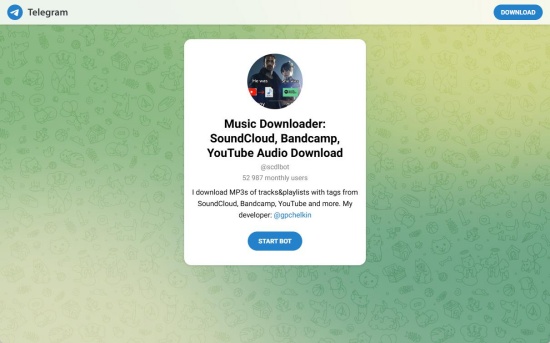
Scdlbot is an open-source Telegram bot designed to download audio files (MP3) from various streaming platforms. It is primarily used to download music and audio sets from multiple sites, including SoundCloud, complete with metadata and art.
If you choose this bot, you open the Telegram app on your phone and search for the bot, @scdlbot. Activate the bot and paste the link to a track, album, or playlist from SoundCloud. The bot processes, converts, and sends you the audio file, usually an MP3. You can click Download on the file in Telegram to keep it on your phone.
Option 2: Foxune (@FoxuneBot)
Features:
- High-Quality Extraction: You can get the best available audio format.
- SoundCloud Downloader: You can convert SoundCloud links into MP3 files for download.
- Simple Command Interface: You can use standard slash commands (/start, /download).
Foxune often appears as @FoxuneBot on Telegram. It is designed to interact with media, specifically for downloading audio files from SoundCloud and possibly other platforms.
To use it, you open the Telegram app. Type FoxuneBot in the search bar or click on the direct link if provided (make sure it is an active bot). Select Start or type "/start" in the chat to activate the bot. Then, you can paste the link you copied from the SoundCloud track into the FoxuneBot and send it out. The tiny bot soon sends you an audio file. You can download the file to your phone.
Option 3: theMasix/telegram-scdl
Features:
- Automatic Detection: Automatically process track, set, or playlist links offered in the chat.
- SoundCloud Downloader: You use it to convert SoundCloud links into MP3 files in the Telegram app for download.
- Metadata Integration: Sets title, artist, album, and artwork.
- Tech Stack: This bot is built using Node.js, Telegraf, and MongoDB.
theMasix/telegram-scdl is an open-source Telegram bot. It helps download music directly from SoundCloud. After sending the music link, you will get a high-quality audio file from the bot.
Just like the two options above, you don't need to install the code on your device. All you need to do is open Telegram and search for "theMasix/telegram-scdl". Click Start in the bot's chat and paste the track's URL you copied from SoundCloud. Let the bot process the link and send you a downloadable MP3.
Option 4: lushaimusic/tgmusicbot
Features:
- Multiple Sites Supported: You can download audio from SoundCloud, YouTube, Deezer, JioSaavn, and Mixcloud.
- Voice Chat Streaming: Plays your requested tracks in Telegram group or channel voice chats.
- In-App Search: You can search for songs via song title directly in the chat.
- Playlist Support: This bot can manage your queues and playlists.
lushaimusic/tgmusicbot features the voice chat music-playing function for Telegram groups. You can use this Telegram bot to download and stream audio from platforms like YouTube, SoundCloud, and Mixcloud directly within Telegram chats.
After ensuring the song you want to download from SoundCloud, open the Telegram app. Search for "@tgmusicbot" and activate the bot. Then you can paste the link into the chat with the bot and wait for the audio file to download.
Option 5: Cobalt.tools
Features:
- Ad-Free/No Tracking: A user-friendly and clean interface.
- Multiple Sites Supported: This bot supports YouTube, SoundCloud, TikTok, Instagram, Twitter, and more.
- High-Quality Audio and Video Downloads: The video quality is up to 8K, and it supports audio conversion.
- Customization: This bot provides options for audio format (MP3), video format (MP4), and GIF conversion.
Cobalt.tools is a free, open-source Telegram bot. It is designed to download videos and audio from various social media platforms. It can help you save diverse content, which is often powered by the main Cobalt API.
Search for Cobalt Tools Bots to add it to the Telegram. Copy the link of the SoundCloud track, playlist, or video you want. Paste the link into the chat with the bot and wait. The bot will send you an audio file for download.
Option 6: Songdl_bot
Features:
- Multiple Sites Supported: You can download music from various platforms like SoundCloud, Deezer, and YouTube.
- High-Quality Formats: The bot offers various qualities, often up to 320kbps MP3 or lossless FLAC.
- Batch Download: You can download full playlists, albums, and entire libraries from SoundCloud.
- In-App Search: The bot supports finding and downloading tracks directly within Telegram.
- Metadata Support: It automatically tags artists, titles, and album art.
Songdl_bot is an automated tool within the Telegram messaging app. It supports batch download, various platforms, and high audio quality.
Here are the steps to use this bot. Open the Telegram app, and type "Songdl_bot" in the search bar. Click Start to activate the bot. Copy the URL of the track you wish to download from the SoundCloud app or website. Paste the URL into the chat window with the bot, and then send it out. The bot begins processing. Not long after that, you receive an audio file for download.
Option 7: tgmusicbot
Features:
- Multiple Sites Supported: Downloads SoundCloud, YouTube, and Mixcloud tracks as audio files within the Telegram app.
- Direct Playback: You can play the downloaded music instantly in Telegram voice chats or saved messages.
- Metadata Processing: This bot can convert thumbnails to square formats.
tgmusicbot is an open-source Telegram bot. It can download and stream music from various platforms within Telegram. You provide it with a link to a song, and it returns you the audio file.
How can you use it? You can install and open the Telegram app. Search for a bot that uses the tgmusicbot code. Open the bot and paste the link you get from the SoundCloud track into the chat window with the bot. The bot will load the link and send back an audio file, usually in MP3 or M4A format. You can save the file to your device.
Option 8: scloud_bot
Features:
- High-Quality Extraction: You can get the best available quality, often 128kbps AAC or higher.
- Metadata Provided: This bot automatically adds metadata to the downloaded file, including artist, title, and album.
- Easy Access: The bot works within Telegram. You don't need to visit external websites or install other apps.
- Playlists Supported: You can download entire playlists.
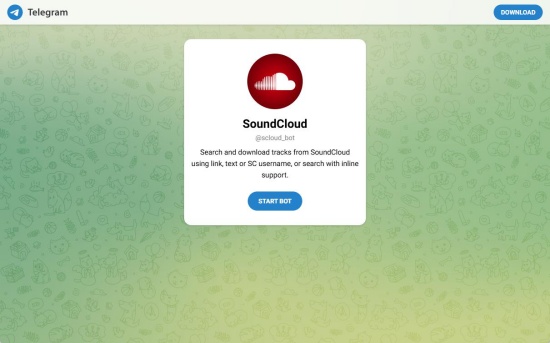
Scloud-bot is a specialized automated program designed to download music directly from SoundCloud links. You can download various SoundCloud content, including tracks, playlists, and even libraries, to MP3 within the app.
When you make sure you've copied the track link from SoundCloud, open the Telegram app on your mobile device or computer. Type scloud_bot in the search bar, and click Start to activate the bot. Paste the link into the chat with the scloud_bot and send it out. The bot processes the link and returns a downloadable audio file.
SoundCloud Telegram Bots Comparison Table
| Telegram Bot | Supported Platforms | Audio Quality | Playlists Supported | Best For |
|---|---|---|---|---|
| 1. scdlbot | SoundCloud, Bandcamp, YouTube | Up to MP3 quality with metadata | Yes | Users looking for an open-source SoundCloud downloader Telegram bot |
| 2. Foxune (@FoxuneBot) | Mainly SoundCloud | High-quality extraction | No | Beginners needing a lightweight SoundCloud download Telegram bot |
| 3. theMasix/telegram-scdl | SoundCloud | High-quality MP3 | Yes | Users who want an automated SoundCloud Telegram bot |
| 4. lushaimusic/tgmusicbot | SoundCloud, YouTube, Deezer, Mixcloud | Standard to high quality | Yes | Telegram groups and music sharing |
| 5. Cobalt.tools | SoundCloud, TikTok, Instagram, YouTube, Twitter | High-quality audio/video | Limited | Users needing multi-platform downloads |
| 6. Songdl_bot | SoundCloud, Deezer, YouTube | Up to 320kbps MP3/FLAC | Yes | Advanced users seeking a powerful SoundCloud music downloader Telegram bot |
| 7. tgmusicbot | SoundCloud, YouTube, Mixcloud | MP3/M4A formats | Limited | Streaming and playback within Telegram |
| 8. scloud_bot | SoundCloud | Up to 128kbps AAC or higher | Yes | Users wanting a simple way to download from Soundcloud Telegram bot services |
Part 3. Best Alternative to Download SoundCloud Music to MP3
If you are looking for a versatile audio recording tool beyond Telegram bots, ViWizard SoundCloud Music Downloader is a good choice. It is a handy software that supports Mac and Windows. It also supports multiple sites, including SoundCloud, YouTube Music, Amazon Music, Tidal, Spotify, and the like. You can download any content you wish, like your favorite tracks, multiple playlists, latest albums, and even podcasts.
Before you use it for conversion, you can customize the output format, and there are lots of formats to choose from: MP3, OGG, WAV, FLAC, and more. And you can adjust your sound details like sample rate and bit rate. Then, name the file according to the artist, album, year, and so on. It preserves the original audio and ID3 tags while downloading at 65x speed. This makes it easy to save and enjoy SoundCloud audio offline on any device. You can have a free trial and test it out!

Want more flexibility with your SoundCloud music? ViWizard SoundCloud Music Converter helps SoundCloud listeners convert tracks, playlists, and albums with seamless music conversion. Save your favorites and keep your SoundCloud collection accessible.
Use ViWizard to Download SoundCloud Music and Play Tracks
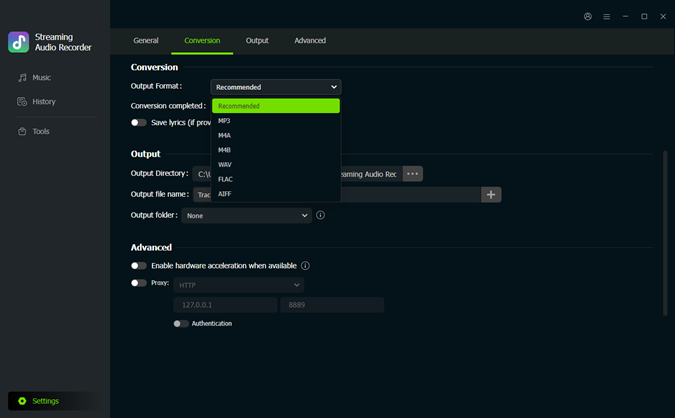 Step 1: Set Output Formats
After the installation of ViWizard, launch the application. Click the menu icon in the top right corner. Select Preferences > Conversion. Choose your favorite output formats: MP3, FLAC, WAV, etc. Adjust the audio quality, and click OK to save the settings.
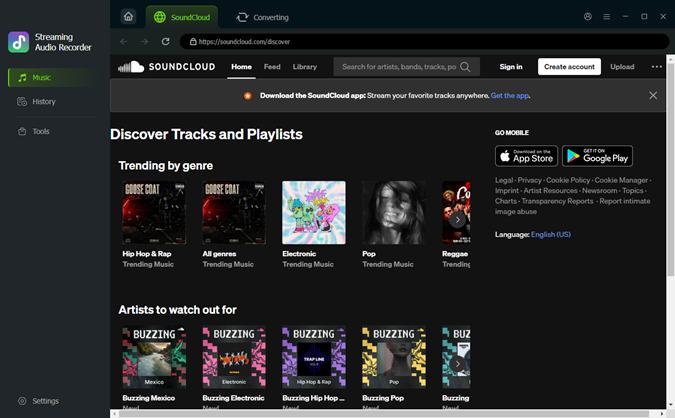 Step 2: Enter the Built-in SoundCloud Web Player
Return to the main screen. Choose SoundCloud as the source platform to convert. The built-in SoundCloud web player will appear. Sign in to it with your account. You can see your liked music, the playlist, and albums.
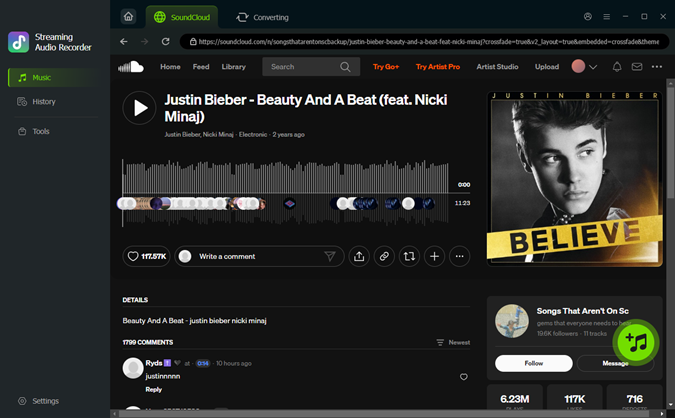 Step 3: Determine Songs or Playlists for Download
In the built-in SoundCloud web player, browse the tracks and playlists to choose the ones you want. Once you figure it out, open the music page and click the + icon (Add to list). ViWizard then scans and loads all available songs to the conversion queue.
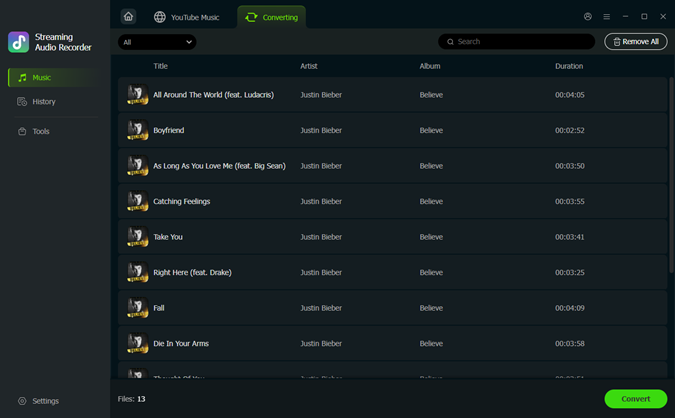 Step 4: Convert and Save SoundCloud Music on Desktop
Ensure your desired tracks are in the conversion page, and select Convert. ViWizard begins downloading SoundCloud at high speed while preserving the original audio quality. After converting, click the converted page. You can select the folder icon to locate the music files on your Windows or Mac. Enjoy the music you've saved from SoundCloud!
FAQs about Telegram SoundCloud Bots
Are Telegram music bots safe to use?
Generally safe. You can use them to download or stream music, but they carry risks regarding data privacy and potential malware. So, make sure to use reputable bots and avoid clicking suspicious links. And remember, never provide sensitive personal information.
Can I automate my SoundCloud account with Telegram?
Yeah, you can automate your SoundCloud account using Telegram. You can use automation platforms to create "recipes" or "scenarios" where SoundCloud acts as a trigger, and Telegram acts as the action.
Conclusion
All in all, SoundCloud Telegram bots are convenient for saving and sharing SoundCloud tracks directly within Telegram. Bots like scdlbot are powerful as they let you get an audio file simply by searching for it and pasting the URL. It is especially useful for casual listeners who prefer fast access. Still, every bot has drawbacks, like inconsistent audio quality and privacy concerns.
Compared with the typical SoundCloud Telegram bots, ViWizard offers more control over formats, audio quality, and file management. Just try the one you prefer, and enjoy your SoundCloud music!
You May Be Interested


Dave Henry loves movies and all things video. He likes checking out different video formats and trying new media players to see how they change the viewing experience.

Leave a Comment (0)