


Enjoy the SoundCloud experience in your car! CARPLAY FINALLY! GUYS FINALLY- from Reddit.
–from Reddit
In 2024, SoundCloud finally announced that it had supported Apple CarPlay integration. SoundCloud iOS users can directly control the playback of SoundCloud on car via Apple CarPlay with hand-free listening experience. If you're searching for Apple CarPlay SoundCloud guidance, this article will display the detailed guidance on how SoundCloud works with Apple CarPlay, and how to set it up with USB cable or wireless connection. For users who encounter playback issues on Apple CarPlay, we also provide efficient and quick solutions to fix it. Let's move on!
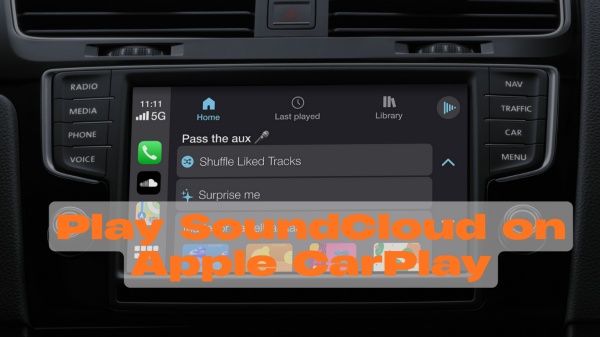
Part 1. Does SoundCloud Work on Apple CarPlay?
Yes — SoundCloud has rolled out support for Apple CarPlay in recent app versions. This means that SoundCloud playback screen can appear on your CarPlay dashboard and let you control music playback directly from the car's screen or Siris voice command.
However, this feature is only available for SoundCloud subscription tiers. If you are SoundCloud Go or Go Plus subscriber, you can stream SoundCloud music on the road with Apple CarPlay, which is also annoyed some standard SoundCloud streamers who really need the CarPlay experience as other music streaming services also provides Apple CarPlay services for free users.

Wondering how to get a SoundCloud free trial? This step-by-step guide shows you how to start a SoundCloud free trial and cancel it to avoid charges.
Part 2. How to Set Up and Play SoundCloud on Apple CarPlay
Before we start to set up SoundCloud on Apple CarPlay, you need to make sure the following things advanced:
You have a paid SoundCloud Go or Plus account, if not you need to upgrade to it to get the full CarPlay experience.
Update your SoundCloud and your iOS system to the latest version.
Make sure you have reliable WiFi connection or cellular data.
Check the Bluetooth settings both on your phone and car is active.
Connecting your phone to your car with the original USB cable is the best.
After prepare all the checks, here we will display how to smoothly play SoundCloud on Apple CarPlay in 2 ways.
Option 1. Using USB
Step 1 Start your car and active Siri on your phone by pressing the side button.
Step 2 Plug your iPhone into the USB port in your car with a reliable Apple USB cable.
Step 3 The connection prompts will appear on your car's dashboard and your iPhone screen. Tap the Allow option to agree the connection.
Step 4 Then the Apple CarPlay is set up and you can cast SoundCloud to your car's screen.
Option 2. Using Bluetooth
Step 1 Press and hold the voice command button on your car's steering wheel.

Step 2 Go to the Home screen on your car's dashboard and toggle on Bluetooth connection.
Step 3 Return to your phone, go to Settings to find and locate WiFi section.
Step 4 Choose CarPlay network and turn on Auto-join option.
Step 5 Head back to Settings on your iPhone, tap the General and locate CarPlay tab.
Step 6 Choose your car to connect and follow the on-screen instruction to finish connecting.

Once you connect, you can access your recently played, your SoundCloud library, your Uploads and the Surprise Me features on your Car's screen.
How to Use Siri to Play SoundCloud on Apple CarPlay
Apple CarPlay directly supports you to play SoundCloud on road with Siris voice commands, which makes hands free SoundCloud listening experience. The following we will show how to activate Siri on CarPlay and provides several simple commands.
Step 1 Press and hold the voice command button on your car's steering wheel.
Step 2 Touch and hold the icon at the top right corner at car's touchscreen to display CarPlay interface.
Step 3 You can say Hey Siri to activate Siri in your car. Then you can ask Siri to play SoundCloud.
- Hey Siri, play [song's name] on SoundCloud.
- Hey Siri, pause.
- Hey Siri, skip this song.
Part 3. How to Fix SoundCloud Apple CarPlay Not Working
Is anyone else experiencing a problem on when using SoundCloud on CarPlay whenever a your playing a playlist and it auto plays the next song it instantly restarts about 1 second in?? It's annoying me so much and idk how or why it's happening or how to fix it I've contacted support already but got no reply. - from reddit
If you suffer the same issues of can't playing SoundCloud on your car with Apple CarPlay, you can follow the solutions listed on this section to solve the SoundCloud playback issue quickly.
-

Solution 1. Make Sure SoundCloud and Your Devices Are Up to Date
The outdated SoundCloud app is one of the most common reasons SoundCloud does not work correctly with Apple CarPlay. You need to update the SoundCloud app to the latest version from the App Store and update your iPhone to the latest iOS version.
-
Solution 2. Check Internet Connection
Streaming SoundCloud smoothly needs an active internet connection, if necessary, you can switch to another stable cellular data or WiFi connection on your phone. Or try to download SoundCloud for offline playback with ViWizard SoundCloud Music Downloader to avoid interruption.
-
Solution 3. Restart SoundCloud/Your iPhone/Your Car
If SoundCloud appears in CarPlay but does not respond or stops playing, it may be caused by the temporary glitches, reboot all the devices can quickly fix the issue. Force-stop and completely close SoundCloud app, restart your iPhone by pressing the power button and turn off the car ignition completely. Wait for while to reopen SoundCloud and reconnect to CarPlay.
-
Solution 4. Uninstall and Reinstall the SoundCloud App
If none of the above steps work, uninstall SoundCloud and reinstall it from App Store is a workaround method to remove all bugs and glitches when you fail to play SoundCloud on CarPlay. Press the SoundCloud icon on your iPhone's screen to confirm to delete it, and then to App Store to install it again and log in back with your SoundCloud Go or Plus account.
-
Solution 5. Re-login to Your SoundCloud Account
Sometimes SoundCloud may not work properly on Apple CarPlay due to temporary session or connection errors. To fix this, log out of your SoundCloud account on both the mobile app and the web player. Fully close the SoundCloud app and your browser, then restart your iPhone and your car's infotainment system. After restarting, log back into SoundCloud, reconnect Apple CarPlay, and play a song or playlist again. In most cases, SoundCloud should now work normally on Apple CarPlay.
Pro Tip: Improve Your Apple CarPlay SoundCloud Listening Experience
Although playing SoundCloud on your car with Apple CarPlay is convenient, the unstable WiFi connection will influence the SoundCloud playback quality on the road. You may encounter SoundCloud buffering, keeping stopping or freezing. And once your SoundCloud subscription expires, you are unable to get the full CarPlay experience with SoundCloud until the subscription active again. Do you want to improve your SoundCloud listening experience when you using CarPlay? Consider to download SoundCloud tracks and listening SoundCloud offline when you driving.
ViWizard SoundCloud Music Downloader is a designed for download SoundCloud tracks with the original audio quality (up to SoundCloud HQ streaming 256 kbps). Despite the normal MP3 format, ViWizard also provide other high resolution audio formats: FLAC, WAV, AIFF, M4A, and M4B. Once saved your SoundCloud preferred playlist with ViWizard, you can export them to USB Drive or your iPhone without DRM limits.

Download songs, playlists, albums, and your music libraries from SoundCloud, Spotify, Apple Music, Tidal, Deezer, Qobuz, Amazon Music, Pandroa, and Line Music as MP3, FLAC, WAV, AIFF, M4A, and M4B foramts with original audio quality and full metadata information.
Step 1 Launch ViWizard and Set MP3 Format
Open ViWizard SoundCloud Music Downloader on your computer. Click Menu option at the top right screen. Navigate to Conversion > Output Format to select MP3, and choose your preferred audio quality (64–256 kbps). Click OK to save the settings.

Step 2 Log in to SoundCloud
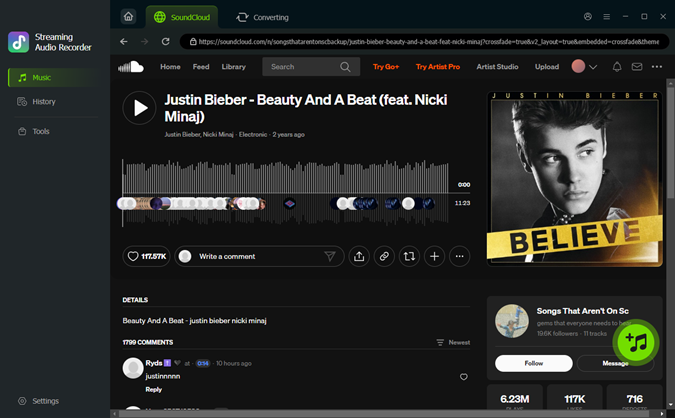
Click the SoundCloud icon in ViWizard and log in to your SoundCloud account. The built-in SoundCloud web player will load your tracks, playlists, and favorites securely inside ViWizard. And ViWizard is make sure your account safety and privacy.

Step 3 Add SoundCloud Music
Browse SoundCloud to find the songs or playlists you want to download. Or you can type the URL of the song you want to download in the search bar. Click Add to List to queue the tracks for downloading.
Step 4 Access and Enjoy Your Downloads
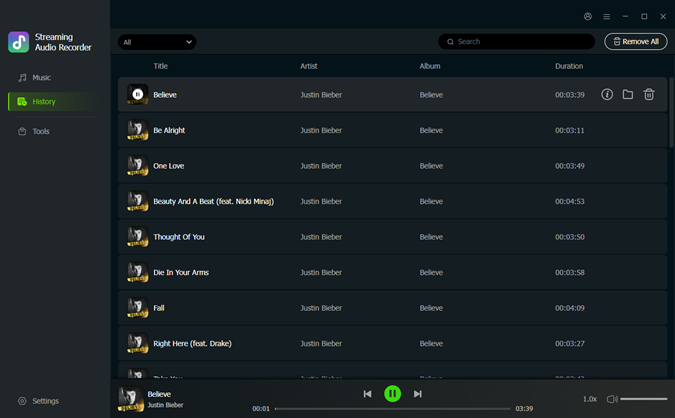
Click Convert to start recording and converting the selected SoundCloud tracks to MP3 files. Once finished, you can open the History tab to confirm your downloads.
Step 5 Transfer SoundCloud Music to iPhone
And then you can locate the SoundCloud downloads in your designated folder on your computer. Connect your iPhone to the computer using an Apple USB cable. The following is the steps on Windows and Mac to transfer your SoundCloud downloads to iPhone.
- For Windows: Open iTunes on your Windows, choose the File tab and click Add Files to Library. And then you can select SoundCloud downloads to add. Choose your iPhone device and go to Music folder on your device settings. Click Sync button and it will automatically transfer the SoundCloud downloads to your iPhone.
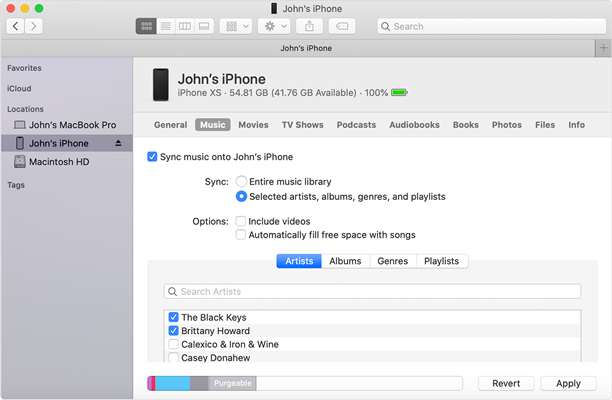
- For Mac: Open Finder on your Mac, and find your iPhone device in the sidebar. Choose Music section and select the SoundCloud downloads you want to transfer. And then hit the Apply icon to start syncing SoundCloud from your Mac to iPhone.

Conclusion
Apple CarPlay SoundCloud integration makes it possible to enjoy SoundCloud music directly from your car's dashboard. By following the setup steps above and keeping your apps updated, you can achieve reliable playback and control through CarPlay. If you want to get a enhanced SoundCloud car listening experience, just download your playlist from SoundCloud with ViWizard SoundCloud Music Downloader!
You May Be Interested







Dave Henry, a multimedia technologist at ViWizard, focuses on delivering the best solutions for digital media challenges, including audio and video conversion, media optimization, and troubleshooting.

Leave a Comment (0)