


Music streaming is part of daily life, but subscription costs are harder to ignore. In the United States, Spotify Premium costs around $12.99 per month for the Individual plan, which adds up over time.
In online communities, people often mention mod apps. These are modified versions of Spotify that use coding tweaks to unlock limited Premium-like features, mainly to try the experience before subscribing.
One common example is EeveeSpotify. It is an unofficial modified Spotify app for iPhone and iPad, usually installed through sideloading with an IPA file instead of the App Store. It may offer fewer ads and unlimited skips, which is why some users try it.
The downside is that it comes with trade-offs like stability issues, safety concerns, and account risks. In this guide, we will go over what it is, how it works, what it can do, common issues, and safer alternatives.

Need Spotify music for offline listening? ViWizard Spotify Music Converter helps Spotify Premium and free users save songs, playlists, albums, podcasts, and audiobooks in popular audio formats with fast, reliable conversion. Start converting and enjoy Spotify music across more devices.
Part 1. What Is EeveeSpotify for Spotify?
If you're trying to understand EeveeSpotify, think of it as a modified version of the Spotify iOS app that changes how the app behaves, without changing how it looks.
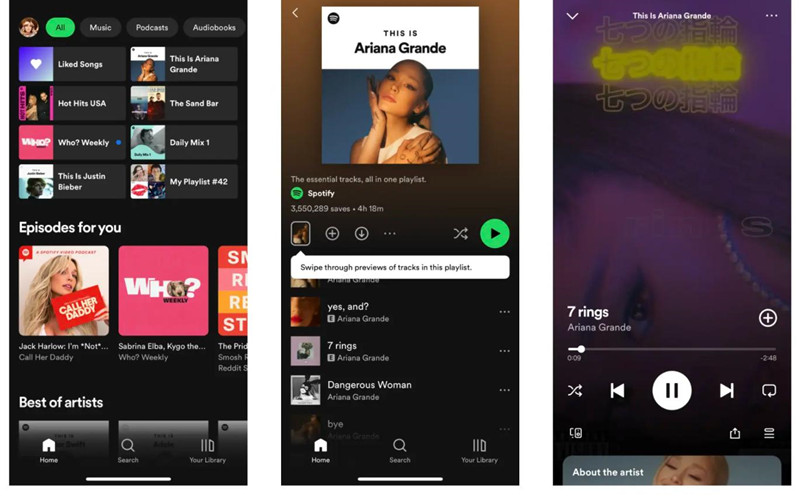
You still use the same Spotify interface, with the same library, search, and navigation. The difference is under the surface. EeveeSpotify applies patches inside the app that adjust how it checks subscription status and feature limits. This makes the app act as if Premium features are available, even without an active subscription. It does not replace Spotify, it only modifies specific internal rules.
Part 2. What Can EeveeSpotify Do? (EeveeSpotify Features)
From a user point of view, EeveeSpotify makes Spotify feel closer to Premium while keeping the same design and experience. It is used mainly to reduce common free-tier limits without switching apps or interfaces.
It works as a rule layer inside Spotify. Instead of changing the app itself, it changes how restrictions are applied during use. Playback feels less limited, but the core Spotify interface stays the same. Because it depends on how Spotify's internal system behaves, its features can also vary after updates, which affects stability over time.
-

Modify Spotify Playback Rules
EeveeSpotify works by changing how the Spotify app reads account and playback permissions inside the official app. It does not replace Spotify. Instead, it adjusts internal checks so the app behaves as if Premium features are active, while the interface stays the same.
-
Remove Ad Interruptions
Spotify normally inserts ads when its servers send specific playback signals. EeveeSpotify works by blocking or skipping those signals before they reach the player. This stops the app from switching into ad playback, so music continues without breaks.
-
Enable On-Demand Playback
Free Spotify often limits direct song selection and pushes shuffle mode on mobile. EeveeSpotify changes how playback permissions are checked inside the app. When the app thinks full access is allowed, users can tap and play any track directly.
-
Lift Skip Limits
Skip limits are controlled by session rules that track how many skips are allowed. EeveeSpotify changes how those rules are applied in the app. This makes the player behave as if skip limits are not active, so users can skip more freely.
-
Improve Lyrics Display
Some versions adjust how lyrics are fetched and shown inside the app. Instead of relying only on Spotify's default system, the app may pull from wider sources. This can make lyrics appear more often and feel more complete.
-
Depend on Spotify Updates
All of these changes depend on how Spotify structures its internal app logic. When Spotify updates its system, the way permissions and playback rules work can change. If that happens, EeveeSpotify may stop working correctly or lose some features until it matches the new structure again.
Part 3. How to Install EeveeSpotify on iPhone and iPad
If you're trying to install EeveeSpotify, you will not find it on the App Store. To install EeveeSpotify on an iOS device, you must sideload the modified IPA file using tools like Sideloadly or AltStore. You will need a PC for the initial setup, a USB cable, and an Apple ID.
Method 1. Install EeveeSpotify with AltStore
AltStore is a sideloading tool that installs apps like EeveeSpotify on iPhone or iPad using your Apple ID without jailbreaking. It runs through a computer setup and signs the app for installation. You need to refresh it occasionally to keep it working.
Step 1Install AltStore on Your Computer
01Download and install AltServer on your Windows PC or Mac from the official AltStore website.
02Open AltServer from the menu bar on Mac or system tray on Windows.
03If AltServer cannot detect your iPhone or iPad on Windows, install Apple versions of iTunes and iCloud because Microsoft Store versions may cause connection issues.
04Connect your iPhone or iPad to the computer with a USB cable, unlock it, and tap Trust This Computer if prompted.
Step 2Install AltStore on Your iPhone or iPad
01Open AltServer on your computer and choose Install AltStore.
02Select your connected iPhone or iPad and enter your Apple ID when prompted.
03Wait for AltStore to appear on your Home Screen.
04Go to Settings > General > VPN & Device Management, tap the Apple ID profile, and choose Trust.
Step 3Enable Developer Mode
01Open Settings on your iPhone or iPad and go to Privacy & Security > Developer Mode.
02Turn it on and restart your device if required.
03Confirm activation after restart.
Step 4Install EeveeSpotify IPA with AltStore
01Download the EeveeSpotify IPA file from a trusted release source.
02Open AltStore, go to My Apps, and tap the + button.
03Select the IPA file and wait for installation to complete.
04Keep AltStore open until finished.
Step 5Open and Refresh EeveeSpotify
01Open EeveeSpotify and sign in with your Spotify account.
02If features do not load properly, close and reopen the app once.
03Keep AltServer installed and occasionally connect your device on the same Wi Fi network to refresh before the 7 day limit.
Method 2. Install EeveeSpotify with Sideloadly
Sideloadly is a desktop tool for Windows and Mac that installs IPA files to iPhone or iPad. It uses your Apple ID to sign the app during installation. You need to reinstall or refresh it from time to time to keep it active.
Step 1Install Sideloadly on Your Computer
01Download and install Sideloadly on Windows PC or Mac.
02Open the program after installation.
03Connect your iPhone or iPad via USB, unlock it, and tap Trust This Computer if prompted.
Step 2Load EeveeSpotify IPA into Sideloadly
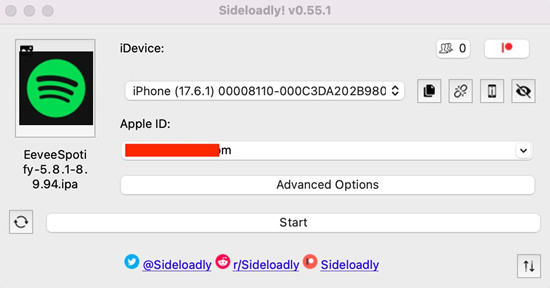
01Download the EeveeSpotify IPA file from a trusted source.
02Confirm your device appears in Sideloadly.
03Drag and drop the IPA file or browse to select it.
Step 3Install EeveeSpotify
01Enter your Apple ID when prompted.
02Click Start and wait for installation to finish.
03Keep the device connected during installation.
04Go to Settings > General > VPN & Device Management and trust the developer profile.
Step 4Enable Developer Mode
01Open Settings > Privacy & Security > Developer Mode.
02Turn it on and restart if required.
03Confirm activation after restart.
Step 5Open and Refresh EeveeSpotify
01Open EeveeSpotify and sign in with your Spotify account.
02Reopen the app if features do not load correctly.
03Reinstall or refresh via Sideloadly when needed, since apps expire after 7 days.
Part 4. Is EeveeSpotify Safe and Legal to Use?
If you're considering EeveeSpotify, it's important to understand that it is not an official Spotify product.
It modifies how the Spotify app works and bypasses subscription rules, which goes against Spotify's terms of service. On top of that, installing apps outside the App Store can introduce risks such as revoked installs or unstable versions over time.
In real use, this means the experience can work, but it does not carry the same reliability or support as official apps. It's similar to using a tool outside its intended environment, where functionality may come and go depending on updates and conditions.
Part 5. Common EeveeSpotify Problems and Fixes
If you use EeveeSpotify for a while, you will likely run into stability issues. Since it is not official, there is no long-term support or guarantee. It often works in short cycles, but it is not always consistent over time.
-

Spotify update issues:
The most common problem is EeveeSpotify stopping after a Spotify update. It depends on internal Spotify components, which often change, so features may break until it is updated or reinstalled.
-
Works then stops behavior:
Some users report it works at first, then stops after an update. It may work again after a new version, since it depends on Spotify's internal system staying consistent.
-
DMCA and availability changes:
The original EeveeSpotify repository was removed after a DMCA takedown, which affected distribution. Since it relies on IPA packages for iOS sideloading, different builds may appear over time and availability is inconsistent.
-
EeveeReborn and version differences:
After the takedown, community versions like EeveeReborn appeared, but they are not identical and may differ in features, stability, or bugs depending on the build.
-
Device and version compatibility:
EeveeSpotify may work on some iOS or Spotify versions but not others, leading to missing features or unstable behavior depending on the setup.
Part 6. Best Alternative Way to Download Spotify Music Without Premium
If EeveeSpotify feels unstable, many users look for a more consistent way to save music offline. This is where Spotify music download tools like ViWizard Spotify Music Converter come in. Instead of changing the Spotify app, they focus on saving tracks directly through a simpler workflow.
ViWizard Spotify Music Converter is desktop software that converts and downloads Spotify music, podcasts, and eligible audiobooks into local audio files. It works for both Premium and free users.
Users need to install the software on a Windows or Mac device, connect to their music library, and select tracks to convert them into supported formats such as MP3, M4A, M4B, WAV, AIFF, or FLAC, depending on preference. Once converted, the files can be kept locally without relying on the official app or subscription. Just note that the downloaded music is intended for personal use only, not commercial use.
Key Features of ViWizard Spotify Music Converter
Free Trial Free Trial* Security verified. 5, 481,347 people have downloaded it.
- Convert Spotify songs, playlists, albums, podcasts, and audiobooks
- Export Spotify music in 6 formats for different devices and players
- Support Spotify Premium and free accounts for music conversion
- Preserve music metadata when organizing converted collections
- Batch download Spotify playlists and large music libraries
 Step 1: Install and open the Spotify music converter
Start by installing ViWizard Spotify Music Converter on your Windows or Mac computer. After opening it, sign in with your Spotify account inside the built-in Spotify interface. It works with both free and Premium accounts, so you can access your library directly without switching apps.
 Step 2: Select songs or playlists to download
Use the built-in search bar to find tracks, albums, or playlists, or paste a Spotify link directly into the program. Once loaded, add the items you want to convert. You can choose single songs or full playlists depending on how much music you want to save.
 Step 3: Set MP3 as the output format
Go to the preferences menu and choose MP3 as the output format. You can also adjust audio quality and file organization options. Many users sort files by artist or album to keep their downloaded music easier to manage later.
Step 4: Convert and save music locally
Click the Convert button to start the process. The tool processes the selected Spotify tracks and saves them as standard audio files on your computer. When finished, you can open the output folder and access your downloaded music offline.
Part 7. Conclusion
EeveeSpotify reduces Spotify free limits by changing how the app applies playback rules. It keeps the same interface but adjusts internal behavior so listening feels less restricted. It is not stable long term because Spotify updates can break its features.
For a more stable option, some users turn to desktop tools like ViWizard Spotify Music Converter. Instead of modifying Spotify, it converts songs into standard audio files on a computer for offline use in formats like MP3.
Overall, EeveeSpotify changes playback inside the app, while ViWizard creates a local music library. The choice depends on whether users want an in-app modified experience or permanent offline files.
You May Be Interested


Adam Gorden, the digital media specialist at ViWizard, is dedicated to providing the best solutions for digital media management, including audio and video conversion, file optimization, and media workflow enhancements.

Leave a Comment (0)