


In recent years, Star Wars has returned to the spotlight through new films, streaming series, and major releases. Popular shows like The Mandalorian, Andor, and Ahsoka have brought renewed attention to the franchise and its iconic music, attracting fans around the world once again.
Since the original 1977 film, Star Wars has grown into one of the most influential space opera franchises in pop culture. Centered on the Skywalker saga, the series is known not only for its characters and stories, but also for its powerful and memorable music.
Composed mainly by John Williams, the Star Wars soundtracks are among the most recognizable film scores ever created. In this post, we will show how to build a complete Star Wars themed music collection, including essential soundtracks and ways to save music for personal offline listening and backup. Scroll down to explore playlists and find selected free MP3 tracks to download.

Need Spotify music for offline listening? ViWizard Spotify Music Converter helps Spotify Premium and free users save songs, playlists, albums, podcasts, and audiobooks in popular audio formats with fast, reliable conversion. Start converting and enjoy Spotify music across more devices.
Part 1. Where to Find Official Star Wars Soundtracks Worldwide
Star Wars music is available on many platforms, though not every release shows up everywhere at the same time. Before collecting, it helps to know where the soundtracks are officially released so you can build a solid library.
Spotify: Official scores from A New Hope, The Empire Strikes Back, Return of the Jedi, and newer releases like The Force Awakens are all available. You'll also find curated playlists, from character themes to "Best of Star Wars" collections. Searching for "Star Wars Complete" or "Star Wars Best of" can save time and give you long playlists ready to play.
Disney Music: Beginner-friendly playlists like Star Wars Complete or character-based collections highlight major themes and motifs. They are a great starting point for exploring the music without getting lost in dozens of albums.
Apple Music: Disney-curated playlists such as Star Wars Complete gather dozens of tracks across the saga. You can also browse individual soundtrack albums, themed collections, or mood-based playlists, making it easy to start a ready-to-go collection.
YouTube / YouTube Music: Official uploads from Disney or Lucasfilm include full OSTs, trailers, and compilations. Live recordings and fan mixes are also available, though not all are official. This is often the only option for unusual or older tracks.
Amazon Music or iTunes: Buying official OSTs in MP3, AAC, or FLAC preserves high-quality audio for detailed listening. Some game soundtracks, like Star Wars Jedi: Fallen Order, are also available. Physical editions, such as vinyl box sets or collector editions, include expanded soundtracks, artwork, and liner notes, making your collection feel more complete.
Part 2. How to Collect Star Wars Music on Popular Streaming Platforms
After locating the music, the next step is organizing it on streaming platforms. Most apps offer tools to save albums, follow soundtracks, and manage themed playlists. Understanding how these features work makes it easier to keep Star Wars music organized across different devices.
1. Sign in to your Spotify account
Open Spotify on desktop or mobile and sign in. If you do not have an account, create one to save full albums or playlists. Free accounts allow listening, but you cannot save albums for offline use. A paid account gives full access and lets you download tracks.
2. Search for official Star Wars soundtracks
Use the search bar and type the exact soundtrack, such as Star Wars: A New Hope (Original Motion Picture Soundtrack). Select the album listed as official under Star Wars or John Williams. Avoid fan compilations if you want complete tracks. If there are multiple editions like Original, Expanded, or Remastered, check the track list. Expanded editions often include extra tracks or orchestral cues worth keeping.
3. Save albums to Your Library
Open the album page and click the heart icon or Save to Library button. The full soundtrack will appear under Your Library > Albums. Saving one album at a time helps avoid accidentally adding the wrong edition or fan-made versions.
4. Create a Star Wars playlist for favorites
After saving albums, curate a playlist. Click Create Playlist in Your Library and name it something like Star Wars Best Of. Add favorite tracks from the saved albums, such as The Imperial March, Duel of the Fates, Binary Sunset, or Rey's Theme. You can also make separate playlists for main themes and lesser-known tracks to explore later.
5. Follow official Star Wars playlists
Spotify hosts official Star Wars playlists that update over time. Search for titles like Star Wars Complete or themed collections such as Hero Themes or Villain Themes. Click Follow to add them to Your Library.
6. Download playlists and albums for offline listening
To enjoy Star Wars music without internet, download saved albums and playlists. Open the album or playlist and toggle the Download switch. Green arrows will appear next to downloaded tracks. This makes your collection ready to play anytime, whether traveling or saving mobile data.
7. Check for alternate editions and bonus tracks
Albums sometimes have expanded or remastered editions on Spotify. Check the album page or the More Albums section on the artist profile. Expanded editions often include extra tracks, alternate cues, or orchestral pieces not in the standard release. Saving these helps keep your collection complete.
8. Organize your Spotify library
Finally, organize your library. Sort playlists by theme, such as Heroes, Villains, or Emotional, or by era like Original, Prequel, or Sequel. Drag tracks to arrange them in your preferred order. You can create a Favorites playlist for iconic themes and a Deep Cuts playlist for rarer tracks, making the collection easy to navigate and enjoy.
Part 3. Essential Star Wars Soundtracks Every Fan Should Collect
With many films and series released over the years, choosing what to collect can feel overwhelming. Some soundtracks are widely seen as the foundation of the Star Wars music catalog.
No 1. Star Wars: A New Hope (Original Motion Picture Soundtrack)
Released on May 25, 1977, Star Wars: A New Hope is where it all began musically. Composed and conducted entirely by John Williams, this soundtrack introduced the instantly recognizable Main Title and the emotional Binary Sunset theme. With 16 tracks, it set the heroic, fairy-tale tone that would define the entire saga. For many fans, this album is Star Wars.
No 2. Star Wars: The Empire Strikes Back (Original Motion Picture Soundtrack)
Released on May 21, 1980, The Empire Strikes Back expanded the Star Wars musical universe in a darker, more dramatic direction. John Williams introduces The Imperial March here, one of the most famous villain themes in film history. Across its 17 tracks, the album balances menace, mystery, and quiet character moments, making it a favorite among longtime fans.
No 3. Star Wars: Return of the Jedi (Original Motion Picture Soundtrack)
Arriving on May 25, 1983, Return of the Jedi brings the original trilogy to a celebratory close. Composed by John Williams, this soundtrack blends emotional resolution with lighter, adventurous themes. With 15 tracks, it features music tied closely to Luke and Leia, the final confrontation, and the victory celebrations that many fans associate with the saga's hopeful ending.
No 4. Star Wars: The Phantom Menace (Original Motion Picture Soundtrack)
For fans of the prequel trilogy, The Phantom Menace offers a sonic tapestry of adventure and intrigue. Released on May 4, 1999, this album contains 17 tracks composed and conducted by John Williams. It famously introduced Duel of the Fates, a choral piece that instantly became one of the most talked-about Star Wars themes and signaled a bold new musical chapter for the saga.
No 5. Star Wars: Attack of the Clones (Original Motion Picture Soundtrack)
Released on April 23, 2002, Attack of the Clones continues John Williams' work on the prequel trilogy with a more romantic and dramatic tone. The album features 14 tracks, highlighted by Across the Stars, a love theme that many fans consider one of Williams' most emotional Star Wars compositions. It perfectly reflects the growing tension and complexity of the story.
No 6. Star Wars: Revenge of the Sith (Original Motion Picture Soundtrack)
Released on May 3, 2005, Revenge of the Sith delivers one of the most intense Star Wars listening experiences. With 15 tracks composed by John Williams, this album captures the fall of Anakin Skywalker and the rise of Darth Vader. Recognized as one of Amazon's Top Editor's Picks of 2005, it is often praised for its emotional weight and dramatic payoff.
No 7. Star Wars: The Force Awakens (Original Motion Picture Soundtrack)
Released on December 18, 2015, The Force Awakens marked John Williams' return to Star Wars for a new generation. Featuring 23 tracks and conducted by Williams and William Ross, the album introduces fresh themes such as Rey's Theme and March of the Resistance, while still echoing familiar motifs from the original trilogy. It sold over 200,000 copies in the US within months of release, reflecting strong fan interest.
No 8. Star Wars: The Last Jedi (Original Motion Picture Soundtrack)
Released on December 15, 2017, The Last Jedi leans heavily into emotional storytelling through music. John Williams uses callbacks to earlier themes while developing new material that reflects conflict, loss, and legacy. With 20 tracks, this album is often appreciated by fans who enjoy quieter, more reflective Star Wars scores alongside the epic moments.
No 9. Star Wars: The Rise of Skywalker (Original Motion Picture Soundtrack)
Released on December 20, 2019, The Rise of Skywalker serves as John Williams' final Star Wars film score. Spanning 26 tracks, the album weaves together themes from across all three trilogies, making it especially meaningful for longtime fans. It feels like a musical farewell, packed with familiar motifs and emotional closure.
No 10. Rogue One: A Star Wars Story (Original Motion Picture Soundtrack)
Released on December 16, 2016, Rogue One features music composed by Michael Giacchino, stepping in for John Williams while staying true to the Star Wars sound. With 21 tracks, the album blends classic motifs with new material that emphasizes sacrifice, tension, and rebellion. Many fans appreciate it as one of the strongest non-Williams Star Wars scores.
No 11. Solo: A Star Wars Story (Original Motion Picture Soundtrack)
Released on May 25, 2018, Solo: A Star Wars Story offers a lighter, more playful take on Star Wars music. Composed by John Williams and John Powell, this soundtrack includes 20 tracks and introduces a new theme for Han Solo while keeping the adventurous spirit alive. It's a fun addition for fans who enjoy a more energetic, space-western feel.
Part 4. How to Download Star Wars Music for a Personal Offline Collection (MP3, WAV, FLAC)
Streaming is great for everyday listening, but it doesn't always meet offline or long-term needs. If you want a personal Star Wars music collection you can play anytime, tools like ViWizard make it simple.
For users who collect music from multiple streaming platforms, ViWizard Streaming Audio Recorder works with ten popular services, including Spotify, Apple Music, Amazon Music, SoundCloud, and YouTube Music. If you mainly use Spotify, the ViWizard Spotify Music Converter is a convenient option. Both save songs in MP3, M4A, M4B, WAV, FLAC, or AIFF. Most streaming services use digital rights management, but ViWizard lets you create personal copies while ensuring no loss in fidelity and metadata.

A versatile all-in-one streaming music recorder to extract songs, albums, playlists, and exclusive content from Spotify, Apple Music, Amazon Music, Tidal, Deezer, Pandora, SoundCloud, Qobuz and LINE MUSIC into popular formats like MP3 — with support for original sound quality, fast batch conversion, and built-in music management to help you save, organize, and enjoy your favorite tracks anytime, anywhere.
How to use ViWizard Streaming Audio Recorder
Step 1 Open ViWizard Streaming Audio Recorder, click the menu icon, and go to Preferences. Choose an output format (MP3, FLAC, WAV, M4A, M4B, or AIFF), adjust quality settings, and select a folder for downloads. Click OK.

Step 2 Choose your music service and log in through the built-in player to access albums, playlists, and tracks.

Step 3 Search by song, album, playlist, or link. Open the selection to view all tracks.
Step 4 Click Add Music ("+") to add tracks to the conversion list. Review the list and confirm by clicking Add to List.
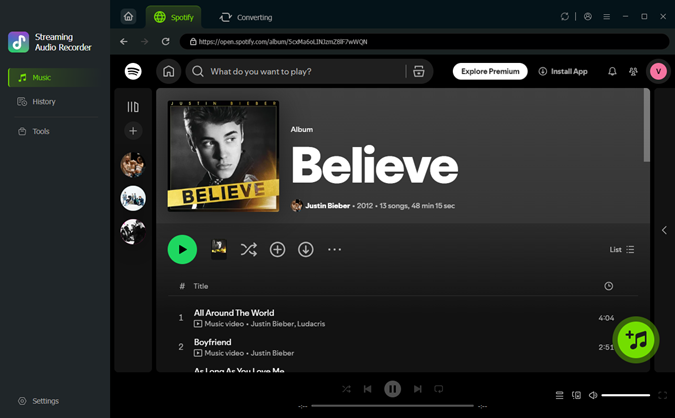
Step 5 Click Convert and play the tracks in the built-in player. ViWizard records them in real time, splits tracks automatically, and preserves tags like title, artist, album, and cover art.

Step 6 When finished, open the output folder. Your Star Wars songs are saved in the chosen format and ready for offline listening or transfer to any device.
Extra Tip: How to Get a Star Wars Lightsaber on Spotify Now Playing
Spotify offers a Star Wars themed lightsaber effect while certain tracks are playing. And the best part? It's super easy to activate with just a simple code!
Step 1 Open your Spotify desktop client or web player and head to the Search section.
Step 2 In the search bar, type "THX1138" and hit enter.

Step 3 Keep your eyes on the progress bar as it magically transforms into a lightsaber!
Step 4 Once you've marveled at the lightsaber effect, look for the Complete Star Wars Soundtrack album and select your favorite Star Wars album or playlist to start playing.
Step 5 As the music starts playing, watch as the progress bar once again transforms into a lightsaber, ready for action!

Step 6 Click on the hilt of the lightsaber.
Step 7 Switch between different lightsaber models and colors to customize your saber to your heart's content. Remember, the lightsaber effect will stick around until you restart Spotify.
You May Be Interested


Adam Gorden is always looking for new ways to explore music and videos. He likes trying different media tools and learning how to manage audio and video files with ease.

Leave a Comment (0)