


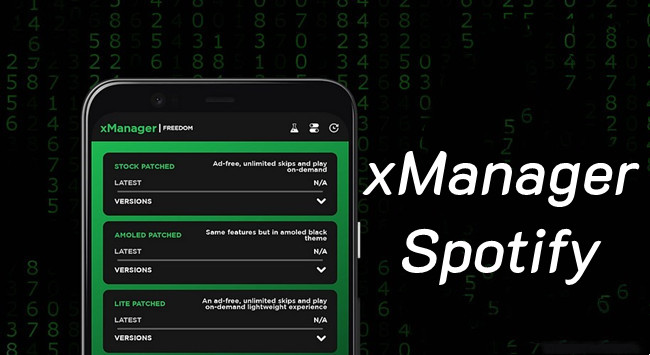
Have you ever wanted to listen to Spotify without Premium but found that some features are locked behind a subscription? Since Spotify Free does not officially include an ad-free experience, unlimited skips, or offline downloads, some users look for Spotify mods, which are modified versions of the official app that offer options beyond the standard version.
However, finding and managing these mods is not always easy. Many modified APK files come from unofficial sources, so users often have to search for compatible versions, install them manually, and keep track of updates.
As a popular Android tool, xManager allows users to browse, manage, and install different versions of modified Spotify APKs in one place, making the process more convenient. This guide will explain what xManager is, how it works with Spotify mods, its key features, and whether it is worth using.
Part 1. What Is xManager?

- Developer:
- xC3FFF0E and the xManager community
- Platform:
- Android 5.0 or later
- Available on:
- Official xManager website and GitHub
- Latest Version:
- xManager v5.9 (version updates may vary)
- File Format:
- APK
- License:
- Free and open-source
- Main Purpose:
- Manage, download, and switch between different Spotify APK versions
xManager is an open-source Android application designed to manage and install different versions of modified Spotify APKs. Developed by Team-xManager and published through GitHub, it works as an APK manager rather than a music streaming service or a replacement for Spotify.
Users still need a Spotify account to access Spotify services, and available features depend on the specific version installed. xManager is mainly built for Android devices and does not offer native apps for Windows, macOS, or iOS, although it may run through Android emulators in some environments.
What's the Difference Between xManager and Xshell?
xManager and Xshell are both related to Spotify modifications, but they work differently. xManager is an installer that helps users manage multiple Spotify versions and switch between builds easily, while Xshell is a command-line script that modifies an existing Spotify installation. Users who want simple version management may prefer xManager, while those comfortable with manual scripts and modifications may choose Xshell.
Part 2. Key Features of xManager
xManager is more than a place to find Spotify mod versions. It provides a centralized way to browse, install, update, and manage different Spotify builds without manually searching for APK files.
- APK Management: Handles Spotify APK browsing, downloading, installation, and management in one place.
- Multiple Version Support: Lets users choose builds based on compatibility, features, or performance needs.
- Easy Installation and Updates: Simplifies installing new versions and keeping existing builds updated.
- App Management Tools: Includes options to launch apps, access settings, uninstall versions, and clear cache.
- Open-Source Transparency: Provides public access to project code and updates through GitHub.
- Ad-Free Listening: Removes many ads during playback.
- Unlimited Skips: Removes free-plan skipping limits.
- Direct Playback: Allows users to play specific songs instead of shuffle-only mode.
- Background Playback: Keeps music playing when the app runs in the background.
- Extra Playback Controls: Provides more options for managing playback.
- Improved Audio Options: May offer additional quality settings depending on the build.
- Premium-Like Features: Adds some Spotify Premium-style functions through modified versions.
Part 3. What Does xManager for Spotify Do?
xManager is not an official Spotify app and is not affiliated with Spotify. It is not a music streaming platform and does not provide access to Spotify's music library. Instead, it works as an Android APK management tool that helps users find, install, and manage different Spotify builds.
Unlike the official Spotify app, many modified builds aim to provide Premium-like features without a paid plan, such as ad-free listening, unlimited skips, and offline playback. However, the experience depends on the specific version. Some builds may have missing features or compatibility issues, so users may need to try different versions to find the best fit.
-

Manage different Spotify APK versions
xManager provides a built-in list of available versions, allowing users to choose specific builds instead of always using the latest release. This can be useful for compatibility, performance preferences, or feature changes.
-
Download and install Spotify variants
Users can select supported Spotify APK variants directly in xManager instead of searching for files manually. Available releases may include modified versions, themed builds, lightweight versions, or community-maintained experimental releases.
-
Update and switch between Spotify builds
xManager makes it easier to check new releases, update installed versions, or switch between different builds without repeatedly searching for APK files.
-
Manage Spotify app settings
Beyond installation tools, xManager includes basic management options such as launching Spotify, opening app settings, uninstalling versions, clearing cache, and managing downloaded APK files.
Part 4. How to Download and Install xManager for Spotify
Getting started with xManager is relatively simple, but choosing the right build and installing modified apps requires some attention. While xManager itself is only an APK management tool, many apps it manages are modified Spotify versions rather than official releases. Installing unofficial apps may involve security, stability, or account-related risks and may not comply with Spotify's terms of service.
For safety, users should only download xManager from its official website or GitHub repository and understand the potential risks before installing modified applications.
01Open a web browser on your Android device and go to GitHub.
02Search for xManager Spotify APK and open the official xManager release page.
03Download the latest xManager APK file available.
04Open the APK file and follow the instructions to install xManager on your device.

05Launch xManager and open the Options menu.
06Join the official xManager community through Discord or Telegram for support and updates.
07Open the Spotify or Spotify Lite download section in xManager.
08Browse the available Spotify versions and select your preferred build.
09Close Spotify, return to xManager, and select Refetch and Reboot to install the selected version.

10Restart your device, open Spotify, and check the installed build and available features.
Can xManager Get Your Spotify Account Banned?
Using modified Spotify versions violates Spotify's Terms of Service, which means your account could be suspended. While bans are uncommon, some users have reported temporary restrictions, such as being logged out and asked to reinstall the official app. To reduce risks:
- Avoid using your main Spotify account with xManager. Consider using a secondary account.
- Disable automatic updates to avoid issues with modified versions.
- Be cautious with online features like Spotify Connect, which may expose the use of a modified app.
Why Do Some Antivirus Programs Flag xManager?
Some antivirus programs may flag xManager as potentially unsafe, often because it modifies app behavior and works with unofficial software. Many users report that xManager is safe when downloaded from its official source. However, always verify the download source, as fake versions from unknown websites may contain actual malware.
How to Choose the Best Spotify Version Using xManager?
The best Spotify version depends on your needs. Newer versions usually include bug fixes and new features but may have more restrictions. Older versions may support features like unlimited skips and background play but may lack newer updates. Modified versions can remove ads and unlock extra features but may be less stable. If a version does not work well, try another build through xManager to find one that fits your device.
Part 5. Is xManager Safe and Legal to Use?
Before using xManager, many users want to know whether it is safe and follows Spotify's rules. Security risks, modified APKs, and Spotify's policies are important factors to consider.
Is xManager Safe to Use?
On the security front, xManager benefits from being an open-source Android project, with its source code and updates publicly available through its official GitHub repository. This transparency allows users and developers to review changes and follow the project's development. However, safety still depends on where the app and related APK files come from. The xManager team recommends downloading only from official sources, such as its website or GitHub repository, to avoid unofficial copies that may introduce security risks.
The main safety concern is not xManager itself, but the modified Spotify APKs it manages. Since these are unofficial versions rather than official Spotify releases, they may involve stability issues, unexpected behavior, or account-related risks. Users should carefully check the source of the files they install and understand the potential risks of using modified apps.
Is xManager Legal to Use?
From a legal perspective, xManager itself is simply an APK management tool. It does not host Spotify's music library, provide accounts, or operate as a streaming service. The main concern comes from the modified Spotify apps installed through it.
Because these versions are not official Spotify releases, using them may conflict with Spotify's Terms of Use, which restrict unauthorized modifications and unofficial access methods. In short, xManager is not an illegal streaming platform, but its use with modified Spotify apps may raise policy concerns. Users should consider both the source of the files and the rules of the services being modified before using it.
Part 6. How to Fix xManager Not Working

When xManager stops working, common causes include loading failures, APK installation errors, incompatible builds, or login issues. The following fixes cover the most common issues users may encounter, with practical steps to help restore normal operation.
- Inability to Download Songs: Some versions may not support offline downloads, even if the feature is expected.
- Compatibility Problems: Certain versions may not work properly with older Android devices or specific Spotify features.
- Ad Removal & Premium Features Not Always Reliable: Users have reported inconsistent ad-blocking and feature availability depending on the version installed.
-

xManager keeps loading or cannot show available versions:
If xManager keeps loading or fails to show available versions, updating the app is usually the first fix to try. Download and install the latest xManager APK from its official source, then reopen the app and refresh the list. In some cases, pulling down on the main screen to reload available versions may resolve temporary loading issues.
-
"App not installed" error after downloading:
If xManager downloads an app but Android shows an "App not installed" error, the issue may be caused by an existing Spotify installation or package conflict. Go to Settings > Apps > Spotify, uninstall the current Spotify app, then return to xManager and download the build again. Make sure your Spotify data is synced before uninstalling, as local app data will be removed.
-
Spotify version does not work properly:
If the Spotify version installed through xManager does not work properly, the APK may not match your device architecture. Open xManager > Manager Tools > Device CPU to check the recommended version, then install the matching build. Most modern devices use Arm64-v8a, while older devices may require Armeabi-v7a. Using the wrong architecture can prevent installation or cause app crashes.
-
APK downloads but fails to install automatically:
If xManager downloads an APK but fails to install it automatically, try installing it manually. Open the Files app, find the APK in the Downloads folder, tap the file, and allow installation from unknown sources if prompted. This can help when the download completes but the built-in installation process fails.
-
Spotify login does not work after installation:
If Spotify login does not work after installing the xManager version, use your Spotify email and password instead of Google login. Direct account login is often more reliable in modified app environments where some login methods may not work properly.
-
Reset xManager settings after unexpected issues:
If xManager starts behaving unexpectedly after previous changes, resetting the app settings may help. Open xManager > Settings, select Reset Settings, and restart the app. This can clear outdated configurations or cached data that may affect performance.
Part 7. Best xManager Alternatives for Spotify Users
xManager is not the only option for users looking to customize their Spotify experience. Depending on your needs, other tools and official options may offer different benefits.
01ViWizard Spotify Music Converter

If you want an alternative to xManager Spotify APK, ViWizard Spotify Music Converter is a simple option for saving Spotify music offline. Just install the Windows or Mac version, import your Spotify library, and choose an output format. It works with both free and Premium accounts, removes ads during conversion, keeps audio quality, and saves important metadata like song titles, artists, and albums. You can export music as MP3, M4A, M4B, WAV, AIFF, or FLAC and keep the files locally on your computer.

Need Spotify music for offline listening? ViWizard Spotify Music Converter helps Spotify Premium and free users save songs, playlists, albums, podcasts, and audiobooks in popular audio formats with fast, reliable conversion. Start converting and enjoy Spotify music across more devices.
02ReVanced Manager
ReVanced Manager is a popular choice for Android users who want more control over apps like YouTube and Spotify. As the successor to YouTube Vanced, it allows users to add features such as ad blocking, AMOLED themes, SponsorBlock, dislike counts, and Shorts removal. To get started, download ReVanced Manager from its official GitHub page, select the app you want to patch, choose the features you need, and install the modified version.
03NewPipe
NewPipe is a lightweight YouTube alternative focused on privacy and a cleaner viewing experience. It removes ads, avoids tracking, and does not require users to sign in. Besides YouTube, it also supports platforms like SoundCloud and PeerTube. You can get it through F-Droid, install it without an account, and use it as a simpler replacement for the official YouTube app.
04Aurora Store
Aurora Store is a privacy-friendly alternative for downloading Android apps from Google Play without using your personal Google account. It still gets apps and updates from Google's servers while offering anonymous access options. After installing it from F-Droid or the official site, you can search, download, and update apps just like you would in the Play Store.
05APKMirror Installer
APKMirror Installer makes it easier to install APK files and newer app bundle formats like .apkm and .apks that Android's default installer may not handle. Created by the team behind Android Police, it is a trusted tool for sideloading apps. Simply install the app, download the APK package you need from APKMirror, and use the installer to complete the setup.
Part 8. Is xManager Worth Using?
After looking at how xManager works, its features, and possible risks, the main question is whether it is the right choice for you.
The biggest reason users choose xManager is flexibility. It lets users manage different Spotify versions, keep their preferred builds, and avoid unwanted updates that may remove certain features. For users who want more control over their Spotify experience, this can be a convenient option.
However, xManager also comes with limitations. Some versions may have missing features or bugs, and because it is an unofficial tool, it may trigger security warnings or cause account-related concerns.
Overall, xManager can be useful for users who understand these risks and want more control over Spotify versions. But if you prefer a safer and more reliable way to enjoy offline music, official options or dedicated music tools may be a better choice.
- Get premium features like no ads and unlimited skips for free
- Easy to switch between different versions of Spotify
- Can keep your favorite features without forced updates
- Some antivirus programs flag it as risky
- Might cause account issues or temporary suspensions
- Not all versions work perfectly or have every feature
- Unofficial, so it may cause crashes or bugs
You May Be Interested


Nick Orin often turns to tech forums to see what apps people are talking about. He likes testing different software, comparing features, and finding out which tools are worth a try.

Leave a Comment (0)