


xManager creates software to help users download and manage music on their devices. It was designed to manage and patch different versions of the Tidal app to enable premium features. The xManager Tidal tool also allows users to download their Tidal collections, similar to other unofficial Tidal downloaders that connect directly to Tidal accounts and provide offline access without relying on the official app.
Because xManager depends on Tidal's platform, it stopped working after Tidal updated its subscription plans and service rules. On April 10, 2022, xManager Tidal, which was known as one of the main cracked versions of TIDAL, stopped working when the platform canceled its free plan.
Even so, many users still discuss xManager Tidal today and continue looking for tools that offer a similar interface and download features. One option is ViWizard TIDAL Music Converter, which helps keep Tidal music available offline on Windows and Mac while adapting to the changes introduced by Tidal. The converter continues to work well, and you can try it on your computer to convert a few Tidal tracks to MP3 for free.

Ready to take your TIDAL music offline? ViWizard TIDAL Music Converter helps TIDAL subscribers save songs, albums, playlists, artists, podcasts, and audiobooks with reliable music conversion. Start converting and keep your TIDAL library within reach.
Part 1: What Is xManager Tidal?

What Is xManager?
xManager is an unofficial Android app manager used to distribute and manage modified versions of music streaming apps. Instead of installing apps through official stores, people install xManager to access patched APK versions. These versions unlock premium style features such as ad‑free listening, offline downloads, unlimited skips, and on‑demand listening without a subscription.
In everyday use, xManager works as a central place for installing and switching between different app versions. Users can choose a version and install it directly inside the manager instead of searching for APK files across multiple websites.
What Is xManager Tidal?
xManager once included support for Tidal through a patched version of the official Android app, often referred to as the Wave or Tidal mod in actual use. The modified app allowed people to log in and access HiFi streaming associated with Tidal HiFi, which was Tidal's earlier standard subscription. This offering attracted the attention of many Tidal free users.
Part 2: How Does xManager Tidal Work?
In practice, the setup of xManager Tidal sometimes involved using VPN connections or specific account regions so the patched app could run more smoothly. For a period of time, the modified client was able to stream music from Tidal.
While convenient, because xManager distributes modified streaming clients, it violated the terms of service of the platforms involved.
-

xManager Tidal to the Rescue
xManager Tidal was a tool that allowed users to run modified versions of the TIDAL app on Android devices. Its main purpose was to provide access to premium features without a subscription. When Tidal still offered a free tier in some regions, this method worked for a period of time and became popular among people who wanted access to HiFi streaming.
-
Installing a Patched App
The process usually started by installing xManager, then choosing a patched Tidal build from the list inside the manager. The app functioned like a small version manager, allowing users to select different builds if the latest one did not work. This helped because official Tidal updates often broke modified versions. With xManager, users could switch to another available build and continue streaming.
-
Unlocking Premium Features
After the patched app was installed, several premium features became accessible. The modified client allowed ad free listening, song skipping, and full access to the Tidal music catalog. Some builds also enabled HiFi streaming, which normally required a paid plan.
-

xManager Tidal Won't Download Music
One common misunderstanding is that xManager Tidal worked as a downloader. In practice, it focused on streaming inside the app and did not export songs as MP3 or FLAC files. Some versions attempted to support offline listening, but downloads often failed because Tidal requires server verification. People who wanted to keep music as local files usually relied on other tools such as ViWizard TIDAL Music Converter.
Part 3: Important Things to Know About xManager Tidal
xManager Tidal faded out in 2024 when Tidal removed its free tier. The patch depended on that free access to verify accounts and unlock premium features. With Tidal's newer subscription model, login failures, blocked access, missing patch versions, and streaming errors soon appeared.

As a result, xManager Tidal is now widely considered inactive. In many cases, xManager fails to recognize modified Tidal builds and shows a "Streaming not allowed" notification. Tidal now enforces server side verification for paid accounts, which prevents patched apps from working properly. Logging in, streaming, and caching tracks stopped working for most users.
The shutdown affects users worldwide, leaving them either subscribing to Tidal's standard plan for $10.99 per month or exploring alternatives such as ViWizard TIDAL Music Converter. Unlike xManager Tidal, it works as a downloader that converts Tidal tracks to formats such as MP3 for offline listening, which remains useful for subscribers or free trial users.
Ready to take your TIDAL music offline? ViWizard TIDAL Music Converter helps TIDAL subscribers save songs, albums, playlists, artists, podcasts, and audiobooks with reliable music conversion. Start converting and keep your TIDAL library within reach.
Part 4: What to Do If xManager Tidal Is Not Working
When xManager Tidal stopped working, there are still a few options to explore. These alternatives provide different workarounds depending on what users need, whether it is Hi‑Res FLAC streaming, modded versions, or unlimited music downloads.
Option 1: Use the Official TIDAL Subscription
One simple option is to subscribe to TIDAL and use the official app. After the service removed its free tier in 2024, the platform began requiring a valid paid account for most actions, which caused patched apps like xManager builds to stop working. With a subscription, the official app provides full catalog access, Hi‑Res FLAC streaming, and built‑in offline downloads. Users can keep using TIDAL without dealing with broken patches.
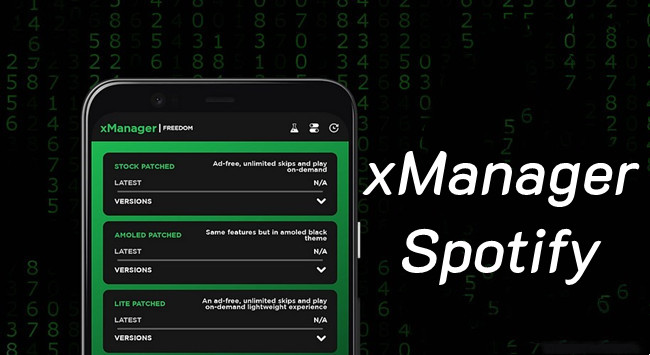
Option 2: Use xManager for Spotify
Another option is switching to Spotify through the xManager installer. While the TIDAL version stopped working, the Spotify builds inside xManager are still widely used. The patched versions can allow ad‑free listening and unlimited skips, which are similar to the features people wanted from the TIDAL mod. Some users also move playlists with tools like ViWizard Free Music Transfer, Soundiiz, TuneMyMusic, or SongShift.
Option 3: Use a TIDAL Music Downloader
Another approach is to download music instead of relying on a modified streaming app. Tools such as Tidal DL on GitHub and ViWizard TIDAL Music Converter can download tracks from TIDAL and save them as MP3 or FLAC. This allows users to build a local music library that still works even if streaming methods change later.
Part 5: Best Alternatives to xManager Tidal
Since it is unlikely to use xManager Tidal anymore, we'll introduce two xManager alternatives for Tidal free streaming. Each of these tools is a viable option, but they come with their own pros and cons. Take your time to explore each one and choose the best fit for your needs.
5.1 Professional Tidal Music Converter [No Limits]
Since Xmanager Tidal is no longer working, most Tidal Mod APKs are also unusable. So, if you want to keep Tidal music forever without a subscription, the best solution is to download Tidal songs directly to your device. The most effective way to do this is by using ViWizard TIDAL Music Converter.
ViWizard TIDAL Music Converter is a professional Tidal music downloader that lets you download any Tidal song without a Premium account. It removes Tidal's DRM protection and converts music into MP3, FLAC, AAC, WAV, and more audio formats—all while preserving HiRes sound quality. With ViWizard, you can store Tidal music permanently and play it on any device, including smartphones, music players, and computers—without limitations.
Key Features of ViWizard TIDAL Music Converter
Free Trial Free Trial* Security verified. 5, 481,347 people have downloaded it.
- Download full songs, albums, playlists, and artists from Tidal without ads offline
- Convert Tidal tracks in bulk at up to 40x faster speed
- Export Tidal music to MP3, FLAC, WAV, AIFF, M4A, and M4B
- Support various quality options up to a maximum of 24-bit, 192 kHz
Although ViWizard TIDAL Music Converter works for all Tidal users, including those without a subscription, you still need to log into your Tidal account through its built-in Tidal web player. ViWizard does not collect or misuse any personal data, however, some users may still have security concerns.
To be on the safe side, I recommend using the Shared Tidal Premium account provided by firehawk52. Since the account expires after a short period, it's best used alongside ViWizard TIDAL Music Converter. This way, you can download songs without worrying about the security of your personal Tidal account.
Step 1Select Your Tidal Music
Install ViWizard TIDAL Music Converter on your computer and launch the program. You'll find a built-in Tidal web player in ViWizard, and log in to your Tidal account or the account given by firehawk52. Browse through songs, albums, or playlists you want to save. When you're ready, hit the "Add Music" button in the bottom right and pick your tracks.

Step 2Set Your Download Preferences
Open the menu in the top right corner and go to Preferences. Under the Conversion tab, choose your preferred audio format. You can pick from popular options like MP3, AAC, FLAC (for lossless quality), or M4A. Click "OK" to save your settings

Step 3Download and Play Tidal Music Freely
Navigate to the conversion list and click "Convert." ViWizard will download your Tidal music in your chosen format. Once completed, you can play these tracks on your computer (Win/Mac), your phone, car stereo, media player, DJ software, or any device you like. Now, you can listen to Tidal in highest audio quality without ads and limited skips.

- Pros
- No subscription needed
- Keeps Tidal high audio quality
- Unlimited Tidal music downloads
- Batch downloading
- User-friendly interface
- Supports offline listening on all devices
- Cons
- Requires Tidal login
- Needs an installation.
5.2 Tidal Music Downloading Websites [with Limits]
If xManager Tidal is no longer working, using online Tidal music downloading sites is another way to listen to music without subscribing to Tidal. However, this method has some limitations. Most ripping sites can only parse the URL of individual songs, meaning you can't download entire playlists or albums. So, if you want to get a Tidal playlist or an album by your favorite artist, the best choice is to use ViWizard TIDAL Music Converter. Or, for more ripping solutions, check this comprehensive guide:

This article provides you 6 Tidal rippers, from open-source programs to professional Tidal converters, helping you rip Tidal Master audio tracks with ease.
Option 1. DoubleDouble
DoubleDouble is a website where you can download Tidal songs for free. However, there are a few trade-offs:
- You won't be able to enjoy Tidal's premium sound quality.
- There are no options to choose the download format.
That said, for quick downloads of individual songs, DoubleDouble is a good option. It's also easy to download from the website by following these steps:
- Visit https://doubledouble.top/.
- Copy and paste the URL of a specific song into the search box on doubledouble.
- Click the green download button and wait for the process to complete.
- Once finished, the Tidal tracks will be downloaded in a zip archive, which you need to extract for playback.

- Pros
- Free
- No installation required
- Simple interface
- Quick song downloads
- Cons
- No playlist/album support
- Lossy quality
- Downloads in zip file
- No configuration for audio quality and format
Option 2. Lucida
Another option for unlimited Tidal playback without xManager Tidal is an online ripping site called Lucida. This site is a more advanced version of DoubleDouble because it allows you to download Tidal albums and provides setup for audio quality and format preferences. Downloading from Lucida is also easy and can be done in a few simple steps:
- Visit https://lucida.to/.
- Copy the URL of Tidal tracks or albums from Tidal and paste it into the search box on Lucida.
- Click the "Go" button to start the parsing process.
- Choose the conversion format and select the desired bitrate.
- Click the "Download track" button to begin downloading.
- Once the download is complete, Lucida will save the Tidal tracks or albums directly to your browser's download folder.

- Pros
- Supports Tidal tracks/albums download
- Customizable audio quality
- Free to use
- Cons
- Limited format choice
- Inconsistent availability
- Unstable
- Slow download speed
Conclusion:
Even though Xmanager Tidal is no longer working, there are several alternatives to consider. For a safer and more reliable solution, using a professional tool like ViWizard TIDAL Music Converter ensures high-quality Tidal music downloads without a subscription. Click the download button below and start enjoying Tidal premium playback just like you did with xManager before.
You May Be Interested


From new releases to old favorites, Matt Smith is always on the lookout for good music. He follows the latest in digital entertainment and shares songs and media he thinks are worth checking out.

Leave a Comment (0)