


Ripping music from TIDAL starts with a simple real-world need, such as getting local audio files that can be used across different devices. However, TIDAL streams music under licensing protection, so the audio is not provided as downloadable files like MP3. Instead, it is delivered inside the app in a controlled format.
Because of this limitation, users often look for different tools to rip music from TIDAL. A popular option is a dedicated music converter like ViWizard TIDAL Music Converter, which can convert tracks into formats such as MP3, WAV, M4A, M4B, AIFF, or FLAC, while also keeping metadata and supporting batch conversion.
Besides desktop tools like ViWizard for Windows and Mac, this post also covers other options such as open-source tools, online downloaders, Telegram bots, and audio recording software. While they work differently, they are all used to rip music from TIDAL in practice.
Part 1. Can You Rip Music from TIDAL?
The short answer is: not directly. Many users notice that TIDAL downloads are not real audio files you can move or export. TIDAL uses DRM protection, so offline downloads stay inside the app and are tied to its system. The audio is decoded inside TIDAL, not saved as MP3 or FLAC files on your device.
Because of this, some users try audio recording instead. They record the sound as it plays and save it as a local file. But this has clear limits. It runs in real time, so a 3 minute song still takes 3 minutes. It depends on system audio and settings, so the output can vary and it cannot guarantee the original file.
Because of these limits, many users choose a more direct option like ViWizard TIDAL Music Converter. It can convert TIDAL tracks into formats like MP3 or FLAC on Windows and Mac. It is easier than recording because it processes the stream and outputs ready-to-use files. In general, ripping music should be for personal use only, and sharing files without permission should be avoided.

Ready to take your TIDAL music offline? ViWizard TIDAL Music Converter helps TIDAL subscribers save songs, albums, playlists, artists, podcasts, and audiobooks with reliable music conversion. Start converting and keep your TIDAL library within reach.
Part 2. How to Rip Music from TIDAL with Desktop Music Converters
Desktop converters are apps installed on a computer that turn music from TIDAL into files like MP3, FLAC, or WAV. Tools like ViWizard TIDAL Music Converter can process streaming audio and save it as local files, often with support for batch conversion of playlists or albums. They also keep basic metadata such as artist name, album, and cover art. This method is stable and works well for large music libraries, but it needs software installation and a Windows or Mac computer. After conversion, files can be moved to mobile devices using USB, cloud storage, or AirDrop.
Option 1. ViWizard TIDAL Music Converter
So, if you are looking to integrate ripped Tidal tracks into your DJ software, or just want to preserve your Tidal music library in master quality after ending your subscription, ViWizard TIDAL Music Converter emerges as the superior solution. (Plus, there are many users on Reddit also love and recommend ViWizard.)

Why We Love It?
What makes ViWizard TIDAL Music Converter stand out? This powerful tool lets you convert Tidal content - including songs, albums, playlists, and audiobooks - into various formats like MP3, AIFF, WAV, M4A, and M4B, while maintaining Hi-Res quality. For extensive music collections, ViWizard offers one-click batch downloading with complete metadata preservation. Ready to experience it yourself? Click the download button below to start capturing Tidal music at its highest quality.
Key Features of ViWizard TIDAL Music Converter
Free Trial Free Trial* Security verified. 5, 481,347 people have downloaded it.
- Download full songs, albums, playlists, and artists from Tidal without ads offline
- Convert Tidal tracks in bulk at up to 40x faster speed
- Export Tidal music to MP3, FLAC, WAV, AIFF, M4A, and M4B
- Support various quality options up to a maximum of 24-bit, 192 kHz
How to Use It?
 Step 1: Select Your Tidal Music
Install ViWizard TIDAL Music Converter on your computer and launch the program. Use the built-in Tidal web player to browse songs, albums, or playlists. When ready, click the "Add to List" button to select your tracks and add them to the conversion queue.
 Step 2: Set Your Download Options
Open the top-right menu and go to Preferences. Under the Conversion tab, choose your output format such as MP3, FLAC, AIFF, or M4A. Save your settings to apply changes before conversion.
 Step 3: Download and Enjoy
Go to the conversion list and click Convert to start processing. ViWizard will download Tidal music in your selected format. After completion, you can play the tracks on any device, including phone, car stereo, media player, or DJ software.
- Keep Tidal Hi-Res audio quality
- Support multiple output formats (MP3, AIFF, WAV)
- No subscription needed
- Faster downloading speed
- Can download entire Tidal playlists and albums
- Download in batch
- Needs installation
- Paid software with a free trial
Option 2. ViWizard Streaming Audio Recorder
If you have subscribed to multiple music streaming services, including Tidal, Spotify, Apple Music, and more, ViWizard also provides you with an all-in-one versatile Music Converter to help you rip music from popular music services with simple clicks. ViWizard Streaming Audio Recorder provides you with more options to rip music not only from Tidal.
Why We Love It?
ViWizard Streaming Audio Recorder seamlessly integrates with 9 popular music streaming services, allowing for convenient music conversion all within a single application. It ensures that the download quality matches the original music source. When ripping from Tidal, you can configure the output to FLAC format with exceptional quality, supporting up to 24-bit and 192 kHz. Additionally, various other output formats are available to accommodate your Tidal playback devices.

Key Features of ViWizard Streaming Audio Recorder
Free Trial Free Trial* Security verified. 5, 481,347 people have downloaded it.
- Built in SoundCloud web player included
- Download unlimited songs, albums, playlists, and artists from SoundCloud
- Export SoundCloud music to FLAC, MP3, WAV, AIFF, M4A, and M4B
- Save the original audio quality of music uploaded by artists on SoundCloud
How to Use It?
 Step 1: Set Tidal as the Ripping Resource
Launch ViWizard and enter the main interface. Click the Tidal icon and sign in with your Tidal HiFi account in the built-in web player. Once logged in, browse your library and click Add to List to select tracks, or paste a URL directly into the search bar to locate content.
 Step 2: Set the Output Format
Click the three-line menu icon to open settings. Go to the Conversion tab and adjust sample rate, bit depth, and bitrate. Choose an output format such as MP3, AIFF, or FLAC, then click OK to save your settings.
 Step 3: Start Ripping Music from Tidal
Return to the conversion list and review selected tracks. You can add or remove songs if needed. Click the Convert button to start processing. ViWizard will analyze and match metadata automatically, and your downloaded Tidal music will appear in the output folder within minutes.
- Keep the original ID3 tags and audio quality
- Built-in Tidal web player and media player
- Supports 9 popular music streaming services, including Tidal
- Support batch ripping
- Need a Tidal HiFi subscription to rip the whole song
- Monthly paid
- Registration and installation needed
Part 3. How to Rip Music from TIDAL with Open-Source Tools
Open-source tools like tidal-dl are community-built programs usually run in command-line interfaces. They read TIDAL metadata and try to rebuild audio files based on track info. They allow control over output format, file names, and folder structure, which makes them flexible for advanced users. But they need technical setup and regular updates, since platform changes can break them.
Option 1. Tidal-dl
As the core of Tidal Media Downloader, Tidal-dl plays the role of commands line interface, which means you need a basic learning of Python to start to rip form Tidal. However, it is available for Windows, macOS, Linux, and Android to help you enjoy Tidal content outside the official Tidal app.
Why We Love It?
Tidal-dl is a free open-source project, supporting for modern operating system. Although the downloading speed of Tidal-dl is 1x, you can rip from Tidal with MP3, FLAC, M4A, M4B, AAC, and WAV format. Also, it provides your multiple output options of quality for you to choose from: Normal, High, Max.
How to Use It?
Install Tidal-dl from the GitHub repository.
Open the Tidal-dl program from the folder where you installed it.
Follow the on-screen prompts in the command-line interface to configure the download preferences, such as audio quality and output format.
Next, enter your Tidal username and password to log in to your account.
Run the command 'tidal-dl [URL]' in Tidal-dl, and replace [URL] with the shared URL of the Tidal track/playlist/video/album you want to rip.
Click the 'Download' button to start the rip.

- Allow batch Tidal downloading
- Support Multi OS
- No extra cost
- Need Tidal subscription
- Require technical knowledge
- Not user-friendly
Option 2. Tidal-GUI
As another version of Tidal Media Downloader, Tidal-GUI provides a visual interface of Tidal-DL, make the Tidal ripping easier with the standalone labeled buttons and settings in the client interface.
Why We Love It?
Similar to Tidal-dl, Tidal-GUI is also free to rip music from Tidal, but only for Windows users. With Tidal-GUI, you can rip Tidal tracks, albums, and playlist in Hi-Res audio quality or Dolby Atmos with one click. Moreover, you can easily manage the download Tidal files with remaining Tidal metadata.
How to Use It?
Install Tidal-gui from the Tidal-Media-Downloader page on GitHub.
Launch the tida-gui.exe file and you will receive a device code.
Enter the displayed device code on the Tidal website. This will link your Tidal account to Tidal-gui.

In Tidal-gui, use the search box to find Tidal tracks, playlists, or albums you want to download.

Click the panel next to the music icon at the bottom left to change the music quality and format.
Then, select the songs you want to rip and click the 'Download' button to start ripping.


This tutorial covers the latest review of Tidal GUI/DL features on GitHub. Let's explore how to use them to rip Tidal music and find the other best alternatives for high-fidelity music streaming.
- High-quality audio downloads
- Keep the Tidal metadata
- Variety output formats
- Only for Windows
- Require Tidal HiFi subscription
- May be unstable and lag after Tidal updates
Option 3. Stream Rip
Stream Rip is another open-source music ripper available on GitHub that supports multiple streaming services, including Tidal. It supports Windows, Linux, and macOS. However, Stream Rip also needs a Tidal premium subscription.

Why We Love It?
Stream Rip is free to download tracks, playlists, and albums from Tidal with metadata information maintained. Plus, you can set the audio quality and audio format for the downloaded Tidal content.
How to Use It?
Install Python (3.10 or higher) and pip. You may not to install it, but some features will not be available.
On Windows and Linux, enter:

On mac, enter:
Open terminal or command prompt.
To configure the audio quality, format, and download path, run:
To start ripping music from Tidal, use:

Replace [LINK] with the URL of the track, album, or playlist.
- Free access
- Support audio configuration
- Tidal rips can be played without the Tidal app
- Need a Tidal subscription
- Audio may be lossy due to compression
- Require technical knowledge for installation and prompts
- Time-consuming process
Part 4. How to Rip Music from TIDAL with Online Downloaders
Online downloaders run in a browser and process links from TIDAL on remote servers. No installation is needed, so they are fast and easy to use for quick single-track downloads. Output quality is not consistent, with audio often ranging around 192 kbps to 320 kbps MP3 depending on the service. Many tools are unstable or shut down over time because they may violate TIDAL's terms.
Option 1. Doubledouble
DoubleDouble is a free website that allows you to rip music from multiple music platforms, such as SoundCloud, Tidal, Deezer, Qobuz.
Why We Love It?
Doubledouble is easy to use, it only requires that your device works with a browser and that you have internet access. Also, you don't need a Tidal subscription. Secondly, it rips Tidal music in Tidal source format by default, and the sound quality is good.
How to Use It?
In your browser, type and visit https://doubledouble.top/.
Copy the URL link of the Tidal song you need to rip and paste it into the search bar of doubledouble's website.
Click Download and your song will start ripping.

Once the download is complete, the file will be downloaded to your browser as a zip file that you can open in any player on your device.

- 100% free
- No Tidal premium subscription needed
- No Tidal account needed
- Works on any devices with a browser
- Cannot set download configuration
- Not 100% lossless
- Need to open the zip archive to get the rips
- Cannot download Tidal playlists and albums
Option 2. Lucida

Lucida is another free music converting site that helps you save music from various streaming services, like Tidal, Qobuz, Deezer, Amazon Music, Yanadex, and SoundCloud.
Why We Love It?
Similar to DoubleDouble, it works without needing a Tidal membership or a Tidal account. It works in a browser on any device as long as there is an active internet connection. But what makes it better than DoubleDouble is that it enables you to set the audio format which includes MP3, OGG, Opus, M4A, AAC, WAV, and Bitcrush. Other than that, Lucida can extract Tidal tracks from an album and lets you download them in batch.
How to Use It?
Visit the Lucida website (lucida.to or lucida.su).
Copy the URL link of the Tidal song you want to rip and paste it into Lucida's input field. (Lucida doesn't support downloading playlists at the moment, but it does support album links).
Select the corresponding audio quality for the format you want to download.
Click the 'Download track' button.
The song will be downloaded to the folder on your device where the browser downloads are stored.

- Free to use
- Support multiple streaming platforms
- No account is required
- Support various audio formats
- Download in high quality
- Audios are not lossless
- Slow download speed
- Cannot download playlists
- May stop working if Tidal updates
Part 5. How to Rip Music from TIDAL with Telegram Bots on Mobile
Telegram bots work inside chat apps. A TIDAL link is sent to the bot, then it is processed on a server and sent back as an audio file. This makes it easy on mobile without installing extra apps or using a browser. Features depend on the bot, with some supporting ZIP files and others only handling single tracks.
However, the Tidal telegram bot is not stable and may still need extra cost. Don't worry, we still find several still free to rip and workable Tida bot telegrams.
Why We Love It?
Tidal telegram bot is more intelligent compare to the Tidal rip website. It can match the target song you want to rip from Tidal, and offer with your multiple audio format or audio sample rates from original resource. Simply paste the URL or the name of the song, Tidal telegram bot will response to it and display the result within seconds.
How to Use It?
Install Telegram app from App Store or Google Play Store.
Paste Music Beaters, Music Downloader, or RedsleaksAiO into Telergam search bar.
Click the start icon to enter the chatting interface and activate the Tidal bot ripper.
Enter the name of song, playlist or album to the Tidal bot telegram.
You will receive the searching results in the chatting, click the more option to find the Save to Music icon.
And then Tidal bot telegram will rip the song from Tidal and save the files to your local device.

- Available for mobile users
- Keeps the Tidal ID3 tags
- Multiple audio format and quality options available
- May become unstable in the future
- Hidden security and risk concerns
- Inaccurate Tidal song matching
- Some files may have low audio quality
Part 6. How to Rip Music from TIDAL with Audio Recording Software
Audio recording tools like Audacity record system sound while music from TIDAL plays. The audio is captured in real time and saved as WAV, MP3, or similar formats. It does not access original files, only the output sound. This method works on almost all systems, but it takes time because TIDAL must run in real time, and some cleanup like trimming or volume adjustment may be needed.
Option 1. ViWizard Audio Capture
ViWizard Audio Capture offers a straightforward way to record Tidal music directly from your computer. This versatile tool captures any audio playing through your system, preserving high-quality sound while automatically adding track information.

Key Features of ViWizard Audio Capture
Free Trial Free Trial* Security verified. 5, 481,347 people have downloaded it.
- Record streaming audio and system audio from different sources
- Capture music, podcasts, and online audio content
- Export recorded audio in 17 formats for different devices and platforms
- Record audio automatically without saving tracks individually
- Organize captured audio files with customizable output options
How to Use It?
 Step 1: Set Up Audio Capture
Install and launch ViWizard Audio Capture on your computer. The software automatically detects your browsers such as Chrome and Firefox. If your browser is not listed, click the Plus button or drag it into the program window to add it manually.
 Step 2: Configure Your Recording Settings
Click the Format panel to choose your output format such as MP3 or WAV. Adjust sample rate and bit rate according to your needs. Higher settings provide better audio quality but result in larger file sizes.
 Step 3: Record Your Tidal Music
Click Start to begin recording. Open Tidal in your browser and play the music you want to capture. ViWizard will automatically detect and record the audio stream while preserving track quality and separation.
 Step 4: Edit and Save Your Music
When finished, stop playback or close Tidal. Use the built-in editor to trim, split, or adjust metadata. Click Save to export your recorded audio files to your computer.
- Work with any streaming service, not just Tidal
- No subscription needed
- Built-in audio editor
- Auto-track splitting feature
- Record in real-time (takes longer)
- Quality depends on your internet connection
- Require playing full songs to record
- Could record ads if they play during capture
Option 2. Apowersoft Online Recorder
Apowersoft Online Recorder is a free, web-based tool, helping you to capture the audio on your screen activity, you can visit Tidal web player or desktop app to stream music, while Apowersoft will rip the song from Tidal.
Why We Love It?
Differing to the mentioned 2 website Tidal rippers, Apowersoft is an online recorder to capture the playback of Tidal from your computer's audio system. The feature of cloud sharing of Apowesoft could upload your Tidal ripping to Google Drive, and you will never worry about the Tidal track losing with the backup.
How to Use It?
Enter Apowersoft Online Recorder official website.
Click the Start Recording button next to the Download option.
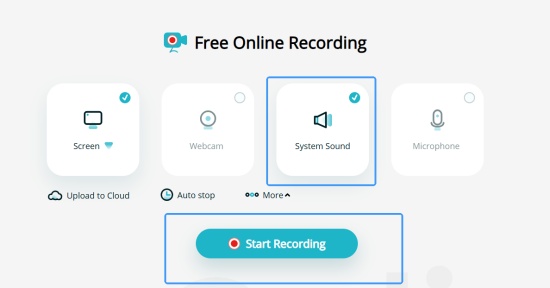
Choose System Sound option to rip music from Tidal and click Start Recording icon at the bottom.
Go to Tidal web player or launch Tidal desktop on your screen.
Select the song you want to rip from Tidal to play.
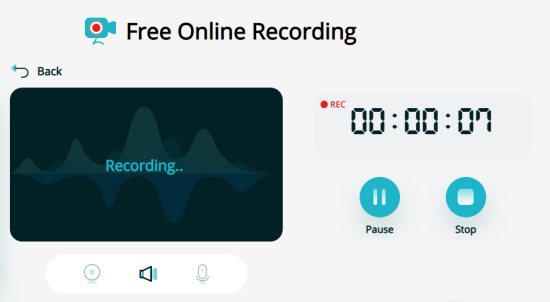
After ripping, head back to Apowerfost, and tap stop icon.
Once ending the recording, you can click the Save icon next to Share to get the Tidal rips to your local.
- User-friendly
- Record Tidal in HD quality
- Easy interface
- Potential audio lag
- No built-in editing tool
- Relies on browser and internet performance
- Standalone system audio ripping needs installation
Part 7. Is It Legal to Rip Music from TIDAL?
Music on TIDAL is licensed, not owned by users. A subscription only gives access to stream and listen under TIDAL's rules. It does not give the right to extract or save files as permanent audio.
In many countries, downloading or converting music outside the official app is restricted. Laws like the U.S. DMCA prohibit breaking digital protection systems, even if the music is accessed through a legal subscription. TIDAL's Terms of Service also do not allow ripping music. Only in-app offline listening is officially supported, while external ripping or conversion is not permitted under these rules.
Part 8. TIDAL Ripping vs. TIDAL Offline Downloads: What's the Difference?
| Feature | TIDAL Downloads | Ripped Music |
| File format | Locked app files | Normal music files |
| Where it works | Only in TIDAL app | Any device |
| DRM | Yes | No |
| Subscription | Needed | Not needed after saving |
| Move files | No | Yes |
| Format control | No | Yes |
| Status | Official | Not supported |
TIDAL downloads stay locked inside the app and only work with an active subscription on authorized devices. They cannot be moved or used outside the TIDAL ecosystem. Ripping tools, by contrast, turn music into standard audio files like MP3 or FLAC that can be stored on different devices. However, TIDAL does not support this kind of music ripping, and offline downloads are not meant to be exported or converted.
Part 9. Conclusion
While users can't rip music from TIDAL directly through the official app, tools like ViWizard TIDAL Music Converter, ViWizard All-In-One Music Converter, Audacity, and others can help save TIDAL music as MP3, FLAC, and other audio formats through conversion or recording. For those who want offline files that work across different devices and more control over their music collection, ViWizard TIDAL Music Converter is a great option to try, with support for batch conversion, preserved audio quality, and metadata retention.
Can I keep TIDAL downloads after canceling my subscription?
No. TIDAL downloads need an active subscription. If your subscription ends, you can no longer play downloaded music in the app.
Can I download TIDAL music as MP3?
No, not with the official TIDAL app. Downloads stay inside the app and cannot be saved as MP3 files.
Can I transfer TIDAL downloads to a USB drive or MP3 player?
No. TIDAL downloads are locked to the app. They can't be moved to a USB drive, MP3 player, or other music device.
Are TIDAL downloads real FLAC files?
Not really. Even though TIDAL offers FLAC audio, downloaded songs are encrypted and can only be played in the TIDAL app.
Does TIDAL work completely offline?
Yes, for downloaded music. However, you still need an active subscription, and TIDAL may check your account from time to time to keep downloads available.
You May Be Interested

14 Best Tools to Rip Spotify Music on Mobile, Desktop, and Online

Use the Best Apple Music Rippers for Free MP3s
7 Best YouTube Audio Rippers to Rip Music from YouTube

How to Download Music from Tidal to Android Phone [2026 Updated]

How to Download and Save Tidal Music to Computer

10+ Best TIDAL Music Downloaders You Can Use in 2026 (Free & Paid)


Dave Henry loves movies and all things video. He likes checking out different video formats and trying new media players to see how they change the viewing experience.

Leave a Comment (0)