


Many streaming music platforms offer promo codes to attract new users and expand their brand reach. TIDAL is no exception. While TIDAL already provides a one-month free trial for new accounts, a promo code can extend that trial period or give you a discount on a subscription.
So, where can you find a TIDAL promo code? How do you redeem one? What should you do if your code isn't working? And how can you download TIDAL music to make the most of a free trial? This article answers all of these questions, one by one.
Part 1. What is a TIDAL Promo Code?
A TIDAL promo code is a promotional tool that unlocks subscription discounts, extended free trials, or prepaid streaming credits. With a valid code, users can pay less or even nothing to enjoy TIDAL's services. At the same time, TIDAL gains new users and increased exposure, which benefits the brand in the long run. For this reason, most TIDAL promo codes are only available to new users.
Promo codes on TIDAL are mostly partner vouchers. These free trials or discounted months are offered through hardware brands, mobile carriers, or fintech apps. Partners include Linn, Hegel, Meridian, PayPal, and others. If you purchase their services or hardware, a TIDAL voucher code may be included. There are also TIDAL gift card codes, which are typically prepaid cards you can use as a payment method on TIDAL.
Part 2. Where to Get a TIDAL Promo Code
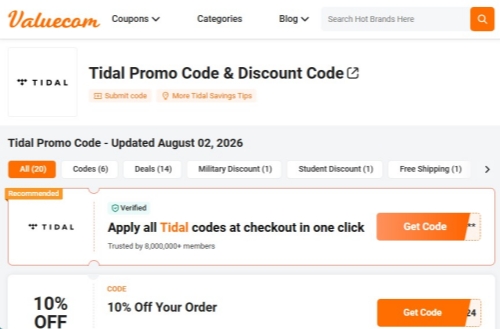
The most well-known way to find a promo code is through coupon aggregator websites. These sites collect TIDAL promo codes uploaded by users and may also share discount news. However, while you might find a valid TIDAL voucher or discount code, many of them will fail to work because they've already been claimed or were randomly generated. If you'd like to give it a try, simply search on Google.
The safest and most reliable way to get a valid promo code is directly through TIDAL's official discount campaigns. These are often tied to partnerships with brands in the audio, automotive, and tech industries.
- If you use DJ hardware or software, you may be eligible for exclusive TIDAL offers. TIDAL is integrated into Rekordbox, and users sometimes receive trial offers or discounts. Similar integrations with Serato DJ Pro and Denon hardware may also include promotional TIDAL access.
- Many mobile carriers and telecom providers partner with TIDAL to offer discounted or even free subscriptions as part of their data plans or add-on services. Check with your local provider to see if TIDAL is included. For example, T-Mobile has previously offered TIDAL perks, especially through legacy Sprint plans.
- TIDAL is built directly into the dashboards or mobile controllers of many vehicles and home audio systems. Examples include Tesla, Mercedes-Benz, and Sonos. If you own one of these devices, open the audio app on your car's screen or home sound system. Initiate a new sign-up directly from the device interface, and you may be offered a promotional deal exclusive to that platform.
- Some fintech apps and credit card reward marketplaces also offer TIDAL promo codes or subscription discounts as part of their perks programs. Keep an eye on your credit card's rewards portal or apps like PayPal and Revolut that partner with streaming services. For example, you can currently get 25% off the TIDAL Individual plan for 12 months with Cash App.
Part 3. How to Redeem Your TIDAL Promo Code
TIDAL promo codes come in two forms: a simple text code or a link. If you received a promotion code after purchasing a product from a TIDAL partner, it's typically a partner code in link format. These are usually redeemed on the partner's website or app where you completed the purchase. In most cases, you just click the link, verify the code, sign in or sign up, and confirm your subscription. The offer is then applied to your TIDAL account.
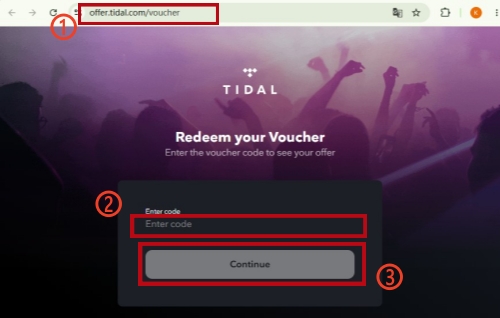
If your code is simply a string of letters and numbers, you'll need to enter it on the TIDAL Voucher Redemption page.
01Open a browser. TIDAL promo code can only be redeemed on its website if the code is simply text. Therefore, whether you are enjoying TIDAL on your phone or desktop, you should go to the browser.
02Enter offer.TIDAL.com/voucher in the address bar or search bar of your browser. Or, you can click the link to reach it directly.
03Enter the promo code you've got. Usually, you can copy and paste it directly.
04Click Continue to apply the code. It will then automatically prolong your trial period or offer you a discount when you're paying on TIDAL. Sometimes you may be required to create a TIDAL account if it prompts.
05Choose a subscription plan. Add a payment method.
Part 4. How to Fix TIDAL Promo Code Not Working
It's common to find that a promo code from a voucher website doesn't work. These codes are often already redeemed or randomly generated. However, sometimes even the promo code included in an official bundle fails to work. So, how to fix the issue?
4.1Check Account Eligibility
As stated by TIDAL, most voucher codes are strictly for new users and cannot be applied to existing or previously registered accounts. If your account has no prior history of active trials or subscriptions, it qualifies as new.
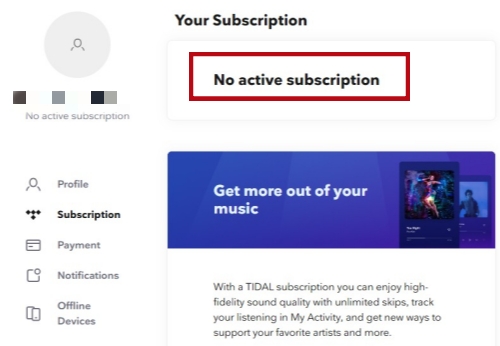
To check, open TIDAL and sign in. If you see a promotional ad offering a free trial, your account is eligible. You can also follow the steps below to check whether your account is currently subscribed to any TIDAL plan.
01Open TIDAL on your phone or desktop and make sure your account is signed in.
02On desktop, click the profile icon. On your phone, click your profile and then the gear icon.
03Select Manage Subscription and wait for the webpage to finish loading.
04Navigate to the Subscription section. You'll see No Active Subscription if your account is new.
4.2Re-Enter the Code Carefully
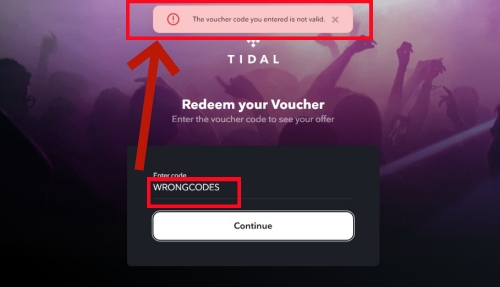
Entering the wrong characters when redeeming a voucher is another common reason for an invalid code. TIDAL promo codes are case-sensitive and often include a mix of uppercase and lowercase letters, numbers, and special characters. A single misplaced character can cause the entire code to be rejected. Therefore, check for typos, extra spaces, or case sensitivity issues. Make sure the text you type matches the code exactly.
The most reliable method is to copy the code directly from its source and paste it into the redemption field. Usually, you'll see a copy button next to the code; just click it to copy. Or you can long-press the code and choose to copy.
4.3Use the Official Web Portal
Avoid redeeming codes inside third-party apps managed by Apple or Google. These apps may fail to sync properly with TIDAL, causing a valid code to appear invalid.
You can follow the official redemption method in Part 3 and go directly to the TIDAL redemption page via a web browser. Though more complicated than using a third-party app, it's more reliable to redeem the TIDAL promo code successfully.
4.4Bypass Region Blocks
Some partner codes or discount plans only work in specific countries. For example, a promo code intended for British users cannot be redeemed if you're in the US. You can use a VPN to match the promotion's target country and resolve region-based errors.
To note, if you're using a paid promo code or discount code, make sure to turn your VPN off when completing the payment. Otherwise, the payment may be blocked, or your TIDAL account could be banned.
4.5Disable Blocker Extensions
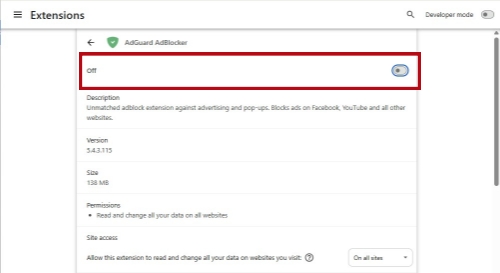
If you're redeeming a TIDAL promo code on a desktop browser, turn off any ad-blocker extension first. The Ad blocker often interferes with the security scripts and data tracking needed to verify and process your code. Therefore, it can prevent the TIDAL redemption page from loading or working correctly.
01Click the extensions icon in the toolbar of your browser.
02Click the three dots next to your blocker extension.
03Choose Manage extension in the dropdown menu.
04Toggle off the extension switch. Wait for several seconds and refresh the TIDAL Voucher Redemption Page.
Part 5. How to Keep TIDAL Music Forever without a TIDAL Subscription
Most TIDAL promo codes are for new users only, and the free trial period is limited typically one month. Once the trial expires, you'll need to pay monthly or hunt for another promo code to keep accessing the songs and albums in your collection. Otherwise, you'll lose access to them or be limited to 30-second previews interrupted by ads.
So, is there a way to keep TIDAL music forever without a subscription? Yes. ViWizard TIDAL Music Converter can help download TIDAL tracks, albums, playlists, and artists in MP3, FLAC, and more. These files can be stored on your computer permanently and remain accessible without internet or TIDAL.
No more worrying about losing your favorite TIDAL songs when your subscription ends. Why not give it a try?

Key Features of ViWizard TIDAL Music Converter
Free Trial Free Trial* Security verified. 5, 481,347 people have downloaded it.
- Convert TIDAL songs, playlists, albums, artists, podcasts, and audiobooks
- Export TIDAL music in 6 formats for different devices and players
- Preserve Hi-Res FLAC and original audio quality
- Preserve Dolby Atmos audio and metadata during conversion
- Batch download TIDAL playlists, albums, and large music collections
 Step 1: Select Your Favorite TIDAL Music
After accessing the library of TIDAL music, open any content in your collection. You can also browse in the built-in TIDAL web player or search for music you're fond of. Next, click the blue music icon to add music to the conversion list.
 Step 2: Set Conversion Preference
You can set the output format as Lossless, MP3, WAV, FLAC, M4A, M4B, and AIFF by clicking the menu icon > Preferences > Conversion.
 Step 3: Start the Music Conversion Process
Navigate to the conversion list you've added items to just now. Check whether you've missed any songs. Click the Convert button at the bottom-right corner to start conversion instantly.
 Step 4: Enjoy or Locate Your TIDAL Downloads
Go to the download history, double-click any track to play it in the built-in media player. Right-click any track and choose Open Folder to locate it in the output directory.
Part 6. Conclusion
TIDAL promo code is easy to get and beneficial for new TIDAL users. With a valid code, you can enjoy a 30-day free trial or even longer, or receive a discount on your TIDAL subscription. However, truly valid codes can be hard to come by, and some may require a purchase. To make the most of any free trial or short-term subscription, use ViWizard TIDAL Music Converter to keep your favorite TIDAL music permanently. These downloads remain accessible even without an active TIDAL subscription.
You May Be Interested




Adam Gorden is always looking for new ways to explore music and videos. He likes trying different media tools and learning how to manage audio and video files with ease.

Leave a Comment (0)