


Since Tidal's relaunch a few years ago with the support of several well-known musicians, it has become a favorite for listeners who want a richer, more detailed experience than most standard streaming platforms can offer. The service has also attracted investment from major tech and financial companies, helping it expand its offerings and reach a wider audience.
However, many returning users are confused when they log in to the Tidal app and try to listen to their favorite music, only to find that only 30 tracks play. This is because Tidal has discontinued its free tier, which can be frustrating for those used to unlimited access.
Even without a free option, Tidal continues to attract music lovers who want to experience its service. This post introduces ways users can still use Tidal for free through free trials, promotions, or tools like ViWizard TIDAL Music Converter, which allows you to save Tidal music as MP3s for long-term use, even if a subscription expires.

A splendid Tidal downloader for both free and paid users that downloads full songs, albums, playlists, artists, and audiobooks to MP3, FLAC, WAV, and more while keeping the original lossless audio and ID3 tags so you can save Tidal music offline on Windows, Mac, or any device without streaming restrictions.
Part 1: Is Tidal Free?
The Tidal app is always free to download on mobile and desktop devices, but its streaming service is no longer free. Tidal used to offer a free, ad-supported plan with access to over 120 million songs. Streaming quality maxed out at 160 Kbps, which was acceptable for most listeners and even competitive with rivals. Users could explore features and Jay Z's exclusive releases without subscribing.
That free tier was discontinued on April 10, 2024. Today, Tidal focuses on a paid subscription at $10.99 per month. This plan includes high-resolution audio, Dolby Atmos tracks, and a 30-day free trial for new users.
Part 2: Is the Tidal Free Plan Still Available in 2026?
Tidal officially discontinued its free plan on April 10, 2024, and there is no plan to bring it back. In the US, limited previews still allow listening to the first 30 seconds of tracks, but full access requires a subscription.
Tidal also simplified its subscription model by removing the old HiFi and HiFi Plus tiers. Now a single plan costs $10.99 per month. This change makes premium audio more accessible and supports artists by consolidating revenue. Removing the free plan can be seen as a chance for users to decide whether to start a free trial or subscribe for HiRes FLAC streaming at a lower cost than before.
Part 3: Does Tidal Offer a Free Trial?
Yes, Tidal offers a 30-day free trial for new users, giving access to all premium features. This includes:
- Access to over 110 million songs, all ad-free
- Download music for offline listening with unlimited skips
- Play music on all supported devices
- Real-time listening and sharing with friends
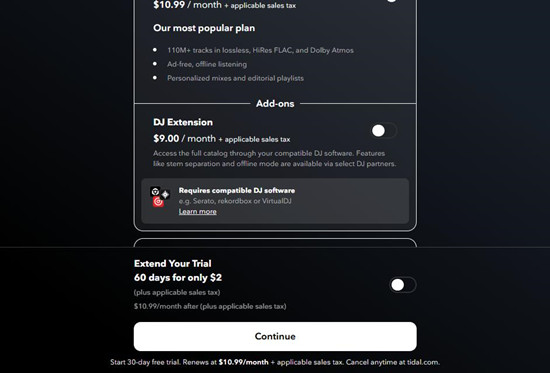
A DJ extension is available as an optional add-on for $9 per month. The trial allows users to test headphones, speakers, network performance, and explore exclusive releases. A free 60-day trial extension is also available for just $2. Isn't it great?
It is not a permanent solution, but it provides full access during the trial period. To start, visit Tidal's official website and click "Start Free Trial." A new user account, valid email address, and a credit card or PayPal account for verification are required. The trial automatically converts to a paid plan unless canceled before the 30 days end.

Wondering about more ways to get Tidal free trial? This post will share with you 17 ways to get a Tidal free trial, and one can even keep Tidal free listening forever.
Start a Tidal Free Trial on the Website
You can start a free Tidal trial on the website to explore their catalog of ad-free music. Follow these steps:
Go to the Tidal homepage and click Start Free Trial at the top of the page.
Enter your email address and create a Tidal account. You can also sign up using Google, Apple, or Facebook.
Enter your profile name and date of birth, then click Continue.
Review Tidal's Terms of Use and Privacy Policy and click Accept or Continue.
Choose the subscription plan and click Continue to see the 30-day free trial offer.
Add your payment method with a credit card or PayPal. You will not be charged until the trial ends.
Click Start Trial or Subscribe to activate your trial and start listening.
Start a Tidal Free Trial in the Mobile App
On mobile devices, you can start a free trial directly in the Tidal app:
Open the Tidal app on your iPhone or Android device and tap Sign Up or Get Started.
Tap Start Free Trial when the plan options appear.
Enter your email, create a profile, and provide your date of birth.
Accept Tidal's Terms of Use and Privacy Policy.
Select the subscription plan and tap Continue.
Enter your payment details with a credit card or PayPal. You will not be billed until the trial ends.
Tap Start Trial to begin and explore Tidal's catalog of over 110 million ad-free songs.
Part 4: Tidal's Current Subscription Plans & Pricing
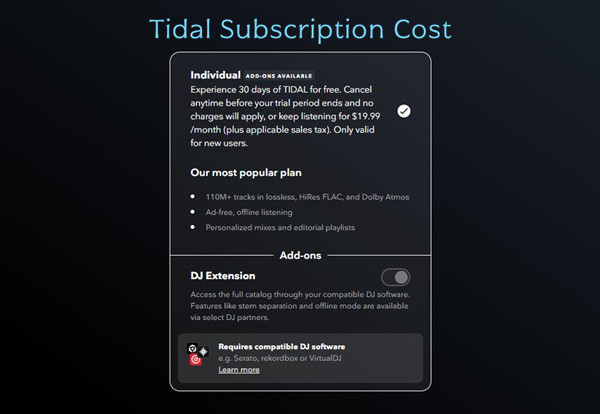
Tidal now has a single paid plan priced at $10.99 per month. It is simple, but it includes a full set of premium features. Subscribers get high-resolution audio, Dolby Atmos tracks, offline downloads, and access to HiRes FLAC streaming. New users are also eligible for the 30-day free trial.
- Tidal no longer offers military/first responder new discounts as of starting March 4th, 2024.
- There is no Tidal annual subscription.
| Tidal Plan | Price | Key Features |
|---|---|---|
| Individual | $10.99/month+applicable sales tax $19.99/month+applicable sales tax for DJ Extension |
110M+ tracks in HiRes FLAC, and Dolby Atmos Personalized mixes, editorial playlists, and live sessions Offline listening Ad-free |
| Family (up to 6 members) | $16.99/month+applicable sales tax | 110M+ tracks in HiRes FLAC, and Dolby Atmos Curated playlist for kids Offline listening Ad-free |
| Student | $5.49/month+applicable sales tax | 110M+ tracks in HiRes FLAC, and Dolby Atmos Curated study playlists Offline listening Ad-free |
| Free Trial | Free within 30 days for a new account ($2 for a 60-day extension) | 110M+ tracks in HiRes FLAC, and Dolby Atmos Personalized mixes, editorial playlists, and live sessions Offline listening Ad-free |
Part 5: How to Use Tidal for Free Forever
Tidal does not offer a permanent free tier. Any claims otherwise are outdated or unofficial. However, combining free trials, promotions, and tools like ViWizard TIDAL Music Converter can extend access to Tidal music.
Option 1: ViWizard TIDAL Music Converter
On the technical side, ViWizard TIDAL Music Converter allows users to download tracks and convert them to MP3 or FLAC during a trial or subscription. After conversion, you can cancel the subscription and keep your music for personal offline use. This method gives permanent access to music files, though streaming features still require an active subscription.
Features such as real-time listening, recommendations, and platform updates are tied to an active account. Attempting to use modified or unofficial versions of the app may involve security risks and is not recommended.
- Pros
- Keeps original high quality, including HiRes FLAC.
- Full Access to all premium content.
- Save Tidal music tracks permanently.
- Lets you listen offline without a subscription.
- Transferable to any device for playback.
- Cons
- Requires installation.

Key Features of ViWizard TIDAL Music Converter
Free Trial Free Trial* Security verified. 5, 481,347 people have downloaded it.
- Download full songs, albums, playlists, and artists from Tidal without ads offline
- Convert Tidal tracks in bulk at up to 40x faster speed
- Export Tidal music to MP3, FLAC, WAV, AIFF, M4A, and M4B
- Support various quality options up to a maximum of 24-bit, 192 kHz
Step 1Log into Your Tidal Account
As ViWizard TIDAL Music Converter has a built-in Tidal web player, you can just launch ViWizard software on your computer and log into your Tidal account without the Tidal app. Once logged in, you have the full Tidal music library in ViWizard.

Step 2Customize the Output Preferences
Click on the hamburger icon in the upper right corner and select "Preferences," where you can configure output settings such as output directory, output format, output filename, and more.

Step 3Select Any Content for Download
Search for songs, playlists or albums by name or keywords, or copy and paste the URL into the search bar to access them directly. Once you've found it, click on it and then click the cyan-colored "Add Music" icon in the lower right corner.

Step 4Download Tidal Music
Go to the conversion list, and click the "Convert" icon at the bottom right. Now, ViWizard will start to download them and convert them losslessly to the universal DRM-free format you set.

Step 5Access the Downloaded Tidal Music
Once complete, you can go to the "History" section to view the downloaded music and play the downloaded tracks within the ViWizard player.

Option 2: Tidal Premium APK

Tidal Premium APK is a modified version of the Tidal app (also known as APK mods) that allows users to unlock premium features such as ad-free and offline listening, high-resolution quality, and other Tidal features without purchasing a Tidal music subscription. However, the MOD APK version comes with some potential risks and drawbacks, so proceed with cautions.
- Pros
- Free access to Tidal premium features.
- Cons
- Several risks to device and your Tidal account.
- Multiple steps to download and install.
- Only compatible with Android devices.
Uninstall the official Tidal music app from your Android device.
Open the Settings app, go to Security or Privacy, and enable Unknown Sources to allow installations from outside the Google Play Store.
Open a web browser on your Android device.
Search for the Tidal Premium APK.
Choose a trusted website that provides the APK file and download it to your device.

After downloading, open your device's Downloads folder.

Tap the APK file and follow the on-screen prompts to install the app.
Once installed, open the Tidal Premium app and log in to your Tidal account.
You should now have access to the available premium features.
Option 3. Telegram Bots
Telegram bots are automated programs that use the Telegram app to respond to user commands and perform specified tasks. Many music bots are specifically built to download songs from various music streaming sites such as Tidal, Spotify, Soundcloud, and Deezer. Although it may not be allowed to get Tidal content over Telegram, here's how you do it if you want to try out the telegram bots for Tidal music:
- Pros
- Easy to use.
- No installation required.
- Cons
- Limited sound quality.
- Limited availability of Tidal songs.
- Difficulty in organizing downloaded files.
Download and install the Telegram app from your device's app store (available on iOS, Android, and desktop).
Open the Telegram app.
Use the search bar at the top to find bots by entering names like @music_ripper_bot, @deezload2bot, or @redmuzicdlbot.
Tap the bot to open its chat interface.
Follow the instructions in the chat to activate the bot.
Copy and paste the URL of the songs, albums, or playlists you want to download.
Wait for the bot to respond and provide the download link.

Long-press the Tidal music title until the Save to Files option appears.

Tap Save to Files to download the content to your device's Downloads folder.
Conclusion
While the Tidal free plan is no longer available, you may still listen to Tidal music using apps such as ViWizard TIDAL Music Converter, Tidal Premium APK, or Telegram Bots. Each method has its pros and cons, so choose the one that best meets your needs. If you prefer high-quality audio and unlimited Tidal premium content downloads, ViWizard TIDAL Music Converter is an excellent choice!
You May Be Interested



Dave Henry loves movies and all things video. He likes checking out different video formats and trying new media players to see how they change the viewing experience.

Leave a Comment (0)