


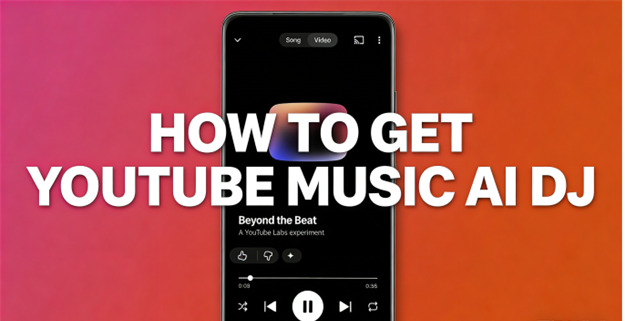
Have you ever experienced the following situation? On a rainy, dreary night, you shuffle the playlist, and the track playing in your ear is so pleasing that you want to learn more about it. So, you return to the home page, Google the name to learn some trivia, or jump into the comment section. Now you don't have to do so, as there is a "friend" who knows every music detail and never gets tired. And that is YouTube Music AI DJ.
In this passage, we will introduce you to YouTube Music AI DJ, explain how to obtain it, and highlight its key differences from Spotify AI DJ. And beyond that, if you want to download your Liked Songs, we will show you another trick. Let's see.
Part 1: What is YouTube Music AI DJ?
Simply speaking, YouTube Music AI DJ is an experimental feature named "Beyond the Beat", which acts as two AI hosts—"Mo and Flow" that can talk to you while you listen. But if you treat them as random robots, you are wrong, and here are some details:
- Contextual Commentary: "Mo and Flow" can chime in and offer you the commentary, artist stories, and fan trivia that you may be interested in, aiming to enrich your listening process.
- Interaction: The process is like two hosts commenting on music, just like your knowledgeable friends. And best of all, they could sound like real and natural radio hosts.
- Interesting and Kind Interjection: There are only 40 seconds every four to five songs, and you will not see them chatter constantly. Why do we say they are interesting? For example, "Mo and Flow" explains how Mariah Carey's "Yours" is originally meant to be a Justin Timberlake duet.
- Added Information: It offers information about the top of your existing playlist or radio station.
To be brief, with YouTube Music AI DJ, we get more experience instead of mere playlists. And this may possibly change the way we discover and enjoy music. Sounds great, but is there an AI DJ on YouTube Music? Follow me.
Part 2: Does YouTube Music Have an AI DJ?
Yes, YouTube Music does have its AI DJ, which is an AI service launched last year. You can get it easily from your phone or your desktop.
And if you are an artist or a fan, the YouTube Music AI DJ can be considerate. For one thing, AI hosts can let you know artists' backgrounds and anecdotes that fans wouldn't otherwise discover, which strengthens the bonds between artists and listeners.
Part 3: How to Get YouTube Music AI DJ
Be sure that you are a YouTube Music or YouTube Premium subscriber and join the YouTube Labs (YouTube's experimental features program). And access is currently limited to users in the United States.
Is everything ready? Let's get started.
On Desktop/Web
Here is the way to run YouTube Music AI DJ on your desktop/web.
Step 1 Open your web browser and go to www.youtube.com/new.
Step 2 Ensure you are logged in to your Premium account.
Step 3 Fetch "Beyond the Beat" from the list of experimental features.
Step 4 Click the "Join" or "Try it".
Step 5 Play a radio station or your playlist, and the AI hosts will automatically chime in every 5 songs or so.
You can also use a new button with a sparkle icon near the "like" and "dislike" to snooze for 1 hour or 1 day. Note that there is NO permanent "off" switch, and to disable it, you need to leave the YouTube Labs.
On Mobile
Here is how to use the YouTube Music AI DJ on your phone:
Step 1 Activate the YouTube Music app on your phone.
Step 2 Tap your profile icon (top right)
Step 3 Choose "Try experimental new features".
Step 4 Scroll down to fetch "Beyond the Beat" and tap "Join".
And the following are the same as those on the desktop/web.
Through this tutorial, you can activate your YouTube AI DJ and enjoy your music journey. But in fact, there is another competitive AI DJ launched 2 years earlier, which is a personalized and generative AI-powered feature conveniently set in the Spotify app that curates a music stream catering to your listening history. Yeah, that is Spotify AI DJ. Want to know their differences? Come on.
Part 4: YouTube Music AI DJ vs. Spotify AI DJ
Some say YouTube Music AI DJ is very similar to Spotify AI DJ. But they are different. The table below shows you.
| Apsects | YouTube Music AI DJ | Spotify AI DJ |
| Hosts | Two hosts (Mo and Flow) | Single AI DJ |
| Selling point | Trivia, stories behind, fun, and every fact | Personalized song recommendations |
| Interaction | No voice commands so far, 40 seconds every 5 songs | Yes, requests generally met |
| Availability | Beta, US only, limited users | Widely available in multiple countries |
| Style | Realistic voice, just like radio hosts | Personalized radio guide |

Simply put, YouTube Music AI DJ focuses on enhancing your music experience with added context, while Spotify AI DJ helps you curate music to listen to according to your previous listening history. Both of them can bring you a completely new music world. But most people think it would be nicer to download and play their music anytime, anywhere. And ViWizard has launched such a product for you. It can convert YouTube Music to MP3 for offline listening.
Bonus: How to Convert YouTube Music to MP3 for Offline Listening
Even though you are a YouTube Music Premium subscriber, you may sometimes desire to download your favorites and play them offline on any platform. No worry, ViWizard YouTube Music Converter can help you. You can play YouTube Music downloads with original sound quality without ads disturbing. Besides, you can deal with the downloads with ease, as we retain the original ID3 tags for you. Once downloaded, you can play YouTube Music in ViWizard's built-in media player.

Download music from 10 streaming platforms to MP3, FLAC, WAV, AIFF, M4A, or M4B with original quality and ID3 tags for permanent offline listening.
Step 1 Open ViWizard and Set MP3 Format
Launch ViWizard YouTube Music Converter on your computer. Click the Menu icon (top right) and choose Preferences. Click Conversion, and then you can see the Output Format. Set any format you like. Then click OK to save the settings.

Step 2 Sign in to YouTube Music
Get back to the main interface, click the YouTube Music icon. Log in with your YouTube Music account to access the built-in web player, in which you can look through your favorites inside ViWizard securely.

Step 3 Add Music and Record
Search the songs, playlists, or stations you like to download. Click Add to List (green icon) to queue them. Once all your desired tracks are added. Click the Convert to start recording, and it converts into an MP3 file automatically.
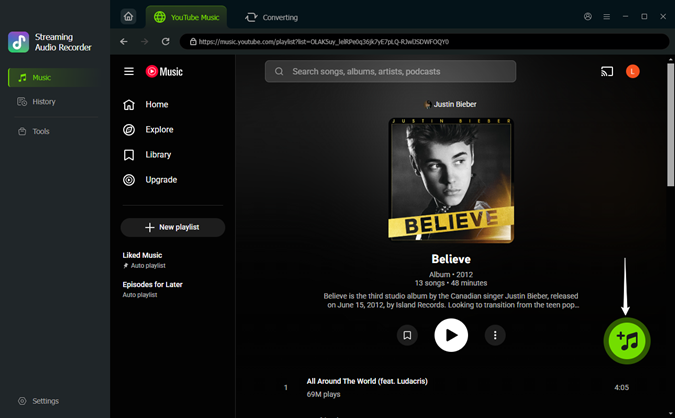
Step 4 Access and Enjoy Your YouTube Music Downloads
Upon conversion, click the History tab to check your downloads. Click the folder icon to locate the MP3 files on your computer. With the rock-solid transfer, you can enjoy your YouTube Music anywhere and anytime, and even organize it in your library.

What if you want to listen to music from other platforms? ViWIzard can do it. We work across all the popular music platforms, including Spotify, Pandora, Apple Music, Deezer, and the like. It allows you to seamlessly transfer your favorite tracks between services, which saves a lot of time.
Conclusion
YouTube Music AI DJ does make us feel more while listening, the hosts sound pretty natural, the trivia is genuinely intriguing, but you cannot really turn them off. But this is still under test, and it may be improved in the near future.
If you want to download YouTube Music for offline listening, ViWizard YouTube Music Converter can be a good choice.
You May Be Interested


From new releases to old favorites, Matt Smith is always on the lookout for good music. He follows the latest in digital entertainment and shares songs and media he thinks are worth checking out.

Leave a Comment (0)