


- Part 1. What Is Amazon Prime and Amazon Music Prime?
- Part 2. How Much Do Amazon Prime and Amazon Music Cost?
- Part 3. Is Amazon Music Free with Amazon Prime?
- Part 4. What Do You Get with Amazon Music Prime?
- Part 5. Amazon Music Prime vs Amazon Music Unlimited
- Part 6. How to Get Amazon Music Prime with a Prime Membership
- Part 7. How to Keep Amazon Music Songs for Free with Unlimited Downloads

- Part 8. Other Amazon Prime Benefits

Music streaming keeps changing, and Amazon Music is no exception. At the end of 2025, some plans were updated, leaving both Prime members and non-members wondering if anything has changed. The question is simple: Is Amazon Music still included with Prime?
A regular Amazon Prime membership already includes perks like Amazon Music Prime, Prime Video, and sometimes deals related to Audible. This situation might feel familiar: you sign up for Prime for benefits like free delivery or shopping discounts, but then discover that Amazon's music service comes with it, offering over 100 million ad-free songs at no extra cost.
But Amazon Music Prime, though free with Prime, is not as full-featured as Amazon Music Unlimited and has a few limits. This post introduces Amazon Music Prime and includes a side-by-side comparison with Amazon Music Unlimited to make things clearer. You will see which features are included, which are limited, and whether Prime alone is enough for a good listening experience. You will also learn about other Prime benefits you can use.
Part 1. What Is Amazon Prime and Amazon Music Prime?
Amazon Prime is a membership that provides benefits across shopping, entertainment, and other Amazon services, including Amazon Music Prime.
1. What Is Amazon Prime?
Amazon Prime is a subscription service from Amazon that bundles many benefits for members. These include free, fast shipping on millions of items, access to Prime Video for movies and TV shows, Prime Reading for selected eBooks and magazines, unlimited photo storage through Amazon Photos, and early access to deals.
2. What Is Amazon Music Prime?
Amazon Music Prime is the music streaming feature included with an Amazon Prime membership. It gives access to over 100 million songs and popular podcasts, covering the main music and podcast catalog.
Unlike Amazon Music Unlimited, Music Prime comes at no extra cost with a Prime membership. Music Prime is limited to a shuffle-only mode and curated playlists for offline listening. In comparison, Amazon Music Unlimited allows unlimited skips, on-demand listening, and higher-fidelity audio including HD and spatial sound.
Part 2. How Much Do Amazon Prime and Amazon Music Prime Cost?
As of early 2026, Amazon Prime costs $14.99 per month or $139 per year. Amazon Music Prime is included with Prime at no extra cost. For more features and unlimited listening, Amazon Music Unlimited costs $10.99 per month for Prime members, or $11.99 for non-Prime members. Prices for this Unlimited plan have increased in the U.S., UK, and Canada since 2025.
Amazon still offers a free 30-day trial for new members of Amazon Prime, which includes Music Prime, as well as for Amazon Music Unlimited. Occasionally, promotions are available to lower the cost.
Price (USD):
| Service | Price |
| Amazon Prime | $14.99/month or $139/year |
| Amazon Music Prime | Included with Amazon Prime (no extra cost) |
| Amazon Music Unlimited | $11.99/month (Prime members) or $12.99/month (non‑Prime) |
Price (UK):
| Service | UK Price |
| Amazon Prime | £8.99/month or £95/year |
| Amazon Music Prime | Included with Amazon Prime |
| Amazon Music Unlimited | £11.99/month (Prime) or £12.99/month (non‑Prime) |
Price (Australia):
| Service | Australia Price |
| Amazon Prime | AU$9.99/month or AU$79/year |
| Amazon Music Prime | Included with Amazon Prime |
| Amazon Music Unlimited | ~AU$12.99/month |
Price (Japan):
| Service | Japan Price |
| Amazon Prime | ¥600/month or ¥5,900/year |
| Amazon Music Prime | Included with Amazon Prime (no extra cost) |
| Amazon Music Unlimited | ¥1,080/month (Prime members) or ¥1,180/month (non‑Prime) |
Part 3. Is Amazon Music Free with Amazon Prime?
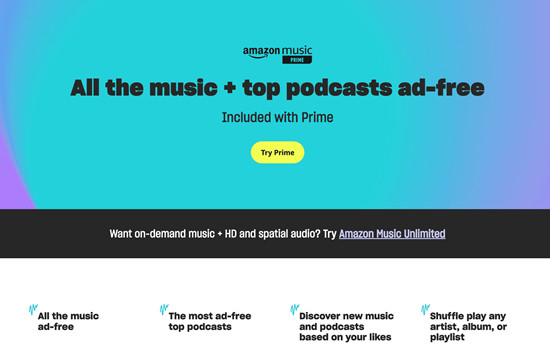
Yes, Amazon Music Prime is included for free with a Prime membership. However, it is not a separate free service. You cannot sign up for Music Prime without an active Prime subscription. This means when your Prime membership starts, renews, cancels, or expires, the same happens with Music Prime since both use the same Amazon account.
Even though Music Prime is included at no extra cost, it is not fully free because it requires a Prime membership, which costs $14.99 per month.
Part 4. What Do You Get with Amazon Music Prime?
Music Prime offers a limited experience compared to the full on-demand service it used to provide before 2023. This change can make the service feel restricted, even though it is included with Amazon Prime.
Key Features of Amazon Music Prime:
- ✅Access to over 100 million songs and podcasts
- ✅Ad-free streaming
- ✅Download "All-Access Playlists" for offline listening
- ✅On-demand access to "All-Access Playlists"
- ✅Shuffle artists, albums, or playlists
- ✅Stream on one device at a time
- ✅Offline downloads work on up to 10 devices
Key Limits of Amazon Music Prime:
- ❌Most songs play in shuffle-only mode only
- ❌Skip limit of about 6 per hour
- ❌Offline downloads available only for selected playlists
- ❌No HD or spatial audio
- ❌Playback may vary across devices
- ❌Large playlists may not play all songs evenly
- ❌Cannot stream on multiple devices simultaneously
- ❌Offline downloads may require occasional internet access
The shuffle-only model and limited skips can be frustrating, which often leads users to consider upgrading to Amazon Music Unlimited for full access.
Part 5. Amazon Music Prime vs Amazon Music Unlimited
Amazon Music Unlimited adds features that Amazon Music Prime does not have. See if Prime alone is enough or if Unlimited's extra features are worth it for your listening habits.
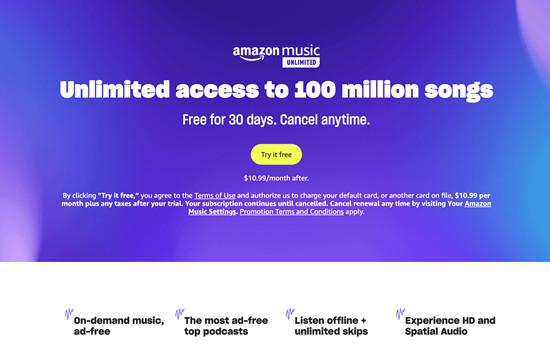
| Feature | Music Prime | Music Unlimited |
|---|---|---|
| Cost | Included with Prime ($14.99/month) | Paid subscription ($11.99 for non-Prime, $10.99 for Prime members) |
| Song catalog | 100+ million songs and podcasts | 100+ million songs and podcasts |
| Included with Prime | ✅ | ❌ (extra cost) |
| Ad-free listening | ✅ | ✅ |
| Playback | Shuffle only | On-demand |
| On-demand play | ✅ (All-Access Playlists only) | ✅ |
| Unlimited skips | ❌ | ✅ |
| Offline downloads | ❌ (selected playlists only) | ✅ (any song, album, or playlist) |
| Audio quality | Standard (up to 320 kbps) | HD, Ultra HD, and Spatial Audio where available |
| HD/Ultra HD audio | ❌ | ✅ |
| Device streaming | One device at a time | Multiple devices supported depending on plan |
| Podcast support | Full ad-free catalog | Full ad-free catalog with extra features |

Amazon Music offers 2 paid tiers for users: Amazon Music Prime and Unlimited. You can check the differences between them to choose which is better for you in this post.
Part 6. How to Get Amazon Music Prime with a Prime Membership
Music Prime may be limited compared to Amazon Music Unlimited, but it works well for casual listening. You can use it on Android smartphones and tablets, Android Auto, and other devices that support the Amazon Music app, without paying for the Unlimited plan. Here's how to get it:
Step 1. Subscribe to Amazon Prime
Go to the Amazon website and sign in with your Amazon account. If you do not have one yet, tap Account & Lists → Start here to create a new account.
Move your cursor over Account & Lists in the top right corner of the page, then select Your Prime Membership from the dropdown menu.
On the Prime membership page, tap the Join Prime or Try Prime button.

Review the available plans, such as the monthly or annual option, and choose the one you prefer.
Confirm your payment method and billing address if prompted.
Tap Start your free trial or Join Prime to activate the membership. Once confirmed, your Prime benefits start immediately.
Step 2. Start Using Amazon Music Prime
Open the Amazon Music website or launch the Amazon Music app on your phone or tablet.
Tap Sign In and log in with the same Amazon account that has your Prime membership.
After signing in, the app will load the Home screen with playlists, stations, and albums available with your Prime benefits.
Tap Find or Browse to explore music categories, playlists, and recommended stations.
Look for sections labeled Included with Prime, then tap a playlist, album, or station to start streaming music.
Step 3. Discover Music Included with Prime
In the Amazon Music app or web player, tap Find in the top or side navigation bar.
Browse categories such as Playlists, Stations, and Podcasts.
Open a playlist marked Included with Prime to start listening.
Tap the + Add to Library button if you want to save the playlist or album to your music library.
Go to Library from the navigation menu anytime to find the music you saved.
Part 7. How to Keep Amazon Music Songs for Free with Unlimited Downloads
If you want to keep your Amazon Music songs even after a subscription ends, a dedicated converter can provide a more flexible solution.
ViWizard Amazon Music Downloader is designed to download and convert music directly from the built-in Amazon Music Web Player. Users can log in to their Amazon account and download songs, albums, playlists, or podcasts during a free trial or active subscription. The converter then saves the content as standard audio files such as MP3.
Another advantage is that there are no download limits. ViWizard Amazon Music Converter also supports batch downloads, allowing artists, albums, or playlists to be converted at once instead of one track at a time. This makes it easier to save an entire Amazon Music library for offline listening on any compatible device.
While the process still requires an active Amazon Music subscription or trial for downloading, the converted files remain available afterward.

Key Features of ViWizard Amazon Music Converter
Free Trial Free Trial* Security verified. 5, 481,347 people have downloaded it.
- Convert Amazon Music songs, albums, playlists, and artists
- Export Amazon Music in 6 formats for different devices and players
- Support Amazon Music Prime and Unlimited accounts
- Remove ads automatically during music conversion
- Batch download Amazon Music playlists and large collections
Step 1 Choose the Output Format
After installing and opening ViWizard Amazon Music Converter, click the menu icon at the top and select Preferences. In the Conversion settings, choose an output format such as MP3, WAV, or AIFF. You can also adjust details like bit rate, sample rate, codec, and audio channels. Click OK to save the settings.

Step 2 Open the Built-in Amazon Music Web Player
Return to the main interface and open the built in Amazon Music web player. Sign in with your Amazon account to access your music library, including saved songs, albums, playlists, and podcasts.

Step 3 Add Songs, Albums, or Playlists
Browse your library or search for music you want to download. When you find the songs, albums, or playlists you want to save, click the Add to List button to load them into the conversion list.
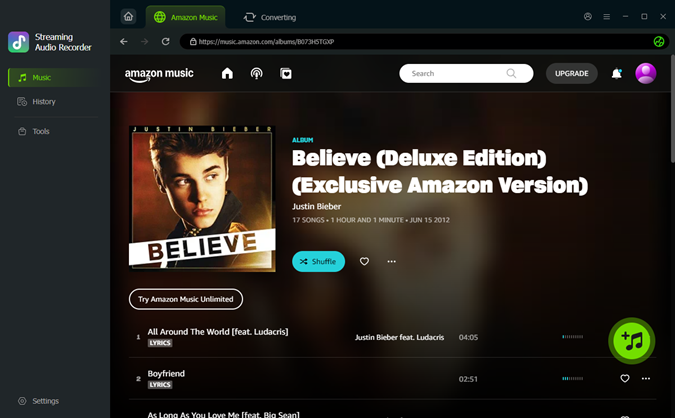
Step 4 Convert and Save Amazon Music
Click the Convert button to start downloading and converting the selected music. Once the process finishes, the converted tracks will be saved to your computer as standard audio files, ready for offline listening on any device.

Part 8. Other Amazon Prime Benefits
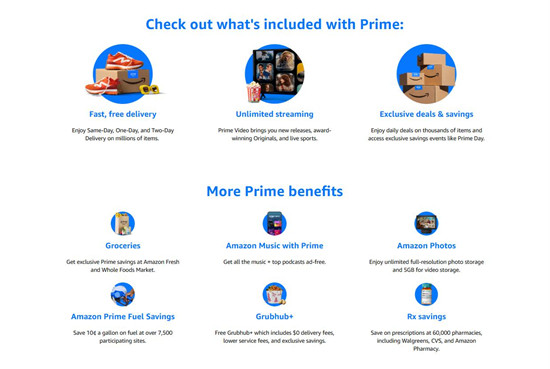
Prime combines fast delivery, entertainment, digital services, and practical perks in one membership. The value is strongest for frequent shoppers, heavy streamers, or families, offering convenience, savings, and entertainment in a single subscription. Even occasional users benefit, but the full advantage comes from using multiple services together.
Fast and Free Delivery: Save Time and Money
Prime provides fast, free delivery on millions of items, including over 300 million products eligible for same-day or one-day shipping.
Prime Video: Movies, Shows, and Live Sports Streaming
Prime Video offers thousands of movies, TV series, Amazon Originals, and live sports in select regions. Titles can be streamed on multiple devices and downloaded for offline viewing.
Amazon Music Prime: Ad-Free Music in Shuffle Mode
Amazon Music Prime includes over 100 million songs and podcasts without ads. Members can shuffle artists, albums, or playlists and download "All-Access Playlists" for offline listening on up to ten devices. Playback is limited to shuffle mode, and skips are restricted, but it provides a free music option built into Prime.
Prime Reading and Kindle Perks: Books and Magazines
Prime Reading gives access to thousands of ebooks, magazines, comics, and audiobooks. Members can also select one newly released book each month through Amazon First Reads.
Audible: Extra Listening with a Separate Subscription
Audible Premium Plus is not included with Prime, but members can take advantage of promotional trials or discounted subscriptions. Integration with Amazon accounts keeps purchases and listening history in one place. Full audiobook access requires a separate subscription, but trials and offers make it easy to expand listening options.
Prime Gaming and Twitch: Free Games and Streaming Perks
Prime Gaming includes a rotating selection of free online games, in-game content, and a monthly free Twitch channel subscription.
Amazon Photos: Unlimited Photo Storage
Prime members get unlimited full-resolution photo storage and 5 GB of video storage. This provides a simple and secure way to back up media without needing a separate cloud service.
Shopping Savings: Early Deals and Rewards
Prime members get early access to Lightning Deals, exclusive sales like Prime Day, and rewards such as cashback through the Prime Visa card.
Everyday Perks: Food Delivery, Fuel Savings, and More
Prime also includes practical perks like free Grubhub+ membership for food delivery, fuel discounts at participating stations, and prescription savings.
Conclusion.
Amazon Prime combines shopping, entertainment, and digital services in one membership. As part of the package, Amazon Music Prime gives Prime members access to a large catalog of songs and podcasts at no extra cost. However, it also comes with limits such as shuffle-only mode for most songs, skip restrictions, and limited offline downloads.
For users who want full control over broader download options, ViWizard Amazon Music Converter provide another option. By converting songs from Amazon Music into standard audio files, users can save their favorite tracks for offline listening anytime and build a personal music collection that works across different devices.
You May Be Interested


Adam Gorden is always looking for new ways to explore music and videos. He likes trying different media tools and learning how to manage audio and video files with ease.

Leave a Comment (0)