


Amazon Prime Music is a widely used streaming platform that offers access to millions of songs for its subscribers. While it's a great service, many users encounter a significant limitation: the skip limit. Just like Spotify, Amazon Music also impose 6-times limit to skip songs per hour. This feature can be frustrating for listeners who prefer skipping songs to find the perfect track.

This article delves into the skip limit on Amazon Music, its purpose, and presents four effective strategies to bypass or eliminate it. Options include utilizing the All-access playlist, upgrading your subscription plan, purchasing Amazon Music MP3 tracks, or downloading your favorite Amazon Music songs locally. We highly recommend the last option, as it permanently removes the skip limits, even after your Unlimited subscription expires. Ready to explore this topic in depth? Let's dive in!
Part 1. What Is the Skip Limit on Amazon Music
Amazon Music Prime, included with your Amazon Prime subscription, offers an impressive music library but comes with certain restrictions to maintain its value balance. One of these restrictions is the skip limit, which only allows a limited number of songs skips per hour when streaming on certain playlists or stations. But if you subscribe to Amazon Music Unlimited, you can skip songs with no limits. As for Amazon Music free users, they are also allowed to skip no more than 6 times per month.
| Amazon Plan | Amazon Music Free | Amazon Music Prime | Amazon Music Unlimited |
| Skip Limit | 6 skips/hour | 6 skip/hour, unlimited skips for the songs in All-Access Playlists | Unlimited skips |
Why There Is a Skip Limit on Amazon Music
The skip limit is implemented to encourage balanced usage of Amazon Music Prime and to distinguish it from the premium tier, Amazon Music Unlimited. By limiting skips, Amazon incentivizes users to upgrade to Music Unlimited for an unrestricted listening experience, which also remove ads for all the songs.
Part 2. How to Remove Amazon Music Skip Limits by Switching to All-Access Playlists (Prime Only)
Amazon Music Prime offers All-Access Playlists as a curated selection of songs tailored to your listening habits. Unlike other playlists or stations, these personalized playlists often come without a skip limit, allowing Prime members to enjoy uninterrupted playback. Simply search for "All-Access Playlists" in the Amazon Music app and start listening.
Step 1 Launch Amazon Music on your mobile or computer.
Step 2 Click on the search bar or the Find tab, then select the All-Access Playlists under the Listen Your Way section.
Step 3 Once you enter this special section, select one playlist you like and play them without skip limits.

Read More : How to Find Amazon Music All-Access Playlists on Prime
Part 3. Remove Amazon Music Skip Limits by Upgrading to Amazon Music Unlimited (Prime & Free)
If you want an unrestricted listening experience and have a large collection of favorite songs, upgrading to Amazon Music Unlimited is the most straightforward and cost-effective solution. This premium service removes the skip limit and provides access to additional features like a larger music library, HD audio quality, and offline playback. For new users, Amazon often offers free trial periods, making it worth exploring. For Prime members, Amazon Music Unlimited costs $10.99 per month and $109 per year.
By upgrading, you'll gain access to a wider range of services within Amazon Music without any limitations. To switch to the Amazon Music Unlimited plan, simply open your browser and go to Your Amazon Music Settings, where you can choose a different plan or renewal option.

Part 4. Bypass Amazon Music Skip Limits by Streaming Purchased Songs Offline (Prime & Free)
Another way to bypass the skip limit is by purchasing individual songs or albums for offline playback. Once you own the tracks, you can download them as MP3 files and play them without any restrictions, including skips. This option is ideal for users who prefer having permanent access to their favorite music without relying on a subscription service.
Step 1 Go to Amazon Music desktop app and navigate to the songs or albums you want to purchase for unlimited skips.
Step 2 At the right side of the desired song, click on the three-dots and select Buy Song.

Step 3 Once you are redirected to the Amazon Music digital store page, fill the payment information and follow the prompts to complete purchasing.
Step 4 After buying all the songs you want, you can go to Library > Music > Songs > Purchased to play the songs without skip limits. Also, you can directly download them into MP3 files for offline listening.

Part 5. Permanently Remove Amazon Music Skip Limits by Downloading Songs Locally (Prime & Free)
As we mentioned above, you can only enjoy All-Access Playlists for unlimited skips and Unlimited subscription, and purchasing songs costs too much. If you want a permanent solution to the skip limit, there is also a way to eliminate it, regardless of the service tier. The only tool you need is ViWizard Amazon Music Downloader. With ViWizard, you can download your favorite Amazon Music tracks as local files and play them without any restrictions, including skip limits, ads, and DRM protection.
Why Choose ViWizard Amazon Music Downloader
Bypass Skip Limitation: By converting songs, playlists, and albums from Amazon Music into offline files, users can overcome skip limits and easily browse their music library without any restrictions.
User-Friendly Interface: ViWizard offers a simple and intuitive interface, making it easy for users to navigate and convert music without any technical expertise.
Fast Conversion Speed: With advanced technology, ViWizard converts music quickly into various common formats at up to 5× speed, saving you time.
Preserves Original Quality: The software retains the original audio quality, including ID3 tags, so you get high-quality playback without any loss.

Key Features of ViWizard Amazon Music Converter
Free Trial Free Trial* Security verified. 5, 481,347 people have downloaded it.
- Convert Amazon Music songs, albums, playlists, and artists
- Export Amazon Music in 6 formats for different devices and players
- Support Amazon Music Prime and Unlimited accounts
- Remove ads automatically during music conversion
- Batch download Amazon Music playlists and large collections
Step 1 Customize Output Format
After installing and launching ViWizard, click twice to activate the program and tap the app menu at the top to access Preferences. In the Conversion settings, choose MP3, WAV, AIFF, or other as the output format. You can also adjust the codec, sample rate, bit rate, and channel here, then click OK to save your changes.

Step 2 Enter Built-in Amazon Music Web Player
Navigate back to the main interface, where you will locate Amazon Music. Click on it to access the Amazon Music web player. You can securely sign in using your Amazon Music account.

Step 3 Add Music from Amazon
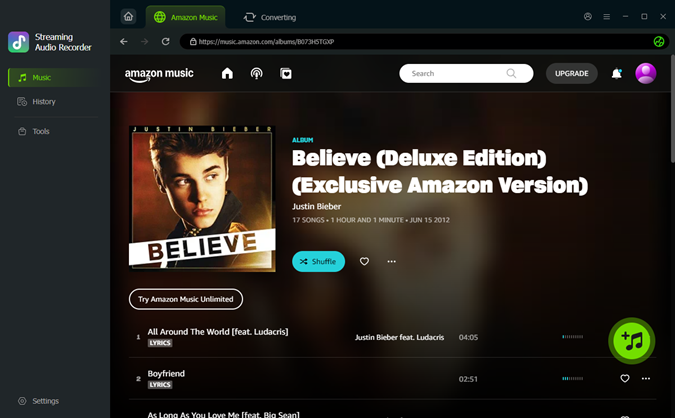
Upon logging in, you have the option to download your favorite songs from your library or paste a copied URL from Amazon Music into the ViWizard search box. Once you locate the desired songs, playlists, albums, or podcasts, simply click the "Add to List" icon to add tracks to your download queue.
Step 4 Download Amazon Music for Unlimited Skips
Now, click the Convert button at the bottom to download all the Amazon Music content you've added to ViWizard. After the conversion is complete, a window will pop up displaying the folder containing all the converted files!

Conclusion
The skip limit on Amazon Music Prime can be frustrating, but there are multiple ways to manage or eliminate it. Whether you're switching playlists, trying a free trial of Amazon Music Unlimited, or using tools like ViWizard Amazon Music Downloader, there's a solution for everyone. With the methods outlined in this article, you can enjoy a seamless listening experience on Amazon Music without the limitations of the skip feature.
You May Be Interested



From new releases to old favorites, Matt Smith is always on the lookout for good music. He follows the latest in digital entertainment and shares songs and media he thinks are worth checking out.

Leave a Comment (0)