



Pandora is one of the most popular music streaming platforms in the US, providing a huge music catalog and known for its smart radio stations and personalized recommendations. Even the free account can access millions of music content with ad support. Pandora also provides Plus and Premium free trial for its new subscribers. If you’re wondering how long the Pandora free trial lasts, or how to get Pandora Premium for free, this guide covers everything you need to know.
Below, we'll explain all official Pandora free trials, partner promotions like T-Mobile, JLab Audio, and UNest, plus how to keep listening to Pandora for free with ViWizard Pandora Music Downloader even after the trial ends.
Part 1. Is Pandora Music Free?
In short, yes. Similar to most popular music streaming services, Pandora provides a free, ad-supported service for personalized radio stations and podcasts. However, it also offers paid subscription tiers: Pandora Plus ($4.99/mo) and Pandora Premium ($10.99/mo) for an ad-free experience and offline listening. If you want to remove ads and unlock advanced features, Pandora also offers Plus and Premium plans—both available with free trials.
Bonus: Brief Intro to Pandora Subscription Tiers
| Plans | Price | On-Demand Songs | Unlimited Skips | Offline Listening | Create playlist | Ads Streaming |
|---|---|---|---|---|---|---|
| Pandora Free | Free | ❌ | ❌ | ❌ | ❌ | ✅ |
| Pandora Plus | $4.99/mo | ❌ | ✅ | ✅ | ✅ | ❌ |
| Pandora Premium | $10.99/mo | ✅ | ✅ | ✅ | ✅ | ❌ |
Read More: How to Make a Playlist on Pandora on iPhone/Android/Windows/Mac
Part 2. Get Pandora Free Trial with Official Pandora Offers
Once you've experienced Pandora Free, the next natural step is to test its paid plans. Pandora offers official free trials, allowing users to decide whether Plus or Premium is worth the upgrade without any long-term commitment.
These trials are offered directly by Pandora and are usually available to new or eligible returning users. Below are the most common options.
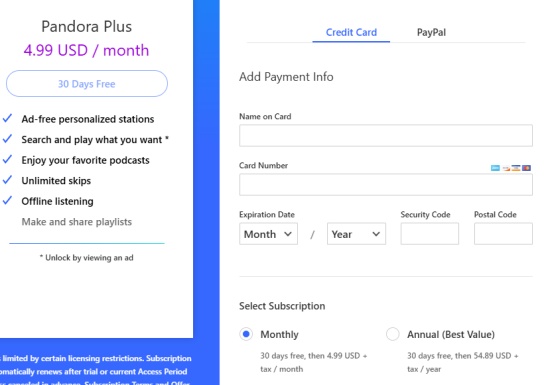
Option 1. Pandora Plus Free Trial (30 Days)
Pandora Plus is a great entry-level upgrade for users who primarily listen to radio stations rather than specific songs. And the following we will show you how to obtain it:
To get Pandora Plus Free Trial
Step 1 Choose your frequently used browser to go to Pandora's official website.
Step 2 Hit the Upgrade icon next to the Profile in the top right screen.
Step 3 After you enter the Pandora subscription plan, choose Pandora Plus and hit the Get 30 Days Free option.
Step 4 Add your payment info with the name and number of your card, paste your security code, and your postal code to the blank.
Step 5 Agree to the Pandora Plus subscription and click the Start Trial button to start your Pandora Plus 30-day free trial.
Option 2. Pandora Premium Free Trial (60 Days)
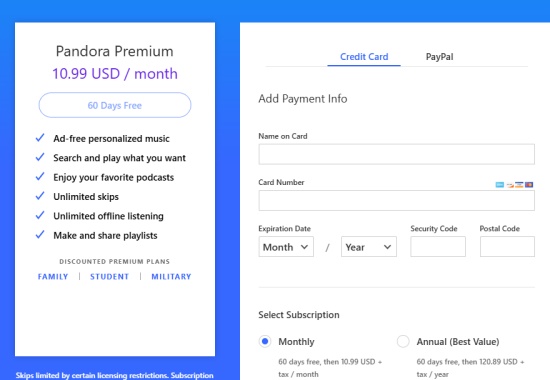
Alternatively, you can also choose to subscribe to Pandora Premium to get more advanced Pandora features. Pandora Premium is designed for users who want on-demand music streaming, playlists, and offline listening. It gives you full control over every song and is perfect if you like creating personalized playlists.
To Get Pandora Premium Free Trial
Step 1 Navigate to the Pandora official website on Chrome or other browsers.
Step 2 Hit the Upgrade button at the top right of the screen.
Step 3 Choose Pandora Premium, and hit Get 60 Days Free icon.
Step 4 Enter your credit card or add PayPal to allow Pandora to know your payment info.
Step 5 Toggle on to agree to Pandora subscription terms and offers terms, so that you can tap the Start Trial icon to begin your Pandora Plus 60-day free trial.
Option 3. Pandora Premium Family Free Trial (60 Days)
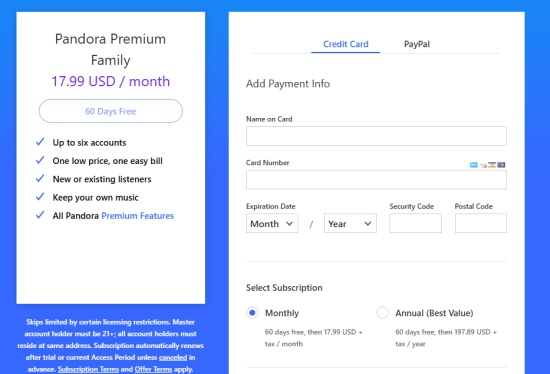
If you have a household with multiple listeners, the Premium Family plan allows up to 6 accounts, each with its own playlists and preferences, making it ideal for families. The Family plan is perfect for households or groups who want multiple accounts under one subscription, so everyone can enjoy Premium features independently.
To Get Pandora Premium Family Free Trial
Step 1 Navigate to the Pandora Subscription Plan page on a browser.
Step 2 In the Pandora Premium section, click the FAMILY option at the bottom left.
Step 3 Enter your credit card details or add PayPal to verify payment info.
Step 4 Toggle on to accept subscription terms and offer terms.
Step 5 Click Start Trial to activate your 60-day Family Premium trial.
Option 4. Pandora Premium 30-Day Free Trial for Pandora Plus Subscribers
If you're already a Pandora Plus user via iTunes or Google. You can upgrade to Premium for 30 days free, allowing you to test full on-demand features without opening a new account.
To Get 30-Day Premium Trial for Plus Users
Step 1 Log in to your existing Pandora Plus account.
Step 2 Navigate to Account Settings and select Upgrade to Premium.
Step 3 Choose the 30-Day Free Trial option for Plus subscribers.
Step 4 Enter your credit card or PayPal information to verify payment.
Step 5 Toggle on to agree to Pandora subscription and offer terms. Click Start Trial to begin your 30-day Premium trial.
Part 3. Get Pandora Premium Free Trial with T-Mobile (4 Months/US Only)
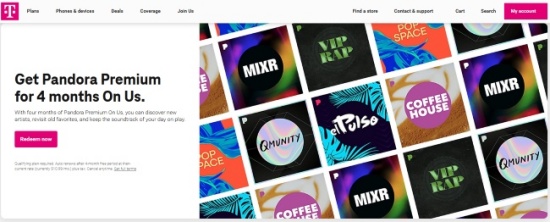
T-Mobile has offered some of the most generous Pandora deals, with certain postpaid plans like Go5G Next including a free 4-month subscription to Pandora Premium. While the exact duration can vary by promotion, it's an incredible value if you are an eligible T-Mobile customer in the US.
To Activate T-Mobile Pandora Free Trial
Step 1 Log in to the T-Mobile app or website with your T-Mobile account.
Step 2 Navigate to the Add-ons & Benefits section to choose Pandora Premium and follow the instructions to link your Pandora account to T-Mobile.
Step 3 Hit the Active option, and you will receive a redemption link via SMS to get your 4 months free Pandora Premium trial.
Part 4. Get Pandora Premium Free Trial with JLab Audio (3 Months)
JLab Audio has partnered with Pandora to provide extended free trials bundled with certain headphones and earbuds. While the promotion is limited and may change, it's an excellent option for music lovers who are purchasing new audio gear. Once you purchased JLab's products, like headphones or earbuds, you will receive a free code that contain 3-month free Pandora Premium.
To Redeem JLab Audio Pandora Promo
Step 1 Navigate to the Pandora redemption page.
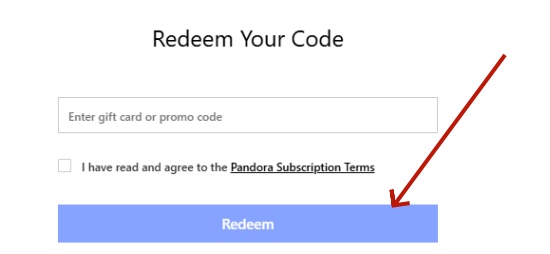
Step 2 Navigate to the Add-ons & Benefits section to choose Pandora Premium and follow the instructions to link your Pandora account to T-Mobile.
Step 3 Hit the Active option, and you will receive a redemption link via SMS to get your 4 months free Pandora Premium trial.
Part 5. Get Pandora Premium Free Trial with UNest (3 Months)
Certain regional partners like UNest have offered Pandora Premium free trials as part of subscription bundles. While these promotions are region-specific, they provide a convenient way for UNest subscribers to access Premium content for an extended period. You need to note that the promotion is only available for new subscribers and can't be used with other promotions or coupons.

To Redeem UNest Free Trial
Step 1 Download the UNest app from App Store or Google Play Store and sign up for U-Next in an eligible region.
Step 2 Check for any Pandora Premium promotion during registration.
Step 3 Follow the instructions to link your Pandora account.
Step 4 Enter payment info for verification. And then you need to agree to subscription terms.
Step 5 After verification, And then you can start streaming Pandora Premium for 3 months.
Part 6. How to Use Pandora for Free Forever After the Trial Ends
Even if your free trial expires, you can continue enjoy on-demand Pandora playback and offline listening with ViWizard. During the free trial period, you can use ViWizard Pandora Music Downloader to save your favorite playlists and tracks to your local device. And then you can stream these Pandora downloads with original Pandora Premium audio quality without ads disturbing. Additionally, you can easily manage the downloads as ViWizard keeps the original ID3 tags with every track. Once downloaded, you can play Pandora Premium content in ViWizard's built-in media player.

Download songs, playlists, albums, and your whole music library from 10 major streaming platforms, including Pandora, to MP3, FLAC, WAV, AIFF, M4A, or M4B with original quality and ID3 tags for permanent offline listening.
Step 1 Open ViWizard and Set MP3 Format
Launch ViWizard Pandora Music Downloader on your computer. Click the Menu icon at the top-right corner and select Conversion. Under Output Format, choose MP3 and select your preferred audio quality. Click OK to save the settings.

Step 2 Sign in to Pandora
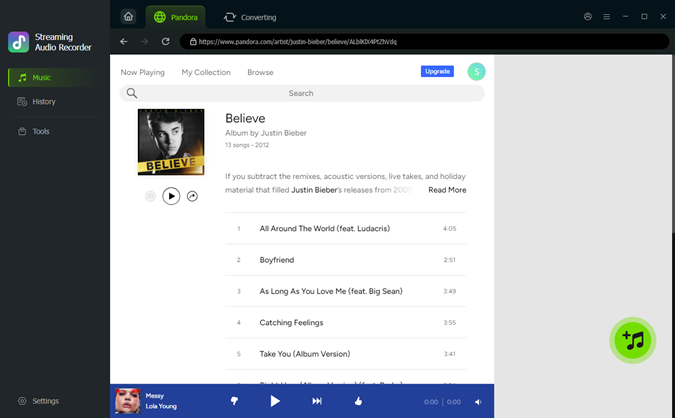
From the main interface, click the Pandora icon. Log in with your Pandora account to access the built-in web player, where you can browse your favorite stations, playlists, and albums securely inside ViWizard.

Step 3 Add Music and Start Recording
Navigate to the songs, playlists, or stations you want to download. Click Add to List to queue them in the conversion list. Once all your desired tracks are added, click Convert to start recording and converting them into MP3 files automatically.
Step 4 Access and Enjoy Your Pandora Downloads
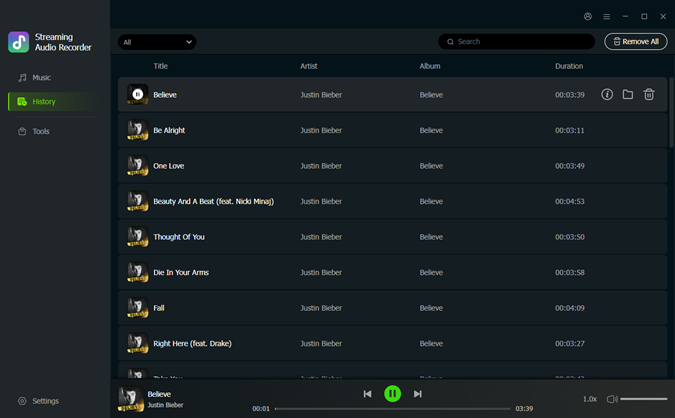
After conversion, open the History tab to view your completed downloads. Click the folder icon to locate your MP3 files on your computer. You can now listen to your Pandora music offline, transfer the files to other devices, or organize them in your music library.
Part 7. How to Cancel Pandora Music Free Trial (Step-by-Step)
If you don't want to be charged after the free trial ends, make sure to cancel your Pandora subscription before the renewal date. Below is the exact step-by-step process to cancel Pandora on the official website.
Step 1 Go to the Pandora website and log in to your account.
Step 2 Click your profile icon in the top-right corner and select Settings.

Step 3 On the Settings page, click Subscription from the left-side menu.
Step 4 Select Switch Plans to enter next page.
Step 5 Scroll down and click Cancel Subscription at the bottom of the page.

Step 6 Enter your current Pandora password to confirm the cancellation.
Conclusion
Pandora offers multiple ways to enjoy Premium for free, from official trials to partner promotions like T-Mobile, JLab Audio, and UNest. Whether you want a short test or several months of ad-free music, there's likely a free trial that fits your needs.
If you don't want to continue, simply cancel before the trial ends—or keep enjoying Pandora Free forever with ViWizard Pandora Music Downloader.
You May Be Interested
Pandora Mod APK Review with a Safer Alternative

Pandora Plus vs Pandora Premium: Which Plan Is Better?

How to Download Music from Pandora without Premium

17 Ways to Get Tidal Free Trial Up to 12 Months

20+ Ways to Get Apple Music Free for Up to 6 Months

8 Ways to Stop Pandora from Automatically Playing


Matt Smith, a digital entertainment industry enthusiast at ViWizard, is dedicated to providing insightful commentary and solutions for music and media-related topics, including industry trends, analysis, and recommendations.

Leave a Comment (0)