


Want to listen to SoundCloud on your Xbox while gaming? You're not alone. Many Xbox users use SoundCloud to play music, discover new artists, or keep their favorite playlists running in the background. But figuring out how to activate SoundCloud, loop a song, or fix playback issues isn't always straightforward. Don't worry—we've got you covered.
In this guide, we'll show you how to set up SoundCloud on Xbox, play music while gaming, repeat tracks, solve common problems, and even enjoy SoundCloud music offline on your console. Let's explore it!
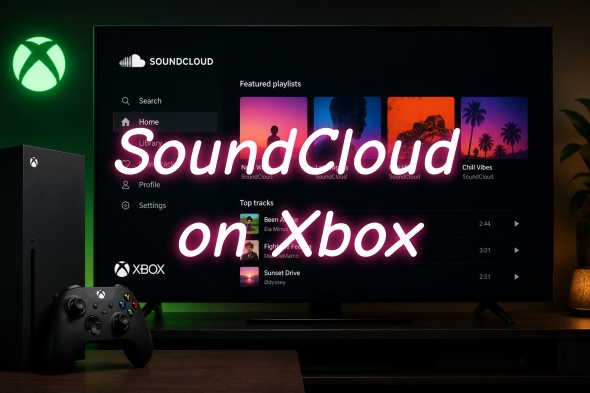
Part 1. Can You Listen to SoundCloud on Xbox?
Yes, you can play SoundCloud on your Xbox. You can install the official SoundCloud app directly from the Xbox Console Apps store. Then you may question what music apps you can use on Xbox. Well, besides SoundCloud, you can get Spotify, Apple Music, Amazon Music, and Pandora.
With the dedicated SoundCloud app, you can access millions of songs and audio on SoundCloud while you game. Free users can play SoundCloud on Xbox, but there is limited access to the catalog. The following are the features of the Xbox app.
Background Play: You can access the library of SoundCloud music while gaming, including your liked tracks, mixes, and remixes.
Discover: You can view SoundCloud Charts, streaming lists, and "The Upload", which is a personalized playlist.
Seamless Login: You can pair your mobile device or computer to your Xbox via an activation code. There is no need to type your password with your controller.
Audio Control: You can easily skip, pause, or adjust your music volume using the Xbox Guide menu while you game.
Playlists: For quick access, you can pin your favorite playlists or albums to your start screen.
Part 2. How to Activate SoundCloud on Xbox
To play background music while gaming and access your liked content, you need to activate SoundCloud on Xbox. All you need to do is link your console to your existing account using another device. During the process, you will get a quick code, and it works the same way whether you use your mobile phone or a desktop web browser.
On Mobile
01Open your Xbox.
02To open the guide, tap the Xbox button on your controller.
03Choose My game & apps > See all > Apps.
04Find SoundCloud in the Microsoft Store and download it.
05Open the SoundCloud app on your Xbox.
06Choose Sign in on the welcome screen.
07The newly installed SoundCloud will show an activation code on the screen. Let it be.
08Open your mobile phone and tap a web browser.
09Navigate to soundcloud/activate, and sign in to your SoundCloud account if prompted.
10Enter the unique code that appears on Xbox, and tap Activate.
On Desktop
01Open your Xbox and press the Xbox button on your controller.
02Go to My game & apps > See all > Apps.
03Search for SoundCloud in the Microsoft Store and choose Install.
04Open the SoundCloud app on Xbox and choose Sign in.
05An activation code will show up on your TV screen. Leave it open.
06Open your computer and visit soundcloud/activate via a web browser.
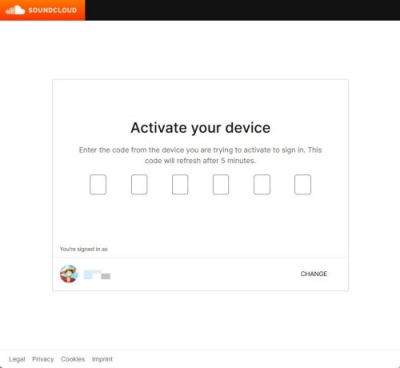
07Log in to your active SoundCloud account if prompted.
08Type the code you get from Xbox. Click Continue or Activate.
Part 3. How to Background Play SoundCloud Songs on Xbox
If you want to play SoundCloud music in the background while gaming, you can install the official SoundCloud app, play your music, and launch your game. The controller can adjust the audio seamlessly, and you can game and play music at the same time.
Background Play SoundCloud Songs on Xbox
01Go to Xbox > Store, search for SoundCloud, and install it.
02Launch the official app from My Game & Apps. And on your phone, go to soundcloud/activate to sign in.
03Locate your liked music and choose Play.
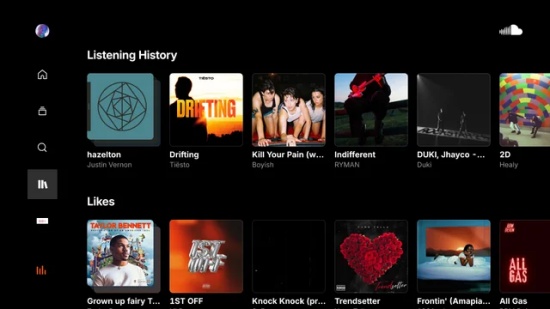
04Press the Xbox button on your console and leave Xbox.
05Open your game, and the music keeps playing in the background.
06To adjust the audio, press the Xbox button to open the guide, highlight the SoundCloud app, and change the volume.
07To skip, pause, or play songs, use the menu.
Part 4. How to Loop SoundCloud Songs on Xbox
If you want to keep a song playing continuously, you can try the built-in repeat feature in the SoundCloud player or Xbox media controls. If a repeat button is not available, creating a playlist that contains only the track you want to hear is a practical alternative. The following methods explain how to loop SoundCloud songs on Xbox in different situations.
Option 1: Using the Xbox Guide
If the repeat button is available in your Xbox media controls, you can enable it while listening to SoundCloud in the background.
01Open the SoundCloud app on your Xbox and start playing a song or playlist.
02Press the Xbox button on your controller to open the Xbox Guide.
03Navigate to the active media player and choose SoundCloud.
04Select the A button to open the playback controls.
05Choose the Repeat/Loop icon to listen on repeat.
Option 2: Using the Playlist Loop
If you cannot find a repeat button on Xbox, a simple workaround is to create a playlist containing only the track you want to loop.
01On your phone or computer, navigate to SoundCloud and sign in to your account.
02Find the song you want to loop, choose the three dots, and add it to a new playlist.
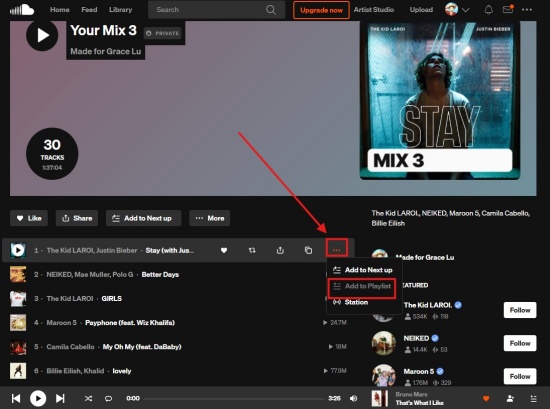
03Open the SoundCloud app on your Xbox and sign in to the same account.
04Go to your Library > Playlists and play the playlist you just created.
05Start playback. The playlist with a single song starts playing continuously when the repeat is enabled.
Option 3: Using the SoundCloud App
To loop SoundCloud songs on Xbox, one of the easiest methods is to play the song on your phone and cast it to your Xbox.
01Open the SoundCloud App on your Xbox.
02Make sure you have activated SoundCloud on your Xbox (Part 2).
03Play the track you want to repeat on your mobile phone.
04Open the Now Playing bar at the bottom of your screen to see your player controls.
05Find the Repeat button.
06Click the Repeat button until it is highlighted or shows a tiny "1".
Part 5. How to Fix SoundCloud Not Working on Xbox
SoundCloud on Xbox often fails due to app bugs, cache errors, or internet drops. To fix it, you can restart your console, clear the app cache, check for updates, or reinstall the app.
Restart the App: You just press the Xbox button on your controller. Highlight SoundCloud, press Menu, and choose Quit.
Hard Reset Your Xbox: Tap and hold the power button for 10 seconds until it shuts off. Unplug it for 30 seconds, and then plug it in. Turn on your Xbox.
Update the App: Navigate to My Games & Apps > Manage > Updates. If SoundCloud needs an update, install it.
Relink Your Account: Sign out of the app. Visit soundcloud/activate on your phone or computer, sign in, and enter the code shown on your TV.
Reinstall the App: Highlight the SoundCloud app, press Menu (three lines icon), and choose Uninstall. Search for SoundCloud in the Microsoft Store within Xbox and download it again.
Part 6. How to Download SoundCloud Music for Offline Playback on Xbox
Now I believe you've learned how to install and activate SoundCloud on Xbox, play music in the background while gaming, loop your favorite tracks, and fix common app issues. While these methods make streaming SoundCloud on Xbox convenient, they still rely on an internet connection and the SoundCloud app. If you'd rather listen without buffering, ads, or network interruptions, ViWizard SoundCloud Music Downloader can help you download SoundCloud music for offline playback.
With ViWizard SoundCloud Music Downloader, you can download SoundCloud songs, albums, and playlists to your computer and save them in popular formats such as MP3, M4A, FLAC, and WAV. You can customize the output format and organize your downloads by title, artist, album, and more. Simply sign in to the built-in SoundCloud web player, select the music you want, and add it to the download list. ViWizard will then convert and save the tracks at high speed while preserving the original audio quality.
After downloading, you can transfer the SoundCloud files to a USB drive and play them on the Xbox. This way, you can enjoy your SoundCloud library on Xbox anytime without an internet connection.

Want more flexibility with your SoundCloud music? ViWizard SoundCloud Music Converter helps SoundCloud listeners convert tracks, playlists, and albums with seamless music conversion. Save your favorites and keep your SoundCloud collection accessible.
Use ViWizard to Download SoundCloud Music for Xbox Offline Playback
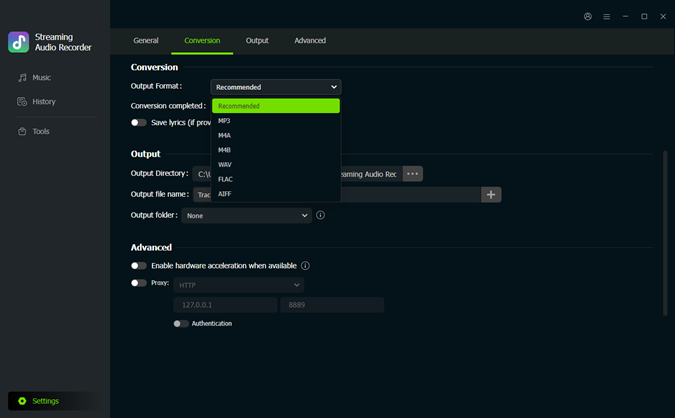 Step 1: Customize the Output Settings
Launch ViWizard SoundCloud Music Downloader and click the menu icon in the upper-right corner. Go to Preferences > Conversion and choose an output format such as MP3, FLAC, WAV, or M4A. You can also adjust the audio quality and output preferences before saving your settings.
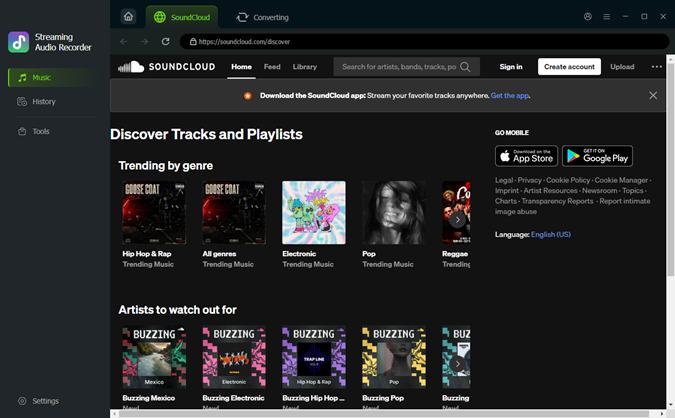 Step 2: Sign In to SoundCloud
Return to the main interface and select SoundCloud. The built-in SoundCloud web player will open automatically. Sign in to your SoundCloud account to access your favorite songs, playlists, albums, and liked tracks.
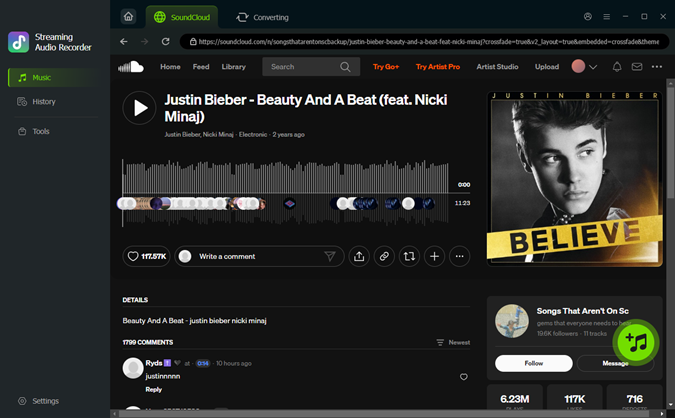 Step 3: Add SoundCloud Music to the Download List
Browse the SoundCloud library and open the playlist, album, or track you want to save. Click the Add to List (+) button, and ViWizard will automatically load the available songs into the conversion queue.
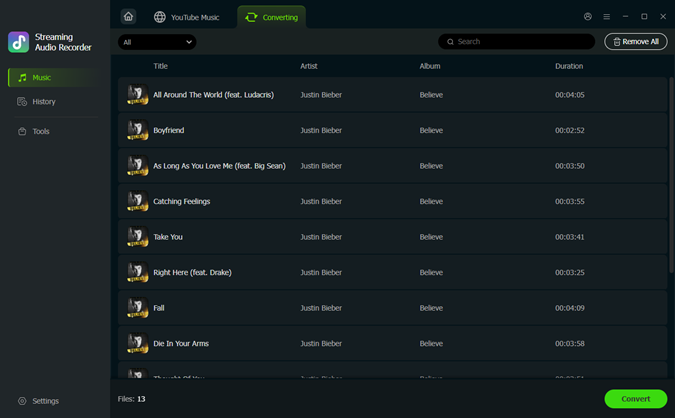 Step 4: Download and Save SoundCloud Music
Review the tracks in the conversion list and click Convert to start downloading. Once the process is complete, the downloaded SoundCloud songs will be saved to your computer. You can format your USB drive to NTFS or FAT32 on your computer. Transfer the files to a USB drive and play them on your Xbox offline anytime.
Conclusion
That's everything you need to get the most out of SoundCloud on Xbox. Once you've activated the app, you can easily stream music, listen in the background during gameplay, and keep your favorite songs on repeat. If you're tired of relying on an internet connection, downloading SoundCloud music for offline playback is a great option. With your favorite tracks saved locally, you can enjoy your music on Xbox anytime without buffering, interruptions, or streaming limits. Just try it!
You May Be Interested


Dave Henry loves movies and all things video. He likes checking out different video formats and trying new media players to see how they change the viewing experience.

Leave a Comment (0)