


If you have a Spotify playlist you'd like to keep as local files, Spotisaver is one tool you may come across. It runs in your browser and lets you work with Spotify playlist, album, and track links. You can paste a Spotify link into Spotisaver, let it find the music, and save available tracks as MP3 files. You can also download playlists as ZIP files or export their tracklists as TXT files.
If you're curious about Spotisaver and what it can actually do, this guide walks through the basics. We'll look at what Spotisaver is, how it works, its main features, and what you get with the Free and Premium plans.

Need Spotify music for offline listening? ViWizard Spotify Music Converter helps Spotify Premium and free users save songs, playlists, albums, podcasts, and audiobooks in popular audio formats with fast, reliable conversion. Start converting and enjoy Spotify music across more devices.
Part 1. What Is SpotiSaver?
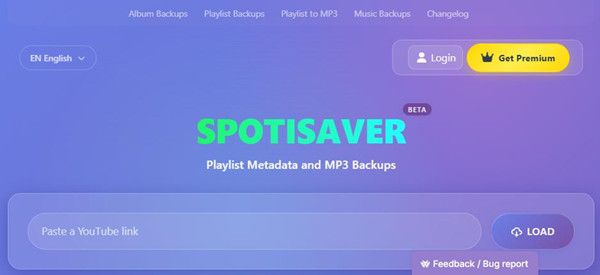
SpotiSaver is a browser-based tool for turning Spotify playlist, album, and track links into personal MP3 backups. Its website describes it as an "independent playlist metadata and MP3 backup tool." You do not need to install a desktop app or browser extension, and SpotiSaver does not require a Spotify login.
The important distinction is that SpotiSaver does not access or download audio directly from Spotify. It uses the Spotify link to identify the music, then looks for matching audio from independent external sources where available.
Part 2. What Can SpotiSaver Do?
SpotiSaver can process Spotify playlists, albums, and individual tracks. Once you load a link, it reads information such as the track title, artist, album, cover art, release date, and playlist structure, then searches for matching audio.
When a match is available, you can save the track as an MP3. Larger collections can also be packaged into ZIP archives, while track information can be exported as a TXT file. SpotiSaver can retain metadata including title, artist, album, cover art, and release date.
The Free plan supports up to 100 tracks per playlist. Premium raises that limit to 1,000 tracks and adds features such as custom filenames, background archive preparation, and YouTube Music link processing.
-

Process a Spotify link
Paste a link to a Spotify playlist, album, or individual track into Spotisaver. The site can identify the music and show information such as the track title, artist, album, cover art, release date, and tracklist. Since Spotisaver works in your browser, you don't need to install software or sign in to Spotify before processing a link.
-
Find matching audio
Once Spotisaver identifies the tracks, it searches independent external sources for matching audio. If it finds a match, you can save the track as an MP3, with the site supporting up to 320 kbps when available. Because the audio comes from external sources rather than directly from Spotify, some tracks may not have a matching file available.
-
Save a whole playlist or album
If you're working with a larger collection, Spotisaver can handle multiple tracks from a Spotify playlist or album. You can download the available tracks individually or put them together in a ZIP archive.
-
Keep the track information
Spotisaver also works with information such as the artist, album, cover art, release date, and other track details. If you only need the song list, you can export the playlist or album as a TXT file instead of saving the audio.
-
Use Spotify links without accessing Spotify audio
Spotisaver says it does not directly download, rip, or record audio from Spotify. Instead, it uses the Spotify link to identify the music and then searches independent sources for matching audio. This approach is also why the site describes itself as a music backup tool rather than simply a Spotify downloader.
Part 3. Is SpotiSaver Safe and Legit?
SpotiSaver states that it is not affiliated with, endorsed by, sponsored by, or associated with Spotify AB. It also does not ask for Spotify credentials, since it does not need access to your Spotify account.
Instead, the Spotify link provides the information needed to identify the requested music, while the actual matching audio comes from independent external sources. That also means SpotiSaver cannot guarantee that every track will be available. If no matching source is found, the track may not be processed.
There is also a legal point to keep in mind. SpotiSaver states that users are responsible for making sure they have the legal right to back up, download, or copy the content they process.
Part 4. How to Use SpotiSaver Playlist Downloader
Using SpotiSaver is fairly straightforward. Open a Spotify playlist, choose Share > Copy Playlist Link, paste the link into SpotiSaver, and click Load. Once the playlist appears, you can download individual tracks, the full collection as a ZIP archive, or the track list as a TXT file.
Private playlists can be a problem because SpotiSaver needs access to the playlist information. Its instructions recommend making the playlist public, waiting about a minute, and loading the link again. Premium users can also prepare larger ZIP archives in the background and receive an email when the archive is ready; prepared archives remain available for 24 hours.
Note: SpotiSaver's MP3 backup function depends on finding a matching recording from an external source, so not every Spotify track is necessarily available. If no suitable match is found, that track may not be available as an MP3.
01Open Spotify and go to the playlist you want to back up.
02Click the three dots (…) next to the playlist name.
03Select Share > Copy Playlist Link.
04Open SpotiSaver, paste the Spotify playlist link into the input field, and click Load.
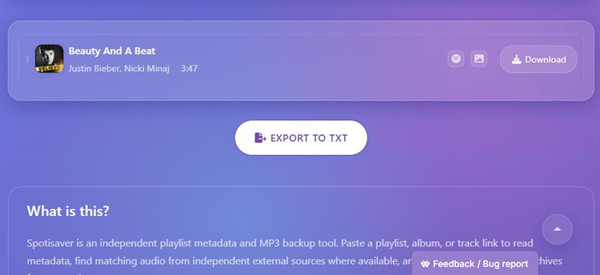
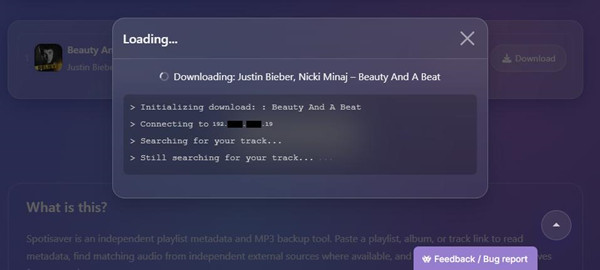
05Wait for SpotiSaver to read the playlist information and search for matching audio.
06Review the available tracks and matches found by SpotiSaver.
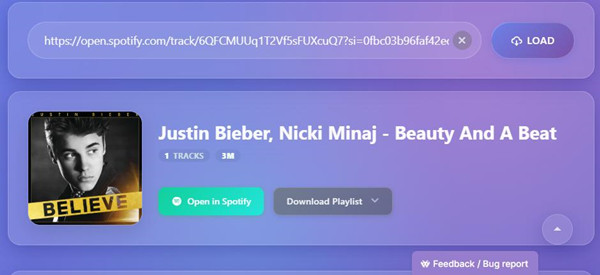
07Select the tracks you want to download, or choose to download the entire playlist as a ZIP archive.
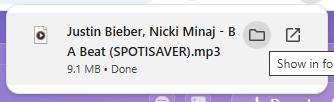
08Choose Export to TXT if you only want to save the playlist's track information.
Part 5. SpotiSaver Free vs. Premium
| Feature | Free | Premium |
|---|---|---|
| Playlist processing | 1 playlist at a time | Higher playlist processing limits |
| Tracks per playlist | Up to 100 tracks | Up to 1,000 tracks |
| ZIP archive | Up to 100 tracks | Up to 1,000 tracks |
| Download speed | Standard download speed | Faster archive preparation when capacity is available |
| Background archive preparation | No | Yes, with email delivery |
| Filename | Includes the Spotisaver tag | No Spotisaver tag |
| Filename customization | Fixed filename pattern | Custom filename templates |
| YouTube Music links | Not supported | Supported |
| Priority queue/support | Basic support | Priority queue and priority support |
| MP3 backups | Yes | Yes |
| ZIP backups | Yes | Yes |
| TXT tracklist export | Yes | Yes |
| No Spotify login required | Yes | Yes |
| Browser-based | Yes | Yes |
The Free plan lets you process one playlist at a time with up to 100 tracks, while ZIP archives are also limited to 100 tracks. It uses a fixed filename format that includes a SpotiSaver tag and does not include YouTube Music downloads, background archive preparation, or email delivery.
Premium costs €2 for 30 days or €5 for 3 months, with no automatic subscription. It raises the playlist and ZIP archive limit to 1,000 tracks, removes the SpotiSaver tag from filenames, and adds custom filename templates, YouTube Music support, background archive preparation, email delivery, faster archive preparation when server capacity is available, and priority support. With custom filename templates, you can control how your saved tracks are named and organized using fields such as artist, title, album, year, and track number.
Part 6. Best SpotiSaver Desktop Alternatives for Downloading Spotify Music
ViWizard Spotify Music Converter is a desktop alternative for Windows and macOS. Its built-in Spotify Web Player lets you log in, browse your library, and add songs, albums, artists, playlists, and supported podcasts to the conversion list; you can also paste a Spotify URL. Unlike SpotiSaver, which uses Spotify links to identify tracks and searches independent external sources for matching audio, ViWizard works with Spotify through its built-in Web Player and converts the selected content within the desktop app. It supports MP3, FLAC, WAV, AIFF, M4A, and M4B, with customizable bitrate and sample rate settings and support for available metadata and album artwork.
You can select individual songs, albums, or playlists, choose an output folder, and access completed files from the History section. ViWizard also includes a built-in media player. The free trial converts only the first 30 seconds of each track or supported content; the full version removes this limitation.
| Feature | SpotiSaver | ViWizard Spotify Music Converter |
|---|---|---|
| Type | Online Spotify downloader | Desktop Spotify converter |
| Platform | Web browser | Windows & Mac |
| How it works | Paste Spotify links and download matching MP3 files | Add Spotify songs, albums, playlists, and other supported content, then convert them |
| Output | MP3, up to 320 kbps when available | MP3, M4A, WAV, FLAC, AIFF, M4B |
| Batch downloads | Playlists and albums | Songs, playlists, albums, and other supported content |
| Customization | Filename options and basic metadata | Format, bitrate, sample rate, filenames, metadata, and lyrics |
| Main appeal | No installation and a simple download process | More control over audio files and local music libraries |
| Users commonly like | Free access, easy playlist downloads, and simple setup | Easy workflow, format flexibility, batch conversion, and customer support |
| Common issues | Some tracks may be unavailable or incorrectly matched | Some users report Spotify account restrictions or occasional software issues |
| Best for | MP3 downloads | More advanced local music management |
Key Features of ViWizard Spotify Music Converter
Free Trial Free Trial* Security verified. 5, 481,347 people have downloaded it.
- Convert Spotify songs, playlists, albums, podcasts, and audiobooks
- Export Spotify music in 6 formats for different devices and players
- Support Spotify Premium and free accounts for music conversion
- Preserve music metadata when organizing converted collections
- Batch download Spotify playlists and large music libraries
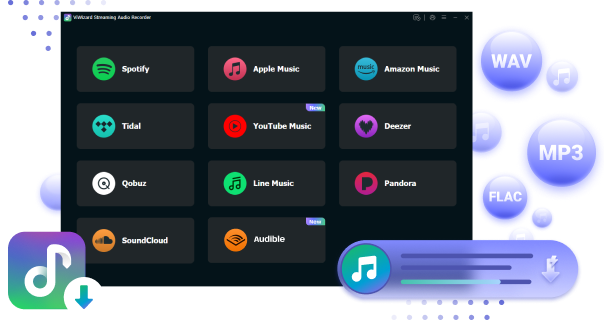
 Step 1: Install and open ViWizard Spotify Music Converter
Download and install ViWizard Spotify Music Converter on your Windows or Mac computer, then launch it. Sign in to your Spotify account through the built-in Spotify Web Player to access your music library directly in ViWizard. Both Free and Premium Spotify accounts are supported.
 Step 2: Add Spotify songs or playlists to the conversion list
Browse your Spotify library and select the songs, albums, or playlists you want to convert to MP3. You can drag and drop them into ViWizard or paste a Spotify URL into the search bar. The selected tracks will appear in the conversion list, where you can review individual songs or entire playlists before starting the conversion.
 Step 3: Choose MP3 as the output format
Click the Menu icon in the top-right corner and select Preferences > Convert. Choose MP3 as the output format, then adjust settings such as bitrate, sample rate, and file organization if needed. You can also choose how ViWizard organizes the converted files, such as by artist or album. Click OK to save your settings.
 Step 4: Convert and save the music locally
Return to the conversion list, review the tracks you want to convert, and click Convert. ViWizard will process the selected Spotify tracks and save the resulting MP3 files to your chosen output folder. When the conversion is finished, open the History section and click the Open Folder icon to access your converted music locally.
Part 7. Is SpotiSaver Worth It?
Choose SpotiSaver if you want a simple browser-based way to process Spotify playlists, albums, or tracks without installing software or connecting a Spotify account. It supports MP3 files, ZIP archives, metadata, and TXT track lists, so you can handle both individual tracks and larger collections. Before you use it, though, check how it gets the audio. SpotiSaver uses Spotify links to identify music and searches independent external sources for matching files, so some tracks may not be available. The Free plan also limits playlists to 100 tracks; choose Premium if you need larger collections or its additional features.
If you want to work with Spotify through a dedicated desktop app instead, try ViWizard Spotify Music Converter. Its built-in Spotify Web Player lets you select Spotify songs, albums, artists, playlists, and supported podcasts, then convert them to MP3, FLAC, WAV, AIFF, M4A, or M4B. Unlike SpotiSaver, ViWizard works with Spotify through its built-in Web Player instead of relying on external audio matching.
You May Be Interested

Top 10+ Spotify Music Downloaders of 2026 (with Best Free Tools)

Review of Spotify-Downloader (Spotdownloader)

SoundLoader Spotify Downloader: Download Spotify Songs as MP3 Online

SpotifyMate Review: Is It Really Reliable for Spotify Downloads?

What Is SpotifyDown? How It Works and a Safer Alternative

Nick Orin often turns to tech forums to see what apps people are talking about. He likes testing different software, comparing features, and finding out which tools are worth a try.

Leave a Comment (0)