


Spotify has long been one of the most popular music streaming services worldwide. With its large user base, personalized recommendations, and simple user experience, it has become a favorite choice for listeners who want to discover and enjoy music easily.
TIDAL takes a different approach by focusing on high-fidelity sound quality. Instead of competing mainly through convenience and personalization, it stands out with features like lossless audio, Hi-Res FLAC, and Dolby Atmos for listeners who want a more detailed listening experience.
But does better sound quality make TIDAL a better choice than Spotify? It depends on what you need. Spotify is better for music discovery, smart recommendations, and everyday listening, while TIDAL is better for users who care more about audio quality and a premium music experience.
In this comparison, we will look at the key differences between Spotify and TIDAL, including music libraries, discovery, user experience, audio quality, device support, pricing, and unique features.
Part 1. Spotify vs TIDAL: Overview
Spotify and TIDAL offer different music streaming experiences. Here's a quick look at what each service brings.
What Is Spotify?

Spotify is one of the world's largest audio streaming platforms, launched in Sweden in 2008. It changed the way people listen to music by replacing downloads and physical purchases with streaming. Today, Spotify offers not only music but also podcasts, audiobooks, and other audio content. As of 2026, Spotify has more than 760 million monthly active users, including around 293 million Premium subscribers, across 184 markets. Its library includes more than 100 million music tracks, millions of podcast titles, and hundreds of thousands of audiobooks.
Spotify offers a free ad-supported plan and paid Premium plans. Premium users get features such as ad-free listening, offline downloads, higher audio quality options, and more. The platform continues to expand through podcasts, audiobooks, personalization, and AI-powered features.
What Is TIDAL?
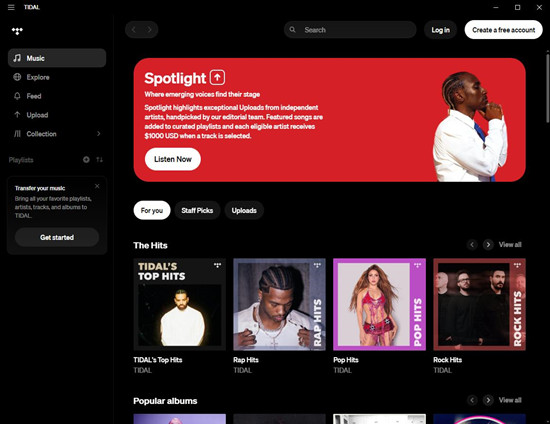
TIDAL is a music streaming service focused on high-quality audio, artists, and a premium listening experience. Launched in 2014, it aims to provide music closer to the original studio quality through features such as lossless audio, Hi-Res FLAC, and Dolby Atmos. Unlike Spotify, which focuses more on scale and personalization, TIDAL stands out through sound quality and music-focused features, with access to more than 180 million tracks.
TIDAL also emphasizes artist support, curated playlists, exclusive content, and deeper connections between artists and fans. It offers paid plans with ad-free listening, offline playback, and premium audio features, but does not provide a traditional free ad-supported tier.
Part 2. Spotify vs TIDAL: Key Differences
The differences become clearer when comparing music discovery, features, audio quality, devices, and pricing. Here's how Spotify and TIDAL compare.
01Spotify vs TIDAL: Music Library and Discovery
Spotify and TIDAL both offer huge music libraries, but they focus on different listening experiences. Spotify is a broader audio platform with more than 100 million music tracks, plus millions of podcast episodes and a growing audiobook catalog. It combines songs, podcasts, audiobooks, playlists, and other audio content in one app, making it a convenient choice for users who want an all-in-one service.
With its extensive content library and powerful recommendation system, Spotify has a clear advantage in music discovery. Its algorithms analyze listening habits, saved songs, playlists, and interactions to create personalized features such as Discover Weekly, Release Radar, Daily Mixes & Radio, Daylist, AI DJ, and Prompted Playlist & AI Playlists. These tools help users discover new songs and artists without actively searching.
TIDAL takes a more focused approach, offering more than 180 million tracks with an emphasis on artist-focused content and premium listening. It also supports discovery through personalized mixes, editorial playlists, genre recommendations, and artist collections. However, its recommendations are less frequent and less tailored compared with Spotify. TIDAL focuses more on premium content and deeper exploration of artists, making it a better fit for dedicated music fans rather than casual listeners looking for constant new discoveries.

02Spotify vs TIDAL: User Experience and Interface
Spotify focuses on convenience and personalization. Its Home page adapts to listening habits, showing recently played content, recommended playlists, new releases, podcasts, and personalized suggestions, making it easy to find something to play. It also offers stronger social features than most streaming services, including collaborative playlists, playlist sharing, artist following, and Spotify Jam for shared listening.
Spotify's interface feels highly personalized and intuitive. The app quickly learns user preferences, while its social features make sharing playlists and discovering new tracks with friends more enjoyable. Many users describe Spotify as a "music hub" because it combines listening, sharing, and discovery in one place.
TIDAL keeps the experience more music-focused. Instead of combining multiple audio formats, its interface focuses on albums, artists, playlists, music videos, and sound settings. While this creates a cleaner music experience, some users find the layout less polished and certain features harder to locate compared with Spotify.
The trade-off is that TIDAL offers fewer social features and less algorithm-driven discovery. Spotify is better for users who enjoy sharing and exploring music, while TIDAL is better for those who prefer a simpler, music-centered experience.
03Spotify vs TIDAL: Lossless Audio and Hi-Res Audio
Spotify and TIDAL take different approaches to sound quality. Spotify historically focused on accessibility and convenience before introducing Lossless audio for eligible Spotify Premium users. Spotify Lossless uses FLAC format with up to 24-bit/44.1 kHz quality, providing more detailed sound with less compression on supported devices.
For most listeners, Spotify Lossless offers an improvement over standard streaming, especially with better headphones or speakers. However, it is designed for everyday users rather than competing directly with high-resolution audio services.
TIDAL has made audio quality one of its biggest advantages since launch. The service supports lossless FLAC, Hi-Res FLAC, and Dolby Atmos audio for compatible tracks and devices. Its highest-quality option supports Hi-Res FLAC up to 24-bit/192 kHz, while standard lossless playback uses CD-quality 16-bit/44.1 kHz FLAC.

TIDAL is a stronger choice for audiophiles and users with premium headphones, DACs, studio monitors, or home audio systems. Spotify provides a more accessible lossless option, while TIDAL delivers the higher-resolution listening experience.
04Spotify vs TIDAL: Device and Platform Support
Spotify and TIDAL both support major platforms, including smartphones, computers, smart TVs, cars, and connected audio devices. Spotify has the wider device ecosystem, supporting iOS, Android, Windows, macOS, web browsers, smart speakers, gaming consoles, smart TVs, wearable devices, and many vehicle systems.
Spotify's biggest advantage is its broad integration with everyday devices. Through Spotify Connect, users can control playback across compatible speakers, TVs, cars, and smart home products without relying only on Bluetooth. Its long market presence has also made it one of the most widely supported streaming services.
TIDAL supports similar platforms, including iOS, Android, Windows, macOS, web players, smart TVs, automotive systems, and high-end audio equipment. Its strength lies in premium audio support, with integrations across Hi-Fi systems and network audio devices from brands such as Sonos, Bluesound, Naim, and Denon. TIDAL Connect also allows direct streaming to supported devices while maintaining high-quality playback.
Overall, Spotify is better for broad compatibility and everyday listening, while TIDAL is better suited for premium audio setups and high-fidelity listening environments.
05Spotify vs TIDAL: Pricing and Plans
Spotify and TIDAL take different approaches to pricing. Spotify focuses on flexible plans and a free ad-supported option, while TIDAL offers paid plans centered around premium features and high-quality audio.
Spotify Plans:
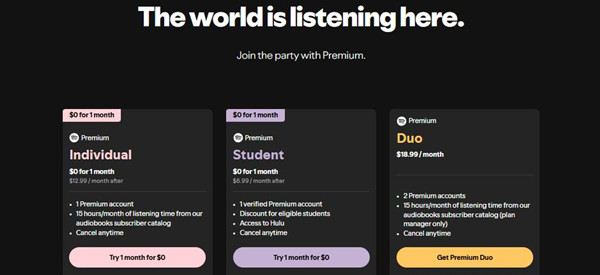
| Plan | Price (US) | Features |
| Free Plan | Free (with ads) | Ad-supported listening |
| Individual Premium | $11.99/month | Ad-free listening, offline downloads, unlimited skips |
| Duo Premium | $16.99/month | Premium access for 2 users |
| Family Premium | $19.99/month | Premium access for up to 6 users |
| Student Premium | $5.99/month | Premium features for eligible students |
Note:
- Spotify offers a free plan with ads, making it easier for users to try the service.
- Premium plans include offline listening, full playback control, and higher audio quality options.
TIDAL Plans:
| Plan | Price (US) | Features |
| Individual Plan | $10.99/month | Ad-free listening, offline downloads, lossless and Hi-Res FLAC audio |
| Family Plan | $16.99/month | Premium access for up to 6 users |
| Student Plan | $4.99/month | Premium features for eligible students |
Notes:
- TIDAL does not offer a traditional free plan. A paid subscription is required for full access.
- All plans include premium audio features such as lossless FLAC, Hi-Res FLAC, and Dolby Atmos support.
Overall, Spotify and TIDAL appeal to different types of listeners. Spotify is better for users who want a free option, flexible plans, and a wider audio ecosystem, while TIDAL is better for those who prioritize lossless audio, Hi-Res sound quality, and a premium music experience.
06Spotify vs TIDAL: Unique Features
Spotify Unique Features
-

Spotify Wrapped
Spotify Wrapped is one of Spotify's most recognizable features. Every year, Spotify creates personalized summaries that show users their most-played artists, songs, genres, and listening habits. It has become a popular social sharing event and an important part of Spotify's brand identity.
-
AI-Powered Personalization
Spotify continues investing in AI-powered features to improve music discovery and create more personalized listening experiences. Features such as AI Playlist and personalized mixes help users find music based on their moods, interests, and listening habits.
-
Spotify Jam and Social Listening
Spotify offers several social features that allow users to share and listen to music together. Spotify Jam lets multiple users control and enjoy a shared listening session, making Spotify more interactive than many traditional streaming services.
TIDAL Unique Features
-
Hi-Res Audio and Premium Sound
TIDAL's biggest advantage is its focus on sound quality. With Hi-Res FLAC, lossless streaming, and Dolby Atmos support, TIDAL is designed for listeners who want a more detailed, studio-like listening experience.
-
Artist-Focused Approach
TIDAL focuses on connecting artists and fans. The platform supports creators through exclusive content, interviews, and editorial features that highlight artists and their work.
-
DJ Integration
TIDAL also offers value for DJs through integrations with compatible DJ platforms. Professional users can access TIDAL's catalog and use features such as stem separation through supported partners.
Part 3. Spotify vs TIDAL: Which One Should You Choose?
The better choice really depends on how you like to listen and what matters most to you.
| Feature | Tidal | Spotify |
|---|---|---|
| Audio Quality | Better: HiFi (lossless) and Master quality | Good: 320 kbps (Premium) |
| Music Discovery | Limited: Focuses on exclusive content | Great: Personalized playlists and recommendations |
| Exclusive Content | Excellent: Artist releases, interviews | Limited: Occasional exclusive content |
| User Interface | Clunky: Can be hard to navigate | Easy: Simple and intuitive |
| Social Features | None: No collaborative playlists or sharing | Strong: Share music, collaborative playlists |
| Device Compatibility | Good: Works on most devices | Best: Seamless across phones, smart speakers, consoles |
| Free Plan | No: Paid subscription only | Yes: Ad-supported free version |
| Price | Higher: $9.99 (Standard), $19.99 (HiFi) | Lower: $9.99 (Premium), family and student plans |
| Offline Listening | Yes: Available for both HiFi and regular | Yes: Available for Premium members |
| Smart Speaker Support | Limited: Some issues with devices | Great: Full support for Alexa, Google Assistant |
When Spotify Is Better:
Spotify is a better choice if you like discovering new music without putting in much effort. Its recommendation system gradually learns your taste and keeps suggesting songs, artists, and playlists that match your listening habits. If you enjoy finding new tracks, exploring different genres, or having playlists ready for different moods, Spotify feels like a personal music companion that keeps getting better over time.
When TIDAL Is Better:
TIDAL is a better choice if sound quality matters more to you than constant discovery. Its support for lossless and Hi-Res audio makes it a great option for listeners using quality headphones, speakers, or home audio systems who want to hear more detail from their music. If you prefer sitting down with an album, exploring an artist's work, or paying closer attention to how music sounds, TIDAL offers a more focused listening experience.
Final Recommendation
For most listeners, Spotify is the more versatile option, while TIDAL is a better fit for music fans who want a more premium listening experience.
Part 4. How to Transfer Between Spotify and TIDAL
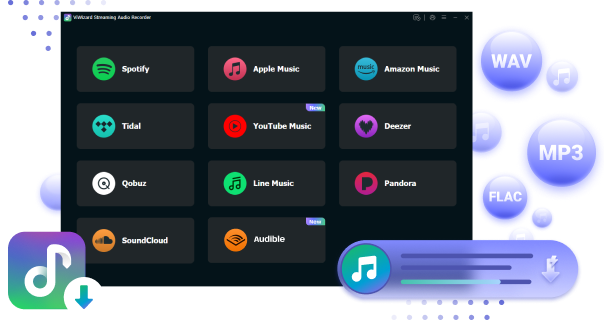
Switching between Spotify and TIDAL does not mean starting your music library from scratch. ViWizard Streaming Audio Recorder integrates with a free Playlist Transfer tool that helps users rebuild their music collections across supported streaming platforms. Instead of manually searching for every song again, it can match tracks automatically and transfer playlists, saved songs, and albums between services while keeping your library organized.
The process is simple: select your playlists from the current service, choose the target platform, and let the tool find matching tracks in the new service. For users with larger collections, batch transfer makes it easier to move multiple playlists and many songs at once.
Beyond playlist transfer, ViWizard Streaming Audio Recorder also helps users save streaming music as regular audio files. It can capture songs from supported services and convert them into common formats, giving users more flexibility to store and play their music on different devices without being limited to one streaming app.

Here are several popular ways to help you transfer Spotify playlist to Tidal on your iPhone, Android device, or computer with ease.
You May Be Interested


Adam Gorden is always looking for new ways to explore music and videos. He likes trying different media tools and learning how to manage audio and video files with ease.

Leave a Comment (0)