


Spotify has become a household name in music streaming, with more than 770 million users and 300 million Premium subscribers worldwide. Its popularity comes from features like curated playlists, personalized recommendations, and a huge music library that appeals to almost every listener.
Still, Spotify is not the only option available. Some users prefer alternatives with benefits like better audio quality, stronger free plans, exclusive content, or a different listening experience that better fits their needs.
With so many music streaming services to choose from, this guide will help you explore some of the best Spotify alternatives and see what each platform offers.
Part 1. Why Look for Spotify Alternatives?
Spotify may be the top streaming platform, but even its biggest fans have likely noticed its flaws.
01Recommendation System

Take the search and recommendation system, for example. While it's designed to suggest new music, many users find the recommendations repetitive and inaccurate. The system often promotes the same artists and genres, leaving you stuck in a musical loop. You know your taste, but it's hard to find something fresh when the same suggestions, like the same artists, keep popping up - even if you've listened to them not so often. As a result, discovering new music can start to feel stale.
02Price Hike

Then there's the price hike. Spotify's Premium plan once felt like a no-brainer at $9.95 per month. Now, with the increase to $12.95, users may start questioning whether the features justify the cost. While the addition of audiobook access - worth $10.90 for 15 hours of listening - is a notable bonus, it's still just a few extra dollars. When comparing options, these small differences add up, especially when other platforms offer similar services at a comparable price. For instance, TIDAL's high-fidelity audio may appeal to audiophiles, and Deezer offers competitive pricing with its vast catalog (we'll talk about these options later).
03Content Management and Licensing Issues

Content management and licensing issues also continue to raise concerns. Artists like Neil Young have pulled their music from Spotify, citing disagreements with the platform's content policies - particularly its support of Joe Rogan's podcast. Licensing agreements dictate what stays and what goes, leaving listeners frustrated when their favorite tracks suddenly vanish. The withdrawal of certain music or even entire artists, like Joni Mitchell and Neil Young, can be a real pain.
04User Interface Updates

Even interface updates have sparked debates. While they're meant to improve the app, many users find them disruptive, like the TikTok-like interface in the Search section. Features such as the "Like" button for albums, which was once a simple way to organize music, have been replaced with the "Add" button, frustrating users who prefer the old setup. If you're like me, it's hard to admit that I'm getting used to the "Add" button instead of the red heart icon. I really miss that - and the old UI, which was once seen as more intuitive and focused solely on music.
With all these issues in mind, it's no surprise that users are considering alternatives. Whatever the reasons - whether it's the algorithm, pricing, or user interface - if an app doesn't meet your expectations, it's only natural to look for a better fit.
Part 2. 5 Best Spotify Alternatives to Consider
Choosing a Spotify alternative really depends on what you want most from a music streaming service. Some users care more about discovering new songs, while others may prefer better sound quality, more content options, wider device support, or unique features. Spotify is still a strong choice for personalized recommendations and social features, but other platforms can offer a better experience in certain areas.
For this list, we picked five popular and well-rounded alternatives: Apple Music, YouTube Music, TIDAL, Deezer, and Amazon Music. They all offer large music libraries, support a wide range of devices, and provide features that make them realistic choices for Spotify users. More niche services, such as Pandora, focus more on a radio-style listening experience, which feels quite different from Spotify's on-demand music streaming model.
01Apple Music
- Monthly Price: $10.99/month
- Free Option: ✗ (Free trial available)
- Free Trial: 1 month
- Music Library: 100 million+ songs
- Content Types: Music, Albums, Playlists, Radio Stations, Music Videos, Artist Content
- Audio Quality: Lossless Audio, Hi-Res Lossless, Spatial Audio with Dolby Atmos
- Unique Feature: Apple ecosystem integration, Apple Music Classical, and library-focused music management
- Family Plan: Yes, up to 6 people
- Student Plan: Yes, $5.99/month
Apple Music is Apple's answer to music streaming, offering millions of songs, albums, playlists, radio stations, and exclusive content across iPhone, iPad, Mac, Apple Watch, Apple TV, Android devices, Windows PCs, and more. If you already use Apple products, the experience feels familiar from the start, with your music library, playlists, and listening history synced across devices.
Why We Prefer Apple Music Over Spotify

Apple Music feels like a premium digital music collection built around sound quality and the Apple ecosystem. Along with a huge music catalog, it offers Lossless Audio, Hi-Res Lossless Audio, and Spatial Audio with Dolby Atmos for supported tracks, with clear audio quality tags shown on song detail pages. The app also gives you plenty of freedom to organize and customize your music library. Instead of relying only on algorithms, Apple Music combines personalized recommendations with playlists created by music editors, artist content, and radio stations.
Spotify is still one of the best platforms for discovering new songs through features like Discover Weekly and personalized mixes. However, Apple Music feels like a better fit for listeners who prefer a cleaner music library and deeper integration with Apple devices. If you use an iPhone, Mac, Apple Watch, or CarPlay, everything feels naturally connected, with your libraries, playlists, and listening history available wherever you go. Features like Siri control also make daily listening more convenient.
Read More: Spotify vs Apple Music Comparison & Guide
02YouTube Music
- Monthly Price: $10.99/month
- Free Option: ✓ (Ad-supported with limited features)
- Free Trial: 1 month
- Music Library: 100 million+ official songs, plus additional YouTube content
- Content Types: Music, Albums, Playlists, Music Videos, Live Performances, Covers, Remixes
- Audio Quality: Up to 256 kbps AAC
- Unique Feature: Access to YouTube's wider music ecosystem, including live versions, covers, remixes, and rare recordings
- Family Plan: Yes, up to 6 people
- Student Plan: Yes
YouTube Music is Google's music streaming service that combines a traditional music library with the huge amount of music content available on YouTube. Besides official songs and albums, it also includes music videos, live performances, covers, remixes, and recordings that may be difficult to find on other streaming platforms.
Why We Prefer YouTube Music Over Spotify

YouTube Music feels more like a complete music discovery platform than a traditional streaming app. It makes switching between watching music videos and listening to audio simple, while YouTube Music Premium adds features like ad-free listening, background playback, and offline downloads. One of its biggest advantages is search. You can often find a song through lyrics, descriptions, or even a vague memory instead of knowing the exact title or artist.
Spotify offers a more polished experience for playlists and algorithm-based recommendations, but YouTube Music gives you access to a wider range of music content. From live recordings and acoustic versions to fan-made covers and rare remixes, it is easier to explore different versions of songs in one place.
Read More: Spotify vs YouTube Music Comparison & Guide
03TIDAL
- Monthly Price: $11.99/month
- Free Option: ✗ (Free trial available)
- Free Trial: 30 days
- Music Library: 110 million+ tracks
- Content Types: Music, Albums, Playlists, Music Videos, Artist Content, Exclusive Releases
- Audio Quality: Hi-Res FLAC up to 24-bit/192 kHz, Dolby Atmos
- Unique Feature: High-fidelity audio, artist-focused content, and DJ software integration
- Family Plan: Yes, up to 6 people
- Student Plan: Yes
TIDAL is a music streaming service designed for listeners who want a higher-quality music experience. It offers a large catalog of songs, lossless and high-resolution audio, Dolby Atmos support, and exclusive content focused on artists and premium playback.
Why We Prefer TIDAL Over Spotify
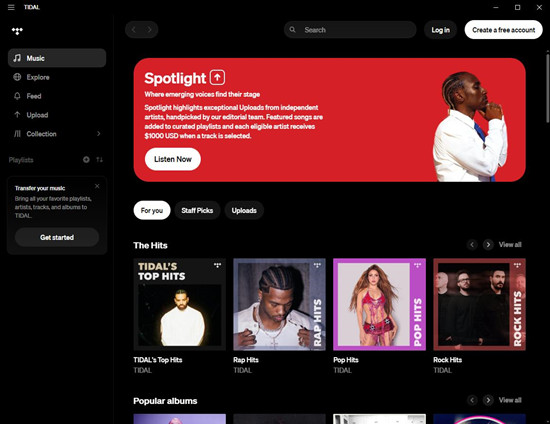
TIDAL feels like a premium listening room for music fans who care about high-fidelity sound. Instead of focusing mainly on casual daily listening, it is built for people who want to hear more detail and depth from their favorite tracks. With compatible headphones, speakers, or audio equipment, the difference in sound quality can become easier to notice.
TIDAL also provides a more album-focused experience, with artist content and exclusive releases for listeners who enjoy following their favorite artists. Features like DJ software support make it attractive for professionals who create mixes. Spotify may still be more convenient for everyday listening with strong recommendations, social features, and a large user community, but TIDAL is a better choice for those who want a more immersive experience and care about how their music sounds.
Read More: Spotify vs TIDAL Comparison & Guide
04Deezer
- Monthly Price: $11.99/month
- Free Option: ✓ (Ad-supported with limited features)
- Free Trial: 30 days
- Music Library: 120 million+ tracks
- Content Types: Music, Albums, Playlists, Podcasts, Radio Stations, Personalized Mixes
- Audio Quality: FLAC lossless audio
- Unique Feature: Flow, an endless personalized mix that combines your favorite songs with new recommendations
- Family Plan: Yes, up to 6 people
- Student Plan: Yes
Deezer is a global music streaming service that offers millions of songs, playlists, podcasts, and personalized recommendations. Compared with larger platforms like Spotify, Deezer feels like a quieter alternative that focuses on simple listening, music discovery, and a clean user experience.
Why We Prefer Deezer Over Spotify

Deezer's standout feature is Flow, a personalized music mix that works like an endless radio station based on your listening habits. It combines songs you already enjoy with new recommendations, making it easy to keep listening without constantly searching for new tracks. The service also supports FLAC lossless streaming, giving users the same high-quality audio option as Spotify while keeping the overall experience simple.
Its international availability is another advantage, especially for listeners with different music tastes. While Spotify has a larger community and stronger social features, Deezer feels less complicated and offers a straightforward way to enjoy personalized mixes, making it a refreshing alternative.
Read More: Spotify vs Deezer Comparison & Guide
05Amazon Music
- Monthly Price: $10.99/month for Amazon Music Unlimited
- Free Option: ✓ (Limited ad-supported access)
- Free Trial: 30 days
- Music Library: 100 million+ songs
- Content Types: Music, Albums, Playlists, Podcasts, Stations
- Audio Quality: HD and Ultra HD audio up to 24-bit/192 kHz
- Unique Feature: Alexa integration, Fire TV support, and connection with Amazon devices
- Family Plan: Yes, up to 6 people
- Student Plan: Yes
Amazon Music is Amazon's music streaming service that connects closely with its wider ecosystem. Available on smartphones, computers, Fire devices, smart TVs, and Alexa-enabled speakers, it provides songs, albums, playlists, podcasts, and high-quality audio options.
Why We Prefer Amazon Music Over Spotify

Although Amazon Music has reduced some features available for Prime users, it still works well for listeners who want to upgrade to the Unlimited plan. If you already use Amazon products, the experience feels naturally connected. Amazon Music works smoothly with Alexa speakers, Fire TV devices, and other Amazon products, allowing you to control playback, search for songs, and manage playlists through voice commands.
For Amazon Prime members, it also adds extra value by fitting into an existing subscription. Meanwhile, Amazon Music Unlimited expands the experience with a larger catalog, HD and UHD audio options, and offline listening. Compared with Spotify, Amazon Music feels like a better choice for users who want their music service to connect more closely with their smart home devices and everyday routines.
Read More: Spotify vs Amazon Music Comparison & Guide
Part 3. Spotify vs. Spotify Alternatives: Feature Comparison
The best Spotify alternative depends on what you value most. Spotify remains one of the strongest choices for music discovery, personalized playlists, and social features, but other platforms offer unique advantages.
| Feature | Spotify | Apple Music | YouTube Music | TIDAL | Deezer | Amazon Music |
|---|---|---|---|---|---|---|
| Music Discovery | Great recommendations with Discover Weekly, Daily Mixes, and Release Radar | Personalized suggestions and editor-made playlists | Find songs through videos, covers, and live versions | Focuses more on artists and albums | Flow creates personalized music mixes | Recommendations based on your listening |
| Sound Quality | Up to 320 kbps | Lossless, Hi-Res Lossless, Dolby Atmos | Up to 256 kbps AAC | Hi-Res Lossless, Dolby Atmos | FLAC lossless audio | HD and Ultra HD audio |
| Content Variety | Music, podcasts, audiobooks, playlists | Music, radio, videos, exclusive content | Music, videos, live shows, covers, remixes | Music, videos, artist content, exclusive releases | Music, podcasts, radio, playlists | Music, podcasts, playlists, stations |
| Playlist Features | Strong playlists, Blend, collaborative playlists | Better music library management | Combines music with video content | More focused on albums | Flow-based playlists | Simple playlists with Amazon integration |
| Social Features | Sharing, Blend, collaborative playlists, Spotify Wrapped | Limited social features | Limited social features | Limited social features | Limited social features | Limited social features |
| Device Support | Works on most devices and platforms | Best for Apple users | Best for Google and YouTube users | Good for audio devices | Works with most platforms | Best for Alexa and Fire TV |
| Unique Feature | Discover Weekly, Spotify Wrapped, Blend | Apple ecosystem and Spatial Audio | YouTube's music videos and rare content | Hi-Fi sound and artist-focused features | Flow personalized mixes | Alexa control and Amazon integration |
Overall, no single service is better than Spotify in every area. The right choice depends on whether you prioritize music discovery, audio quality, content variety, or ecosystem features. These alternatives may offer a better experience for users with specific listening preferences.
Part 4. How to Switch from Spotify to Other Music Streaming Services
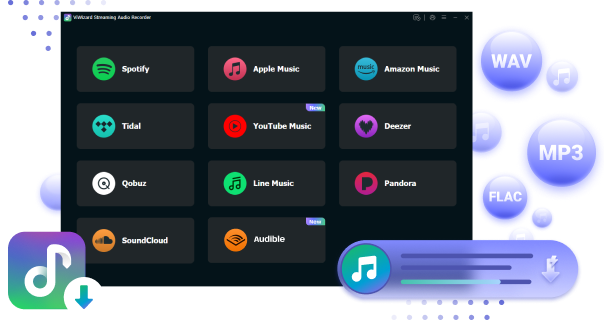
Switching from Spotify to another music streaming service does not mean rebuilding your music library from scratch. ViWizard Streaming Audio Recorder makes the transition easier with playlist transfer and music conversion features.
With a free Playlist Transfer tool built in, ViWizard helps move your music collection between supported platforms, including Spotify, Apple Music, Amazon Music, YouTube Music, Deezer, TIDAL, and Qobuz. Instead of searching for every song manually, it can transfer songs, albums, playlists, personalized playlists, and Liked Songs to the new service. For larger collections, batch transfer makes it easier to move multiple playlists and tracks at once.
Beyond playlist transfer, ViWizard Streaming Audio Recorder can save streaming music as regular audio files. It converts songs from 10+ platforms into formats like MP3, WAV, FLAC, AIFF, M4A, and M4B, allowing users to create local copies for personal backup and offline listening without being tied to one platform.
Whether you are switching to Apple Music, YouTube Music, TIDAL, Deezer, Amazon Music, or another service, ViWizard helps you keep your favorite songs and enjoy a smoother transition with more control over your music collection.
Part 5. Which Spotify Alternative Is Right for You?
- Choose Apple Music if you use Apple devices and want better sound quality with Lossless Audio, Spatial Audio, and deeper ecosystem integration.
- Choose YouTube Music if you enjoy music videos, live performances, covers, remixes, and rare versions of songs.
- Choose TIDAL if you care about high-quality audio and a more artist-focused listening experience.
- Choose Deezer if you want a simple Spotify alternative with Flow personalized mixes and lossless audio support.
- Choose Amazon Music if you use Alexa, Fire TV, or other Amazon devices and want better smart home integration.
If you are moving from Spotify to another streaming service, you may want to keep your favorite songs, playlists, and albums. ViWizard Streaming Audio Recorder lets you save Spotify music as common audio files, so you can keep your collection and play it on more devices without being limited to one platform.
Keep your Spotify favorites before switching. Try ViWizard Streaming Audio Recorder today and enjoy your music anywhere, anytime.
You May Be Interested

Which Music Streaming Service Is Best for Offline Listening?

Spotify vs Napster in 2026: Which Service Should You Choose

Spotify vs Pandora: Which is Better for You?

Spotify vs iHeartRadio: Which Music Streaming Service Is Better for You?

Is SoundCloud Better Than Spotify?
Spotify vs Pandora: Which is Better for You?

Adam Gorden is always looking for new ways to explore music and videos. He likes trying different media tools and learning how to manage audio and video files with ease.

Leave a Comment (0)