



If you're heading onto a plane, you probably don't want to lose your music just because there's no internet. So, does Apple Music have an offline mode? Thankfully, you can listen to Apple Music offline. You just need to download the songs, albums, or playlists you want before you go offline.
Once your music is downloaded, Airplane Mode can make things even easier. Turn it on during the flight, and you can keep listening without an internet connection. In other words, Apple Music's offline listening works through downloaded music, while Airplane Mode gives you a simple way to stay offline while you travel.
In this guide, we'll look at how Apple Music offline listening works with Airplane Mode, how to download music for offline playback on different devices, and what you can do if you want to listen to Apple Music without the Apple Music app.
Part 1. Does Apple Music Have an Offline Mode?
Apple Music does not have a separate setting officially called "Offline Mode." Instead, subscribers can download songs, albums, and playlists to supported devices, including iPhone, iPad, Apple Vision Pro, Android, Mac, and Windows PC.
Part 2. Can You Listen to Apple Music in Airplane Mode?
Yes, but Airplane Mode is not required for offline use. You can disable your internet connection and play downloaded music on your iPhone. You can also use Airplane Mode, which turns off cellular and Wi-Fi connections by default. Apple Music cannot stream music without an internet connection, but downloaded songs, albums, and playlists remain available for offline use. Music that has only been added to your library cannot be played offline.
So, Airplane Mode does not activate an Apple Music Offline Mode; it disconnects your device from the internet, while downloaded music remains available offline.
Part 3. How to Listen to Apple Music in Airplane Mode on iPhone and iPad
On iPhone and iPad, you need an active Apple Music subscription and must download the music you want before going offline. In the Apple Music app, add the songs, albums, or playlists to your library if needed, then tap Download. During the flight, turn on Airplane Mode, open the Music app, and play your downloaded content. If permitted, you can turn Wi-Fi back on separately while Airplane Mode remains enabled.
01Open the Apple Music app.
02Find the song, album, or playlist you want to listen to offline.
03Add the content to your library if needed.
04Tap Download to save the content to your device.
05When you're ready to go offline, open Control Center.
06Tap Airplane Mode to turn it on.
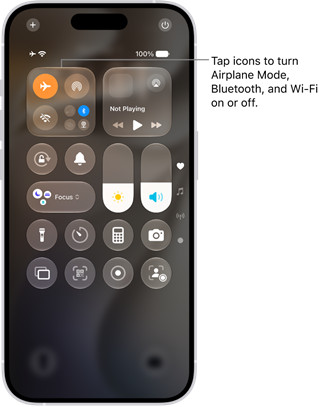
07Open the Music app and play the downloaded content.
08If allowed, turn Wi-Fi or Bluetooth back on separately while Airplane Mode remains enabled.
Part 4. How to Listen to Apple Music in Airplane Mode on Android
On Android, download the songs, albums, or playlists you want in the Apple Music app before going offline. Add the content to your library if needed, then tap Download. Turn on Airplane mode from Quick Settings or Settings > Network & internet > Airplane mode, depending on your device, then open Apple Music and play your downloaded content. Supported devices can also turn Wi-Fi back on while Airplane mode remains enabled.
01Open the Apple Music app.
02Find the song, album, or playlist you want to listen to offline.
03Add the content to your library if needed.
04Tap Download to save the content to your device.
05Open Settings > Network & internet.
06Turn on Airplane mode or Flight mode. You can also swipe down from the top of the screen and tap Airplane mode.
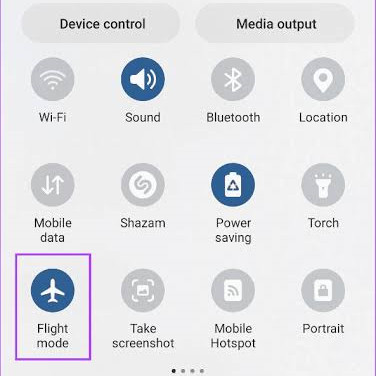
07Open Apple Music and play the downloaded content.
Part 5. How to Listen to Apple Music in Airplane Mode on Mac
Mac does not have a mobile-style Airplane Mode, so you need to disconnect from the internet manually. Before going offline, add and download the songs, albums, or playlists you want in the Apple Music app. Once disconnected, open Apple Music and play your downloaded content. Undownloaded catalog content requires an internet connection.
01Open the Apple Music app.
02Find the song, album, or playlist you want to listen to offline.
03Add the content to your library if needed.
04Click Download to save the content to your Mac.
05When you're ready to go offline, click Control Center in the menu bar.
06Use the Wi-Fi controls to disconnect from the network.
07If your Mac uses Ethernet, disconnect the Ethernet connection as well.
08Open Apple Music and play the downloaded content.
Part 6. How to Listen to Apple Music in Airplane Mode on Windows PC
Windows PC has Airplane mode, which you can enable from Settings > Network & internet > Airplane mode or the network controls on the taskbar. Before enabling it, add and download the songs, albums, or playlists you want in the Apple Music app. With Airplane mode enabled, open Apple Music and play your downloaded content offline. Undownloaded content requires an internet connection.
01Open the Apple Music app.
02Find the song, album, or playlist you want to listen to offline.
03Add the content to your library if needed.
04Click Download to save the content to your PC.
05When you're ready to go offline, open Settings > Network & internet > Airplane mode.
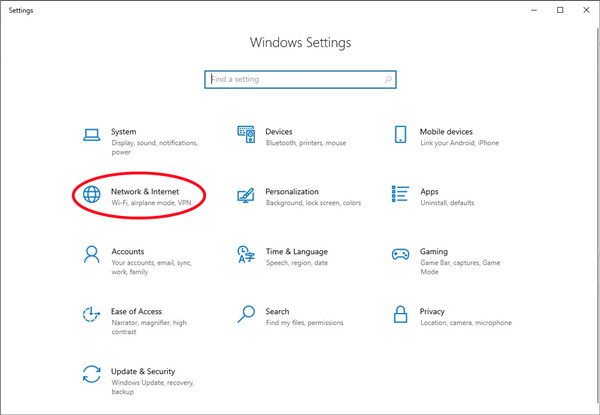
06Turn on Airplane mode. You can also access network controls from the taskbar.
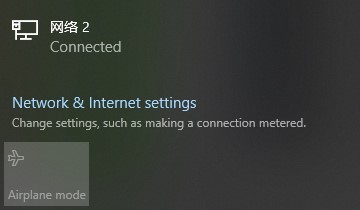
07Open Apple Music and play the downloaded content.
Part 7. How to Listen to Apple Music in Airplane Mode Without the Apple Music App
Apple's official offline method requires the Apple Music app, and Apple Music downloads are not provided as ordinary local audio files for use outside Apple's supported apps. Users who need access outside the app may consider an Apple Music downloader like ViWizard Apple Music Converter as an alternative.
ViWizard Apple Music Converter can download Apple Music songs and save them as local audio files in common formats such as MP3, WAV, FLAC, AIFF, M4A, and M4B. You can then transfer the files to a phone, tablet, computer, or other compatible device, enable Airplane Mode, and play them with a local music app such as VLC without needing the Apple Music app or an active Apple Music subscription.

Key Features of ViWizard Apple Music Converter
Free Trial Free Trial* Security verified. 5, 481,347 people have downloaded it.
- Convert Apple Music songs, playlists, albums, and artists
- Export Apple Music in 6 formats for different devices and players
- Preserve metadata and lyrics when creating music collections
- Organize converted music by artist and album
- Batch download large Apple Music collections
 Step 1: Download and Install ViWizard Apple Music Converter
Start by visiting the ViWizard website and downloading the Apple Music Converter for your computer. It works on both Windows and Mac. Once installed, launch the application and sign in with your Apple Music account. This gives you access to your Apple Music library, including your playlists and albums, so you can save them as local audio files.
 Step 2: Select MP3, WAV, or FLAC as the Output Format
Next, choose the format you want to use for local playback. You can select MP3, WAV, or FLAC depending on your needs. Click the gear icon in the top-right corner to open the settings. Here, you can adjust audio options such as the sample rate, bit rate, and channel settings to control the audio quality and file size. When you're happy with the settings, click OK to confirm.
 Step 3: Choose the Apple Music Songs to Download
Now browse your Apple Music library and select the songs, albums, or playlists you want to save as local audio files. Click the "+" button to add your selections to the conversion list, then click "Add to Conversion List" to queue them. When you're ready, click "Convert" to start downloading the selected Apple Music content as MP3, WAV, or FLAC files.
 Step 4: Access Your Downloaded Apple Music Files
Once the conversion is finished, click the "History" button to view your downloaded files. Click the folder icon next to a file to open its location on your computer. You can then manage the MP3, WAV, or FLAC files locally or transfer them to compatible devices for offline playback with a local music player.
Part 8. Apple Music Airplane Mode vs. Local Music Playback
| Feature | Apple Music in Airplane Mode | Local Music Playback |
|---|---|---|
| Internet connection | Not required after download | Not required |
| Music source | Apple Music catalog downloads | Local audio files |
| Apple Music app | Required | Not required |
| Apple Music subscription | Required for catalog content | Not required |
| File access | Managed within Apple Music | Directly accessible |
| Playback apps | Apple Music | Compatible local music players |
| Device transfer | Limited to supported Apple Music devices and apps | Transferable to compatible devices |
| Offline listening | Yes, for downloaded content | Yes, for stored files |
| Long-term file ownership | No, tied to the service | Yes, if you own or have the right to use the files |
If you just want some music for a flight, Apple Music's offline downloads are a pretty convenient option. Download your songs, albums, or playlists before takeoff, turn on Airplane Mode, and you're good to listen without an internet connection. There's just one catch: those downloads stay within the Apple Music app, so you need an Apple Music subscription for catalog content and can't freely transfer them or play them with other music apps as ordinary audio files.
In short, Apple Music Airplane Mode is great for simple offline listening within Apple Music. But if you want more control over your music files, ViWizard Apple Music Converter can download Apple Music songs and save them as local audio files in MP3, WAV, FLAC, AIFF, M4A, or M4B. You can then transfer the files to compatible devices and play them with a local music player. Try ViWizard Apple Music Converter for more flexible offline playback.
You May Be Interested


Adam Gorden is always looking for new ways to explore music and videos. He likes trying different media tools and learning how to manage audio and video files with ease.

Leave a Comment (0)