


You find an audiobook you have been waiting to listen to, but before starting your purchase or subscription, you notice that Audible is offering a promo code. Like many listeners, you may wonder where these codes come from, whether they are still valid, and how to apply them to your account.
Audible promo codes can help you access discounts, free trials, or special audiobook offers, but they often come with specific conditions, expiration dates, or usage limits. Understanding how these codes work can help you avoid common problems and use available offers more effectively.
This guide explains how to get and redeem Audible promo codes, what conditions to check before using them, and how to keep your Audible books accessible after ending your subscription. Let's get started!
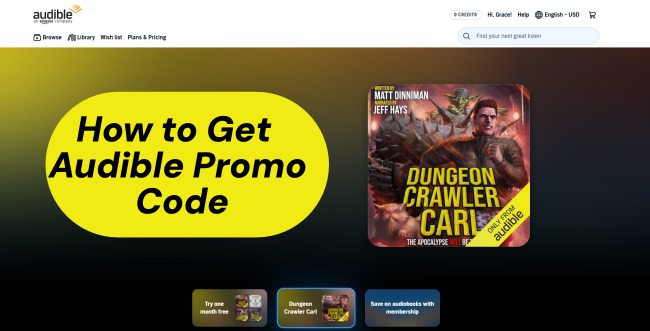
Part 1. What Is an Audible Promo Code?
An Audible promo code is a special discount code provided by Audible or its partners that helps users access certain offers, such as free trials, discounted membership, audiobook deals, or bonus credits. These codes are mainly used in the audiobook and digital entertainment field to encourage people to explore more Audible services. So, what are the key features of an Audible Promo Code?
- Unlocks special offers: Provides access to promotions such as free trials, discounted memberships, free audiobooks, or bonus credits.
- Works for eligible accounts: Applies only to users or subscriptions that meet the requirements of the specific promotion.
- Supports limited-time campaigns: Often appears during special events, seasonal promotions, or partner offers.
- Provides cost savings: Helps users reduce the cost of Audible memberships or audiobook purchases.
- Available through different channels: Can be shared by Audible, Amazon, publishers, brands, websites, and other promotional partners.
- No app redemption: Codes cannot be redeemed inside the official Audible Mobile apps for iOS or Android; you must use a desktop computer or mobile web browser.
Audible promo codes are targeted at new listeners who want to explore Audible, as well as existing users looking for special promotions. Before using one, it is important to check whether the code applies to your account and region. In the following part, we will show you how to find Audible promo codes.
Part 2. How to Get an Audible Promo Code
Audible promo codes are usually available through official promotions, special offer pages, and partner campaigns. Instead of searching randomly for codes, you can check these common sources to find current Audible deals.
-

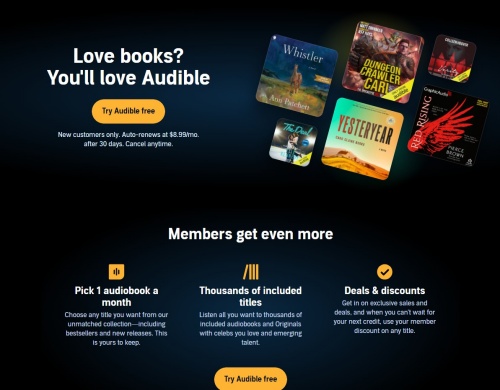
Sign Up for Audible Free Trials
New Audible users can visit the official Audible Free Trial page to get a 30-day free trial with membership benefits and credits. From time to time, Audible also provides special promotions with longer trial periods, such as 2 or 3 months free for eligible users, including some Amazon Prime members.
-
Check Seasonal Promotions
Audible and Amazon launch special discounts during major shopping events, such as Prime Day and holiday sales. These promotions may include offers like 99-cent audiobooks, 50% off membership prices, or discounted rates for the first few months of a subscription.
-
Look for Creator and Author Promotions
Some audiobook authors, narrators, and publishers receive Audible promotional codes through the ACX Promo Codes program. These codes are usually used to share specific audiobook titles with listeners, allowing them to access selected books for free or at a special price.
-
Check Membership Retention Offers
Existing Audible members may receive special discounts when they try to cancel their subscriptions. In some cases, Audible may offer a retention deal, such as 50% off the membership price for 3 months, to encourage users to continue their subscriptions.
Keep in mind that Audible promo codes are often limited by account type, region, or promotion period. Always check the offer details before redeeming a code.
Part 3. How to Redeem an Audible Promo Code
If you have an Audible promo code, using it only takes a few steps. Whether you're on your phone or computer, you can enter the code directly through the Audible website and check whether the offer applies to your account. Here's how to redeem your Audible promo code on both mobile web and desktop.
On Mobile
01Open your phone and tap a browser you prefer.
02Navigate to the Audible website on your phone and sign in.
03Scroll to the bottom of the Audible homepage.
04Tap Promo Code.
05Enter your promo code in the box.
06Tap Redeem.
07If the code is valid, the audiobook or offer will be added to your cart.
On Desktop
01Click a modern browser (Chrome, Firefox, etc.).
02Open the Audible website on your computer and sign in.
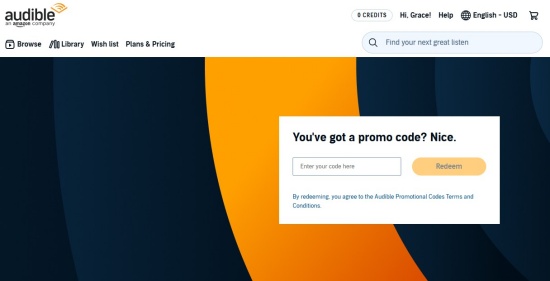
03Scroll to the bottom of the homepage. Or go to the promo redemption page.
04Select Redeem a Promo Code.
05Enter your promo code in the provided box.
06Select Redeem.
Part 4. What Are Conditions and Limitations for Audible Promo Code?
Before you redeem an Audible promo code, there are a few rules. Knowing these restrictions can save you some frustration when a code doesn't work. Audible promotional claim codes are generally used for specific audiobook deals or audiobook credits, and not every code can be used for every purchase. Here are the main conditions and limitations.
-

You Need an Audible Account
You must have an Audible account to redeem a promo code. If you don't have one yet, you'll need to create an account before using the code.
-
Redeem the Code on Audible.com
Audible promotional claim codes must be redeemed through Audible.com. They cannot be redeemed on other Audible websites, such as Audible.co.uk, Audible.com.au, Audible.de, or Audible.fr.
-
Codes Are for Audiobooks or Credits
A promotional claim code can only be used for eligible audiobooks or audiobook credits. You cannot use it to purchase another promo code or a gift certificate.
-
Check the Expiration Date
Every promo code has its own expiration date. The exact date should be included in the terms or message that came with the code. Once it expires, you can no longer redeem it.
-
Codes Cannot Usually Be Transferred
Promo codes generally cannot be resold, transferred for money, exchanged for cash, or moved to another Audible account. An unused code already added to an Audible account also cannot normally be transferred to another account.
-
Additional Terms May Apply
Some promotions have extra rules beyond these general conditions. If you're unsure whether your code is still valid or what it can be used for, you can check your Membership Details on the Audible desktop website and review the terms that came with the promotion.

This tutorial will show you five ways to download Audible books free, even a way to keep these free downloads forever.
Part 5. How to Keep Your Audible Books Forever Without a Subscription
An Audible promo code can help you get free trials, discounts, or audiobook offers, but these benefits usually depend on your Audible account and subscription status. Once a promotion ends or your membership is cancelled, you can't conveniently manage the audiobooks you have purchased or added to your library.
To keep your Audible audiobooks accessible for long-term personal use, you can consider ViWizard Audible Converter. It can convert your Audible books into common audio formats. It works on Windows and Mac and helps you create a personal backup of your audiobook collection.
ViWizard converts Audible audiobooks to more than AA or AAX files. It supports Lossless, MP3, M4A, M4B, WAV, AIFF, and FLAC formats so you can play your audiobooks on more devices. It also preserves chapter information and metadata, while the Split feature lets you divide long audiobooks by chapter, hour, or minutes.

Key Features of ViWizard Audible Audiobook Converter
Free Trial Free Trial* Security verified. 5,481,347 people have downloaded it.
- Convert Audible audiobooks without AA/AAX format limitations
- Export audiobooks in 6 formats for different devices and players
- Split audiobooks by chapters or sections for personalized listening
- Preserve chapter information and metadata when creating collections
- Manage Audible audiobook libraries across converted files
How to Convert Audible Audiobooks
 Step 1. Open ViWizard and Sign In
Install and launch ViWizard Audible Converter on your Windows or Mac computer. Sign in with your Audible account through the built-in Audible web player, and your purchased audiobooks will appear in your library.
 Step 2. Choose an Output Format
Click the menu icon in the top right corner. Select your preferred output format. MP3 is a popular choice because it works with most phones, tablets, car systems, and media players. You can also customize audio settings such as bitrate and sample rate.
 Step 3. Add the Audiobooks You Want to Save
Select the Audible titles you want to keep and click Add to move them to the conversion list. You can choose one audiobook or convert multiple titles simultaneously.
 Step 4. Convert and Save Your Files
Click Convert to start the process. When it finishes, you can open the output folder and access your converted audiobook files for offline listening. By using an Audible promo code, you can save money when exploring Audible's services. And by keeping a personal backup of your purchased audiobooks, you can continue managing your collection even when a promotional offer or subscription period ends.
Part 6. Conclusion
Getting an Audible promo code can save money while exploring Audible's audiobook library. Whether you find a code through an official promotion, a seasonal deal, or a partner offer, the key is to check the details before using it so you know exactly what you're getting.
Keep in mind that every promo code has its own rules. Some are available only to new users, some work only with specific audiobooks, and others may expire after a certain time. Taking a moment to check the requirements can help you avoid running into problems during redemption.
If you have built up a collection of Audible audiobooks and want to keep them easier to manage after a subscription or promotion ends, tools like ViWizard Audible Converter can help you create personal backups and listen to your books flexibly. Hopefully, this guide helps you make better use of Audible promo codes. Enjoy your audiobook!
You May Be Interested


From new releases to old favorites, Matt Smith is always on the lookout for good music. He follows the latest in digital entertainment and shares songs and media he thinks are worth checking out.

Leave a Comment (0)