


Audible users run into the same problem. They can download and listen to audiobooks in the Audible app, but moving them to a USB drive, or other devices is not always easy because of Audible's DRM protection.
Because of this, some users turn to tools like Epubor Audible Converter to convert Audible AA and AAX files into DRM-free formats like MP3, M4B, and MP4. It works on both Windows and Mac, and it can load your Audible library and import your purchased audiobooks before starting the conversion process.
Epubor Audible Converter is simple enough to use, but it is still worth it? In this review, we'll take a closer look at its features, how to use it, its pros and cons, and how it compares with tools like ViWizard Audible Converter, which offers a more polished interface and a more advanced audiobook conversion experience.

Need more flexibility with your Audible audiobooks? ViWizard Audible Audiobook Converter helps Audible subscribers save audiobook titles with simple and reliable audiobook conversion. Convert your audiobooks and manage your collection across devices.
Part 1. What Is Epubor Audible Converter?
Epubor Audible Converter is a desktop application for Windows and Mac designed to help users manage and convert Audible audiobooks. It connects directly to an Audible account and lets users prepare audiobooks for conversion into common audio formats, including MP3, M4B, and MP4. Users can also import AA or AAX files downloaded from Audible purchases. The program is built for Audible content and focuses on making audiobooks easier to download, organize, and back up across devices without the Audible app.
Part 2. How Much Is Epubor Audible Converter?
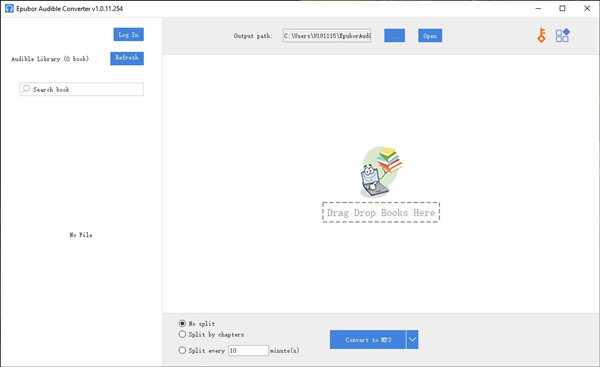
Epubor Audible Converter is paid software, which requires a license to use fully. It offers a free trial that lets you convert one Audible audiobook to a DRM-free format like MP3. After that, a paid license is needed to continue converting more files. Pricing plans include annual and lifetime options depending on usage needs.
| Licenses | Price | Device Limit | Key Features |
| 1-Year License | $29.99 | 1 Device |
Full-featured version 1-Year free upgrades 30-Day money-back guarantee |
| Lifetime License | $39.99 | 1 Device |
Full-featured version Lifetime free upgrades 30-Day money-back guarantee |
| Lifetime Family License | $69.99 | 2–5 Devices |
Full-featured version Lifetime free upgrades 30-Day money-back guarantee |
After purchasing the full version, you receive a license key by email. Entering this key in the trial version unlocks all features and allows unlimited audiobook conversions during the active license period.
Part 3. Features of Epubor Audible Converter
The main purpose of Epubor Audible Converter is to convert Audible audiobooks. It includes core features such as converting audiobooks into MP3, M4B, and MP4, splitting long files into chapters, and keeping metadata like titles and chapter details. These features work together to support a more flexible workflow than the default Audible setup.
- Format Conversion: Convert Audible AAX audiobooks to MP3, M4B, or MP4 format for easy playback.
- Automatic Library Loading: Log in to your Audible account and load your library, saving time downloading titles before conversion.
- Chapter Splitting: Divide audiobooks by chapter and minute. Very suitable for navigating long titles.
- High-Speed Conversion: Batch converts files at 60X faster speed.
- Metadata Preservation: Maintain ID3 tags for audiobooks, such as title, author, genre, cover art, etc.
Part 4. Epubor Audible Converter Review
Epubor Audible Converter makes it fairly easy to import and manage Audible audiobooks, with a main interface that combines account login and local AA or AAX file loading. Once the library is loaded, you move directly from selecting a book to choosing an output format and starting conversion. The left panel also includes an Audible Library view that keeps all titles in one place.
However, I found the interface a bit dense at first. Everything sits in one workflow, so login, importing, and conversion all happen on the same screen. It works smoothly once you get used to it, but at the beginning it can feel unclear where each step starts and ends.
In use, the conversion process is simple. You can select a single audiobook or batch process multiple files, choose formats like MP3, M4B, or MP4, and start immediately. Chapter splitting and metadata retention help keep output organized instead of turning everything into one long file. Performance is stable, but larger audiobooks take more time depending on file size and system speed. The progress bar is minimal, so there is little detail beyond the conversion running in the background.
One limitation is that compatibility is not always consistent. Standard Audible files work well, but switching to another account can affect processing.
Overall, it is a functional and direct tool once you get familiar with the layout. The workflow stays simple and efficient for basic audiobook conversion, even if the interface takes a bit of time to get used to.
- It is easy to use. The layout is simple and clear.
- It works with Audible AA and AAX files directly.
- It can remove DRM from audiobooks.
- It converts files to MP3 and M4B. These formats work on most devices.
- It keeps chapters in many cases, so listening is easier.
- It supports batch conversion, so you can process many books at once.
- It works offline after installation.
- You need to install it on a computer.
- It is not free. The free version is limited.
- It may stop working after Audible updates its system.
- It only works on Windows and Mac. No mobile version.
- Some files may fail to convert sometimes.
Part 5. How to Use Epubor Audible Converter
Using Epubor Audible Converter starts with logging into an Audible account inside the software, then selecting audiobooks to process. After that, you choose the output format and start conversion. The process is simple, but format and chapter settings can still affect the final result, so it helps to understand the steps before starting.
To run the Epubor Audible Converter for Mac/Win smoothly, you first need an Audible account or have already downloaded the AAX audiobook to your computer. Secondly, your computer must meet the following specifications:
| Aspects | Details |
| Windows Operating System | Windows 10, 11 |
| macOS Operating System | macOS X 10.14 and later |
| Processor |
Windows: 1GHz or above macOS: Intel or Apple Silicon |
| RAM | 512MB (1GB recommended) |
Step 1Download and Install Epubor Audible Converter
01Go to the official Epubor Audible Converter website.
02Click the For Win or For Mac button to choose the correct version.
03Click the My Free Trial button to download the installer.
04Follow the on-screen instructions to install the software properly.
05Launch the application after installation is complete.
Step 2Register Software (If You Have a License Key)
01Click the key icon in the upper right corner.
02Enter your license email and registration code.
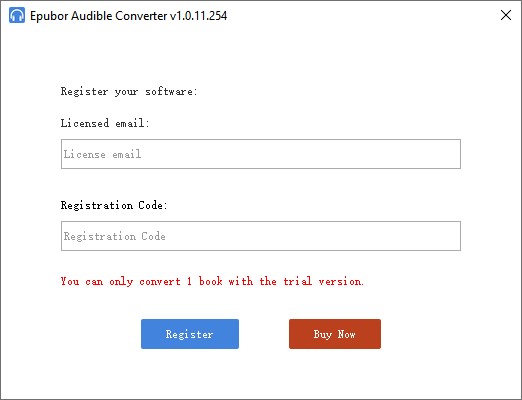
03Click Register to confirm activation.
04If you have not purchased a key, you can skip this step.
Step 3Log In or Add Audible Files to Epubor
01Log in to your Audible account inside the converter or download AAX files from the official Audible website.
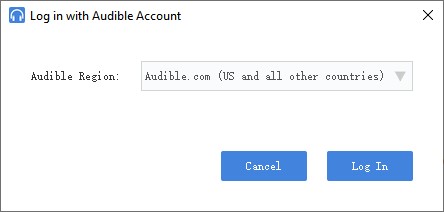
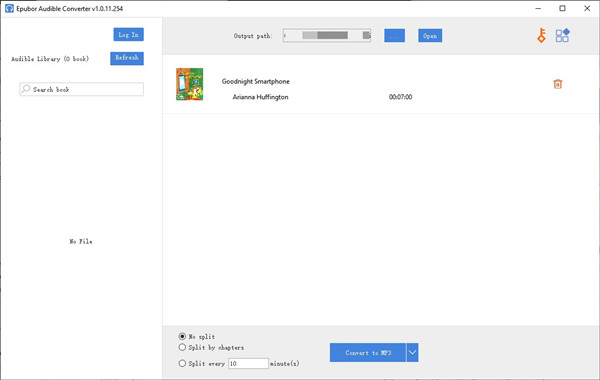
02If you are logged in, drag audiobooks from the left panel into the empty area on the right.
03If you already downloaded AAX files, drag and drop them directly into the software.
Step 4Choose Output Format
01Click the drop-down arrow next to the Convert to MP3 button.
02Select your desired output format: MP3, M4B, or MP4.
Step 5Enable Chapter Splitting (Optional)
01Select Split by chapters or choose Split every [ ] minute(s).
02Select No split if you want to keep the audiobook as a single file.
Step 6Start Conversion
01Click Convert to [format] to start the conversion process.
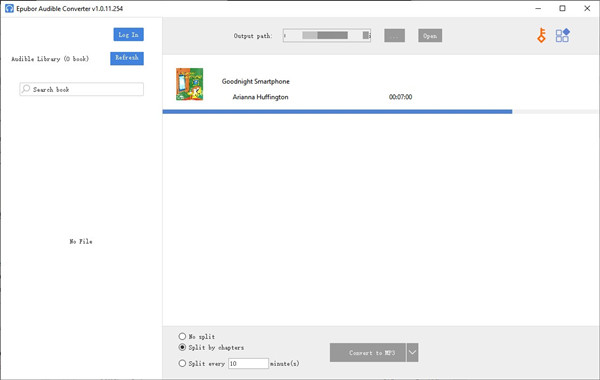
02Once finished, click the Open button at the top.
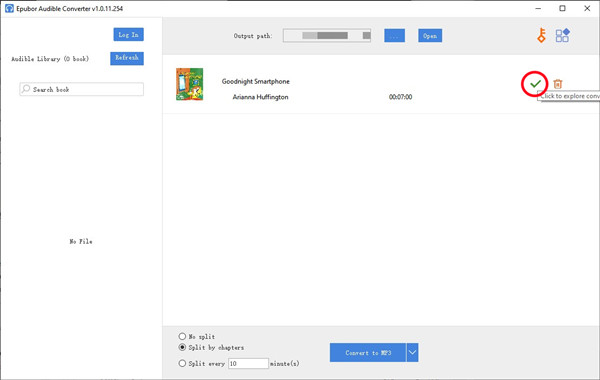
03You can now access the converted Audible files in your selected output folder.

Part 6. Best Alternatives to Epubor Audible Converter
Epubor Audible Converter is one option in a wider group of audiobook conversion tools. Alternatives like ViWizard Audible Converter offer more format support, faster workflows, and a more polished interface. ViWizard also supports a broader range of Audible content, including Audible Plus titles, making it less limited to AA and AAX files and more suitable for large libraries.
Like Epubor, ViWizard Audible Converter is a desktop tool for Windows and Mac that connects to your Audible library. After installation, you sign in, add audiobooks, choose an output format such as MP3, M4A, M4B, WAV, AIFF, or FLAC, and start conversion. It preserves chapters, metadata, and cover art, and supports chapter splitting. The interface is also more structured, making it easier to navigate importing, settings, conversion, and output files.
Key Features of ViWizard Audible Audiobook Converter
Free Trial Free Trial* Security verified. 5,481,347 people have downloaded it.
- Convert Audible audiobooks without AA/AAX format limitations
- Export audiobooks in 6 formats for different devices and players
- Split audiobooks by chapters or sections for personalized listening
- Preserve chapter information and metadata when creating collections
- Manage Audible audiobook libraries across converted files
 Step 1: Launch the App and Load Your Audible Library
Open ViWizard Audible Converter on your Windows or Mac computer. After launching, sign in with your Audible account. The program will automatically sync your audiobook library and display all purchased titles inside the built-in interface, so everything is ready in one place.
 Step 2: Set Your Output Preferences
Before converting, go to the settings or preferences section. Choose an output format such as MP3 or M4A based on your playback needs. You can also adjust audio quality settings like bitrate or sample rate for better control. Finally, select an output folder where all converted files will be saved.
 Step 3: Select the Audiobooks You Want to Convert
Browse your synced Audible library inside ViWizard. Choose the audiobooks you want to save locally. Add them to the conversion list using the add or plus button. You can select a single title or multiple books for batch conversion.
 Step 4: Start Converting and Access Your Files
Once everything is ready, click the Convert button to start the process. The software will download and convert your audiobooks while preserving chapters and basic metadata in most cases. After completion, open the output folder to access your converted files for offline playback on any device.
Part 7. Epubor Audible Converter vs. ViWizard Audible Converter
| Features | Epubor Audible Converter | ViWizard Audible Audiobook Converter |
|---|---|---|
| Supported Input Formats | AAX | AA, AAX |
| Supported Output Formats | MP3, M4B, MP4 | MP3, M4A, AAC, AC3, OGG, AIFF, APE, FLAC, WAV, WMA, M4B, M4R, MKA, AU |
| Supported Operating Systems | Windows 10, 11 macOS X 10.14 and later |
Windows 7, 8, 10, 11 macOS 10.8 - macOS 14 |
| Conversion Speed | Up to 60x faster | Up to 100x faster |
| Price | 1-Year License: $29.99 Lifetime License: $39.99 Family Lifetime License: $69.99 |
1-Month License: $10.95 1-Year License: $34.95 Lifetime License: $69.95 |
| Free Trial | ✔ | ✔ |
| DRM Removal | ✔ | ✔ |
| Chapter Splitting | ✔ | ✔ |
| Metadata Editing | ❌ | ✔ |
| Audio Quality Settings | ❌ | ✔ |
Epubor Audible Converter focuses on basic conversion with a simple setup, while ViWizard Audible Converter offers broader format support and a more flexible workflow.
Epubor supports only MP3, M4B, and MP4, which limits output options. It also lacks advanced settings like sample rate, bit depth, codec control, and ID3 tag editing. In addition, it does not offer monthly plans, which makes it less flexible for short-term use. ViWizard Audible Converter, on the other hand, supports more formats, including MP3, AIFF, FLAC, WAV, M4A, and M4B. It also offers monthly pricing starting at $10.95, allowing users to try it without long-term commitment.
Part 8. Is Epubor Audible Converter Worth It?
The value of Epubor Audible Converter becomes clearer in everyday use rather than just its feature list. From my experience, it is built around a direct workflow. It combines importing, converting, and organizing in one place, keeping the process simple without much setup. It works best for quick Audible audiobook conversion with minimal steps.
However, it feels a bit older and less polished compared to alternatives like ViWizard Audible Converter. It focuses more on convenience than advanced control, making it better for straightforward use cases. Pricing starts at $29.99 for 1 year, $39.99 for 5 years, and $69.99 for lifetime, with a 30 day money back guarantee. ViWizard Audible Converter starts at $10.99 per month. One advantage of Epubor is MP4 output support, which is less common in similar tools.
In the end, it makes sense to try both Epubor Audible Converter and ViWizard Audible Converter before subscribing, since the final choice often depends on personal workflow.
Is Epubor Audible Converter safe?
Yes, the Epubor Audible Converter can be used safely. It received a 4.6/5 rating from over 1101 reviewers on TrustPilot, indicating a high level of user trust. Although the software has a feature that allows you to log in to your Audible account during the conversion process, it is an optional feature, so you don't have to worry about your account personal information at all. However, you should always download from the official website to avoid the risks of unofficial sources.
Is Epubor Audible Converter free?
No, Epubor Audible Converter is not free. It provides a trial version that only allows you to convert one audiobook file. If you want unlimited conversions and full functionality, you will need a paid license, starting at $29.99 per year or a $39.99 lifetime license for one computer.
Is there a cracked version of Epubor Audible Converter?
No, there is no cracked version of the Epubor Audible Converter, and we do not recommend using it. Cracked versions are illegal and unethical. They may violate copyright laws and expose users to risks such as malicious software, data theft, or software instability. Instead, by purchasing a legitimate license from Epubor's order page, you can receive updates and customer support, which cracked versions cannot provide.
You May Be Interested



Nick Orin often turns to tech forums to see what apps people are talking about. He likes testing different software, comparing features, and finding out which tools are worth a try.

Leave a Comment (0)