


If you've ever used SoundCloud on more than one device, you probably know how easy it is to stay logged in everywhere without even noticing. You may question: how many devices can you log in to? As many devices as you like. But both Free and SoundCloud Go/Go+ users can only listen to music on one device at a time. And the latter can play songs downloaded on SoundCloud on up to 3 different devices.
However, to better manage your account, you need to log out of SoundCloud on your device. Whether you're switching phones, sharing a computer, or just trying to clean things up, learning how to log out of SoundCloud on all devices helps you keep things organized and secure.
In this guide, we'll walk through how to sign out of SoundCloud from mobile, desktop, and all connected applications.
Part 1. How to Log Out of SoundCloud on Mobile and Tablets
To log out of SoundCloud on your mobile phone or tablet, you can tap Library, open your Settings, and select Sign Out. If you are using a mobile browser, you can also sign out smoothly. Now follow me.
On Mobile & Tablet App (Android & iOS)
01Tap the SoundCloud app.
02Choose Library in the bottom bar.
03Select your profile picture in the top right corner.
04Tap Settings > Account (under Autoplay).
05Scroll through to find Sign Out, and tap it.
06Select OK to complete the process.
On Mobile & Tablet Browser (Android & iOS)
01Open your mobile browser (Safari, Chrome, etc.) and navigate to SoundCloud.
02Locate the top right corner of your screen.
03Choose the profile icon, username, or the three dots near the search bar.
04Tap Settings from the drop-down list.
05Scroll down to the bottom to find Sign Out.
06Select Sign Out. And you've logged out of your SoundCloud account on your mobile browser.
Part 2. How to Log Out of SoundCloud on Desktop
You can easily log out of SoundCloud on a desktop. In the web browser, you can open the menu in the top-right corner and choose Sign Out, like the mobile browser. On the desktop app, it can be simpler. Here are the steps to log out on a desktop.
On Web Browser (Chrome, Safari, Edge)
01Click your preferred browser and visit SoundCloud.
02Your account is logged in automatically. If not, sign in.
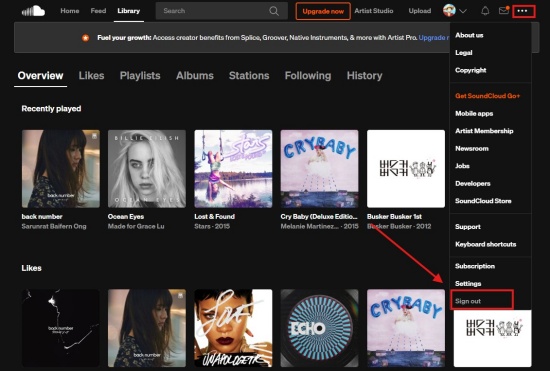
03Look at the top right corner to find the three dots (…).
04Click the three dots to see a drop-down menu.
05Select Sign Out from the list, and you have logged out of SoundCloud on the web browser.
On Desktop App (Windows & Mac)
01Open the SoundCloud Desktop App.
02Select your profile picture or your username at the top right.
03Choose Settings from the given list.
04Scroll through to find the bottom option, "Sign Out". Click it.
Part 3. How to Log Out of SoundCloud on All Devices
If you want to log out of SoundCloud on all of your devices, you can revoke access to your connected applications from a web browser on your mobile or desktop. This way, you sign out everywhere.
On Mobile or Desktop Browser
01Activate your mobile or computer.
02Choose a web browser and visit SoundCloud.
03Make sure you've signed in. Click the horizontal three dots near your profile picture.
04Select Settings from the drop-down menu.
05Scroll all the way to find the Connected applications section.
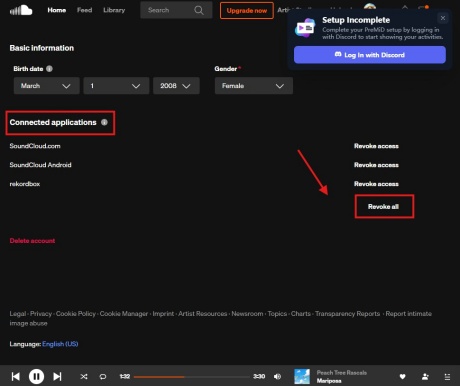
06Choose Revoke all at the bottom of the section.
07Click Revoke all and sign out when prompted. You have successfully signed out on every device.
Part 4. How to Fix SoundCloud Log Out Not Working
When the SoundCloud log-out fails, stuck cache files or extension conflicts are to blame. Don't worry, and we offer you tips for both the web browser and the mobile app. Let's get started.
On Web Browser
Clear Browser Cache and Cookies: Navigate to your browser settings and clear your browsing data.
Disable Extensions: Ad-blocker or privacy plugin can stop scripts needed to sign out. Close them and try again.
Turn on Incognito Mode: Open a private window, and check if the log-out fails. If it does, your main browser's cookies are corrupt.
Revoke All Access: If you cannot access the computer, go to SoundCloud Connected Applic page to select "Revoke all".
On Mobile
Clear App Cache: Open the app settings and choose Clear application cache.
Force Stop: Force-stop the app from your mobile phone's application manager. Turn it on again.
Update or Reinstall: Go to your app store to see if there is a latest version of SoundCloud. If it is already updated, delete the app and reinstall it.
Bonus: How to Keep Listening to SoundCloud After Logging Out
Simply put, it is necessary to log out of SoundCloud across different connected devices. This can let you manage account security and control where your music is accessed. Whether you sign out individually on each device or use the "Revoke all" button, it ensures your account is not left active on unused devices. If you cannot log out smoothly, you can take the troubleshooting tips in part 4.
Want a more flexible way to enjoy SoundCloud music beyond account limits? ViWizard SoundCloud Music Downloader offers an offline listening solution. It helps download SoundCloud tracks, playlists, and albums and save them in widely used formats such as MP3, FLAC, WAV, and more, while keeping original audio quality and ID3 tags intact. It supports batch conversion and lets you adjust settings like bitrate and sample rate, so you can build a stable personal music library that plays anytime, even without logging into SoundCloud or staying signed in.

Want more flexibility with your SoundCloud music? ViWizard SoundCloud Music Converter helps SoundCloud listeners convert tracks, playlists, and albums with seamless music conversion. Save your favorites and keep your SoundCloud collection accessible.
How to Use ViWizard SoundCloud Music Downloader for Offline Listening
 Step 1: Customize the Output Settings
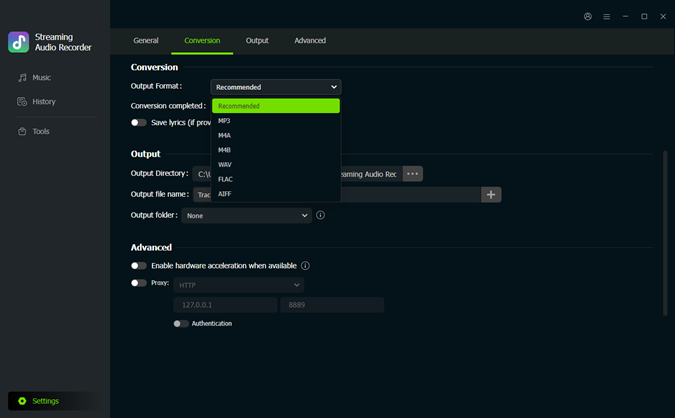
Launch ViWizard SoundCloud Music Downloader and click the menu icon in the upper-right corner. Go to Preferences > Conversion and select your preferred output format, such as MP3, FLAC, WAV, or M4A. You can also fine-tune audio quality settings like bitrate and sample rate before saving your preferences.
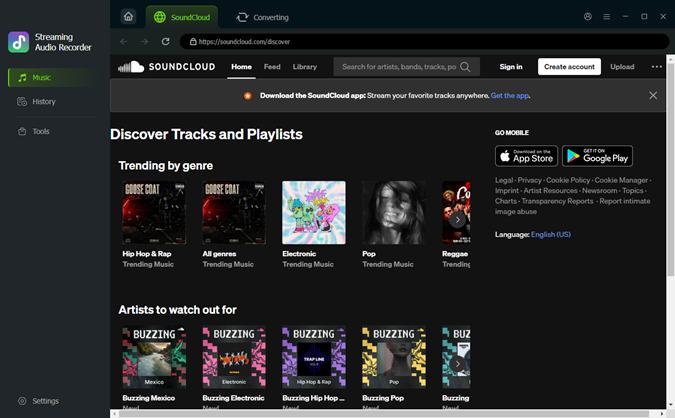 Step 2: Sign In to SoundCloud
Return to the main interface and choose SoundCloud. The built-in SoundCloud web player will open automatically. Sign in to your SoundCloud account to access your library, including playlists, albums, liked tracks, and saved songs.
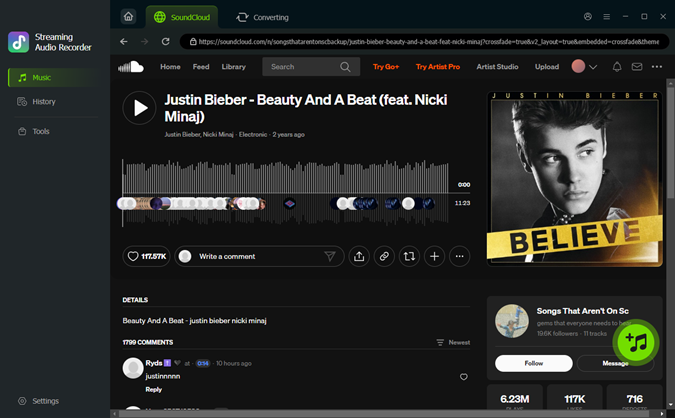 Step 3: Add SoundCloud Music to the Download List
Browse and open any playlist, album, or individual track you want to download. Click the Add to List (+) button, and ViWizard will automatically scan and load the selected music into the conversion queue.
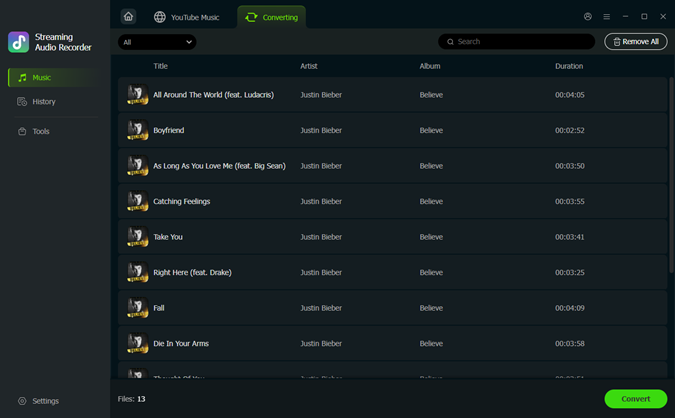 Step 4: Download and Transfer for Offline Listening
Click Convert to start downloading and saving your SoundCloud music to your computer. Once the process is complete, the files are stored locally and can be played offline anytime. Even after logging out of SoundCloud, you can still access and enjoy your downloaded tracks directly on your device without needing an active account or internet connection.
Conclusion
So that's basically it—logging out of SoundCloud on all devices is just about knowing where to tap and using the right option when you want a full reset. Once you do it, your account stays cleaner and more under control across every device. And if you still want to keep your music with you even after logging out, tools like ViWizard SoundCloud Music Downloader make it easy to download your tracks and listen offline anytime, no login needed. Just give it a try!
You May Be Interested

How to Log Out of Apple Music on All Devices: A Complete Guide

Solved: Log Out of Spotify Everywhere (All Devices)

Solved: Spotify Keeps Logging Me Out

Does SoundCloud Have Ads? 9 Ways to Block Ads on Any Device

How to Listen to SoundCloud Offline without Go/Go+ in 2026
How to Sign Out of YouTube Music on All Devices: A Full Guide

How to Log Out of Pandora on Mobile, Desktop, and Other Devices


Dave Henry loves movies and all things video. He likes checking out different video formats and trying new media players to see how they change the viewing experience.

Leave a Comment (0)