


Want to see your SoundCloud Wrapped for 2025? Here's the quick answer: SoundCloud does have its own Wrapped-style recap called Your Playback, and you can check it right now. It shows your top songs, artists, genres, moods, and listening trends from the past year.
This guide shows you how to see SoundCloud Wrapped 2025, how to open it on mobile and desktop, why it may not appear, and how to save or download your Wrapped playlists so you can keep them forever.

Part 1. Does SoundCloud Have a Wrapped?
Yes, SoundCloud has its own version of Wrapped called Your Playback or SoundCloud Playback. Just like Spotify Wrapped or Apple Music Replay, it gives you a personalized recap of your top songs, artists, and listening trends from the year, usually covering activity from January 1st to November 30th. It's a fun way to see what you've been listening to and how your music taste has changed over time.
When you open your SoundCloud Wrapped 2025, you'll find:
- Your top 5 artists, tracks, genres, and moods
- Your total listening time for the year
- A Playback Playlist with your top 50 most-played songs
Part 2. When Does SoundCloud Playback Come Out?
SoundCloud drops the 2025 Playback on December 3. The release may appear at different times in different regions. Usually, it shows up in the first or second week of December. Keep an eye on your SoundCloud app and make sure notifications are turned on in early December.
Part 3. How to See SoundCloud Wrapped
On both the SoundCloud app and the SoundCloud website, it's very easy to find your SoundCloud Playback 2025 and see every slide. If you use the mobile app, make sure it's updated to the latest version. While the desktop web version does not require any updates.
On Mobile (iOS & Android):
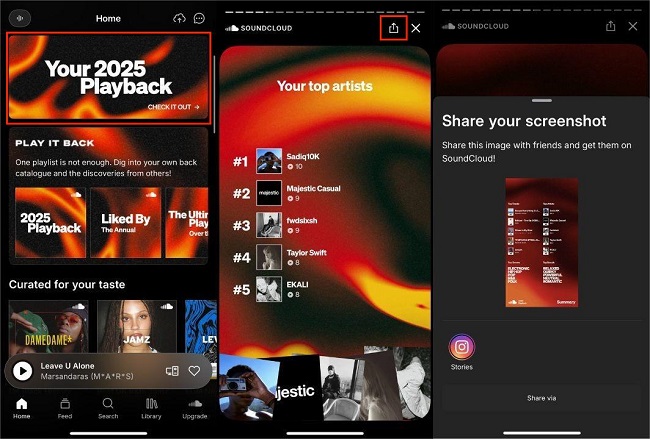
Step 1 Make sure your SoundCloud app is updated to the latest version, then open the app and log in to your account.
Step 2 On the Home screen, look for the colorful banner labeled: "Your 2025 Playback."
Step 3 Tap the banner to open your personalized Wrapped summary.
Step 4 To share the visual slides of your music stats, tap the Share icon located in the upper right corner of the screen.
Step 5 To share your playlist, go to PLAY IT BACK, open the playlist, tap the three-dot icon, and select a social platform.
On Desktop Browser:
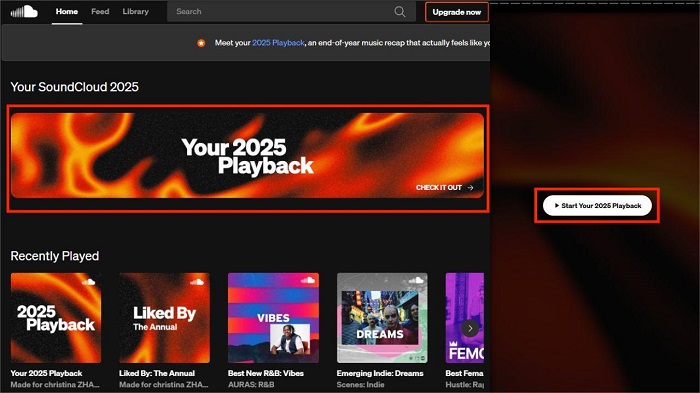
Step 1 Go to soundcloud.com and log in.
Step 2 Find the banner that says "Your 2025 Playback" and click it.
Step 3 The Playback slides will load. When ready, click Start Your 2025 Playback to begin.
Step 4 At the end, you can save your Playback playlist.
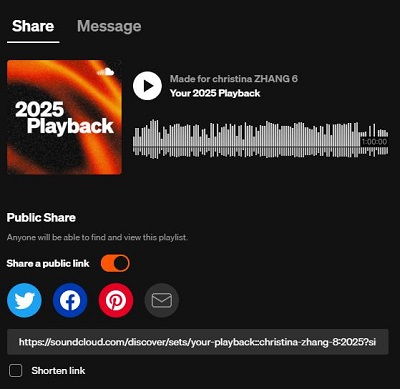
Step 5 To share it, go to Play it Back or your library, then click Share and choose a social media platform.
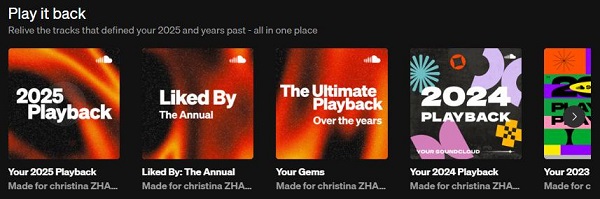
Previous SoundCloud Playback Playlists You Might Want:
You can also find your previous SoundCloud Playback playlists in the Play it Back section on the home page. There are other playlists too, like Liked By: The Annual, which shows songs liked by people you follow, and Your Gems, which includes your most played songs over the years.
Part 4. How to Fix SoundCloud Wrapped Not Showing Up
If your SoundCloud Wrapped isn’t showing up, you’re not alone. Many users run into this each year, and it’s usually something small that causes it. Wrapped relies on your listening activity, your app version, and a few things SoundCloud handles in the background. In this part, we’ll go through the fixes that often get Wrapped to appear so you can check out your year in music.
Fix 1. Check the Minimum Requirements (The First Fix)
Before trying other fixes, make sure your account met the minimum listening activity from January 1 to November 30, 2025.
- Listen enough: playing at least 10 different artists and 30 tracks between Jan 1 – Nov 30.
- Update the app: Use the latest version of the SoundCloud app or access it via the official website.
- Account type: The annual Playback summary feature is available for all Free, Go, and Go+ users.
- Check for notifications: Wrapped usually shows as a banner on the home screen. If you don't see it, check your email or the in-app notifications in early December.
- Search for it: If you still can't find it, use the search bar within the app and type "Playback" or "Your 2025 Playback."
Fix 2. Update the App or Use a Browser
Make sure your SoundCloud app is updated to the latest version. Older versions may still show the Playback banner, but tapping it can trigger a message saying the link is not available. If you don't want to update the app, log in on a desktop browser at soundcloud.com. On a computer, you don't need to update anything, and you can still view the Playback slides.

Fix 3. Clear Cache or Reinstall the App
If Wrapped still does not appear, try clearing your app cache or reinstalling the SoundCloud app. Logging out and back in can also refresh your account and make Wrapped visible.

Fix 4. Contact SoundCloud Support
If you meet all the eligibility requirements, tried the steps above, and it's been a few days into the release period, it's time to contact SoundCloud support. You can Go to the SoundCloud Help Center. Submit a support ticket with your account details, app version, and what steps you've already tried.
Part 5. How to Download SoundCloud Wrapped Playlist (without Subscription)
Now that you've found your SoundCloud Playback 2025, we recommend you "heart" the playlist and add it to your playlists. This way, even after the event ends, you can still find it easily.
If you want to listen to your Playback playlist offline, you can tap the Download button under the cover art. However, this requires a SoundCloud Go or Go+ subscription. Don't have a subscription? No problem. ViWizard SoundCloud Music Downloader lets you download songs, playlists, albums, and even your entire SoundCloud library, including your Wrapped playlist, with just one click.
The software can batch download all songs from your Playback playlist and convert them into MP3, FLAC, WAV, AIFF, M4A, or M4B formats. Each song will keep its metadata, including cover art, and the original audio quality.
We believe it's smart to save your yearly playlist on your device. That way, if you ever want to relive the 2025 vibe, you can access your music offline without relying on SoundCloud's servers.

Key Features of ViWizard SoundCloud Music Downloader
Free Trial Free Trial* Security verified. 5, 481,347 people have downloaded it.
- Built in SoundCloud web player included
- Download unlimited songs, albums, playlists, and artists from SoundCloud
- Export SoundCloud music to FLAC, MP3, WAV, AIFF, M4A, and M4B
- Save the original audio quality of music uploaded by artists on SoundCloud
How to Download SoundCloud Wrapped Playlist Using ViWizard
Step 1 Set Output Format
Open ViWizard SoundCloud Music Downloader. Click the menu icon (☰) and go to Preferences. Under the Conversion tab, choose your preferred Output Format (like MP3) from the dropdown menu. You can also adjust the bitrate, sample rate, and output folder. Click OK to save your settings.

Step 2Select SoundCloud
ViWizard supports downloading from SoundCloud, Spotify, Apple Music, and other platforms. To download a playlist from SoundCloud, click the SoundCloud icon to open the built-in web player.

Step 3Add Your Playback Playlist
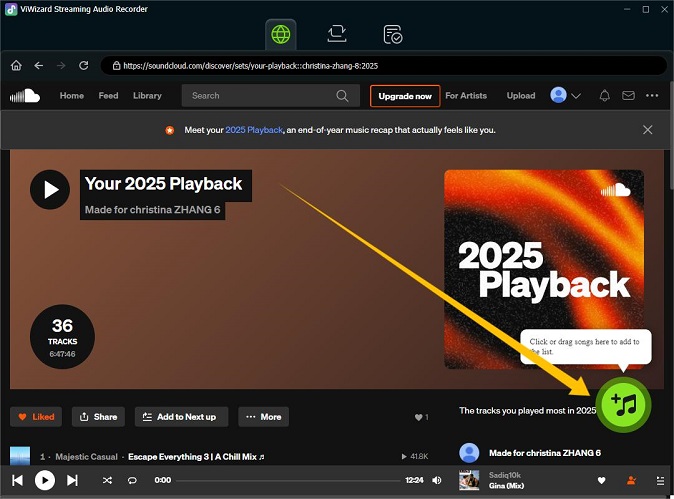
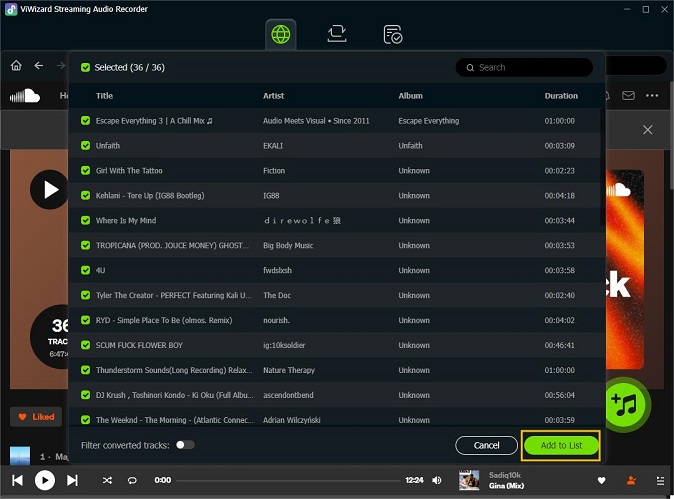
Log in to your SoundCloud account in the built-in player and go to your Wrapped playlist. Open the playlist and click the "+" button to let ViWizard detect all the tracks. In the popup window, select all tracks or pick specific ones you want to download. Then click Add to List to add them to the download queue.
Step 4Download Your Wrapped Playlist
Click the Convert button to start downloading and converting your Wrapped playlist. ViWizard can download up to 65 times faster. When finished, go to the History tab, click the folder icon next to a track, and you'll find the entire playlist saved on your computer in the format you chose.

Conclusion
By following this guide, you now know how to get your SoundCloud Wrapped 2025, view it on mobile or desktop, and troubleshoot if it doesn't appear. And if you want to listen offline or keep your playlist forever, tools like ViWizard SoundCloud Music Downloader let you save your entire Wrapped playlist in popular formats, complete with metadata and cover art no subscription required.
You May Be Interested




Matt Smith, a digital entertainment industry enthusiast at ViWizard, is dedicated to providing insightful commentary and solutions for music and media-related topics, including industry trends, analysis, and recommendations.

Leave a Comment (0)