



One of the greatest advantages of YouTube Music is its integration with YouTube, which offers many great live performances that never appear on other platforms. The moment you subscribe to one of them, you may ask: YouTube Music Premium vs. YouTube Premium, which is better? What are their differences? This post aims to figure them out. Let's begin.
Part 1. What Are YouTube Premium and YouTube Music Premium?
As YouTube Music or YouTube free users, we never clearly learn what the differences are between free and premium. Here you will learn what YouTube Premium and YouTube Music Premium are and what additional benefits you can get from these services.
1.1 What is YouTube Premium?
Actually, YouTube provides free users with the same high-quality content as YouTube Premium owners. The point that may influence our viewing experience lies in the ads and background play. Free users have to watch a video with pre-roll, mid-roll, and display ads, and the video stops as they use other apps or the screen is off.
YouTube Premium helps remove advertisements across YouTube, YouTube Music, and YouTube Kids. Besides, it enables background play. And users can also download the videos and music for offline use and stream even higher-quality videos. This is indeed a better viewing experience.
YouTube Free vs. YouTube Premium: Comparison Table
| Feature | YouTube Free | YouTube Premium |
|---|---|---|
| Ad-free | No | Yes (across all platforms) |
| Background Play | No | Yes |
| Resume Watching Across Devices | No | Yes |
| Queuing | No | Yes |
| Downloads | No | Yes (offline videos and music) |
| Included with YouTube Music Premium | No | Yes |
| Video Quality | Standard (up to 4K) | Enhanced 1080 bitrate available |
| Picture-in-picture | No | Yes |
YouTube Premium: Price
- For individuals: $15.99 per month ($159.99/year).
- For family: $26.99 per month (up to 5 additional members).
- For students: $8.99 per month (requires verification).
- For Premium Lite: $8.99 per month (ad-free and background play, but this excludes YouTube Music Premium and still shows ads on music content, Shorts, and browsing).
1.2 What Is YouTube Music Premium?
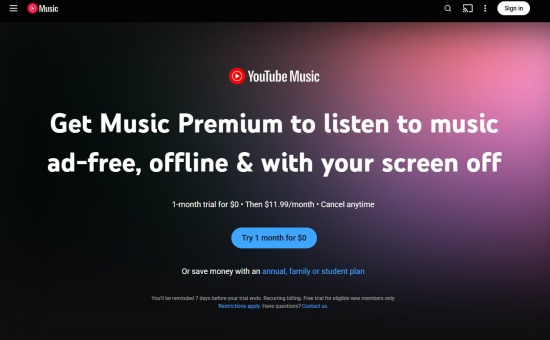
YouTube Music is a standalone music streaming service. And YouTube Music Premium is its subscription level. With support from YouTube, YouTube Music has evolved into a must-have streaming app. For both free and premium users, YouTube Music offers a catalog of over 100 million songs, official albums, and the like. Thus, there is a close race between YouTube Music and Spotify.
YouTube Music Free vs. YouTube Music Premium: Comparison Table
| Feature | YouTube Music Free | YouTube Music Premium |
|---|---|---|
| Ad-free | No | Yes |
| Background Play | No | Yes |
| Queuing | Yes (only on desktop/web) | Yes |
| Downloads | No | Yes |
| Audio Quality | 128 kbps | 256 kbps |
| Audio-Only Mode | No | Yes |
YouTube Music Premium: Price
- For individuals: $11.99 per month (1-month free trial often available, $119.99 for 12 months)
- For family: $18.99 per month (covers up to 5 additional household members).
- For students: $5.99 per month (requires annual verification).
Part 2. Does YouTube Music Come with YouTube Premium?
Yes, YouTube Music does come with YouTube Premium. If you subscribe to YouTube Premium, not Premium Lite, you will have ALL YouTube Music Premium perks, including ad-free music streaming, background play, offline music, high audio quality, and audio-only mode.
Simply put, YouTube Premium can be applied across YouTube, YouTube Kids, and YouTube Music.
Part 3. Differences between YouTube Premium and YouTube Music Premium
Now we have learned what YouTube Premium and YouTube Music Premium are. Then what content do they offer? And what features do they boast? Which one is more cost-effective? Don't worry. We will explain this to you in this part.
3.1 YouTube Music Premium vs YouTube Premium: Contents & Features
With YouTube Music Premium, you can listen to over 100 million songs, live performances, covers, and unofficial music uploads. Besides, it provides an ad-free, offline, and uninterrupted listening experience. And YouTube Music Premium can let you switch to audio-only mode to save data.
With YouTube Premium, you watch all YouTube videos, shorts, and music without ads. When you travel or go somewhere without an internet connection, you can also download YouTube videos or audio for offline use. Most importantly, YouTube Premium supports YouTube Kids ad-free.
What's more? Both YouTube Music Premium and YouTube Premium provide background play, meaning you can listen to the audio while using other apps or with the screen off. And YouTube Music Premium is included in YouTube Premium.
3.2 YouTube Music Premium vs YouTube Premium: Price
YouTube Music Premium is renowned for its value proposition, as it is bundled with YouTube Premium, and this can be a major cost-saving feature. Let's see the price.
| Plan (for) | YouTube Music Premium | YouTube Premium |
|---|---|---|
| Individual | $11.9/month | $15.99/month |
| Family | $18.99/month | $26.99/month (up to 5 users) |
| Student | $5.49/month | $8.99/month |
| Annual | $119.99 | $159.99 |
| Premium Lite | / | $8.99/month (ad-free, limited features) |
3.3 YouTube Music Premium vs YouTube Premium: Other Aspects
Beyond core points like content and price, there are other aspects we need to consider when we choose a premium subscription.
| Aspects | YouTube Music Premium | YouTube Premium |
|---|---|---|
| Access Available | YouTube Music | YouTube and YouTube Music |
| High Quality | 256kbps for music | 1080p for the picture, 256kbps for music |
| Ad-Free Experience | Yes | Yes |
| Background Play | Yes (audio only) | Yes (all content) |
| Offline Downloads | Yes (audio only) | Yes (audio and videos) |
| Queueing | Yes | Yes |
| YouTube Kids | No | Yes |
Part 4. YouTube Premium and YouTube Music Premium: Which Is Better?
It turns out that YouTube Premium outshines YouTube Music Premium. As you choose YouTube Premium, everything is covered in it. You can enjoy offline downloads, ad-free service, background play, higher quality videos, and most importantly, YouTube Music Premium. Then go and subscribe to it? Hold on, for it is more advisable to choose according to your demand.
Choose YouTube Premium If:
- You prefer a bundle, which includes membership to YouTube Music Premium and YouTube Kids at no extra cost.
- You want to remove ads from all videos on the platform, including vlogs, shorts, tutorials, and movies. YouTube Music Premium only provides an ad-free service within the app.
- You desire to continue videos or audios with the screen off or while using other apps.
- You hope to download entire videos and playlists, as YouTube Music Premium only allows audio content.
Choose YouTube Music Premium If:
- You prefer a typically cheaper plan per month.
- You only want an ad-free music listening experience (similar to Spotify).
- You want to play YouTube Music tracks with the phone screen turned off or while using other apps.
Pro Tip: How do I switch from YouTube Music Premium to YouTube Premium?
YouTube Premium gives full access to all the content, so sometimes you may come across this question. Don't worry. To switch to YouTube Premium, you can follow the steps:
Step 1Sign in to the YouTube website or app with your account.
Step 2Click your profile picture and select Purchases and membership.
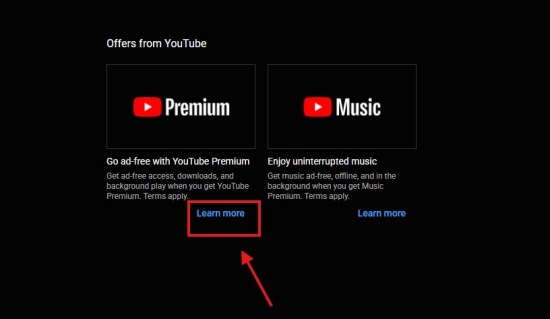
Step 3Under the Offers from YouTube section, find YouTube Premium.
Step 4Click Learn More under the YouTube Premium section to see upgrade details.
Step 5Click Upgrade or Get YouTube Premium.
Step 6Select your preferred plan (Individual, Family, etc.) and confirm your payment method.
Step 7Click Start Membership to finish the switch.
Bonus: Download MP3 from YouTube Music for Offline Listening
Both YouTube Premium and YouTube Music Premium can be the right choices if you have different purposes. YouTube Premium can guarantee full access to YouTube Kids and YouTube Music, and YouTube Music Premium provides a music streaming service like Spotify. But if you like traveling and prefer to download MP3s from YouTube Music, you can choose ViWizard YouTube Music Downloader.
With ViWizard YouTube Music Downloader, you can download your favorite songs to your PC. Before converting, you can personalize the bit rate, sample rate, and bit depth (up to 24-bit, 320kbps, 192kHz). Want to set the output format? Here are many formats for you to choose from: FLAC, MP3, WAV, AIFF, M4A, and M4B. Best of all, your songs can be downloaded at 30x speed. And it automatically saves metadata like song titles, artists, album art, and genres, so you can easily organize and browse your music. Once you use it, you will be surprised by its convenience.

Download songs, playlists, albums, and your whole music library from 10 major streaming platforms, including YouTube Music, to MP3, FLAC, WAV, AIFF, M4A, or M4B with original quality and ID3 tags for permanent offline listening.
Steps to Use ViWizard YouTube Music Download:
Step 1 Customize Output Format and Audio Quality
Download ViWizard YouTube Music Downloader on your PC. Launch the app and click on the menu icon on the top right. Choose Preference and then Conversion. You can choose the output format you prefer, such as MP3, WAV, AIFF, or FLAC. Select bitrate and sample rate as you like. And finally, click Save.

Step 2 Launch YouTube Music in ViWizard
Leave the settings page and go back to the main screen. Click YouTube Music, and you can see the built-in YouTube Music web player. Sign in to the web with your account. Browse your library, albums, playlists, and liked music to ensure the song you want to download.

Step 3 Select Songs, Playlists, and Albums on YouTube Music
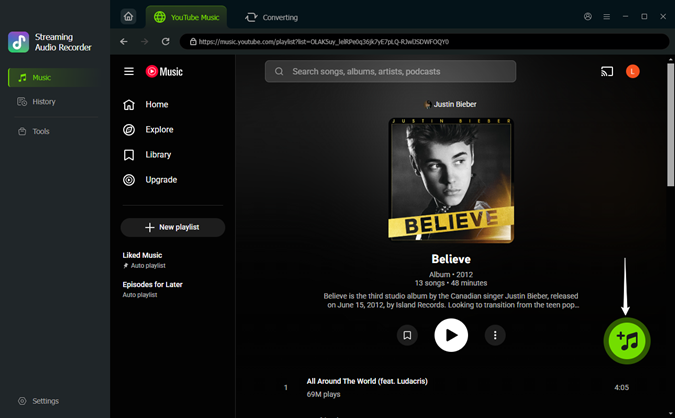
Locate the songs you want to download within the built-in player. Click the playlist or the song, and click on Add to List. ViWizard will scan and load all the songs into the conversion list.
Step 4 Convert and Save YouTube Music Downloads on Desktop
Ensure the songs you want to download are in the conversion page, and click Convert. Then the downloader begins to run at a faster speed with original quality. After conversion, go to the converted page to find the downloads. And you can even find the files in your output folder. Enjoy your music!

FAQs: YouTube Music Premium and YouTube Premium
Do I need both YouTube Premium and YouTube Music?
No, you do not need to pay for both, as YouTube Premium includes YouTube Music Premium. Once you have YouTube Premium, you can use YouTube Music Premium at no extra cost (ad-free, music downloads, background play, and audio-only mode).
Is the audio quality better on YouTube Music?
Yes, YouTube Music offers a maximum bitrate of 256 kbps AAC when you set it to "High" in your settings, while standard YouTube provides 128 kbps AAC on YouTube videos.
Why am I being charged more for my iPhone?
Because you sign up through the Apple App Store, which includes a 30% commission fee. You can subscribe via a web browser to get the standard rate.
Conclusion:
Generally speaking, both YouTube Music Premium and YouTube Premium can provide us with a better experience. You can enjoy your leisurely moments without interruption. But if you consider downloading YouTube Music songs to your PC, ViWizard YouTube Music Downloader can help you. Just give it a try!
You May Be Interested

Tidal vs YouTube Music: A Complete Comparison [Updated]

Spotify vs YouTube Music: Key Differences You Need to Know

Apple Music vs YouTube Music: A Complete Comparison

Latest Guidance to Get YouTube Premium for Free Forever

How to Download Your YouTube Music Library without Premium
4 Ways to Listen to YouTube Music with the Screen Off

From new releases to old favorites, Matt Smith is always on the lookout for good music. He follows the latest in digital entertainment and shares songs and media he thinks are worth checking out.

Leave a Comment (0)