


YouTube Music has one of the biggest song libraries out there, but its default audio settings might not be the best for high-end gear or certain music styles. The trick to improving this is using an Equalizer (EQ). This handy tool lets you adjust frequencies to suit your ears and your space.
Finding the YouTube Music equalizer isn't as straightforward as it should be. Unlike Spotify, there isn't always a clear "EQ" button in the app. Whether you can find it really depends on your device and settings.
In this guide, you will learn exactly how to change the equalizer on YouTube Music for Android, iOS, and Desktop. We will also share the best equalizer settings to help you get professional-grade audio from your favorite streaming service.
Part 1. Does YouTube Music Have an Equalizer?
Yes, YouTube Music does have an equalizer, but its availability depends on the device you are using.
On Android, YouTube Music supports an equalizer through your phone's system audio settings. You can access it directly from the YouTube Music app, which will open the device's built-in equalizer where you can adjust bass, treble, and other sound frequencies.
On iPhone and iPad, YouTube Music does not include a built-in equalizer inside the app. Instead, you need to change the equalizer using the iOS system settings, which apply to music playback across apps.
On desktop computers, the YouTube Music web player currently does not provide a native equalizer. If you want to adjust the sound while listening on a computer, you will need to use a browser extension or a system audio equalizer.
In the following sections, we'll show you how to change the YouTube Music equalizer on Android, iPhone, and desktop step by step.
Part 2. How to Change YouTube Music Equalizer on Android
YouTube Music has an equalizer on Android, but it uses your phone's audio driver instead of a separate app equalizer. So, the look of the interface might change based on whether you have a Samsung, Google Pixel, or Xiaomi device.
How to Change the YouTube Music Equalizer on Android:
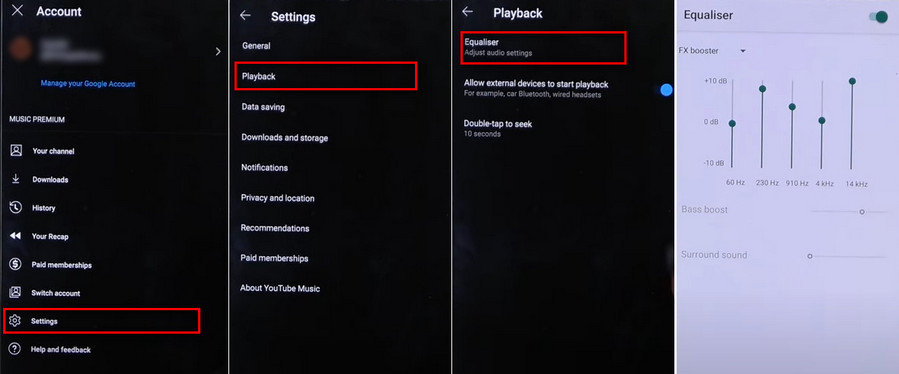
Step 1 Open the YouTube Music app on your Android phone or tablet.
Step 2 Tap your profile picture in the top-right corner.
Step 3 Choose Settings from the menu.
Step 4 Scroll down and select Playback.
Step 5Tap on the Equalizer option. This opens your phone's system equalizer, where you can tweak the sound settings.
Step 6 Customize the audio by flipping the switch. Your changes will apply immediately to the music playing in YouTube Music.
Troubleshooting: Why's My Android Equalizer Missing?
If you follow the steps above and don't see the "Equalizer" option, here are the most likely reasons:
- System Restriction: Some devices, like certain Google Pixel models, don't come with a user-friendly equalizer.
- Active Session Needed: On many phones, the Equalizer option only lights up when you have headphones plugged in or music is playing.
- Optimization Issues: If your EQ isn't working, go to Settings > Apps > Show System Apps and check that your audio tuner app isn't restricted.
If your device lacks a built-in equalizer, you can always download a third-party equalizer app to manage your audio. Check out Part 6 for some top equalizer app recommendations!
Part 3. How to Use Equalizer on YouTube Music for iPhone
The YouTube Music app on iOS doesn't have a built-in equalizer right now. But there's an easy fix: move your YouTube Music songs to Apple Music, where you can access the EQ presets on your iPhone.
But how can you convert songs from YouTube Music to Apple Music?
Just use ViWizard YouTube Music Converter to download your tracks and convert them to formats like MP3, M4A, or WAV that Apple Music supports. After that, sync the files to your iPhone, and you're all set to play them in the Apple Music app.
Why choose ViWizard? It keeps the highest audio quality and lets you tweak settings like bitrate and format. Plus, it saves full ID3 tags like song title, artist, and album artwork, so your music library stays organized and you can see track info while you listen on your iPhone. Once you've moved the converted songs to Apple Music, just turn on the EQ presets in your iPhone settings, and enjoy your YouTube Music tracks with a personalized sound!

Download songs, playlists, albums, and your whole music library from 10 major streaming platforms, including YouTube Music, to MP3, FLAC, WAV, AIFF, M4A, or M4B with original sound quality and full song info and keep your music forever.
How to Convert and Sync YouTube Music for iPhone EQ
Step 1 Set the Output Format
Launch ViWizard YouTube Music Converter and go to Menu > Preferences > Conversion. Choose MP3 or M4A as the output format, as these are fully compatible with iPhone and Apple Music. For the best audio experience, set the bitrate to 320 kbps. Click OK to save your settings.

Step 2 Access the YouTube Music Web Player
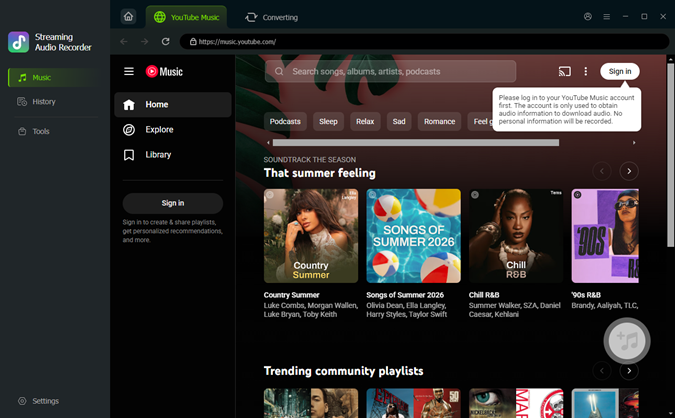
On the main interface, use the built-in YouTube Music web player to sign in to your account. This allows you to browse your entire library, including your liked songs and custom playlists, directly within the converter.
Step 3 Select Your Favorite Tracks
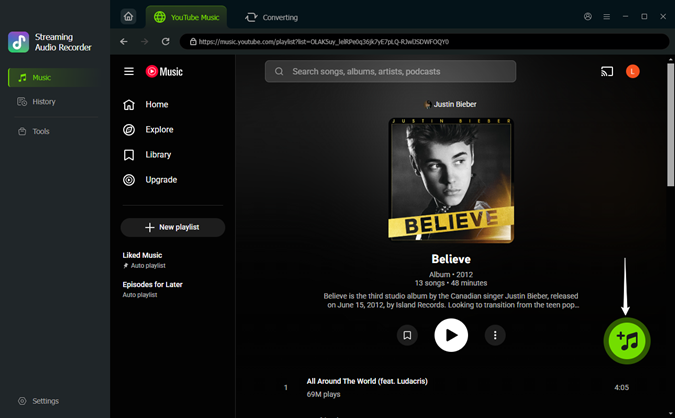
Browse your library or search for the specific songs you want to optimize. Click the Add (+) button on the album or playlist. ViWizard will automatically load the tracks into the conversion list. Check the boxes for the songs you want to sync to your iPhone.
Step 4Convert YouTube Music for iPhone
Click the Convert button. ViWizard will quickly download your songs as high-quality local files. Once the process is finished, you can find the files in your output folder, ready to be synced.

Step 5Sync and Use iPhone Equalizer
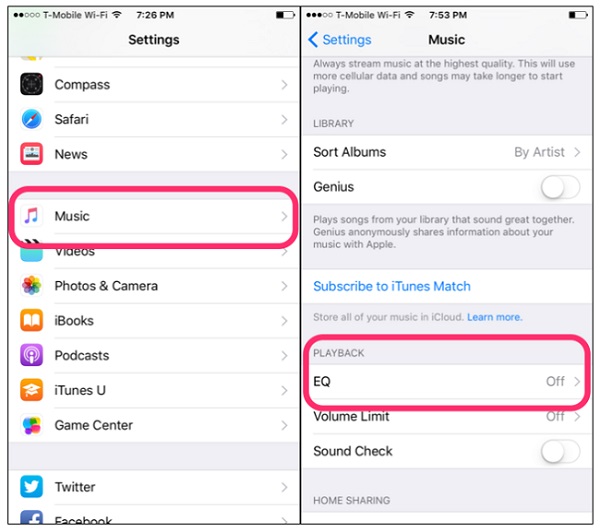
You can then import these files into Apple Music (or iTunes) and sync the converted YouTube Music to your iPhone. After syncing the songs to your iPhone, you can enable the equalizer in Apple Music:
Open Settings on your iPhone.
Scroll down and tap Music.
Tap EQ.
Choose a preset such as Bass Booster, Pop, or Rock.
Part 4. How to Get YouTube Music Equalizer on Desktop
If you are listening to YouTube Music on a Windows PC or Mac, you might have noticed that the official web player and desktop app lack any sound adjustment tools. However, desktop users actually have the most flexibility when it comes to audio customization.
You can get a pro-level sound using browser extensions for a quick fix or system-wide software for a full audiophile experience.
Option 1: Using Browser Extensions (Chrome & Edge)
If you listen to YouTube Music mainly in a web browser, extensions make it super easy to add an equalizer.
Search for "Equalizer for YouTube" or "Audio Equalizer."
Click "Add to Chrome."
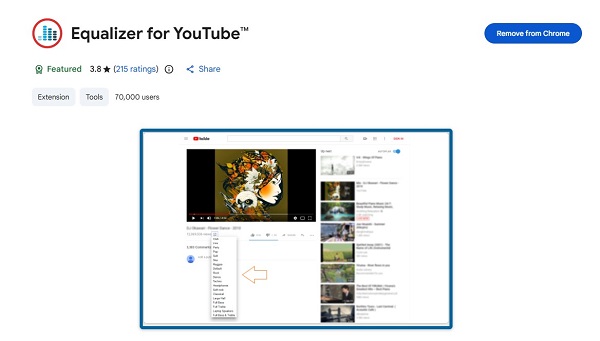
Open a YouTube video.
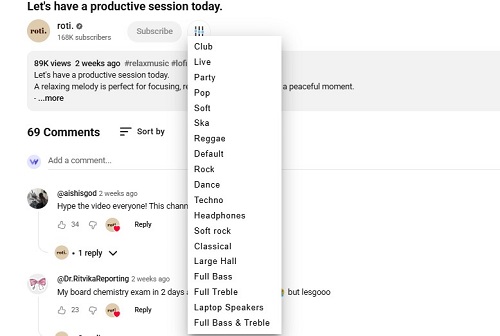
You'll see an EQ button next to the Subscribe button.
Click it and choose a preset like Pop, Soft, or Live to tweak your audio.
Option 2: Using System-Wide EQ Software
Since the browser EQ only adjusts audio in that specific tab, go for system-wide software if you want to change the sound for everything on your computer.
For Windows Users:
- FxSound (Free/Open Source): This is the go-to for Windows. It's super user-friendly and comes with presets tailored for music and movies.
- Equalizer APO: A more advanced, open-source tool for those who want to control every decibel.
For Mac Users:
- eqMac: A powerful system-wide equalizer for macOS that lets you control frequencies from any audio source, including the YouTube Music app.
- Boom 3D: A great paid option that gives you 3D surround sound and advanced equalization profiles for different headphones.
Part 5. Best Equalizer Settings for YouTube Music
Finding the "perfect" sound is all about personal taste, but tweaking certain frequencies can really enhance your listening experience, depending on the genre. Whether you're using a 5-band slider on your phone or a pro desktop setup, these tips will help you get the best audio possible.
Before you pump up the bass, keep in mind that cranking up frequencies too high can cause distortion. Pro audiophiles usually drop the unwanted frequencies instead of boosting the ones they like.
Top 3 Recommended EQ Presets
Here are some simple guidelines to get the best listening experience.
1. The "Perfect" V-Shape (Best for Pop, Hip-Hop, and EDM)
This setting is a crowd favorite because it makes music feel fun and lively. It boosts the bass for a punchy vibe and the treble for clarity, while slightly lowering the vocals to avoid harshness.
- Bass (60Hz - 150Hz): +4dB to +6dB
- Mids (400Hz - 1kHz): -2dB to -4dB
- Highs (8kHz - 15kHz): +3dB to +5dB
2. The "Vocal & Clarity" Boost (Best for Podcasts and Acoustic)
If lyrics get lost or acoustic instruments feel flat, this preset brings the mids forward so voices and guitars are crisp and clear.
- Bass: 0dB (Flat)
- Lower Mids (250Hz - 500Hz): -2dB (Cuts muddiness)
- Upper Mids (2kHz - 4kHz): +3dB (Adds punch to voices)
- Highs: +1dB
3. The "Bass Head" Profile (Maximum Impact)
If you love feeling the deep sub-bass in tracks from artists like Travis Scott or Hans Zimmer, this one's for you.
- Sub-Bass (32Hz - 64Hz): +8dB
- Bass (125Hz): +4dB
- Mids: -2dB
- Highs: +2dB (To keep the sound bright)
Part 6. Best Equalizer Apps for YouTube Music
Since YouTube Music doesn't always offer a built-in equalizer, especially on iPhone, using a third-party app can help you boost and customize your audio. Below are some of the best equalizer apps and tools for different devices.
Best Equalizer Apps for Android:
Thanks to Android's flexibility, these apps can enhance YouTube Music directly.
Option 1: Wavelet (Best for Audiophiles)
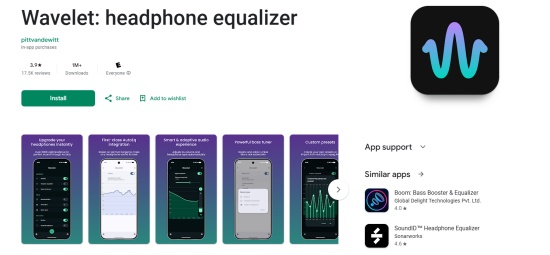
Wavelet is a favorite among Android users. Its AutoEq function includes over 3,000 pre-configured profiles for headphones like Sony WH-1000XM5 or AirPods Pro. The app can detect when YouTube Music starts playing and automatically apply your settings, giving you a "set it and forget it" experience with near studio-quality sound.
Option 2: Poweramp Equalizer (Best for Power Users)
For those who want full control, Poweramp Equalizer offers a professional parametric EQ with up to 32 bands. Its advanced DVC (Direct Volume Control) lets you boost deep bass or high treble without distortion. If you like tweaking every frequency manually, this is the one to try.

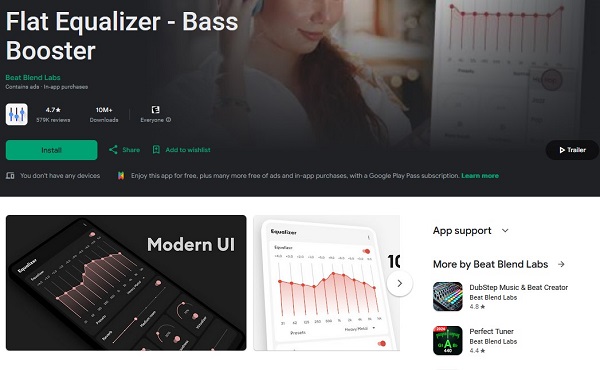
Option 3: Flat Equalizer (Best Free Option)
This user-friendly app has a 10-band EQ, bass booster, and volume amplifier. It's great for beginners who want a sleek interface without getting lost in complex settings.
Best Equalizer Apps for iOS
iOS limits system-wide equalizers for third-party audio apps, but some can still boost sound quality for downloaded files.
Option 1: Boom: Bass Booster & Equalizer (Overall Best for iOS)
Boom connects with some streaming services and has a 16-band EQ, custom presets, and a cool 3D Surround Sound effect that works with any headphones.
Option 2: Equalizer Fx (Best for Simplicity)
This app features a straightforward 7-band EQ and various presets. It's great for boosting bass and is perfect if you find iOS's native options lacking.

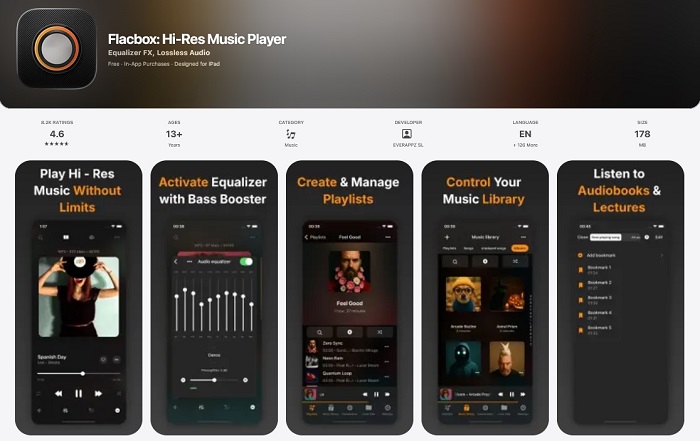
Option 3: Flacbox (Best for Local Files)
If you've converted YouTube Music to local files, Flacbox is your best player. It has a professional-grade equalizer that handles high-res audio formats like FLAC and ALAC without losing quality.
Best Equalizer Tools for Desktop
If you listen to YouTube Music in a browser or desktop player, these tools can enhance your audio experience:
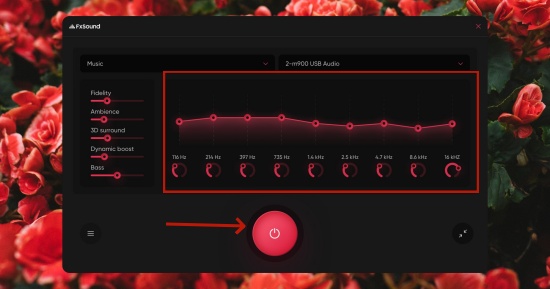
Option 1: FxSound (Highly Recommended)
Now totally free and open-source, FxSound is super user-friendly. It has a modern interface, a 20-band EQ, and presets that enhance compressed streaming audio for a fuller sound.
Option 2: Boom 3D (Mac & Windows)
A user-friendly audio enhancement app with presets and 3D surround sound.
Option 3: SoundSource (Mac)
Perfect for Mac users who want per-app EQ settings. You can boost bass for YouTube Music while keeping Zoom calls flat and clear.

Option 4: Browser Equalizer Extensions
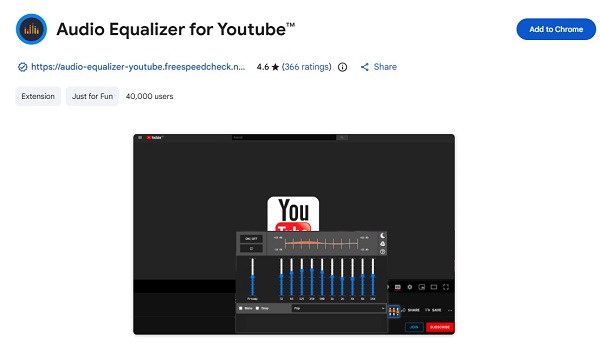
Extensions like Audio Equalizer for YouTube™ add an EQ button next to the "Like" button, letting you tweak audio directly on the YouTube page.
Part 7. FAQs About YouTube Music Equalizer
Will using an equalizer improve the sound quality of YouTube Music?
An equalizer won't magically increase your audio's bit depth or resolution, but it can make a big difference in how your music sounds on your gear. By adjusting frequencies, you can clear up muddy bass, bring hidden vocals to the front, or balance out the limitations of cheap headphones. For the best results, make sure YouTube Music's Audio Quality is set to Always High before applying any EQ settings.
Does the equalizer affect downloaded music in the YouTube Music app?
On Android, the equalizer affects both streaming and downloaded tracks because it works through the system audio settings. On iPhone, the YouTube Music app doesn't have a built-in EQ, so downloaded tracks will not be affected unless you convert them and play them in Apple Music.
Does the equalizer work with Bluetooth headphones?
Yes. Most software equalizers like Wavelet or FxSound work over Bluetooth, but many high-end headphones such as Sony, Bose, and Sennheiser have their own built-in EQ in the official apps. For the best sound, it is better to set the EQ in the headphone's app first. These settings are processed inside the headphones, which helps prevent lag and distortion. You can then make small adjustments with a software equalizer if you want.
Can I use the Spotify equalizer for YouTube Music?
No. Spotify's equalizer is built into the Spotify app and only works with Spotify playback. To adjust YouTube Music, you need to use your device's system equalizer, a third-party EQ app, or convert the music to play in Apple Music if you're on iOS.
Conclusion
Even though YouTube Music doesn't have a built-in equalizer on every device, you don't have to settle for average sound. Android users can use system-wide settings, while desktop and iPhone users can improve audio with browser extensions or by converting tracks with ViWizard YouTube Music Converter to access the native iOS EQ.
By using the right tools and the EQ settings in this guide, you can enjoy your favorite playlists with much clearer, richer sound.
You May Be Interested



From new releases to old favorites, Matt Smith is always on the lookout for good music. He follows the latest in digital entertainment and shares songs and media he thinks are worth checking out.

Leave a Comment (0)