


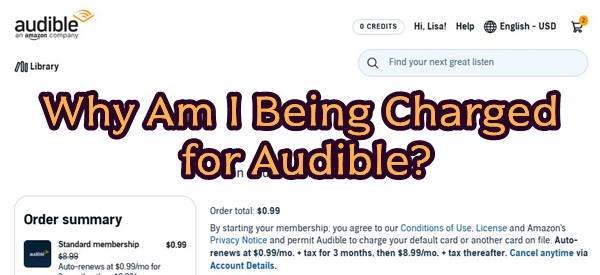
Many services like Audible offer free trials, and it is easy to sign up in just a few taps. After the trial, the subscription can keep running in the background. Soon, a monthly charge may appear on your bank statement, even if you are not using it.
Audible offers plans like Audible Standard at $8.88 per month and Audible Premium Plus at $14.95 per month. Like many subscriptions, costs build up when services are forgotten or not checked often. That is why many people ask, "Why am I being charged for Audible?" In most cases, it is not random billing, but hidden subscriptions or account mismatches. Billing may also be tied to an Amazon account, which can make it less clear across Amazon, Apple, and Audible systems.
This guide explains why these charges happen, how to understand them, and how to stop or reduce future billing while saving money on subscriptions and audiobooks.
Part 1. What Are Audible Charges?
As of 2026, Audible charges usually come from three sources: a monthly membership, audiobook purchases, or a small $1 authorization fee when a card is added or verified.
Most charges come from a subscription plan. Pricing is about $8.88 per month for Audible Standard (Audible Plus) and $14.95 per month for Audible Premium Plus. Some regions also offer annual plans with a lower monthly cost. Plans include audiobooks, credits, podcast access, and member-only deals like discounts or "2 for 1" offers depending on the tier.
Audible also offers a free trial for new users with access to audiobooks and 1–2 credits. After the trial, it automatically converts to a paid subscription unless canceled. This is when monthly charges usually begin.
- Free trials that turn into paid memberships after the trial ends.
- Monthly subscriptions that renew until cancelled.
- Old or forgotten Amazon accounts with active Audible plans.
- One-time audiobook purchases that look like recurring charges.
- Kindle eBook purchases with bundled audiobook add-ons.
- Small card verification charges.
- Subscriptions on a different Amazon account than the one being checked.
- Charges from shared Amazon accounts used by family members.
- Apple or Google subscriptions billed outside Audible.
- Charges after cancellation due to billing timing delays.
- Saved payment methods that continue billing subscriptions.
- Confusing transaction labels that look like subscriptions.
Part 2. Why Am I Being Charged for Audible?
Many users are surprised when they see unexpected charges from Audible. In most cases, the reason is simple. These charges are not random and usually come from an active subscription or an account still linked in the background.
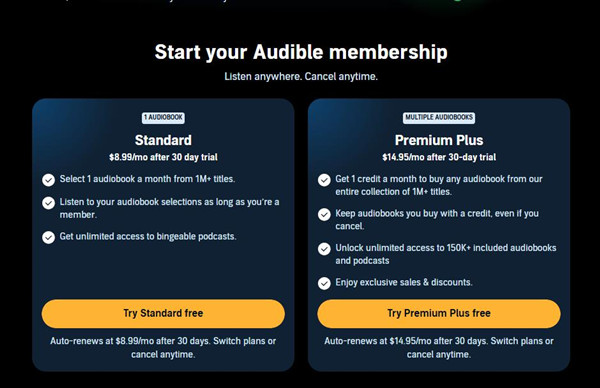
- If Audible charges you $14.95: This is usually the Audible Premium Plus plan. Many users start with a free trial or promo and forget to cancel. After the trial ends, it renews automatically at $14.95 per month until stopped, even if the app is not used.
- If Audible charges you $8.88: This usually comes from the Audible Standard plan. It also renews automatically after signup or trial. Users often miss it because it is a smaller monthly charge that blends into other subscriptions.
-

Forgotten subscription (most common):
An active membership is still linked to an old or unused Amazon account. Users often forget a trial or promo they started, which later renews into a paid plan. In some cases, it does not appear in the app when users are logged into the wrong account, but billing continues as long as the subscription is active on Amazon's side.
-
Wrong account login:
The subscription is tied to the Amazon account used at signup, not the one currently open in the app. Users often think they have no plan when they are simply in a different account.
-
Payment method issue:
Charges continue if a valid payment method remains on the Amazon account. Even if forgotten, billing continues as long as a working card is on file. This often happens when payment details are updated or accounts are shared in a household.
-
Apple billing issue (iPhone users):
For Apple signups, billing is handled through Apple ID, not Audible. The subscription may not appear in the app, but charges continue until canceled in Apple subscription settings.
-
Sync delay charges:
Some users see charges after canceling due to system delays. The subscription is already canceled, but a final billing cycle may still complete.
-
Library confusion:
Some users think charges are wrong because their library looks different. In most cases, books are still owned but may shift due to catalog updates, licensing changes, or edition updates.
Part 3. How to Check Audible Charges on Your Account
To understand charges from Audible, you need to check where the billing is actually coming from. In most cases, it is tied to your Amazon account and not the app itself.
1. Deleting the Audible app does not stop billing.
2. You must cancel the membership through your Amazon account to stop future charges.
Check Audible Charges and Contact Support if You Still Cannot Find the Source
01Sign in to the Amazon account you think was used for Audible, either in your browser or the Amazon app.
02Go to "Hi, [Your Name]" and open "Purchase history".
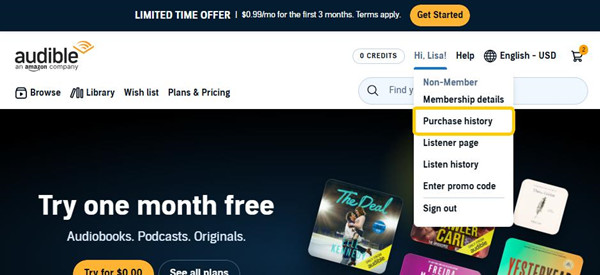
03Look through the list for any Audible charges, including subscription renewals, audiobook purchases, or free trials that turned into paid plans.
04Head into "Settings" and check your country or marketplace region, like US, UK, or Canada, then match it with the charge name on your bank statement.
05If nothing matches, sign out and try again with any other Amazon email you may have used.
06If you still cannot find it, go to the Audible Help page and pick billing support for your region.
| Charge on statement | Region | What it means | Contact Us |
|---|---|---|---|
| Audible, adbl.co/bill | US | US Audible subscription or purchase. Check your Amazon US account. | Contact Us |
| Audible, audible.es/cbr | Spain | Spanish Audible billing. Contact Audible ES support. | Contact Us |
| Audible, Audible LTD, adbl.co/pymt | UK | UK Audible subscription. Check Audible UK account. | Contact Us |
| Audible, Audible Australia Pty Ltd, adble.co/pay | Australia | Australian Audible billing. Check Audible AU account. | Contact Us |
| Audible, audible.de/rg | Germany | German Audible charges. Check Audible DE account. | Contact Us |
| Audible, audible.fr/py | France | French Audible billing. Check Audible FR account. | Contact Us |
| Audible, audible.it/rc | Italy | Italian Audible charges. Check Audible IT account. | Contact Us |
| Audible, Canada | Canada | Canadian Audible billing. Check Audible CA account. | Contact Us |
| Amazon Audible, audible.com.br/cobr | Brazil | Brazil Audible billing. Check Audible BR account. | Contact Us |
| Amazon India | India | India Audible charges. Check Audible IN account. | Contact Us |
| Audible/AMZN, Audible, Inc. | Japan | Japan Audible billing. Check Audible JP account. | Contact Us |
07Have the last four digits of the card ready, since it helps them track down the exact account and charge.
Part 4. How to Fix Unexpected Audible Charges and Get a Refund
To fix unexpected charges from Audible, you first need to check where the charge comes from. In most cases, it is linked to your Amazon account and an active subscription or purchase. Once you identify the source, you can cancel it and check whether you are eligible for a refund.
Step 1Check Other Amazon Accounts
01Go to the Amazon sign-in page and sign out of any account you are currently using.
02Sign in again using other email addresses you may have used before. Audible charges are often linked to older accounts.
03Go to Account & Lists > Your Content & Devices > Preferences.
04Check whether an Audible membership is shown. If it is active, that account is still being billed.
Step 2Check Subscriptions
01Go to Account & Lists > Memberships & Subscriptions on Amazon.
02Look for any Audible plan listed as active or set to renew.
03Click Manage Subscription next to Audible.
04Check the billing status and renewal date. Cancel the subscription if you do not need it, since Audible renews automatically unless it is stopped here.
Step 3Check Apple Subscriptions (iPhone Users)
01Open Settings on your iPhone or iPad.
02Tap your Apple ID name at the top, then tap Subscriptions.
03Find Audible in the list.
04Check the status and cancel it if needed. Apple handles billing for subscriptions made through iOS, not Audible or Amazon.
Step 4Check Your Order History
01Go to Amazon > Account & Lists > Your Orders.
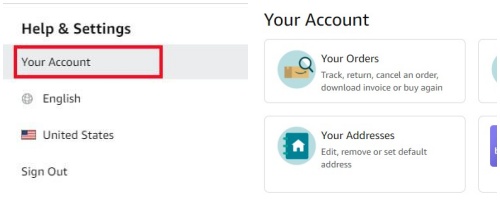
02Search for "Audible" or look under digital orders.
03Check each charge, including renewals or trial conversions. Some may appear as Amazon Digital Services.
04Match the date and amount with your bank statement to confirm the source.
Step 5Contact Support
01Open the Amazon Help Center or Audible Help Center, then choose Contact Us.
02Select Memberships & Subscriptions or Digital Services Charge Issue.

03Enter the charge date, amount, and payment method.
04Ask support to check all linked Amazon accounts, since the charge may come from a different login.
Step 6Request a Refund
01Ask support to review the charge for a refund.
02Explain if the subscription was not intended, or if it came from a free trial.
03Wait for their decision. According to Audible's legal conditions of use, "Fees are non-refundable except in the specific circumstances described in these Terms."
Step 7Dispute the Charge (Last Option)
01Contact your bank or card issuer if support cannot resolve the issue.
02Request a dispute or charge reversal for the transaction.
03Share any proof you have, such as statements or support messages. This step should only be used when Amazon or Audible cannot resolve the charge.
Part 5. How to Stop Future Audible Charges
Once you figure out where the Audible charges are coming from, the next step is deciding what to do.
- If you want to keep using Audible, treat it as a normal monthly cost under your Amazon account. Check the billing cycle so you know when each payment happens. This helps avoid surprise charges later.
- If you do not want it anymore, cancel the subscription so it stops billing you. You can do this in your Amazon account under "Memberships & Subscriptions". Follow the steps carefully, since there may be prompts trying to keep you subscribed. Continue until you see clear confirmation of cancellation. If needed, contact Amazon support to finish it.
- If the charge still looks unfamiliar, check other accounts you may have used. Try different email addresses linked to Amazon, since Audible can be active on a secondary login without showing on your main one. Also check shared or family accounts if applicable.
- If you are sure the charge is not yours, contact Amazon support or your bank to dispute it. Most banks let you flag charges in their app or by phone. They can block future billing and may refund recent charges while reviewing the case.
Bonus: How to Save Money on Audible Subscriptions and Audiobooks
If you want to cut long term costs, the goal is to rely less on ongoing access through Audible under your Amazon account and keep your audiobooks as personal files instead.
One way to do this is with ViWizard Audible Converter. It helps you back up and convert Audible audiobooks into common formats like MP3. After that, the files are not tied to a subscription anymore. You can log in, choose your audiobooks, and convert them in batches on Windows or Mac. You do not need AA or AAX files.
You can pick formats like MP3, M4A, M4B, WAV, AIFF or FLAC. It also preserves simple file info like tags, and splits long audiobooks into smaller parts by chapters or time. This makes the files easier to store offline without needing an active subscription.

Key Features of ViWizard Audible Audiobook Converter
Free Trial Free Trial* Security verified. 5,481,347 people have downloaded it.
- Convert Audible audiobooks without AA/AAX format limitations
- Export audiobooks in 6 formats for different devices and players
- Split audiobooks by chapters or sections for personalized listening
- Preserve chapter information and metadata when creating collections
- Manage Audible audiobook libraries across converted files
 Step 1: Open the app and sign in
Start ViWizard Audible Converter on your Windows or Mac computer. It includes a built in Audible library inside the app, so you can access everything in one place. Sign in with your Audible account from Amazon. After that, your audiobook library will load automatically and be ready to use.
 Step 2: Set MP3 as the output format
Before you start converting, go to the settings or preferences area and choose MP3 as the output format. MP3 works on almost any device, including phones, tablets, cars, and media players. You can also adjust basic quality settings like bitrate if you want better sound or smaller file size. Pick an output folder so your files are easy to find later.
 Step 3: Select your audiobooks
Go through your library inside the app and pick the audiobooks you want to save. Click to add them to the conversion list. You can choose one title or select many at once if you want to back up your whole collection.
 Step 4: Convert and save
Click the Convert button to start. The tool will turn your audiobooks into MP3 files and keep basic details like title, author, and chapters. When it finishes, open the output folder to find your saved files. You can now play them anywhere without needing an active subscription.
Conclusion:
Most Audible charges come from active subscriptions, account mix-ups, or one-time purchases, not unknown billing. In many cases, it is a forgotten trial, a different Amazon login, or billing through Apple or Google. Checking all accounts and billing platforms usually finds the source.
If you want more control over your Audible audiobooks, you can use ViWizard Audible Converter to save and manage them offline in more flexible formats.
You May Be Interested


Adam Gorden, the digital media specialist at ViWizard, is dedicated to providing the best solutions for digital media management, including audio and video conversion, file optimization, and media workflow enhancements.

Leave a Comment (0)