


If you have used iTunes or Apple services for years, you have likely built a collection of music, movies, audiobooks, or podcasts through the iTunes Store or Apple Music. Even though these are paid or subscribed items, they do not always behave like fully flexible files across all devices.
This is mainly because of DRM, or Digital Rights Management. DRM is a protection system used by Apple and other platforms to control how digital media can be used, copied, or played. In Apple's ecosystem, this system is called FairPlay Streaming (FPS), which is used for movies, TV shows, and some older music to limit playback to authorized devices linked to an Apple ID.
While Apple removed DRM from most music purchases in 2009 with iTunes Plus, video content and subscription based media still remain restricted under FairPlay protection.
Because of this, we will look at how iTunes DRM works, what the legal considerations are in the United States, and what options are available for accessing and managing different types of iTunes content.
Part 1. How Does DRM Work in iTunes?
This confusion is very common. Apple Music uses DRM for all downloads, and video content is always restricted, which can make it feel like everything in iTunes is locked.
On top of that, iCloud syncing may replace purchased songs with streamed or matched versions, which can make even DRM-free music seem restricted. Because of this, users often think DRM is more widespread than it really is.
Does iTunes still have DRM?
Music purchased from the iTunes Store is DRM-free (iTunes Plus, 256 kbps AAC) and has been since 2009. Apple Music is different. Songs downloaded from Apple Music are DRM-protected and only work while your subscription is active. DRM also applies to Apple Music content, movies, and TV shows. Older music purchased before 2009 may still have DRM, but it can often be removed by re-downloading.
How does DRM work in Apple's ecosystem?
Apple's DRM works like a permission check for playback. Instead of opening a file directly, the system verifies your Apple ID, device authorization, and subscription status. If something does not match, playback is restricted. For streamed content, files are encrypted and require sign-in and a decryption key from Apple's servers before playing. In most cases, playback issues are not caused by broken files, but by failed license checks or account verification.
What iTunes content is protected by DRM?
🟢 Purchased Music: Music bought from iTunes after 2009 is usually DRM-free and can be played freely on your devices. Older purchases may still have DRM, but iTunes Match can sometimes upgrade them.
🟢 Apple Music Downloads: Apple Music songs are DRM-protected. They only work while your subscription is active.
🟢 Movies and TV Shows: Purchased movies are usually DRM-free. Rentals are always DRM-protected and expire.
🟢 Audiobooks: Most iTunes and Audible audiobooks are DRM-protected and only work in approved apps or devices.
🟢 iTunes Extras: Bonus content like extras is usually DRM-free.
🟢 Services: iTunes Match can upgrade old music to DRM-free. Apple Music always uses DRM for downloads.
What Is a DRM-Removal Tool?
A DRM-removal tool is software like Requiem 4.1 that removes restrictions from digital content such as music, movies, and audiobooks that are protected by DRM. Platforms like iTunes and Audible use DRM to control how content can be used, for example by limiting playback to certain devices or requiring an active subscription.
In simple terms, a DRM-removal tool unlocks the content so it can be used more freely. For example, if you own a song or audiobook but cannot play it on a non-Apple device, the tool may convert it into common formats like MP3 for audio or MP4 for video, so it can work on more devices.
Part 2. Is It Legal to Remove DRM from iTunes Content in the US?
In the United States, removing DRM is not allowed. Apple's own terms explain that DRM-protected content is licensed, not fully owned, meaning users can only access it under Apple's usage rules. It says, "You may access our Services only using Apple's software, and may not modify or use modified versions of such software." From Apple's position, there is no official method to remove DRM from Apple Music, rented videos, or other protected content.
In real-world use, even purchased content is still controlled by DRM rules under U.S. copyright law (DMCA Section 1201). This applies to music, movies, and other protected digital media. In most cases, removing DRM is not legal or allowed in the US, except in very limited situations. These exceptions, such as accessibility or research uses, are narrow and usually do not apply to everyday personal use.
According to WIRED, this also reflects the difference between what may feel acceptable and what is legally allowed. In practice, users are expected to stay within personal, authorized use under Apple's system.
Part 3. How to Remove DRM from iTunes M4V Movies and Videos (ViWizard iTunes M4V Converter)
Basic Info of ViWizard M4V Converter:
- Compatible OS: Mac, Windows
- Java Required: Not Required
- Supported iTunes Version: iTunes 12.10.2 and later
- Remove DRM from iTunes Music: No
- Remove DRM from iTunes Movies: Yes
- Remove DRM from iTunes TV Shows: Yes
- Remove DRM from iTunes Audiobooks: Yes

ViWizard iTunes M4V Converter is used to convert DRM-protected iTunes movies and TV shows so they can play on non-Apple devices. It is often used when downloaded or purchased M4V files do not open properly on Android phones, Windows PCs, or smart TVs. The goal is to turn them into common formats like MP4 so video files work more easily.
The process is simple. Just install the software, add the M4V files, and convert them to MP4 or MOV, with support for lossless 5.1 audio tracks. Batch conversion is supported, which helps when handling full movie libraries instead of single videos. Original HD video, surround sound (AC3 5.1), subtitles, and closed captions are kept during conversion. It is like having the exact same video, just without the DRM restrictions.
In practice, the main benefit is removing Apple device limits. Once converted, the videos can be stored on many devices for offline playback without format issues or extra apps.

Need iTunes videos on more devices? ViWizard iTunes M4V Converter helps iTunes users convert purchased movies, TV shows, and videos with flexible video conversion. Convert your videos and enjoy playback with fewer format limitations.
How to Remove DRM from iTunes Videos with ViWizard M4V Converter:
01Open ViWizard M4V Converter on your computer. Make sure iTunes is installed so it can access your iTunes library.

02Click the Library button to load all your purchased or rented iTunes movies, TV shows, and M4V videos.
03Click on the M4V files you want to convert. For multiple files, hold Ctrl (Windows) or Cmd (Mac) and select the files, then press OK.
04Alternatively, you can drag and drop files directly from your iTunes folder into ViWizard.
05Click Format and select Lossless M4V for the best quality, keeping original audio, subtitles, and video intact.
06Click Output to choose where the converted files will be saved. Pick a folder that's easy to find later.
07Click Convert to begin removing the DRM. ViWizard will decrypt and convert your files.
08The conversion may take a few minutes, depending on file size. ViWizard will notify you once it's done.
09Go to the output folder to find your DRM-free files, ready to play on any device.
- Removes DRM from iTunes movies and TV shows
- Converts videos to MP4 and other formats
- Keeps subtitles and audio tracks
- Works on Android and smart TVs
- Supports batch conversion
- Requires installation
- Paid software
- Depends on computer performance
Part 4. How to Remove DRM from iTunes Audio, Videos, and Audiobooks (Requiem 4.1)
Basic Info of Requiem:
- Compatible OS: Windows, macOS, Linux*
- Java Required: Not Required
- Supported iTunes Version: Up to iTunes 10.7
- Remove DRM from iTunes Music: Yes
- Remove DRM from iTunes Movies: Yes
- Remove DRM from iTunes TV Shows: Yes
- Remove DRM from iTunes Audiobooks: Yes
Requiem 4.1 is an older tool made for removing iTunes DRM from media protected by Apple's FairPlay system. It was used for different types of content, including music, videos, and audiobooks.
The tool is very simple in design. It does not include extra features and focuses only on DRM removal. This simple setup made it popular when it was still actively used for older iTunes libraries, but it only works with older versions of iTunes (up to version 10.7). If your system is updated, you would need to install an older iTunes version, which can feel like a step back. Moreover, it is no longer updated and may not work with newer iTunes versions. Because of this, it is mainly seen as a tool from an earlier stage of DRM protection rather than a current solution like ViWizard M4V Converter.

How to Remove DRM from iTunes Media with Requiem:
01Ensure you have the appropriate version of Requiem for your operating system.
02It's important to note that Requiem only works with iTunes versions up to 10.7, so make sure you have a compatible iTunes version installed.
03Open Requiem on your computer. It will automatically detect your iTunes library.
04Choose the iTunes media files you want to remove DRM from. This can include music, movies, TV shows, or audiobooks.
05Click on the Start or Convert button to begin the DRM removal process.
06Requiem will work its magic, decrypting the DRM protection from your selected files.
07Once the conversion is complete, Requiem will create DRM-free copies of your media files.
08These files will be saved to a designated folder on your computer.
09You can now enjoy your iTunes music, movies, TV shows, and audiobooks without any DRM restrictions.
10Transfer them to any device or media player of your choice for seamless playback.
Read More: Requiem DRM Removal - Remove DRM from iTunes Movies with Requiem 4.1
- Free DRM removal tool
- Works on music, movies, and audiobooks
- Keeps original file quality
- Simple to use
- No setup needed
- Not updated anymore
- May not work with new iTunes versions
- Limited compatibility
Part 5. How to Remove DRM from Apple TV Movies and Shows (VidiFab Streaming Video Downloader)
Basic Info of VidiFab Streaming Video Downloader:
- Compatible OS: Windows, macOS
- Java Required: Not Required
- Supported Apple TV+ Content: Movies and TV shows via streaming download
- Remove DRM from Apple TV+: Yes (streaming video download support)
- Convert Apple TV+ Videos to MP4: Yes
- Download Apple TV+ Movies: Yes
- Download Apple TV+ TV Shows: Yes
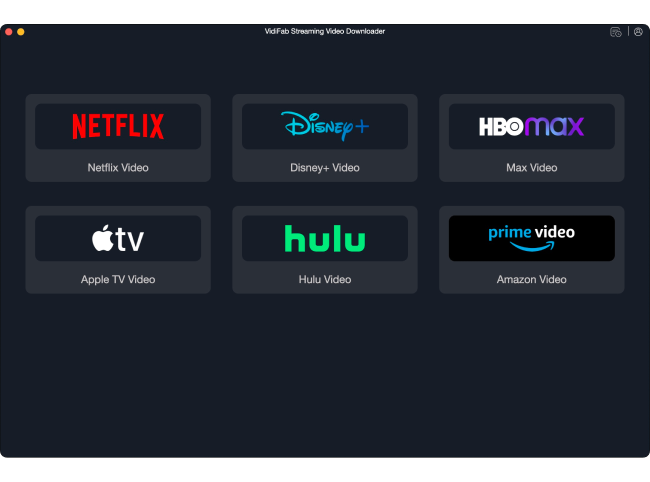
VidiFab Streaming Video Downloader is designed to save streaming videos for offline viewing, including Apple TV content and other popular streaming services. It is mainly used when users want to download shows or movies instead of streaming them online.
The focus is on downloading rather than converting files. This makes it useful for building offline video libraries when internet access is weak or when traveling. Compared to screen recording, it is more direct and easier to manage.
Stability is important. Streaming services often update their protection systems, so performance can depend on how well the tool keeps up with those changes.
- Downloads Apple TV+ videos for offline viewing
- Saves videos in MP4 format
- Supports full episodes and seasons
- Keeps HD quality
- Works without internet after download
- Requires installation
- Paid tool
- May be affected by streaming updates
Part 6. How to Remove DRM from Apple Music Songs (ViWizard Apple Music Converter)
Basic Info of Apple Music Converter:
- Compatible OS: Windows, macOS
- Java Required: Not Required
- Remove DRM from iTunes Music: Yes
- Remove DRM from iTunes Movies: No
- Remove DRM from iTunes TV Shows: No
- Remove DRM from iTunes Audiobooks: Yes
ViWizard Apple Music Converter is used to convert Apple Music songs, playlists, albums, and more into standard audio files, including MP3, M4A, M4B, WAV, AIFF, and FLAC. It is useful when music needs to be saved locally on Windows or Mac computers or moved between different devices, even without the Apple Music app.
It works well for users who want to convert multiple songs or even entire libraries, which makes it practical for managing full music collections. It supports formats like MP3 at up to 320 Kbps or other lossless formats, so files can be used on different devices or in audio software. It helps keep music accessible outside the streaming app.

A full-featured Apple Music converter that easily converts Apple Music songs, albums, playlists—including iCloud Music Library content, personalized recommendations, and curated playlists—into MP3, M4A, M4B, WAV, AIFF, and FLAC so you can keep your Apple Music forever or transfer it to any device without restrictions.
How to Convert Apple Music to MP3, WAV, or FLAC with ViWizard Apple Music Converter:
01Start by installing ViWizard Apple Music Converter on your computer. Once installed, open the program.
02Go to the Preferences or Settings section and open the Conversions tab. Here, choose your preferred output format such as MP3, WAV, or FLAC, and set a destination folder for your converted files.
03Open the built in Apple Music interface inside the tool or use the Apple Music app or web player. Browse and find the songs, albums, or playlists you want to process, then add them to the conversion list using the plus option.
04Review your selected tracks in the list and confirm them by adding them for conversion. This step prepares the content for processing.
05Click Convert to begin. The tool will process the selected Apple Music tracks and generate standard audio files while keeping key details like audio quality and track information.
- Removes DRM from Apple Music songs
- Converts to MP3, AAC, WAV, FLAC
- Keeps song info like artist and album
- Supports batch conversion
- Plays on any device
- Requires installation
- Paid software
- Depends on conversion time and library size
Extra Tip: Replace Digital Contents with DRM-Free Version
If you've already used DRM removal tools like ViWizard to convert your iTunes media to DRM-free formats, you can easily replace your DRM-protected files with these new, liberated versions. This process ensures complete control and freedom over your digital library without any restrictions.
How to Replace DRM-Protected iTunes Media with DRM-Free Versions:
01Identify the DRM-protected media files in your iTunes library. This includes songs, movies, TV shows, and audiobooks that you have previously converted to DRM-free formats using ViWizard or similar tools.
02Before replacing, organize your iTunes library to easily identify the DRM-protected media you're replacing.
03Create a separate folder or playlist for the new DRM-free versions to keep everything organized.
04For each DRM-protected media item in your iTunes library, delete or move them to another location outside of iTunes.
05This ensures you don't have duplicates or confusion between the DRM-protected and DRM-free versions.
06Now, add the DRM-free versions of your media files to your iTunes library.
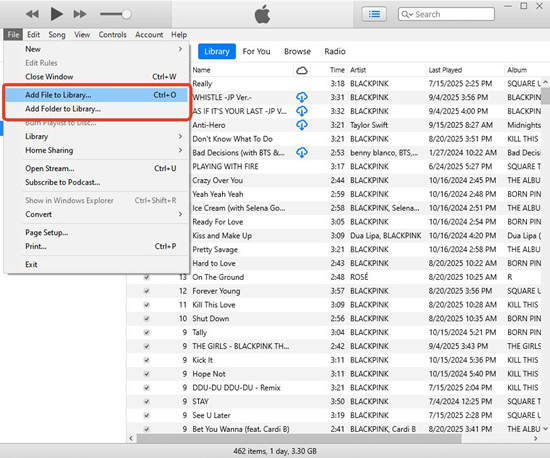
07Drag and drop the files into iTunes, or use the File > Add to Library option to import them.
08If necessary, update the metadata (such as song titles, album names, etc.) and artwork for the new DRM-free media.
09Transfer the media to your smartphones, tablets, MP3 players, or burn them to CDs/DVDs for offline use.
Part 8. Comparison of iTunes DRM Removal Tools
| Aspect | ViWizard iTunes M4V Converter | Requiem 4.1 (Legacy) | VidiFab Streaming Video Downloader | ViWizard Apple Music Converter |
| Main use | Convert iTunes movies and TV shows | Remove DRM from older iTunes media | Download streaming videos for offline viewing | Convert Apple Music songs and library |
| Content type | iTunes video (M4V) | Old iTunes audio, video, audiobooks | Streaming movies and shows | Apple Music audio |
| Output | MP4, MOV | DRM-free files (varies) | Downloaded video files | MP3, M4A, FLAC, WAV |
| Batch support | Yes | Limited | Yes | Yes |
| Quality | Keeps HD video, subtitles, AC3 audio | Depends on old setup | Depends on streaming source | Up to 320 Kbps or lossless |
| Ease of use | Simple conversion steps | Very basic but outdated | Simple download workflow | Simple batch conversion |
| Compatibility | Modern Windows and Mac | Old iTunes only (up to 10.7) | Depends on streaming platform updates | Modern Windows and Mac |
| Status | Actively used | Outdated legacy tool | Active but platform-dependent | Actively used |
Part 9. Conclusion & FAQs
iTunes DRM removal tools fall into modern converters tools. ViWizard iTunes M4V Converter and ViWizard Apple Music Converter are current solutions that convert iTunes video and Apple Music audio into common formats on most devices. They also support batch processing and work well on modern Windows and Mac systems.
VidiFab Streaming Video Downloader focuses on saving streaming videos for offline viewing rather than converting files, with performance depending on streaming platform changes.
Requiem 4.1 is an outdated tool from an earlier iTunes era and only works in legacy setups. Today, most users rely on newer tools that are more stable and compatible with current systems.
Why iTunes music sometimes won't play on other devices
This usually happens because users mix different types of Apple content. Music purchased from the iTunes Store after 2009 is generally DRM-free and can play on multiple authorized devices. Apple Music downloads are different because they are DRM-protected and only work while the subscription is active. Many users only notice this when moving music between devices, where songs seem missing but are actually just restricted.
Why iTunes keeps asking to authorize a computer
iTunes may ask for authorization again even when you are already signed in. In real Apple Community cases, this is usually caused by Apple ID mismatches, old authorization records, or files linked to another account. Most of the time, the music itself is fine. The issue is the device connection that needs to be refreshed.
Difference between iTunes purchases and Apple Music downloads
iTunes purchases are usually permanent files that stay available as long as your Apple ID is active. Apple Music downloads are temporary and tied to a subscription, so they stop working when the subscription ends. This is why Apple Music is often described as "rented music" in real user discussions.
Why purchased songs still seem protected
This often happens when Apple Music or iCloud matching replaces original purchased files with streamed or cloud versions. A song may still appear as "purchased," but its behavior can change depending on how it was downloaded or synced. This is commonly noticed after switching devices or restoring a library.
You May Be Interested


Dave Henry loves movies and all things video. He likes checking out different video formats and trying new media players to see how they change the viewing experience.

Leave a Comment (0)